
Author’s note: We’ve been reviewing and comparing CRM platforms since 2019. This guide draws on 4,000+ verified user reviews from G2 and Capterra, hands-on testing, and direct comparisons with five leading alternatives. Last updated: August 2026.
HubSpot is used by over 228,000 companies worldwide; but whether it’s the right fit for your business is a different question entirely.
This guide gives you a straight answer on HubSpot’s pros and cons in 2026: what it costs at every tier. which features are actually worth paying for, where it falls short, and who should look elsewhere before signing an annual contract.
Here’s what we’ll cover:
-
-
- HubSpot pros — 8 genuine strengths, explained plainly
- HubSpot cons — 8 real drawbacks, with actual pricing numbers
- HubSpot pricing (2026) — a plain-English breakdown of all four tiers
- Who HubSpot is (and isn’t) best for — clear audience segmentation
- The best HubSpot alternative for SMBs — an honest comparison
- FAQs — 13 common questions answered directly
-
HubSpot Pros and Cons at a Glance (2026)
Quick answer for those who need it fast:
| ✓ HubSpot Pros | ✗ HubSpot Cons |
|---|---|
| All-in-one CRM, marketing, sales, and service | Pricing jumps sharply from Starter to Professional |
| Genuinely useful free CRM tier | Mandatory onboarding fees of $3,000–$12,000 at higher tiers |
| Best-in-class ease of use and UI | Most automation locked behind Professional ($100/seat/mo) |
| Tight marketing and sales data alignment | Annual contracts with no mid-cycle refunds |
| Expanding AI tools via Breeze suite | Contact-based billing inflates cost as your list grows |
| 1,500+ native app integrations | No A/B testing on Starter plan |
| World-class HubSpot Academy and knowledge base | Custom reporting requires Professional or above |
| Scales from startup to large enterprise | Cheaper all-in-one alternatives exist for SMBs |
Key Takeaways Before You Read On
HubSpot pros and cons in 2026 come down to a single tension: remarkable power versus steep, escalating pricing.
Here’s what you need to know upfront:
-
-
- Pricing escalates fast — the jump from Starter ($15/seat/month) to Professional ($890/seat/month) is a 5x increase, and Professional requires a mandatory $3000 one-time onboarding fee, while for Enterprise, it is $7000
- Most useful features are tier-gated — A/B testing, sequences, custom reports, and advanced AI workflows are all Professional-only or above.
- Annual contracts create risk — Professional and Enterprise plans require 12-month commitments. Cancelling early does not result in refunds.
- HubSpot is genuinely powerful for the right buyer — B2B companies with complex sales cycles, attribution needs, and the budget to commit will find it one of the best platforms available.
- SMBs need to compare carefully — for small teams that need automation without enterprise pricing, platforms like EngageBay offer very similar core features at a fraction of the cost.
-
Table of Contents
What Is HubSpot Good For? 8 Genuine HubSpot Pros (2026)
When looking at HubSpot pros and cons, it helps to be specific. HubSpot isn’t great at everything; but what it does well, it does very well. Here are the eight strongest arguments in its favor.
The Key Advantages of HubSpot (2026)
| HubSpot Pros | Why It Matters in 2026 |
|---|---|
| All-in-one customer platform | CRM, marketing, sales, service, CMS, commerce, and operations in one ecosystem |
| Advanced automation & AI | Visual workflows, AI-powered content, Breeze Agents, predictive insights |
| Integrated CMS & content tools | Native website, landing pages, blog, personalization |
| Deep integrations & marketplace | 1,000+ apps, native data sync, enterprise connectors |
| Built for scale | Tiered growth from Starter to Enterprise |
HubSpot CRM Pro #1: The Free CRM Is Genuinely Useful
This isn’t a bait-and-switch free tier with a 14-day countdown. HubSpot’s free CRM supports up to 1,000,000 contacts with functional deal tracking, contact and company records, meeting scheduling, email tracking, and basic pipeline management.
For a startup or early-stage team graduating from spreadsheets, this is a real working tool, not just a trial. That’s rare in the CRM market, and it’s a meaningful advantage.
The catch is that you hit its limits fast. Once you need automation, sequences, A/B testing, or custom reports, you’re looking at the Professional tier.
HubSpot CRM Pro #2: Best-in-Class Ease of Use
Across thousands of user reviews, the most consistent praise HubSpot receives is for how easy it is to use. New reps can be productive within hours, not weeks — a genuine competitive edge over platforms like Salesforce or Dynamics 365.
The contact timeline is one of the best implementations in any CRM. It shows every email, call, page visit, and meeting in one clean chronological view. Pipeline views are drag-and-drop. Deal creation takes seconds.
For managers who have fought CRM adoption battles before, a tool that reps actually open every day is worth more than a feature-rich system that collects dust.
HubSpot CRM Pro #3: Tight Marketing and Sales Alignment
If your company runs both marketing and sales through HubSpot, the alignment between the two teams is seamless in a way that most competitors require integrations and workarounds to achieve.
Marketing-qualified leads flow directly into sales pipelines with full context — which campaigns they engaged with, which emails they opened, which content they downloaded. Sales reps see exactly what brought a prospect to them. Marketing teams see which leads convert into revenue.
This closed-loop reporting is one of HubSpot’s most underappreciated advantages, especially for inbound-driven B2B teams.
HubSpot CRM Pro #4: A Truly All-in-One Customer Platform
One of the biggest HubSpot advantages in 2026 is that it genuinely consolidates CRM, marketing automation, sales engagement, customer service, website CMS, operations, and commerce under one roof.
Instead of stitching together five separate tools, one platform manages:
-
-
- Contact and deal management
- Email marketing and automation workflows
- Sales pipelines, forecasting, and sequences
- Customer support ticketing and knowledge base
- Website, landing pages, and blog (CMS Hub)
- Payments and commerce tools
- AI-powered automation via Breeze
-
For teams that value a single source of truth — cleaner data, better attribution, less operational friction — this consolidation is a genuine strength.
HubSpot CRM Pro #5: Powerful Marketing Automation
If you’re evaluating HubSpot marketing hub pros and cons, automation is one of its strongest cards. HubSpot offers visual, multi-branch workflow automation that goes well beyond email.
You can trigger actions across email, ads, sales tasks, CRM updates, and service tickets based on behavioral signals and lifecycle stage. The workflow builder is drag-and-drop. For 90% of marketing automation needs, it handles the job without needing a developer or a dedicated admin.
The important caveat: meaningful automation requires the Professional tier at minimum.
HubSpot CRM Pro #6: HubSpot Breeze AI — The Most Complete Native AI Suite in CRM
HubSpot’s AI product suite, branded as Breeze, has expanded significantly in 2025–2026 to the point where it’s now a legitimate differentiator — not just a marketing add-on.
Unlike platforms that bolt on a third-party AI layer, Breeze is built directly into HubSpot’s CRM data. That means it can pull real contact history, deal stages, and conversation context to take action — not just generate generic text.
Here’s what Breeze includes, and what each component actually costs:
Breeze Copilot is the in-app AI assistant available across the entire HubSpot interface. It can draft emails, summarise contact records, suggest next steps on deals, and answer questions about your CRM data. Available on all paid tiers — Starter and above.
Breeze Customer Agent handles inbound inquiries across email, chat, and forms without human involvement. It’s trained on your CRM data, knowledge base, and past conversations. Pricing moved to outcome-based in April 2026: $0.50 per resolved conversation. Requires Professional or Enterprise.
Breeze Prospecting Agent finds in-market accounts, builds contact lists, and drafts personalised outreach sequences. Also moved to outcome-based pricing in April 2026: $1.00 per qualified lead. Requires Professional or Enterprise.
Breeze Data Agent lets you ask natural-language questions directly over your CRM — “which deals closed last quarter from LinkedIn campaigns?” — and get an answer without building a custom report. Requires Professional or Enterprise, billed via HubSpot Credits.
Breeze Studio and the Agent Marketplace let you install pre-built AI agents with a few clicks. Current agents in the marketplace handle CRM record cleanup (deduplication, stale data), automated outbound phone calls, call transcription and summarisation, and in-market account prospecting. This is the area moving fastest — new agents are being added on a rolling basis.
The honest caveat on HubSpot pros and cons here: the tier gap is real. Breeze Copilot on Starter is essentially a ChatGPT wrapper with CRM merge fields. The genuinely differentiated capabilities — outcome-based agents, predictive scoring, multi-channel campaign generation via Loop Marketing — all sit at Professional ($890/month) or Enterprise. Free and Starter users get a stripped-down assistant, not the full AI suite.
For teams that can access Professional or above, Breeze is currently the strongest end-to-end native AI offering in the CRM category.
What Changed in HubSpot in 2026
HubSpot’s Spring 2026 Spotlight update was one of its most significant product releases in recent years. If you evaluated HubSpot six months ago and ruled it out, some of these changes are worth a second look.
Here’s what’s new:
Breeze AI moved to outcome-based pricing.
The Breeze Customer Agent now costs $0.50 per resolved conversation, and the Breeze Prospecting Agent charges $1.00 per qualified lead — both changed in April 2026. Instead of paying a flat monthly fee for AI access, you only pay when the agent actually delivers a result. For teams with predictable support or outbound volumes, this can be genuinely cost-effective.
Loop Marketing is now live.
Feed HubSpot one campaign brief and it generates a full multi-channel campaign — emails, landing pages, social copy — automatically. Available on Professional and Enterprise.
Multi-touch revenue attribution is now native.
Marketing Hub can now show you which touchpoints contributed to closed revenue, without any third-party tools or data engineering. This was a long-standing gap versus Salesforce. It closed in Spring 2026.
The AEO module tracks your brand in AI search.
HubSpot now monitors whether your brand appears as a citation in ChatGPT and Perplexity responses. It costs $50/month standalone or is included with Professional and Enterprise.
Two smaller but useful updates: the drag-and-drop email editor was fully rebuilt for speed and responsiveness, and Breeze Copilot — HubSpot’s in-app AI assistant — is now accessible directly inside Slack.
HubSpot CRM Pro #7: HubSpot Academy and Self-Service Learning
This is an underrated advantage. HubSpot Academy is one of the best free educational resources in B2B SaaS — covering not just how to use HubSpot but broader topics in sales methodology, inbound marketing, and revenue operations.
Free certification courses, a massive knowledge base, and an active user community mean that answers to almost any “how do I do X?” question are a quick search away. For small teams without dedicated CRM admins, this reduces dependence on expensive support tickets and paid consultants.
HubSpot CRM Pro #8: Scalability from Startup to Enterprise
HubSpot is designed to grow with businesses over time. The tiered structure — Free, Starter, Professional, Enterprise — means a team can start with the free CRM and expand into progressively more powerful tools without migrating to a new platform.
For mid-market and enterprise organizations with the budget to commit, HubSpot’s ecosystem, partner network, custom objects, and advanced analytics make it one of the most mature platforms in the category.
The scalability advantage is real. The cost of that scalability is where the conversation gets complicated.
The Bottom Line on HubSpot’s Strengths (2026):
If your priority is consolidation, automation depth, AI integration, and long-term scalability, HubSpot remains one of the most comprehensive customer platforms available.
However, as you’ll see in the next section, these strengths often come with trade-offs in pricing flexibility and feature gating — which are critical when evaluating HubSpot pros and cons for SMBs.
EngageBay vs HubSpot – Which Is Better for CRM?
Why Is HubSpot Not a Good Fit? HubSpot Cons Explained (2026 Update)
When analyzing HubSpot pros and cons in 2026, the strengths are clear — but so are the trade-offs.
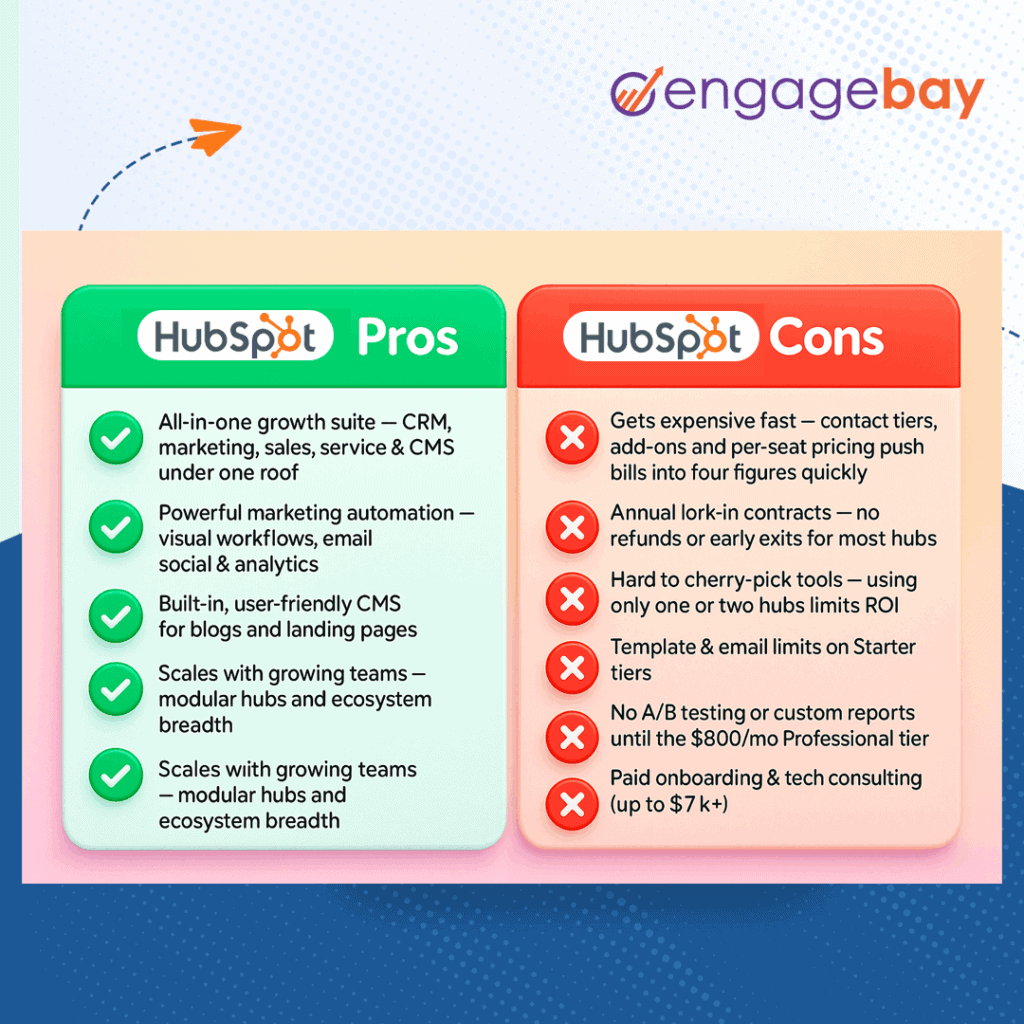
HubSpot has evolved into a powerful AI-enabled customer platform, yet its pricing structure, contract terms, feature gating, and scaling costs remain major friction points for many small and mid-sized businesses.
Below are the most important HubSpot drawbacks to consider before committing.
| HubSpot Cons | Why It’s a Concern in 2026 |
|---|---|
| Gets expensive quickly | Costs scale with contacts, seats, add-ons, AI features, and hubs |
| Annual contracts | Professional & Enterprise plans typically require yearly commitments |
| Works best only as all-in-one | Partial usage often reduces ROI |
| Email & template limitations | Limited flexibility compared to dedicated email tools |
| No A/B testing on Starter | Split testing gated behind higher tiers |
| Limited reporting on lower tiers | Custom reporting requires Professional+ |
| Paid onboarding & tech support | Mandatory onboarding for higher tiers |
| Better-priced alternatives exist | Many SMB-focused CRMs offer similar features at lower cost |
HubSpot CRM Cons #1: It gets expensive—quickly
Let’s start with the most common deal-breaker: pricing.
We were looking for something that wouldn’t drain our budget and EngageBay felt like a steal compared to other CRM’s like Hubspot or Salesforce. The all-in-one aspect is what drew me in.
Victoria V. – Founder – Small-Business (G2 review)
HubSpot’s freemium model looks attractive upfront. The free CRM includes contact management, deal tracking, meeting scheduling, and limited marketing tools.
But the reality in 2026 is this:
-
-
-
Advanced automation, AI workflows, custom reports, and A/B testing are gated behind Professional tiers.
-
Contact limits scale pricing aggressively.
-
Additional seats increase costs.
-
Add-ons (Data Hub, reporting increases, SMS, API limits, etc.) push total spend higher.
-
AI features (Breeze Agents and advanced automation) are not fully available on lower tiers.
-
-
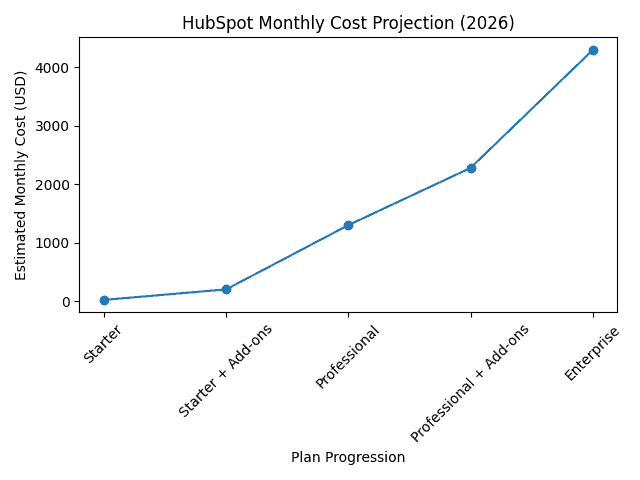
HubSpot’s true monthly cost is driven by add-ons and contact tiers — this chart uses public pricing anchors and common add-ons to show realistic ranges. See HubSpot pricing pages for official quotes.
HubSpot Plans (2026 Structure)
HubSpot offers:
-
-
-
Starter
-
Professional
-
Enterprise
-
-
Across multiple hubs:
-
-
-
Marketing
-
Sales
-
Service
-
Content (CMS)
-
Operations
-
Commerce (usage-based model)
-
-
The Starter Customer Platform begins at a low monthly price per seat. However, pricing is per user, and marketing contact tiers increase as your database grows.
For example:
| Marketing Contacts | Estimated Additional Cost Impact |
|---|---|
| 1,000 | Included in base Starter |
| 3,000 | Additional tiered fees apply |
| 5,000+ | Scales aggressively per 1,000 contacts |
Unlock the Truth About HubSpot’s Free Tools
As businesses scale campaigns and lead capture, these incremental charges compound quickly.
Once you upgrade to Professional, pricing jumps significantly. Enterprise increases further — excluding onboarding fees.
HubSpot’s 2024+ Pricing Changes (Still Impacting 2026)
| User Requirement | Previous Structure | Updated Structure |
|---|---|---|
| View-only access | Included in free | Separate View-Only seat |
| Edit access to CRM records | Included in free | Paid Core seat |
| Sales/Service-specific access | Dedicated seat | Dedicated seat |
And here’s the key issue:
Many businesses start on Starter believing it’s enough — but once they need even basic automation, custom reporting, or A/B testing, they’re pushed into Professional tiers far sooner than expected.
Some users have shared that needing just one advanced workflow or custom report triggered a move to plans costing hundreds — sometimes thousands — per month.
That’s the pricing cliff.
What You Will Actually Pay: Realistic Monthly Costs by Team Size
The tier prices above are starting points. What most teams actually pay depends on three things stacking together: the number of editing seats, the size of your marketing contact database, and any add-ons. Here’s what that looks like in practice:
| Team Profile | Plan | Realistic Monthly Cost | Notes |
|---|---|---|---|
| Solo founder, 1K contacts, 1 seat | Starter | ~$15/month | Base seat price, no overages |
| Small team, 5K contacts, 3 seats | Starter | ~$245/month | 3 seats × $15 + ~$200 in contact tier overages |
| Mid-market, 10K contacts, 5 seats | Professional | ~$2,280/month | $890 base + 9 contact tiers × ~$50 each |
| Mid-market, 25K contacts, 10 seats | Professional | ~$3,000–$3,500/month | Pro pricing flattens above 10K but still scales |
| Enterprise, 50K contacts, 20 seats | Enterprise | ~$5,000–$5,500/month | $3,600 base + ~$1,500 in contact tier overages |
A few things worth knowing before you budget:
Marketing contacts and CRM contacts are not the same thing.
Only the contacts you actively send marketing emails to count toward your tier. Contacts sitting in your CRM that you don’t market to are free and unlimited. This means a business with 50,000 total contacts but only 10,000 active marketing contacts pays the 10K rate — not the 50K rate.
Going one contact over your tier triggers an automatic upgrade.
There’s no grace period. If a campaign pushes you from 9,900 to 10,100 contacts, HubSpot bills you for the next tier immediately. List hygiene — regularly removing unengaged or bounced contacts — is not optional at scale, it’s a cost-control measure.
The Professional onboarding fee is on top of everything above.
The $3,000 mandatory onboarding charge for Professional is a one-time, non-refundable fee paid at signup. It doesn’t appear in monthly cost projections but it is real money leaving your account on day one.
Add-ons compound the number further.
A dedicated sending IP costs $300/month. The AEO module (brand citation tracking in ChatGPT and Perplexity) is $50/month if not on Pro/Enterprise. Transactional email API access requires a separate add-on. None of these appear in the base tier price.
Note: Marketing contacts and CRM contacts are billed separately. Contacts you don’t actively market to sit in the free CRM at no charge.
HubSpot CRM Cons #2: Annual Contracts and Limited Flexibility
Another major HubSpot drawback is contract rigidity.
-
-
-
Professional and Enterprise plans typically require annual commitments.
-
Even when billed monthly, you’re locked into the annual contract value.
-
Early cancellation usually doesn’t mean refunds.
-
-
If your business is experimenting with tools, this creates risk. You’re financially committed before knowing long-term fit.
Many SMB-focused SaaS platforms now offer fully flexible month-to-month billing. HubSpot largely does not at higher tiers.
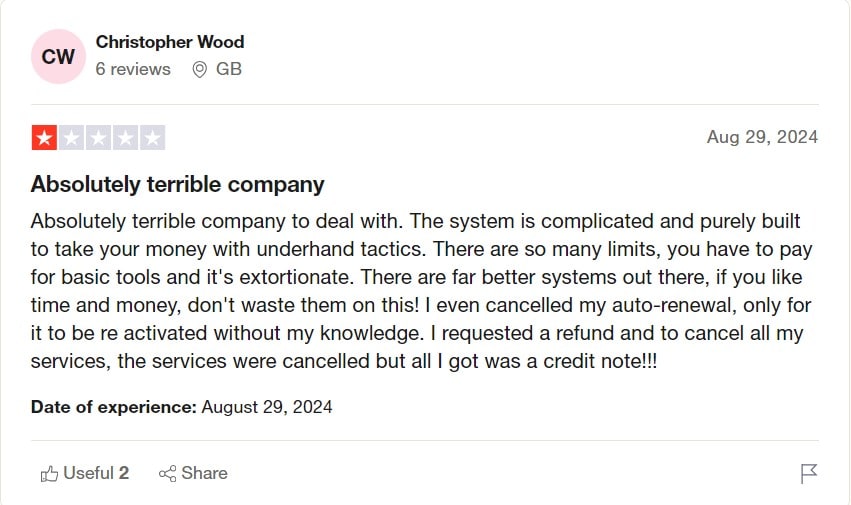
Additionally, users often report:
-
-
-
Complex renewal terms
-
Upsell pressure
-
Surprise increases during contract renewal
-
-
If you choose HubSpot, go in fully aware of long-term commitment.

While we won’t argue that HubSpot is a pretty remarkable marketing automation tool, you better be 100% certain that you’re in love with it before you drop that kind of money.
HubSpot CRM Cons #3: It’s Less Effective If You Don’t Use It as an All-in-One Platform
HubSpot is built to be an all-in-one ecosystem.
If you only want:
-
-
-
CRM + email
-
Or automation + reporting
-
Or marketing without CMS
-
-
You may not get optimal ROI.
For example:
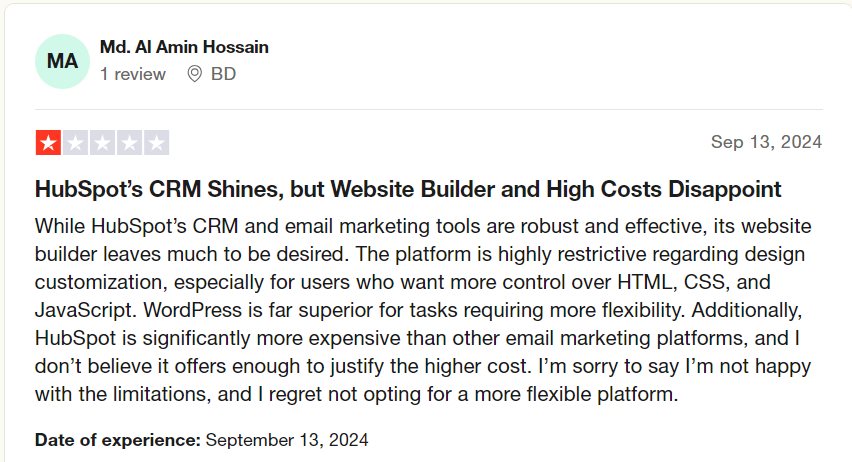
If your website runs on WordPress and you’re happy with it, adopting HubSpot CMS may feel unnecessary. But not using its CMS reduces personalization depth and data cohesion.
Some users report buying additional hubs just to unlock reporting or automation dependencies across modules.
HubSpot works best when fully adopted — partial usage often feels overpriced.
Plus, you won’t be getting as much “bang for your buck.” There are more affordable alternatives.
HubSpot CRM Cons #4: Email Tool Limitations
HubSpot’s email marketing tool is solid but not best-in-class.
Common concerns include:
-
-
-
Limited template variety compared to dedicated email platforms
-
Less design flexibility
-
Shared team signatures lacking personalization depth
-
Advanced email testing locked behind higher tiers
-
-
For teams heavily focused on email-first marketing, standalone platforms may offer deeper customization at lower cost.
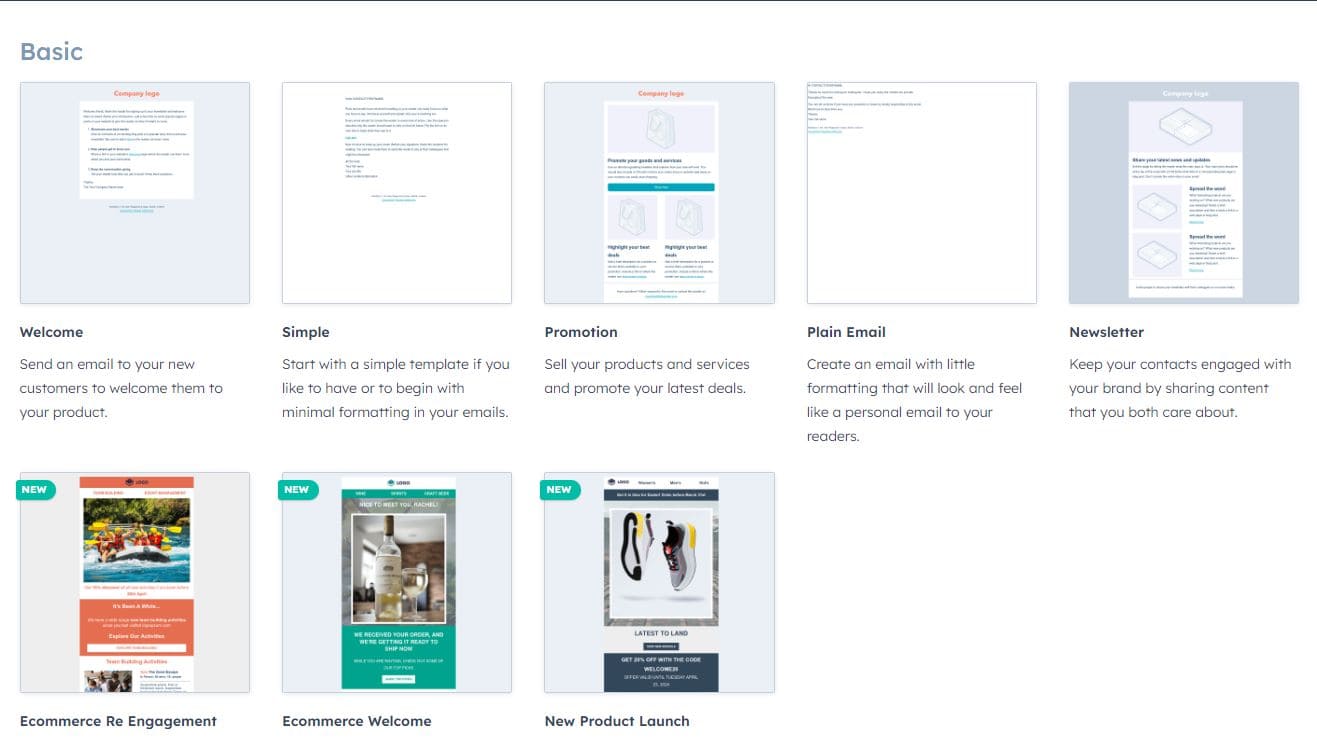
HubSpot’s limited free graphic email templates
HubSpot CRM Cons #5: There’s no A/B testing on lower packages
A/B testing is essential for optimizing:
-
-
-
Emails
-
Landing pages
-
CTAs
-
Campaign performance
-
-
However, A/B testing capabilities are restricted to Professional tiers and above.
For businesses on Starter, this limits experimentation and optimization — often forcing upgrades just to access fundamental marketing tools.
HubSpot CRM Cons #6: Reporting and Analytics Are Tier-Gated
Basic reporting is available in lower tiers.
But advanced features like:
-
-
-
Custom report builders
-
Multi-touch attribution
-
Revenue analytics
-
Predictive forecasting
-
Advanced dashboards
-
-
Require Professional or Enterprise.
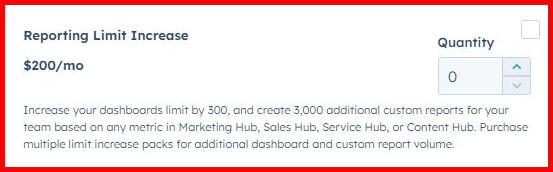
Even then, reporting limits may require paid add-ons to expand dashboard and report capacity.
For data-driven companies, this significantly increases total cost of ownership.
HubSpot CRM Cons #7: Paid Onboarding and Technical Support
Professional and Enterprise plans typically require mandatory onboarding — often costing thousands.
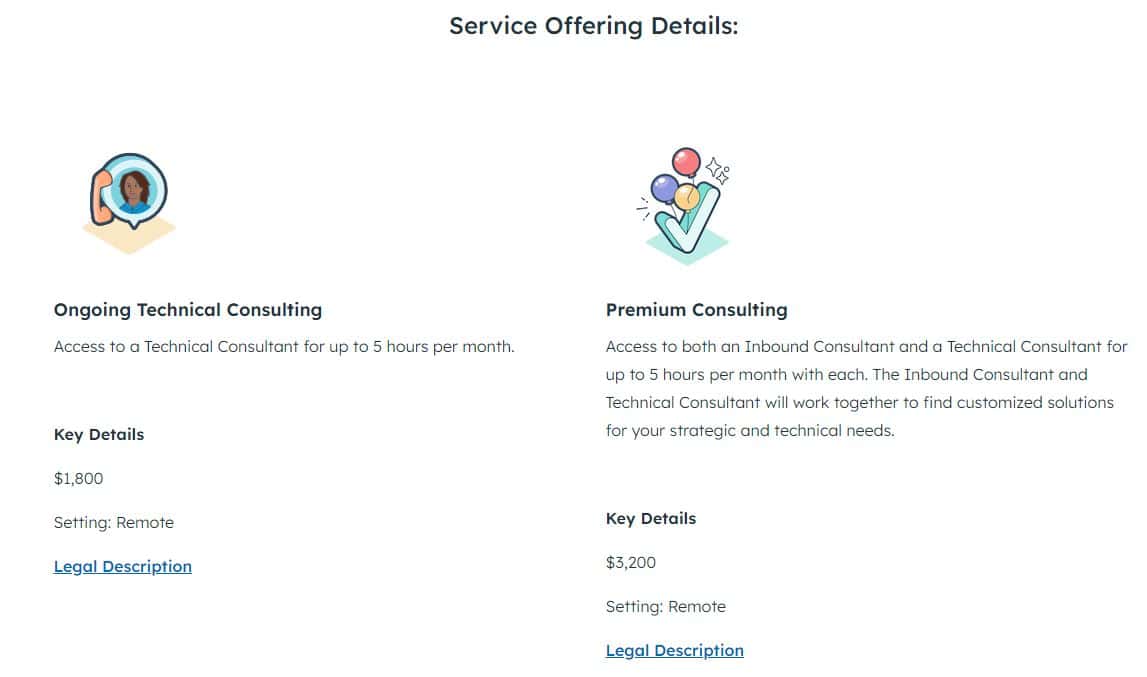
Beyond onboarding, ongoing technical consulting may be required for:
-
-
-
Complex workflow builds
-
Advanced reporting
-
CRM customization
-
Data migration
-
-
Some users report being directed to partner agencies or paid consultants for tasks they expected to be included.
Imagine this as a small business with a minimal budget for a CRM software. Is it really feasible to use HubSpot?
HubSpot CRM Cons #8: Many Cheaper Alternatives Offer Similar Core Features
Here’s the uncomfortable truth:
Most SMBs do not need enterprise-grade AI agents, custom objects, and multi-hub orchestration.
They need:
-
-
-
CRM
-
Email marketing
-
Automation
-
Landing pages
-
Reporting
-
Basic AI assistance
-
-
And many platforms offer those features at far lower monthly costs — without annual contracts.
If budget efficiency is critical, exploring HubSpot alternatives is not optional — it’s responsible decision-making.
Read also: 8 Surprisingly Awesome HubSpot Alternatives
HubSpot CRM Cons #9: Additional Pain Points to Consider
While we’ve covered all the key cons of HubSpot, there are more pain points that should be addressed:
-
-
-
Basic CRM feature gaps: Certain operational conveniences (like deal cloning in some workflows) are limited or gated.
-
Vendor lock-in via CMS: Migrating away from HubSpot CMS can be technically complex.
-
Not truly SMB-budget friendly: Realistic monthly investment often exceeds $500–$1,000 once automation is required.
-
Affiliate-heavy review ecosystem: Many online reviews are partner-affiliated, which can skew perception.
-
-
The Bottom Line on HubSpot’s Drawbacks (2026)
HubSpot is powerful — no question.
But when evaluating HubSpot pros and cons, the real issue isn’t capability.
It’s cost structure, contract rigidity, feature gating, and scalability pricing.
If you’re a mid-market or enterprise company with budget flexibility and long-term commitment, HubSpot may be worth it.
If you’re a small business, startup, or cost-conscious growth team, you need to evaluate alternatives carefully before signing that annual agreement.
Exciting HubSpot Alternatives to Watch For
HubSpot Feature Ratings (August 2026)
To give you a fast, scannable picture of where HubSpot genuinely excels and where it falls short, here is how it rates across ten key feature areas — based on seven years of CRM market coverage and 4,000+ verified user reviews from G2 and Capterra.
| Feature Area | Rating | Why |
|---|---|---|
| Ease of Use | ⭐⭐⭐⭐⭐ 5/5 | Best UI in the CRM category — new users are productive within hours |
| Free CRM | ⭐⭐⭐⭐⭐ 5/5 | Genuinely unlimited contacts and users — one of the most generous free tiers in SaaS |
| Marketing Automation | ⭐⭐⭐⭐ 4/5 | Powerful multi-branch workflows, but locked behind Professional at $890/month |
| Email Marketing | ⭐⭐⭐⭐ 4/5 | Rebuilt editor is excellent; 2,000 email/month send cap on Starter is a real constraint |
| AI / Breeze | ⭐⭐⭐⭐⭐ 5/5 | Most comprehensive native AI suite in the CRM category as of April 2026 |
| Reporting & Dashboards | ⭐⭐⭐⭐½ 4.5/5 | Multi-touch revenue attribution added natively in Spring 2026 — now best-in-class |
| Landing Pages | ⭐⭐⭐⭐½ 4.5/5 | First-class builder with smart content personalisation; A/B testing on Pro+ only |
| Customer Support | ⭐⭐⭐⭐ 4/5 | HubSpot Academy is the gold standard in the category; mandatory onboarding fees are friction |
| Pricing Flexibility | ⭐⭐½ 2.5/5 | Annual lock-in at Pro/Enterprise, steep tier jumps, and non-refundable onboarding fees |
| SMB Value | ⭐⭐½ 2.5/5 | Free tier is genuinely excellent; paid tiers price out most small businesses by year one |
Overall: 4.1 / 5 — HubSpot is an exceptional platform for the buyer it was designed for. The ratings for Pricing Flexibility and SMB Value reflect a structural mismatch between the platform’s capabilities and the budget realities of smaller teams, not a flaw in the product itself.
The two areas where HubSpot pulls clearly ahead of every competitor in this category are its free CRM and its AI suite (Breeze). The two areas where it consistently draws the most complaints — across G2, Capterra, and Reddit — are pricing flexibility and SMB value, which map directly to the most common reason businesses switch away from HubSpot to alternatives like EngageBay, ActiveCampaign, or Brevo.
Who Is HubSpot Best For? A Segment-by-Segment Verdict
Understanding HubSpot pros and cons means understanding who the platform was actually built for — and who is paying for capabilities they will never use. Here is an honest verdict for six common buyer types.
Is HubSpot Good for Solopreneurs and Freelancers?
Verdict: Use the free CRM. Don’t buy the Marketing Hub.
HubSpot’s free Smart CRM is one of the most generous in the category — unlimited contacts, deal tracking, meeting scheduling, and basic email tracking at no cost. For a freelancer managing a client roster or a solopreneur tracking leads, it is a genuinely useful tool.
Stop there. The paid Marketing Hub Starter starts at $15/seat/month, and Professional jumps to $890/month — there is no scenario where that price makes sense for a one-person business.
The cheapest path is: use HubSpot’s free CRM for pipeline management, and pair it with a standalone email tool like MailerLite ($9/month) or Kit (free up to 10,000 subscribers) for newsletters and campaigns.
Best alternative for email marketing: MailerLite or Kit.
Is HubSpot Good for Startups?
Verdict: Start free. Do not upgrade until after product-market fit.
The free CRM is the right starting point for early-stage startups — it handles contact management, basic pipelines, and meeting scheduling without any cost or commitment.
The mistake most startups make is upgrading to Professional too early, before they have the volume, team size, or automation complexity to justify $890/month plus a $3,000 non-refundable onboarding fee.
Defer the upgrade until you have a repeatable sales process, a marketing contact list above 5,000, and at least three people who will use the platform daily.
Until then, the free CRM paired with ActiveCampaign ($15/month) covers most early-stage automation needs at a fraction of the cost.
Best alternative for startup automation: ActiveCampaign.
Is HubSpot Good for Small Businesses?
Verdict: The free tier works. The paid tiers rarely pencil out.
Small businesses are the buyer type most likely to be oversold on HubSpot. The free CRM is excellent, but the moment a small team needs marketing automation, A/B testing, or custom reporting, they are looking at Professional — $890/month plus a mandatory $3,000 onboarding fee, on an annual contract. For most small businesses, that investment does not return enough to justify itself in year one.
The platform that most directly addresses this gap for small businesses is EngageBay. It bundles CRM, email marketing, marketing automation, landing pages, and customer service helpdesk in a single platform — the same core stack as HubSpot — starting from $13/user/month with no annual contract and no onboarding fee.
For small businesses evaluating HubSpot CRM pros and cons against budget constraints, EngageBay is the most direct like-for-like comparison at a fraction of the price.
Best alternative for small businesses: EngageBay.
Is HubSpot Good for B2B Service Companies?
Verdict: Yes — this is the buyer HubSpot was built for.
If you run a B2B service business — agency, consultancy, SaaS, professional services — with a sales cycle longer than 30 days and a genuine need to attribute revenue back to marketing activities, HubSpot Professional earns its cost.
The closed-loop reporting between marketing campaigns and closed deals is the strongest implementation in this price range, and it becomes more valuable as your team grows and your attribution questions get more complex.
The lowest-cost path to the meaningful features is Marketing Hub Professional at $890/month (includes 3 seats), accepting the $3,000 onboarding fee as a one-time setup cost.
Once your revenue exceeds $1M annually and marketing attribution genuinely drives budget decisions, this is one of the best investments in the category.
Best alternative if budget is still a constraint: ActiveCampaign Plus at ~$189/month for 10,000 contacts, which covers automation depth without the CRM reporting sophistication.
Is HubSpot Good for eCommerce Brands?
Verdict: No. HubSpot was built for B2B, not eCommerce.
HubSpot’s data model — contacts, companies, deals, pipelines — is designed around long B2B sales cycles, not high-volume consumer transactions.
It lacks native abandoned cart recovery, product recommendation engines, per-workflow revenue attribution by SKU, and the Shopify or WooCommerce integrations that eCommerce teams rely on daily.
You can connect HubSpot to a Shopify store, but you are adding complexity to work around a fundamental mismatch.
Best alternative for eCommerce: Omnisend, which is purpose-built for Shopify and WooCommerce with native abandoned cart, product recommendations, and per-workflow revenue attribution at a fraction of HubSpot’s cost.
Is HubSpot Good for Enterprise Companies?
Verdict: Strong fit — if marketing leads the platform decision.
At Enterprise tier ($3,600/month for 5 seats, $7,000 onboarding), HubSpot unlocks custom objects, advanced permissions, predictive lead scoring, unlimited custom dashboards, SSO, and dedicated IP addresses for email sending.
For large B2B organizations where marketing drives revenue and needs to prove it, HubSpot Enterprise is one of the most complete platforms in the category.
The one caveat: if your organization has already standardized on Salesforce for CRM, the case for HubSpot becomes harder to make.
In that scenario, using HubSpot Marketing Hub alongside Salesforce CRM is a common setup — but it adds integration complexity. The strongest Enterprise fit is when HubSpot is the CRM and the marketing platform simultaneously.
Best alternative for enterprise if Salesforce is already in place: Keep Salesforce CRM and add ActiveCampaign or Marketo for marketing automation rather than running a parallel HubSpot CRM.
HubSpot Alternatives for SMBs:
If you’ve worked through the HubSpot pros and cons above and the pricing doesn’t fit your budget, you’re not stuck. Several platforms offer comparable core functionality at significantly lower price points.
The most relevant comparison for small and mid-sized businesses is EngageBay.
EngageBay is an all-in-one CRM, marketing automation, email marketing, and customer service platform — built specifically for SMBs that need HubSpot-level functionality without the HubSpot price tag.
HubSpot vs EngageBay vs ActiveCampaign vs Brevo: Side-by-Side (2026)
If the HubSpot pros and cons above have you looking at alternatives, here is how the four most commonly compared platforms stack up for small and mid-sized businesses. All figures reflect August 2026 pricing.
| Feature | HubSpot Professional | EngageBay Pro | ActiveCampaign Plus | Brevo Business |
|---|---|---|---|---|
| Monthly cost (5 users, 10K contacts) | ~$2,280/month | ~$510/month | ~$189/month | ~$65/month |
| One-time onboarding fee | $3,000 mandatory, non-refundable | $0 — free assisted onboarding | $0 | $0 |
| Annual contract required | Yes | No | No | No |
| Built-in CRM | Yes — best-in-class | Yes — full CRM included | Yes — available on Plus+ | Basic only |
| Marketing automation | Yes — Pro only | Yes — included | Yes — best-in-class depth | Yes — solid |
| A/B testing | Yes — Pro only | Yes — included | Yes — including full automation paths | Yes — included |
| Custom reporting | Yes — Pro only | Yes — included | Yes — included | Limited |
| Email + CRM + helpdesk in one platform | Yes | Yes | No — CRM add-on | No |
| Native AI tools | Yes — Breeze suite (most comprehensive) | Yes — basic AI included | Yes — predictive sending on Pro | Limited |
| Contact-based billing | Yes — escalates aggressively | No — flat pricing | Yes — moderate escalation | No — billed by email volume |
| Free plan available | Yes — generous free CRM | Yes — up to 250 contacts | No — 14-day trial only | Yes — 300 emails/day |
| Best for | B2B mid-market, revenue attribution | SMBs wanting all-in-one at low cost | SMBs needing deep automation | Large lists, email + SMS focus |
What the table tells you:
HubSpot is the most expensive option by a significant margin once you move past the free tier, but it leads on CRM depth, native AI, and closed-loop revenue reporting. It earns its cost for B2B teams that genuinely need those capabilities.
EngageBay is the only platform in this table that bundles CRM, marketing automation, email marketing, and customer service helpdesk without an annual contract or onboarding fee. For small businesses evaluating HubSpot disadvantages around cost and commitment, it is the most direct like-for-like comparison at a fraction of the price.
ActiveCampaign offers the deepest marketing automation in this group — including split-testing of entire automation paths, a feature HubSpot does not support — at roughly 10% of HubSpot Professional’s cost at 10,000 contacts. The trade-off is a weaker native CRM and no built-in helpdesk.
Brevo is the outlier in the group: it charges by email send volume rather than contact count, which makes it uniquely cost-effective for businesses with large databases and moderate sending frequency. It lacks the CRM depth of the other three but leads on bundled SMS and WhatsApp at this price point.
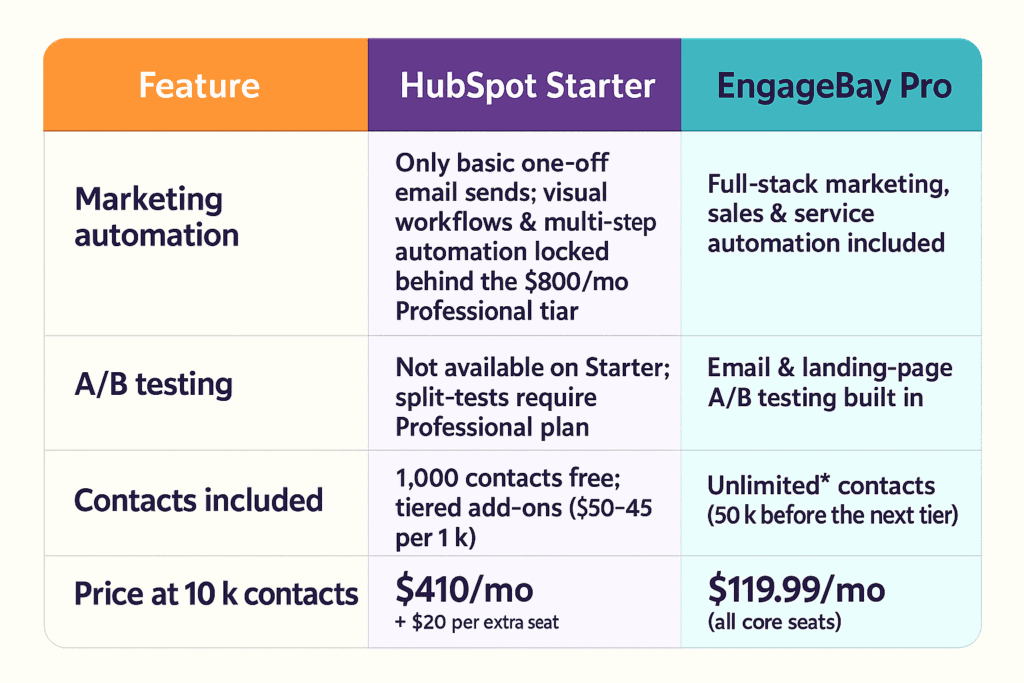
Snapshot:
Running a midsize CRM + automation stack with 10K contacts and five team members costs roughly 4–5× more in HubSpot before factoring in add-ons, reporting upgrades, AI expansions, or additional seat growth.
EngageBay’s flat pricing model removes onboarding fees, contract lock-in, and aggressive contact-tier jumps — while still covering core automation and CRM needs.
The Bottom Line: Compare Carefully
You’re not short on CRM options in 2026.
But here’s the reality:
-
-
-
If you need enterprise-grade AI agents, multi-hub orchestration, custom objects, and complex analytics — HubSpot can justify its cost.
-
If you need practical automation, CRM, marketing tools, and reporting without massive financial commitment — there are smarter-value options available.
-
-
Software should accelerate growth — not strain cash flow.
Before committing to any annual contract, run the numbers at your expected contact count and team size 12 months from now.
That’s how you avoid the pricing cliff.
And if you want a flexible, cancel-anytime alternative with strong automation and CRM depth, trying EngageBay is a logical next step.
Is HubSpot Worth It in 2026?
Is HubSpot worth it depends almost entirely on which business is asking. The platform is not overpriced for the buyer it was designed for — but it is significantly overpriced for the buyer it is most aggressively marketed to. Here is a plain-English answer for three common situations.
Yes — HubSpot Is Worth It If:
You are a B2B company doing $1M or more in annual revenue, with a sales cycle longer than 30 days, and you need to prove which marketing activities are generating pipeline.
This is the scenario HubSpot was built for. At Professional tier, the closed-loop attribution between marketing campaigns and closed-won deals is the strongest implementation in this price range.
The CRM, the marketing automation, and the reporting all share the same data model — which means a CFO asking “what did email contribute to revenue last quarter?” gets a real answer, not a spreadsheet estimate.
If that reporting need is genuine and recurring, HubSpot is worth it. The $890/month plus $3,000 onboarding is a real cost, but it pays back quickly when marketing budget decisions are grounded in actual attribution data.
Borderline — HubSpot May or May Not Be Worth It If:
You are a growing team of 5 to 25 users, budget-conscious, and you need solid marketing automation — but you do not have complex attribution requirements or a dedicated marketing ops person to manage the platform.
In this scenario, is HubSpot worth it is genuinely hard to answer without running the numbers for your specific contact volume and team size. The free CRM is an easy yes. The jump to Professional is where it gets complicated — $890/month plus a non-refundable $3,000 onboarding fee on a 12-month contract is a serious commitment for a team that is still figuring out its marketing motion.
The honest advice here: trial the free CRM first, map out what features you actually need at Professional, and then price out whether a lighter alternative covers 80% of those needs at 20% of the cost before signing anything annual.
No — HubSpot Is Not Worth It If:
You are a solopreneur, an eCommerce brand, a B2C business, or any team with a large contact database and a tight monthly budget.
For these buyers, the HubSpot pros and cons math does not work out. The contact-based billing model penalises large lists. The annual contract removes flexibility. The features that justify the Professional price tag — advanced automation, custom reporting, AI agents — are either irrelevant to the use case or available elsewhere at a fraction of the cost.
For small businesses and budget-conscious teams that need CRM, email marketing, automation, and helpdesk in one place, EngageBay covers the core stack from $13/user/month with no annual contract and no onboarding fee. It is not a feature-for-feature
HubSpot replacement at the Enterprise level — but for the majority of SMBs evaluating is HubSpot worth it, it is the most direct comparison that actually fits the budget.
The Final Verdict in 2026
HubSpot remains one of the most comprehensive CRM and marketing platforms available, and that reputation is earned. Its ease of use, ecosystem depth, marketing-sales alignment, and expanding AI capabilities make it a genuinely powerful choice for the right buyer.
For B2B companies with complex sales cycles, real attribution needs, and the budget to commit to Professional or Enterprise tiers, HubSpot is worth the investment.
But for small businesses, early-stage startups, and cost-conscious teams, the HubSpot pros and cons math often doesn’t add up. A 10-person team moving from Starter to Professional faces a $890/month increase plus a $3,000 onboarding fee — before they’ve generated a dollar of return on that upgrade.
If your budget is a genuine constraint, explore alternatives like EngageBay that offer CRM, automation, email, and helpdesk in one platform at a fraction of the cost. There’s no single right answer; but there is a right answer for your specific situation, budget, and growth stage. Compare carefully before signing anything annual.
Sign up for free today and see what all the buzz is about.
Create my free EngageBay account now
Related reading:
These are the pros of HubSpot:
– It’s a truly all-in-one marketing, sales, and customer support software. HubSpot calls it the ‘flywheel’. Many consider this one of the best HubSpot CRM pros.
– It also offers a free CRM platform.
– It has one of the best UI among CRM software, which makes it easy for users to use and navigate.
– It acts as a marketing platform, data warehouse, and communications tool at the same time.
– HubSpot Academy is an amazing resource with certifications for marketers, salespeople, and support agents.
That said, HubSpot has drawbacks, too (especially from the POV of small businesses). This blog post and the following question offer an in-depth analysis.
While HubSpot is a great software, it has a lot of limitations too. Here are a few key limitations for small businesses:
It is one of the most expensive CRM & marketing automation software—in fact, it gets really expensive so quickly that many businesses have to drop HubSpot for a more affordable alternative.
HubSpot has compulsory annual contracts. If, for any reason, you decide to drop HubSpot midyear, you still have to pay for the whole year. HubSpot does not offer refunds for early termination.
HubSpot does not offer A/B testing, marketing automation, and other essential features in its affordable packages. These features come in ‘bundles’ that cost thousands of dollars per month, depending on the number of contacts you have.
Other CRM software—like EngageBay and ActiveCampaign—offer features similar to HubSpot at a highly affordable price. This means HubSpot is NOT the best platform for small businesses and startups.
HubSpot’s free plan now includes only 5x Core seats for free, with unlimited View-Only seats. Users who enjoyed edit access for free will either have to upgrade to a paid Core seat or do away with view-only access.
The seat-based pricing structure currently only affects new customers, meaning you won’t be requested to switch to the new plans immediately. However, there’s a good chance that users will have to adopt the new structure during the next renewal.
Major cons of HubSpot CRM include expensive pricing tiers, essential and core features locked behind upgrades, and limited functionality in the HubSpot free and HubSpot Starter plans. Many users have reported needing expensive workarounds or third-party tools for basic CRM tasks like deal duplication, making HubSpot less suitable for startups, solopreneurs, and small businesses.
HubSpot also increases its pricing regularly. Many users saw around 5x-20x the cost in 2024 for the same features.
Yes, HubSpot plans follow a tier-based pricing for marketing contacts. This means you keep paying more as your contacts grow. For example, the HubSpot Marketing Hub starts at $15/month for 1,000 contacts. Then, HubSpot charges as per a tiered pricing.
Compare this with EngageBay’s Pro plan, which offers unlimited contacts for $110.39/month. That’s because EngageBay is designed for small businesses and startups.
HubSpot does offer free tools:
Free marketing tools: Forms, email marketing, ad management, landing pages, and shared inbox.
Free sales tools: Live chat, conversational bots, team email, customizable quotes, and more.
Free customer service tools: Ticketing, email scheduling, live chat, and more.
But is HubSpot really free? Or is there a catch? Here’s our deep dive 🙂
These are the prices of different HubSpot Hubs:
HubSpot Marketing Hub Pricing
HubSpot Marketing Hub Starter—1,000 contacts
$15/mo/seat
HubSpot Marketing Hub Professional—2,000 contacts
$800/mo (includes 3 seats)
HubSpot Marketing Hub Enterprise—10,000 contacts
$3,600/mo (includes 5 seats)
HubSpot Sales Hub Pricing
HubSpot Sales Hub Starter
$15/mo/seat
HubSpot Sales Hub Professional
$90/mo/seat
HubSpot Sales Hub Enterprise
$150/mo/seat
HubSpot Service Hub Pricing
HubSpot Service Hub Starter
$15/mo/seat
HubSpot Service Hub Professional
$90/mo/seat
HubSpot Service Hub Enterprise
$150/mo/seat
HubSpot Content Hub Pricing
HubSpot Content Hub Starter
$15/mo/seat
HubSpot Content Hub Professional
$450/mo (includes 3 seats)
HubSpot Content Hub Enterprise
$1,500/mo (includes 5 seats)
HubSpot Operations Hub Pricing
HubSpot Operations Hub Starter
$15/mo/seat
HubSpot Operations Hub Professional
$720/mo/seat
HubSpot Operations Hub Enterprise
$2,000/mo/seat
No, the HubSpot Starter plan has limited automation capabilities. Advanced features like workflows are only available in the HubSpot Professional and HubSpot Enterprise tiers, which may necessitate an upgrade for businesses seeking automation.
HubSpot’s website builder offers integration with its CRM but may lack the flexibility and features of platforms like WordPress. Users have expressed concerns about potential vendor lock-in and limited customization options.
Many users have reported unexpected additional costs and upgrades, especially when seeking specific features. These essential features are often locked behind higher-tier plans, leading to frustration over the perceived predatory pricing model.
Not really. HubSpot’s Starter seats look cheap, but as soon as a young company needs simple automation or reporting, the bill jumps to $890+ per month, plus a mandatory $3,000 onboarding fee and an annual lock-in. Cash-conscious startups usually find the ROI hard to justify—and steep contact overages pile on.
EngageBay’s forever-free plan bundles CRM, email marketing, live chat and helpdesk for up to 250 contacts with zero seat limits or contracts. You can upgrade gradually—about $60/mo unlocks the full suite and 50 k contacts—so bootstrapped teams start selling and supporting customers from day one, free of sticker shock.
It depends on your size and needs. HubSpot is easier to set up and use, with a generous free tier and all-in-one marketing, sales, and service — which suits most small and mid-sized businesses. Salesforce is more powerful and customizable for large or complex enterprises, but it’s pricier and steeper to learn. Both get expensive at scale, so budget-conscious teams often weigh lighter alternatives too.
Primarily a CRM. HubSpot is best known as a CRM platform — free contact management plus paid Marketing, Sales, and Service Hubs. It also sells a separate Content Hub (formerly CMS Hub) for building and hosting websites. So it’s both, but most people mean the CRM when they say “HubSpot.”
