
Choosing between HubSpot vs GetResponse in 2026 comes down to how deeply you want your marketing platform connected to CRM data, automation, and AI-driven workflows.
HubSpot has evolved into a full-funnel CRM-powered growth platform, combining marketing, sales, service, and operations with AI-assisted automation across the customer lifecycle. GetResponse, on the other hand, remains a marketing-first platform known for email campaigns, marketing automation, landing pages, and built-in webinar tools.
Both tools target growing businesses—but they serve very different use cases. HubSpot is designed for teams that need CRM-driven personalization and multi-hub scalability, while GetResponse appeals to marketers who want fast campaign execution without a complex CRM setup.
In this 2026 head-to-head comparison, we break down pricing, features, automation, AI capabilities, CRM depth, and ideal use cases to help you decide which platform fits your growth strategy.
Table of Contents
Quick Comparison: HubSpot vs GetResponse (2026)
| Feature | HubSpot (2026) | GetResponse (2026) |
|---|---|---|
| Entry-level price (≈1k contacts) | Starter — $20 / mo (Starter Customer Platform bundle) | Email Marketing — $19 / mo |
| Email send limit (same tier) | Limited — marketing emails capped at ~5× contact tier / month (e.g., 1k contacts ≈ 5k sends) | Unlimited monthly email sends |
| Built-in CRM & shared inbox | Yes — Free CRM with omni-channel shared inbox (email, chat, forms) | Basic CRM / contact management — simple pipeline & funnels, not a full sales CRM |
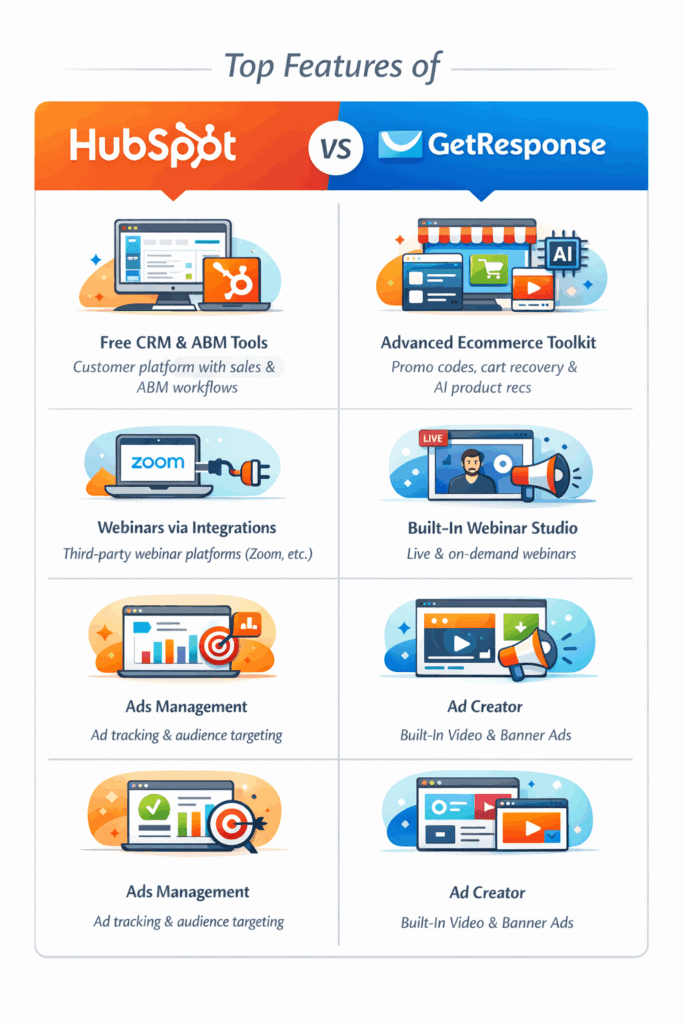
| Webinar hosting | No native webinar studio — webinars handled via integrations or custom event setups | Yes — built-in live & on-demand webinar hosting |
| eCommerce promo codes & AI product recommendations | Basic — primarily via integrations (Shopify apps, marketplace tools) | Advanced native toolkit — promo codes, cart recovery, AI product recommendations |
| Social Ads Creator | Ads management & tracking only — no native ad creative builder | Yes — built-in social & paid ads creator (video/banner templates) |
| Account-based marketing (ABM) | Yes — native ABM workflows and company scoring (Pro/Enterprise tiers) | No — ABM not supported |
| Free-plan contact limit | ~1,000 contacts | 500 contacts |
| Support on entry plan | Email + in-app chat; phone support on higher tiers | 24/7 email + live chat; phone support on highest tiers |
HubSpot vs GetResponse: Main Differences
Both HubSpot and GetResponse help businesses attract audiences, capture leads, and nurture customers through email and automation.
In 2026, both platforms offer core marketing tools such as landing pages, forms, email campaigns, marketing automation, live chat, and basic ad management.
That’s where the similarities end.
HubSpot has evolved into a CRM-first customer platform with built-in sales, service, and account-based marketing capabilities.
GetResponse, on the other hand, remains a marketing-led platform, doubling down on webinars, ecommerce promotions, and built-in ad creation.
The table below highlights the key functional differences between HubSpot and GetResponse in 2026.
| Feature | HubSpot (2026) | GetResponse (2026) |
|---|---|---|
| eCommerce tools | Basic e-commerce support mainly via integrations and marketplace apps; promo codes and product recommendations typically handled through connected platforms or partners | Advanced native e-commerce toolkit: promo codes, cart recovery, sales funnels and a built-in AI product-recommendation engine |
| Social Ads Creator | Ads management, audience targeting and reporting (no built-in creative video/banner builder) | Yes — built-in social/paid Ads Creator with templates for banners and simple video ads |
| Webinar platform | No native webinar studio; HubSpot customers use marketplace webinar integrations (Zoom, ON24, etc.) or embed streaming workflows | Native live & on-demand webinar studio with livestream to YouTube/Facebook/LinkedIn, polls, CTAs and evergreen webinar options |
| Sign-up-form A/B testing | No dedicated A/B testing for standalone forms — A/B testing available for landing page variants that contain different forms | A/B testing available for landing pages and popups; native A/B for standalone signup forms is limited (workarounds/third-party tools commonly used) |
| Shared inbox / omnichannel messaging | Unified Conversations inbox — email, live chat, Messenger and forms aggregated in one inbox | Live-chat focused (GetResponse Chats); email / Messenger aggregation requires integrations with other tools |
| Account-based marketing (ABM) | Yes — native ABM features (account scoring, company records, ABM workflows) in paid Pro/Enterprise tiers | No dedicated ABM features — platform focuses on email, automation, webinars and e-commerce |
| Built-in CRM | Yes — full free CRM included (contacts, deals, tasks, views, pipelines) | Contact management + lightweight CRM features (tagging, scoring, funnels) but not a full enterprise sales CRM |
Comparing HubSpot vs GetResponse (2026)
To evaluate HubSpot vs GetResponse fairly in 2026, we’ll compare both platforms across seven key areas: ease of use, pricing, email marketing, CRM capabilities, landing page creation, marketing automation, and analytics.
While both tools help businesses attract leads and run campaigns, they are built for very different use cases—HubSpot as a CRM-first customer platform, and GetResponse as a marketing-led growth platform.
HubSpot vs GetResponse: Ease of use
In this section, we evaluate overall usability, interface design, onboarding experience, and customer support resources.
HubSpot
HubSpot has expanded significantly by 2026, but it remains well-organized despite its all-in-one nature.
Each Hub (Marketing, Sales, Service, Operations, and Commerce) is accessible from the top navigation, with clear sub-menus that make it easy to locate features without deep clicking.
For users focused purely on marketing, this breadth can feel overwhelming at first. Some features may feel unnecessary if you don’t need CRM, sales, or service tools alongside marketing.
To some, this all-in-one nature isn’t relevant to them. As Kaitlin Hay, a Digital Marketing Specialist, says:
“There is a lot on the site that I don’t use, there seems to be a lot of extra bells and whistles that aren’t essential to running a marketing program.”
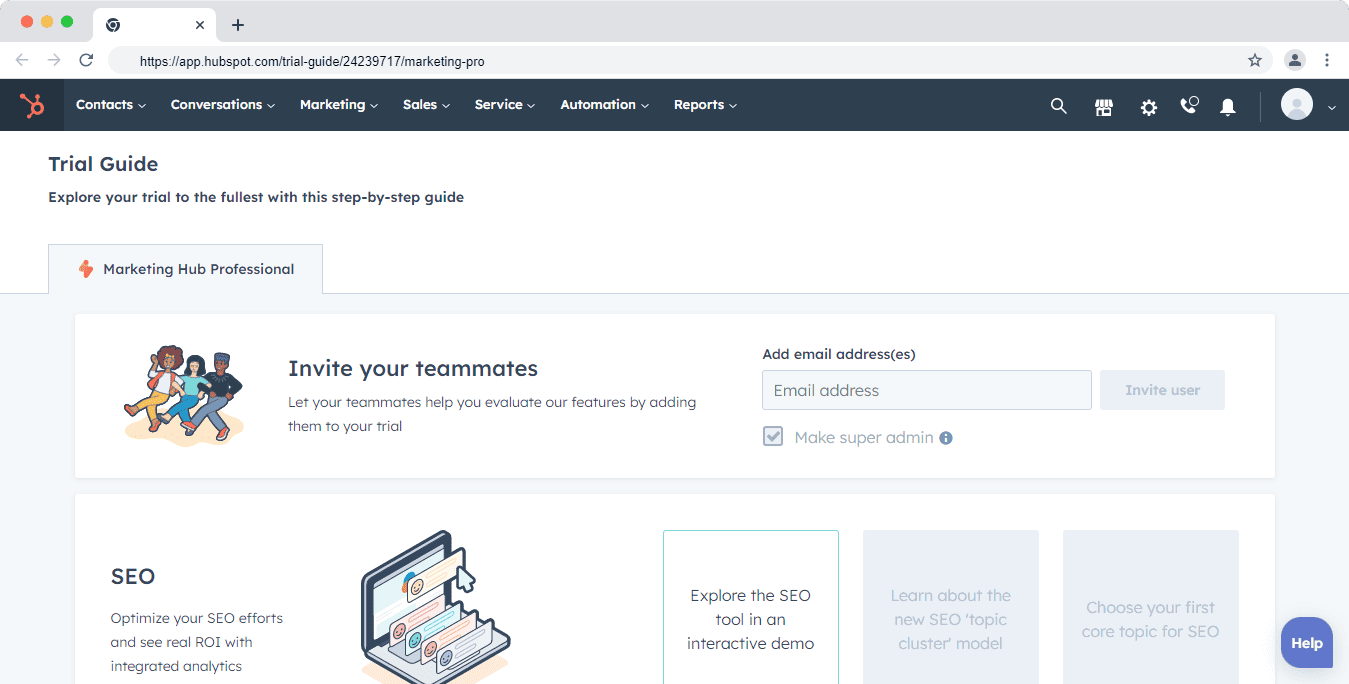
But in terms of using its marketing tools, HubSpot is user-friendly, as Kaitlin explains:
“Setting up automated drip workflows is user-friendly and they really do think of everything! Its intuitive and easy to use, makes creating drip campaigns easy. Also love the email analytics and how easy it is to create grey list and blacklist email lists to remove old subscribers to improve the open rate.”
That said, HubSpot’s interface is highly polished and consistent across hubs.
Marketing tools like email campaigns, workflows, and automation builders are intuitive, even for non-technical users. Visual editors, guided setup flows, and contextual tooltips reduce the learning curve significantly.
Automation is one of HubSpot’s strongest usability wins. Building multi-step workflows, managing lists, and reviewing performance metrics feels structured and predictable—especially valuable for teams running complex nurture or lifecycle campaigns.
Customer support (2026):
-
-
-
Starter plans include email and in-app chat support
-
Phone support is available on Professional and Enterprise tiers
-
Global, multilingual support teams for international customers
-
-
Beyond direct support, HubSpot’s ecosystem is a major advantage.
The knowledge base, HubSpot Academy courses, and active community forums provide detailed, role-based guidance.
Certified HubSpot partners also contribute advanced use cases and troubleshooting help.
GetResponse
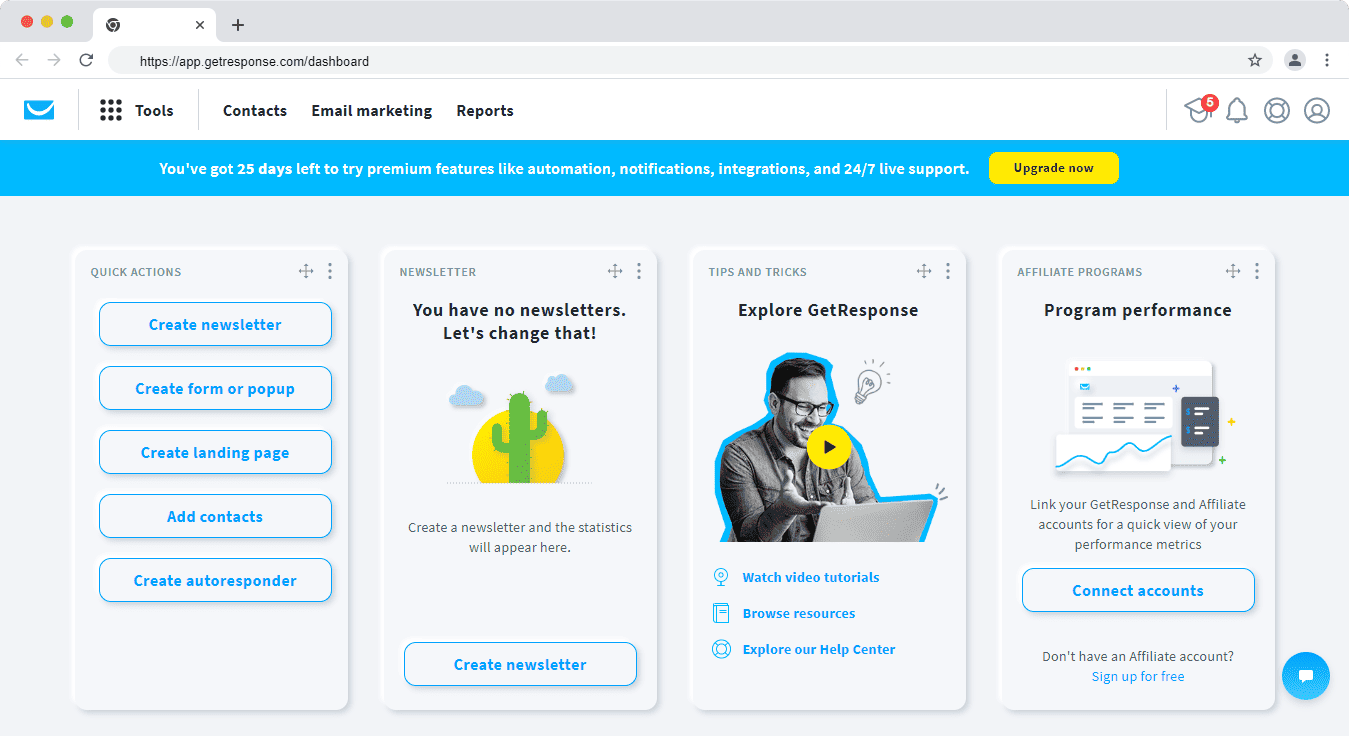
GetResponse offers a noticeably simpler experience because it is more focused.
The platform centers on email marketing, automation, webinars, and ecommerce promotions rather than a full CRM stack.
The dashboard is clean, and most features are accessible within one or two clicks.
In-app walkthroughs and prompts help first-time users launch campaigns quickly, especially email sequences and basic automations.
GetResponse excels at helping users get started fast. Prebuilt templates, onboarding checklists, and tutorial videos reduce friction during initial setup.
Users running their first email campaign or webinar can be live quickly without prior experience.
However, compared to HubSpot, documentation tends to be more feature-focused rather than strategy-driven.
Advanced use cases—especially around data modeling or multi-touch lifecycle campaigns—require more experimentation or external learning.
Here’s how Richard Tunnah, CEO of Redman Capital, summed up his experience:
“GetResponse is easy to get started with as they offer help videos and support to get you through the difficult first email campaign set up. I have tried a few of the leading email campaign companies including Aweber, Constant Contact and Mailchimp, GetResponse was the easiest to set up your first campaign.”
Customer support (2026):
-
-
-
24/7 email and live chat support on paid plans
-
No phone support except on highest enterprise-level tiers
-
-
Overall, GetResponse is straightforward and beginner-friendly, particularly for teams focused on email, webinars, and ecommerce promotions rather than CRM-heavy workflows.
Ease of use verdict (2026)
Both platforms are easy to use—but for different audiences.
-
-
-
HubSpot is better suited for teams that want a unified CRM-driven platform and are willing to invest time in learning a broader system in exchange for long-term scalability and deeper automation.
-
GetResponse is ideal for marketers who want to move fast with email, webinars, and promotions, without the complexity of a full CRM ecosystem.
-
-
In 2026, user feedback consistently shows HubSpot rated higher for overall usability and support depth, while GetResponse scores well for simplicity and fast onboarding.
HubSpot: Pros and Cons in a Nutshell
Read also: The Best HubSpot Alternative
GetResponse vs HubSpot: Pricing (2026)
This is the major difference between GetResponse and HubSpot. It could be the deciding factor. So, let’s review their pricing.
How much does HubSpot cost?
HubSpot uses a modular, hub-based pricing model, where your total cost depends on the hubs you choose, the number of marketing contacts, and the paid seats required for your team.
HubSpot contact types (2026)
HubSpot pricing is primarily driven by marketing contacts, while allowing large volumes of non-marketing data to live inside the CRM.
-
-
-
Marketing contacts
These are contacts you actively market to—email campaigns, ads, automation, and nurturing workflows.
✔ These count toward your pricing tier. -
Non-marketing contacts
Contacts stored for reference, sales, or support—but not used in marketing campaigns.
✔ These do not affect pricing.
-
-
All plans continue to include up to 1 million non-marketing contacts, which can be stored and managed inside the free CRM.
HubSpot plans & hubs
HubSpot pricing is applied across individual hubs and bundles, including:
-
-
-
Marketing Hub
-
Sales Hub
-
Service Hub
-
Operations Hub
-
HubSpot Customer Platform (bundle)
-
-
Each hub offers one free tier and three paid tiers: Starter, Professional, and Enterprise.
Starter plan — from $20/month
The Starter tier is designed for small teams and individuals who want essential CRM-connected marketing, sales, or support tools without advanced automation.
What’s included:
-
-
-
Email marketing
-
Forms
-
Landing pages
-
Live chat
-
Basic CRM functionality
-
-
The Starter plan includes 1,000 marketing contacts.
Additional marketing contact pricing:
-
-
-
First 1,000 contacts — included
-
1,001–3,000 — ~$20/month per additional 1,000
-
3,001–5,000 — ~$18/month per additional 1,000
-
5,000+ — ~$16/month per additional 1,000
-
-
Email sending limits (2026):
Starter plans are capped at 5× your marketing contact limit per month.
Professional plan — from ~$890/month
The Professional tier is built for growing teams that need advanced automation, multi-channel campaigns, analytics, and AI-assisted workflows.
Key features:
-
-
-
Advanced marketing automation
-
Omni-channel campaigns (email, ads, social)
-
AI-powered workflows & reporting
-
Custom reports and attribution
-
Team-based permissions
-
-
The plan includes 2,000 marketing contacts.
Additional marketing contact pricing:
-
-
-
First 2,000 contacts — included
-
2,001–22,000 — ~$250/month per 5,000
-
22,001–42,000 — ~$225/month per 5,000
-
42,001–62,000 — ~$200/month per 5,000
-
62,001–82,000 — ~$175/month per 5,000
-
82,000+ — ~$150/month per 5,000
-
-
Important notes (2026):
-
-
-
Email sending limit increases to 10× your marketing contact count
-
Mandatory onboarding applies (one-time fee of ~$3,000)
-
-
Enterprise plan — from ~$3,600/month (billed annually)
The Enterprise tier is designed for large teams and complex organizations that require deep customization, governance, and advanced data models.
Key features:
-
-
-
Hierarchical teams and advanced permissions
-
Asset and data partitioning
-
Custom behavioral events
-
Custom objects for proprietary data models
-
Predictive analytics and governance controls
-
-
The Enterprise plan includes 10,000 marketing contacts.
Additional marketing contact pricing:
-
-
-
First 10,000 contacts — included
-
10,001–50,000 — ~$100/month per 10,000
-
50,001–100,000 — ~$90/month per 10,000
-
100,001–200,000 — ~$80/month per 10,000
-
200,001–500,000 — ~$70/month per 10,000
-
500,000+ — ~$60/month per 10,000
-
-
Important notes (2026):
-
-
-
Email sending limit increases to 20× your marketing contact count
-
Mandatory onboarding fee of ~$6,000 applies
-
Annual contract commitment required
-
-
HubSpot seat pricing update (carried into 2026)
HubSpot’s seat-based access model, introduced earlier, is now fully standard across all plans.
-
-
-
View-Only seats
Unlimited and free across all plans
No edit access (read-only) -
Core seats
Required for any user who needs edit access
Applies across marketing, sales, and service tools
-
-
Key change to note:
Free edit-access seats no longer exist. Any user who needs to create, edit, or manage assets must be assigned a paid Core seat, which significantly impacts total cost for growing teams.
Bottom line (2026)
HubSpot remains one of the most powerful CRM-connected platforms on the market—but in 2026, pricing scales quickly as your marketing contact volume and team size grow.
Best for:
Businesses that want a single, CRM-first platform across marketing, sales, and customer support—and are prepared to invest as they scale.
This table can help you understand better:
| User requirement | Previous pricing structure | 2026 pricing structure |
|---|---|---|
| Users who only need read-only access to reports, dashboards, records, and CRM data | Included by default in free plans | Unlimited free View-Only seats with read-only access |
| Users who need edit access to records, reports, emails, workflows, and other marketing/sales assets | Included in free plans with limited edit access | Paid Core seats required for any edit or creation access |
| Users who need sales- or service-specific tools (pipelines, tickets, calling, automation) | Dedicated Sales or Service seats | Dedicated Sales Hub or Service Hub Core seats (still required) |
How much does GetResponse cost? (2026)
GetResponse follows a list-size–based pricing model with feature tiers designed specifically for marketers.
In 2026, GetResponse offers the following plans: Free, Email Marketing, Marketing Automation, Ecommerce Marketing, and Max / Max².
Since Max / Max² plans are custom-priced and enterprise-specific, we’ll focus on the three core paid plans most businesses choose.
Two important things to note about GetResponse pricing (2026):
-
-
-
Unlimited monthly email sends on all paid plans. You’re not charged based on how many emails you send.
-
Contacts are counted per list. If the same email address appears in multiple lists, it may be counted multiple times toward your contact limit.
-
-
GetResponse pricing is driven entirely by the number of contacts in your list and the feature tier you select.
Email Marketing plan – Pricing starts at $19/month
This plan is ideal if you’re looking for a straightforward email marketing platform to capture, engage, and nurture an audience without advanced automation.
Key features include:
-
-
-
Unlimited email newsletters with A/B testing and click tracking
-
Autoresponders for welcome and follow-up emails
-
Basic segmentation (tags, contact actions, lead magnets)
-
Website builder
-
Landing pages and signup forms
-
Access to prebuilt automation templates (no custom workflows)
-
Limited live chat functionality
-
-
Email Marketing plan pricing:
-
-
-
1,000 contacts — $19/month
-
2,500 contacts — $29/month
-
5,000 contacts — $54/month
-
10,000 contacts — $79/month
-
25,000 contacts — $174/month
-
50,000 contacts — $299/month
-
100,000 contacts — $539/month
-
-
Marketing Automation plan – Pricing starts at $59/month
This plan is best suited for teams that want to scale beyond basic email campaigns and introduce behavior-driven automation.
In addition to everything in the Email Marketing plan, it includes:
Key features:
-
-
-
Visual automation builder with custom workflows
-
Contact scoring and event-based triggers
-
Drip campaigns and advanced nurture sequences
-
Live webinars
-
Limited web push notifications
-
Fully unlocked live chat
-
Advanced segmentation logic
-
-
Marketing Automation plan pricing:
-
-
-
1,000 contacts — $59/month
-
2,500 contacts — $69/month
-
5,000 contacts — $95/month
-
10,000 contacts — $114/month
-
25,000 contacts — $215/month
-
50,000 contacts — $359/month
-
100,000 contacts — $599/month
-
-
eCommerce Marketing Plan – Pricing starts at $119/month
This plan is built specifically for eCommerce brands that need transactional messaging, product-level automation, and revenue-focused reporting.
In addition to all Marketing Automation features, it includes:
Key features:
-
-
-
Transactional emails (order confirmations, shipping updates)
-
Abandoned cart and abandoned order recovery
-
Synced promo codes and ecommerce automations
-
Ecommerce-based segmentation
-
On-demand and paid webinars
-
Unlimited web push notifications and automation
-
Ecommerce and product performance reports
-
AI-powered product recommendations
-
-
GetResponse’s native ecommerce toolkit—including AI product recommendations, promo-code management, webinars, and the Social Ads Creator—delivers growth features that HubSpot typically requires add-ons or third-party integrations to achieve.
Ecommerce Marketing plan pricing:
-
-
-
1,000 contacts — $119/month
-
2,500 contacts — $139/month
-
5,000 contacts — $169/month
-
10,000 contacts — $199/month
-
25,000 contacts — $299/month
-
50,000 contacts — $444/month
-
100,000 contacts — $699/month
-
-
Pricing verdict
GetResponse remains significantly more affordable and predictable than HubSpot for email- and campaign-driven teams.
While HubSpot delivers broader platform value, its pricing escalates quickly as contact volume and paid seats increase, often forcing upgrades to unlock essential features.
GetResponse, by contrast, selectively unlocks features across tiers without aggressively pushing users into higher-priced plans.
Bottom line:
-
-
-
Choose HubSpot if CRM-led growth and cross-team alignment are critical.
-
Choose GetResponse if your priority is email marketing, automation, webinars, and ecommerce campaigns at a controlled cost.
-
-
Read also: HubSpot Pricing and Comparison with Affordable Alternatives
GetResponse vs HubSpot: Email Marketing (2026)
Both HubSpot and GetResponse offer strong email marketing capabilities designed to help teams segment audiences, personalize messaging, and optimize performance through testing and automation.
In 2026, however, their email tools reflect two very different philosophies: CRM-driven lifecycle marketing (HubSpot) versus campaign- and ecommerce-driven email execution (GetResponse).
Below is a breakdown of how each platform performs.
HubSpot
HubSpot’s email marketing is deeply integrated into its CRM and automation engine, making it ideal for lifecycle-based campaigns rather than one-off broadcasts.
The drag-and-drop email editor remains intuitive and polished, with a clean layout and clear editing flow.
While HubSpot’s native template library is more limited than some email-first tools, the editor emphasizes consistency, brand control, and data-driven personalization over visual variety.
As Kaizer Ahmed says:
“While the (HubSpot) platform offers a lot of customization options, some users may find that they are limited by the available templates and design options.”
HubSpot’s real strength lies in smart content and personalization tokens. Emails can dynamically adapt based on CRM data and behavioral signals such as:
-
-
-
Lifecycle stage
-
Job role or company properties
-
Recent website activity
-
Last engagement or email click
-
Lead score and funnel stage
-
-
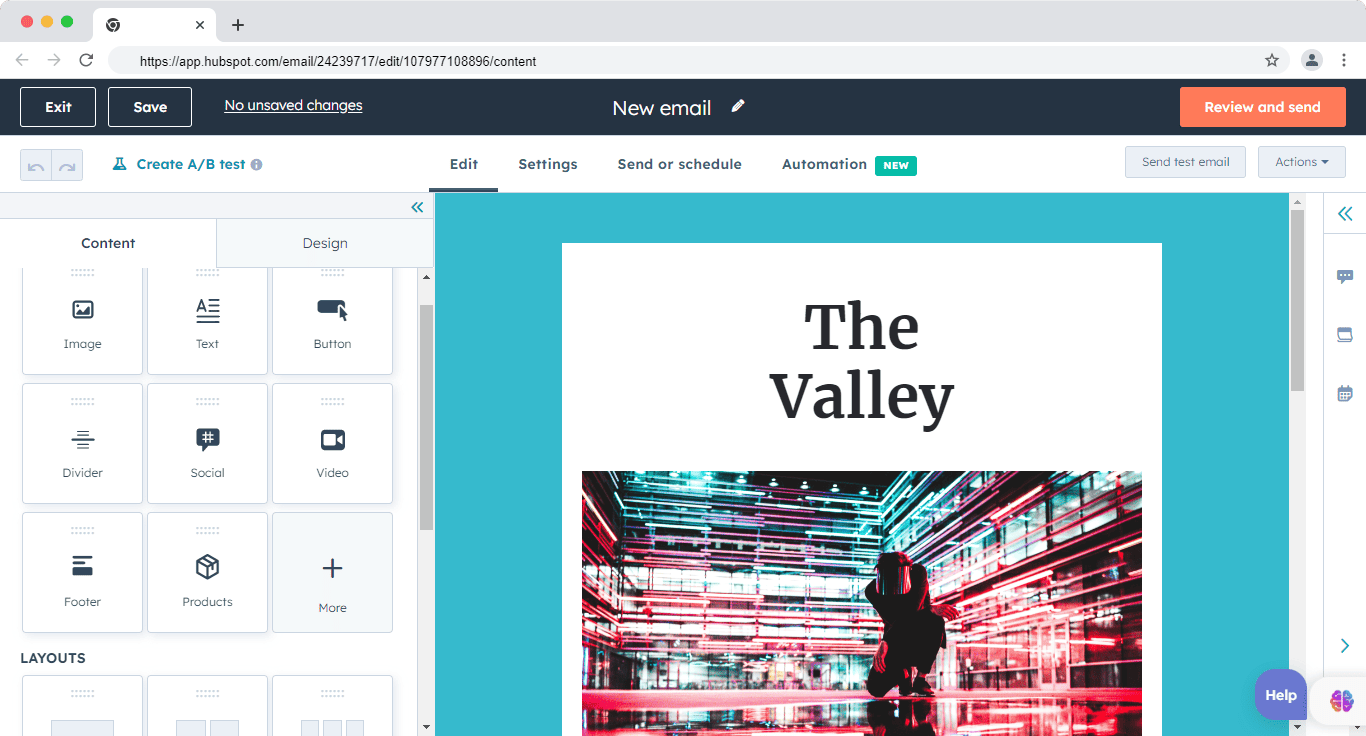
In 2026, this CRM-connected personalization allows marketers to deliver context-aware emails without duplicating campaigns for different segments.
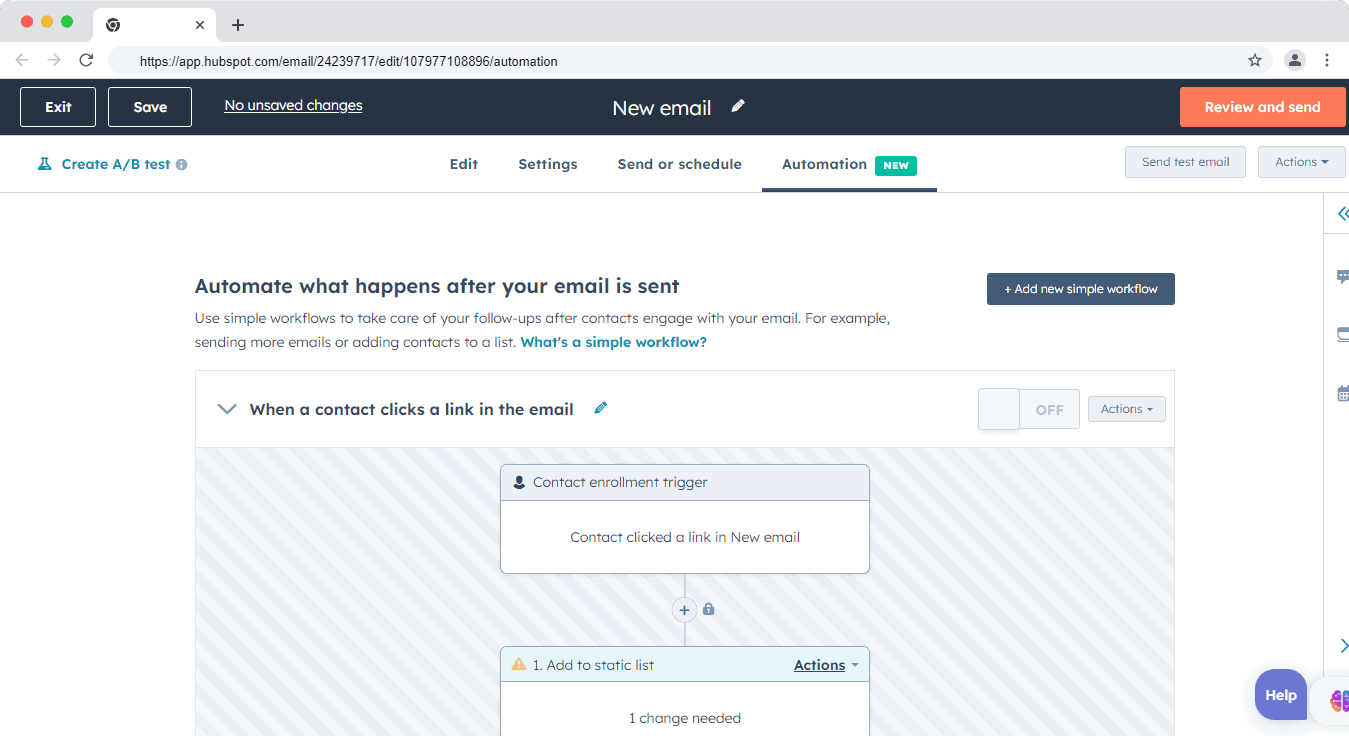
Once an email is created, it can be seamlessly tied into automation workflows.
Marketers can trigger follow-ups, branch logic, update CRM records, or hand off leads to sales based on how recipients interact with an email—without leaving the workflow builder.
GetResponse
GetResponse approaches email marketing from a campaign-first perspective, making it especially appealing for ecommerce brands and content-heavy marketers.
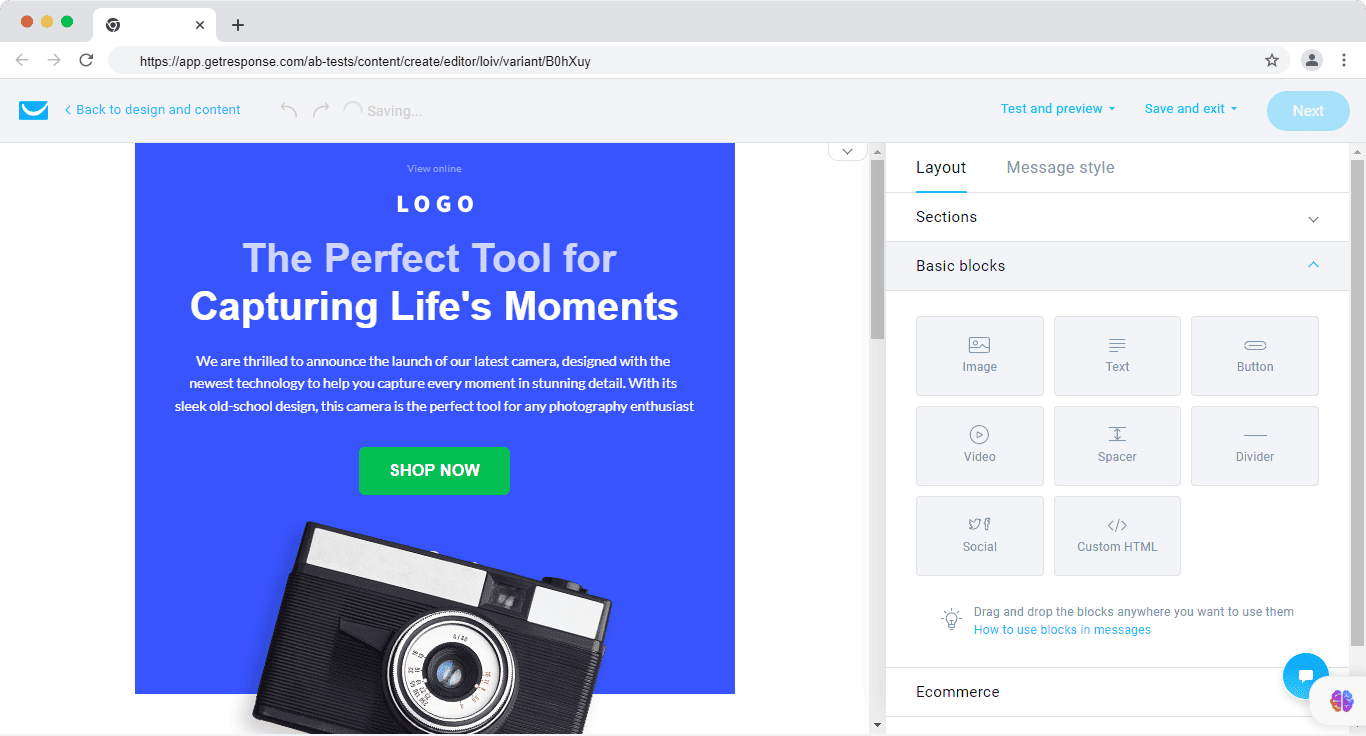
The platform offers a large library of ready-made templates, many optimized for product promotions, seasonal campaigns, and ecommerce use cases.
This makes GetResponse a strong choice for teams that prioritize speed and visual variety over deep CRM personalization.
The email editor is straightforward and beginner-friendly, with minimal complexity.
However, compared to HubSpot, it offers less depth in CRM-based personalization and lifecycle logic.
Advanced personalization typically relies on tags, segmentation rules, or ecommerce data rather than a unified CRM profile.
A/B testing, autoresponders, and basic automation are well supported, but some actions—such as building advanced branching logic or tying email behavior directly into sales pipelines—require moving into the automation builder rather than being handled entirely inside the email editor.
Email marketing verdict (2026)
Both tools are strong—but for different types of teams.
-
-
-
HubSpot is better suited for businesses that rely on CRM-driven, behavior-based email marketing, where emails are part of a broader lifecycle strategy across marketing, sales, and support.
-
GetResponse excels for email-centric and ecommerce-focused teams that want attractive templates, unlimited sends, and fast campaign execution without CRM complexity.
-
-
Bottom line:
If email is part of a larger CRM-powered growth engine, HubSpot wins.
If email campaigns and promotions are the core growth lever, GetResponse offers better speed and value.
Read also: Marketing Automation Software for Small Businesses
GetResponse vs HubSpot: CRM Integration (2026)
CRM integration plays a critical role in modern email and marketing automation.
When your marketing platform is tightly connected to customer data, you unlock more precise segmentation, stronger lead scoring, and automation triggered by real customer behavior—not just email interactions.
Here’s how HubSpot and GetResponse compare in 2026.
HubSpot
HubSpot is built around a native CRM, which is at the core of its customer platform. Marketing, sales, and service tools all run on the same data model, eliminating the need for syncing or third-party connectors.
This native CRM foundation enables advanced lead management and lifecycle automation. Teams can view a complete contact record—including email activity, website behavior, deal history, support tickets, chat conversations, and form submissions—in one unified timeline.
HubSpot’s Free CRM, combined with its omnichannel Conversations inbox, allows teams to manage:
-
-
-
Contacts and companies
-
Deals and pipelines
-
Emails, live chat, Messenger conversations
-
Forms, meeting bookings, and tickets
-
-
Because marketing automation is CRM-aware, workflows can be triggered by:
-
-
-
CRM property changes
-
Deal stage movement
-
Lead score updates
-
Sales or support activity
-
-
Free CRM + omnichannel shared inbox let teams see every contact, deal, email, chat, Messenger thread, and form submission in one place.
In addition to its native CRM, HubSpot continues to support integrations with external CRMs for hybrid setups or migrations.
Common integrations include Salesforce, Microsoft Dynamics 365, Zoho CRM, Pipedrive, Freshsales, Close, Copper, Insightly, SugarCRM, and others—though many teams no longer need a second CRM once fully onboarded to HubSpot.
GetResponse
GetResponse remains a marketing-led platform, not a CRM-first system.
It offers contact management, tagging, scoring, and sales funnels, which cover basic CRM-like needs for small teams. However, it does not provide a full sales CRM with deal pipelines, account hierarchies, or service records comparable to HubSpot.
For businesses that rely on an external CRM, GetResponse supports native integrations with popular systems such as:
-
-
-
Salesforce
-
Microsoft Dynamics 365
-
Zoho CRM
-
SugarCRM
-
-
Additional CRMs—including HubSpot CRM, Capsule, Salesflare, and others—can be connected using built-in connectors or third-party integration tools.
While these integrations allow data syncing for email campaigns and segmentation, automation depth depends on the CRM connector and does not offer the same real-time, object-level control available in HubSpot’s native CRM.
CRM Integration verdict (2026)
The difference is clear.
-
-
-
HubSpot delivers the strongest CRM integration because the CRM is the platform. This enables deeper personalization, more advanced automation, and better alignment between marketing, sales, and support teams.
-
GetResponse works well when paired with an external CRM, but its CRM capabilities are lightweight and designed primarily to support email and campaign execution.
-
-
Bottom line:
If CRM-driven growth, lead scoring, and cross-team workflows are essential, HubSpot clearly leads.
If you already use a CRM and need email automation layered on top, GetResponse is sufficient and cost-effective.
Read also: Free CRM with Marketing Automation
GetResponse vs HubSpot: Landing Page Creation (2026)
Creating landing pages inside your marketing platform helps reduce tool sprawl and improves conversion tracking.
In 2026, however, ease of use alone isn’t enough—landing page builders must support personalization, experimentation, automation, and performance optimization.
Here’s how HubSpot and GetResponse compare.
HubSpot
HubSpot’s landing page builder is designed for CRM-driven conversion optimization.
Pages are built using a no-code, drag-and-drop editor that’s easy to use even for non-technical teams, while still offering enough control for marketers focused on performance.
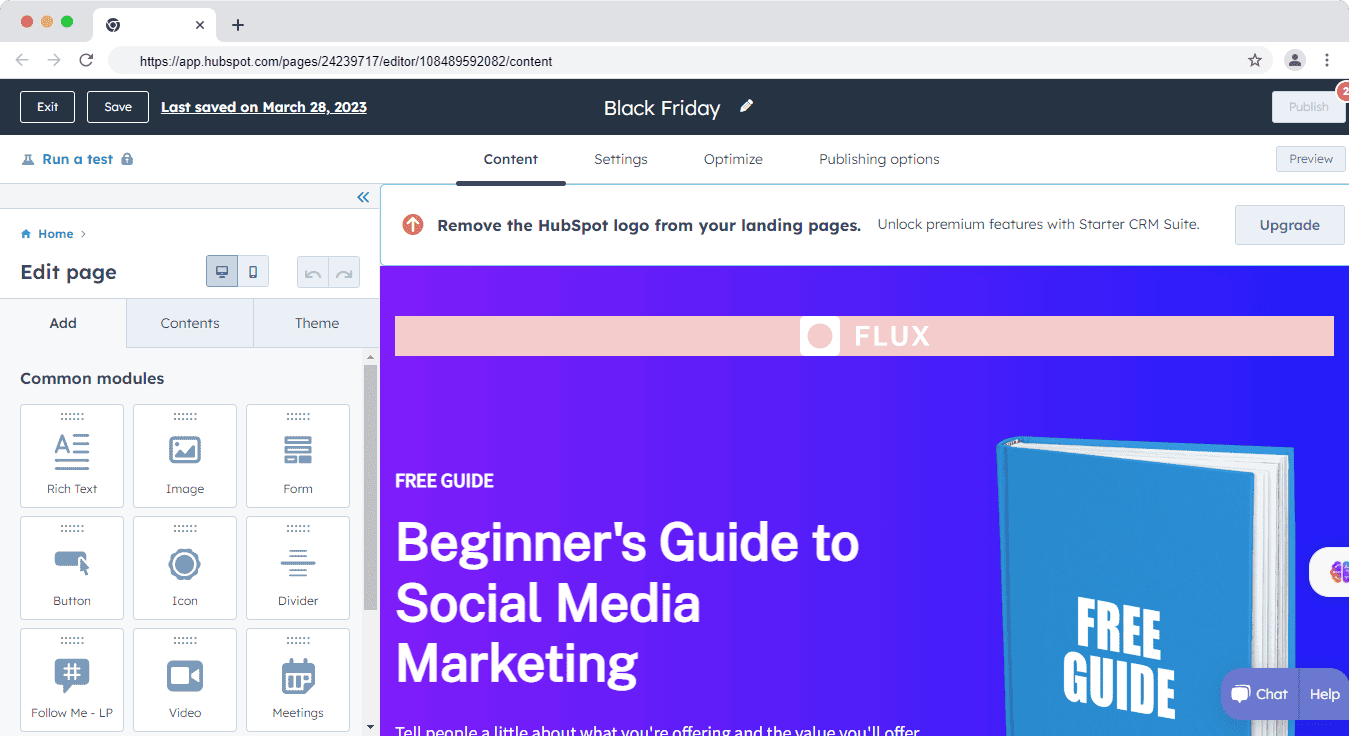
The platform includes a library of modern, responsive templates that can be customized to match brand guidelines.
Beyond layout, HubSpot excels at conversion-focused features:
-
-
-
Native forms and CTAs tied directly to CRM records
-
Built-in A/B testing for landing page variants
-
SEO recommendations and performance insights
-
Page analytics connected to contacts, deals, and lifecycle stages
-
-
One of HubSpot’s biggest differentiators in 2026 is smart content.
Marketers can dynamically change headlines, copy, CTAs, or entire sections based on:
-
-
-
Traffic source or campaign
-
Device type or location
-
Preferred language
-
Lifecycle stage or CRM properties
-
Past website or email behavior
-
-
This makes HubSpot landing pages especially effective for personalized inbound and account-based campaigns.
GetResponse
GetResponse takes a campaign- and funnel-first approach to landing pages.
The platform offers 100+ prebuilt landing page templates, with popular formats such as lead magnets, discounts, opt-ins, and webinar registrations.
Marketers can also start from a blank canvas and assemble pages using a simple drag-and-drop builder.
GetResponse’s builder supports:
-
-
-
Custom signup forms and fields
-
Section-based layouts
-
Embedded videos and media
-
Quick publishing without technical setup
-
-
While functional and beginner-friendly, the editor offers less design flexibility and fine-grained control compared to HubSpot.
Advanced customization and SEO tuning are more limited, and large-scale personalization relies on segmentation rather than CRM-level context.
Here’s how Meriah Kruse summed up the landing page builder:
“Although I appreciate the landing page maker, I am also still hoping for some improvement in the landing page construction functions, which I find stodgy and finicky.”
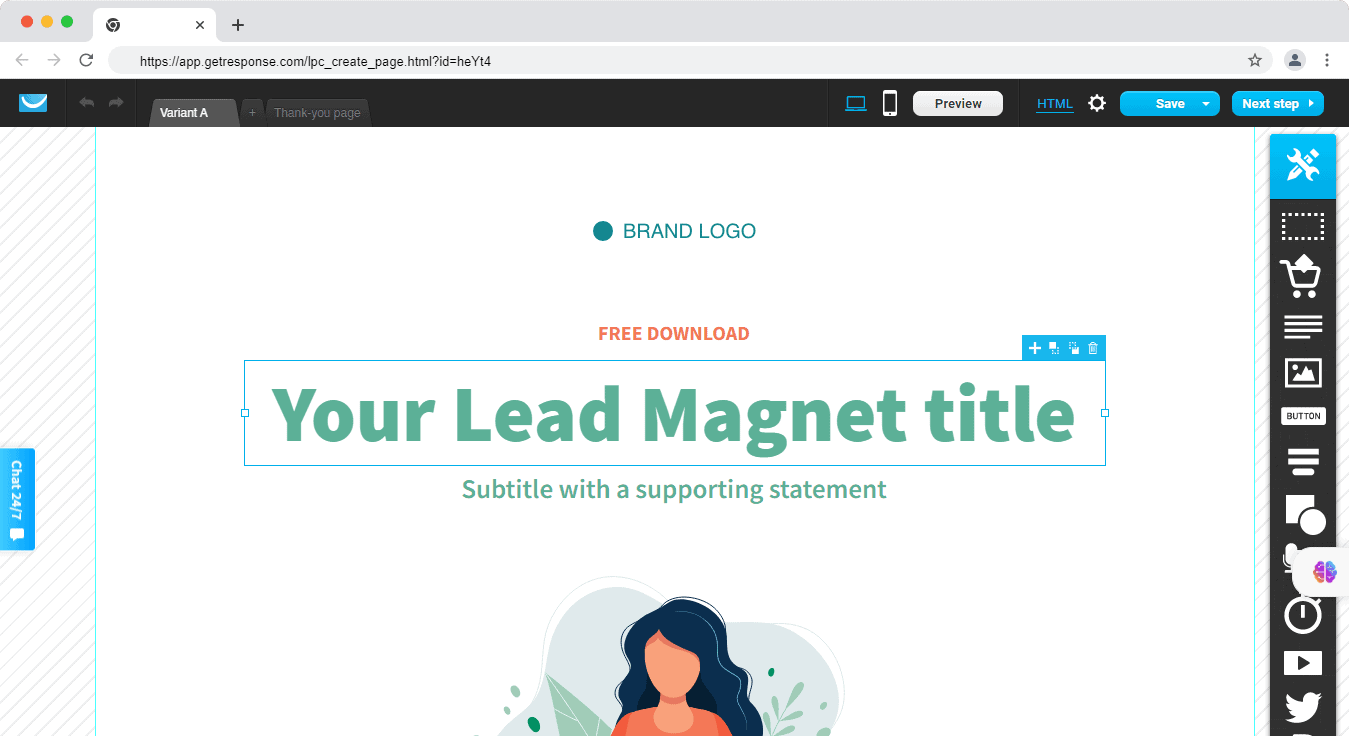
That said, GetResponse stands out in 2026 for webinar-led landing pages.
Its native webinar studio—including live and on-demand webinars,
YouTube and Facebook streaming, polls, and CTAs—is fully integrated into the landing page workflow at no additional cost.
This makes it particularly effective for marketers running webinar-driven funnels.
GetResponse: Built-in webinar studio (live, on-demand, YouTube/Facebook streaming, polls, CTAs) comes at no extra cost.
Landing page creation verdict (2026)
Both platforms allow you to build landing pages without code, but they excel in different scenarios.
-
-
-
HubSpot delivers a more advanced and flexible landing page experience, with stronger UI, deeper personalization, built-in A/B testing, and SEO optimization tied directly to CRM data.
-
GetResponse is a better fit for marketers focused on campaigns, funnels, and webinars, offering fast setup and strong webinar integration without relying on third-party tools.
-
-
Bottom line:
Choose HubSpot if landing pages are part of a CRM-driven inbound strategy.
Choose GetResponse if your pages are primarily built to support email campaigns and webinars.
Read also: Is HubSpot Worth It? An In-depth HubSpot Review for Small Businesses
HubSpot vs GetResponse: Marketing Automation (2026)
Marketing automation in 2026 goes far beyond simple drip emails. Modern platforms are expected to react to real-time behavior, CRM data, and multi-channel engagement.
Both HubSpot and GetResponse offer automation tools—but they differ significantly in depth, flexibility, and use cases.
HubSpot
HubSpot’s automation is built on top of its native CRM, making workflows deeply connected to contacts, companies, deals, tickets, and custom objects.
Marketers can create workflows from scratch or start with prebuilt templates.
When building a workflow, you first choose the object type (Contacts, Companies, Deals, Tickets, or custom objects), then define the workflow logic—such as scheduled, event-triggered, or behavior-based automation.
HubSpot supports advanced automation capabilities including:
-
-
-
Multi-object workflows (contact + company + deal logic)
-
Native ABM workflows with company scoring and account-level automation
-
Conditional branching based on CRM properties and engagement data
-
Lifecycle-stage automation and sales handoff logic
-
-
HubSpot’s Native ABM workflows with company scoring and automation help target high-value accounts—capabilities GetResponse lacks.
Enrollment triggers can be based on virtually any CRM event—form submissions, email clicks, deal stage changes, website behavior, lead score updates, or support activity.
This allows teams to orchestrate highly personalized, cross-functional journeys.
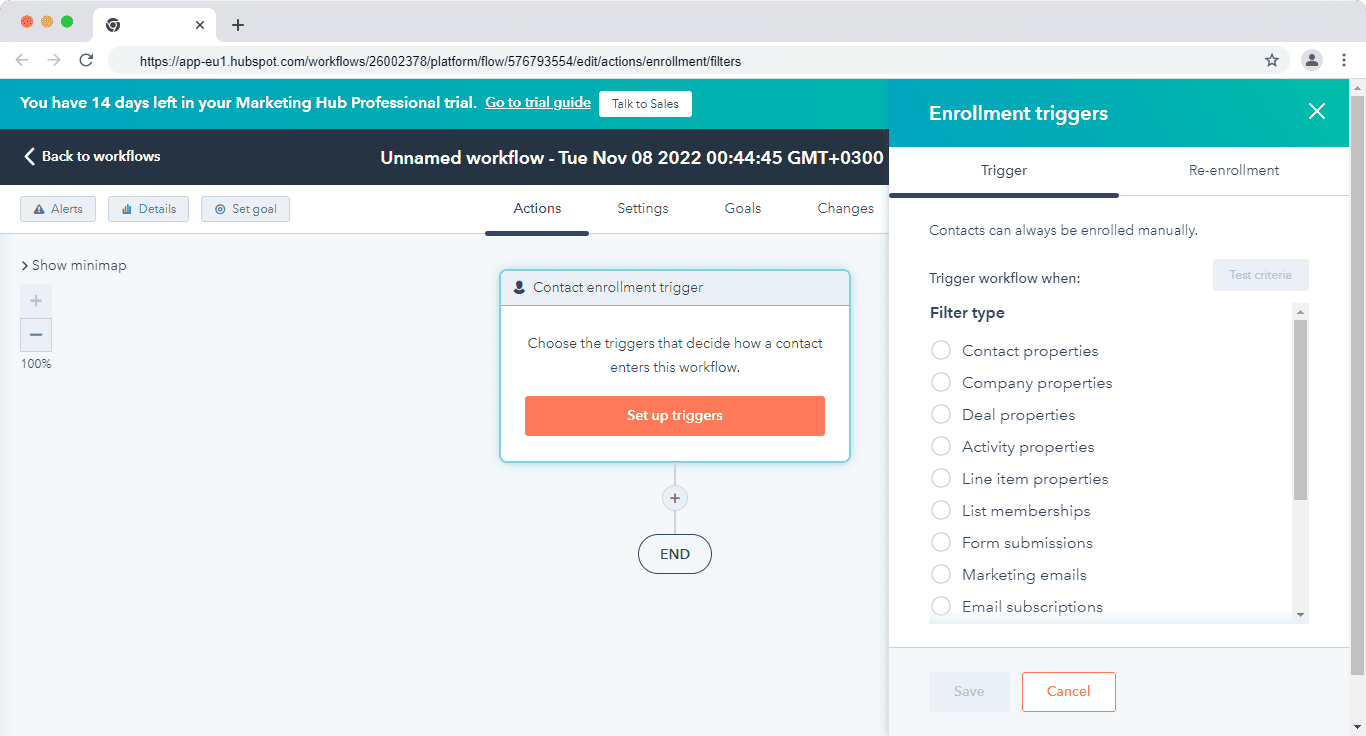
Automation actions vary by subscription tier, and some advanced features remain gated behind Professional and Enterprise plans.
However, HubSpot’s workflow builder is highly visual and scalable—actions can be cloned, reordered, and reused to speed up complex workflow creation.
Read also: The Best GetResponse Alternatives (Features, Pricing)
GetResponse
GetResponse takes a campaign-first automation approach, focused primarily on email, ecommerce, and funnel-based triggers.
Automation workflows are typically triggered by user actions such as:
-
-
-
Newsletter signups
-
Landing page visits
-
Email engagement
-
Webinar registrations
-
Abandoned carts or purchases
-
-
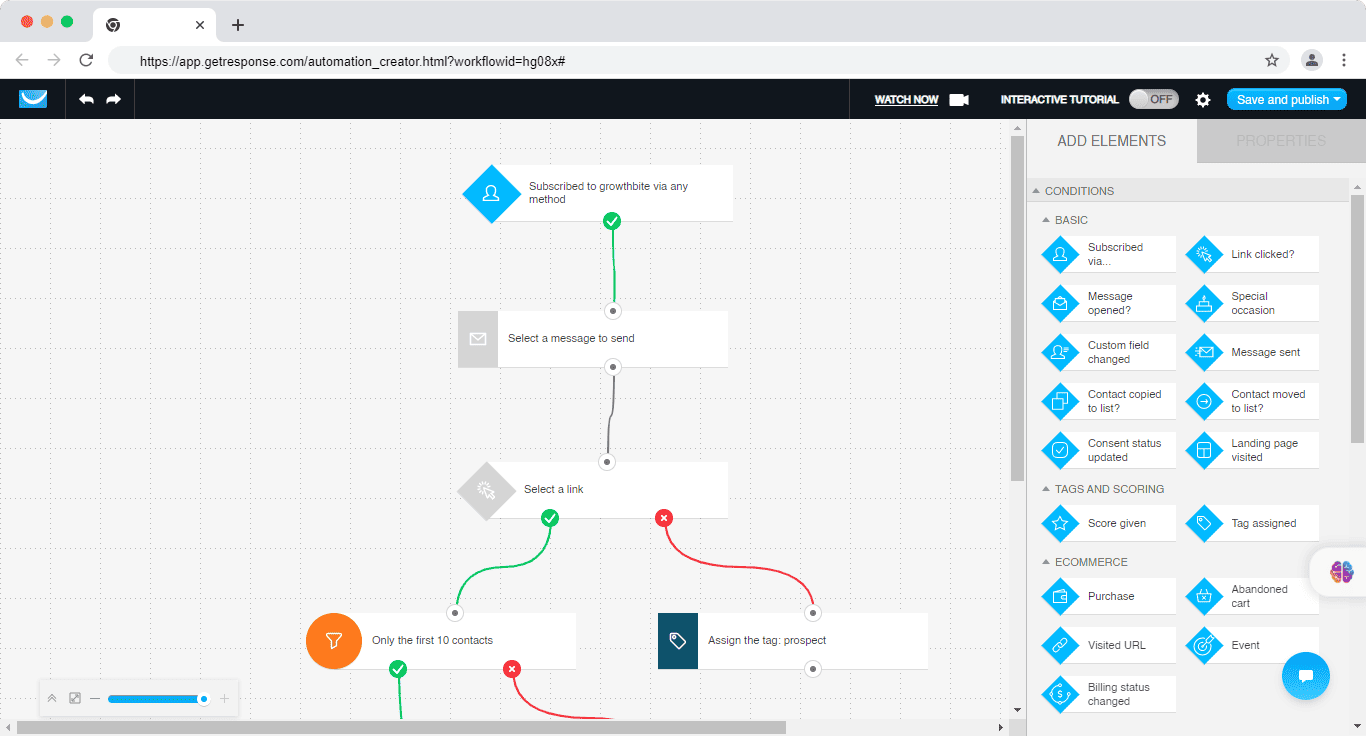
The platform offers a wide range of prebuilt automation templates, organized by use cases such as welcome sequences, engagement and retention, post-purchase follow-ups, abandoned cart recovery, online courses, webinars, and affiliate campaigns.
GetResponse’s automation builder is visual and easy to use, making it accessible for small teams and solo marketers.
Ecommerce brands benefit from native triggers tied to products, orders, and promotions.
However, automation depth is limited compared to HubSpot. Triggers are largely contact- or event-based, with no native support for company-level automation, deal-driven workflows, or ABM-style orchestration.
Marketing automation verdict (2026)
Both platforms deliver strong automation—but for different audiences.
-
-
-
HubSpot offers a more powerful and flexible automation engine, especially for businesses that rely on CRM-driven workflows, ABM, and multi-team coordination.
-
GetResponse provides accessible, affordable automation that works well for email-led, ecommerce, and webinar-based campaigns, without the complexity of a full CRM.
-
-
Bottom line:
Choose HubSpot if automation is central to your growth strategy and involves sales, marketing, and service teams.
Choose GetResponse if you want effective automation at a lower cost, focused primarily on email, funnels, and ecommerce.
Read also: GetResponse Vs TinyEmail — In-Depth Analysis With Key Differences
EngageBay: A More Affordable and Powerful Alternative
HubSpot is a more powerful all-in-one CRM and marketing platform built for businesses that want deep alignment across marketing, sales, and customer support.
In 2026, HubSpot continues to lead in CRM depth, automation, and enterprise-grade features—but that power comes at a cost.
Pricing scales quickly with contacts and paid seats, making HubSpot less suitable for small teams, startups, or solo marketers who primarily need affordable email marketing and automation.
GetResponse positions itself as a more budget-friendly alternative, especially for email campaigns, webinars, and ecommerce marketing.
It offers unique native features like webinar hosting and product-focused automation.
However, its interface can feel less intuitive for complex workflows, and costs rise as list sizes grow—making it less competitive against modern all-in-one platforms in the long run.
That’s where EngageBay stands out.
Showdown: HubSpot vs EngageBay
EngageBay is significantly more affordable than both HubSpot and GetResponse, while still offering a true all-in-one CRM, marketing automation, and support platform.
In 2026, EngageBay’s Growth plan (starting at ~$49.99/month) includes full marketing automation—at a lower price point than GetResponse’s Marketing Automation plan (from $59/month) and far below HubSpot’s Professional tier.
With EngageBay, you get:
-
-
-
CRM + email marketing + marketing automation in one platform
-
Push notifications and site messaging
-
Lead scoring and behavior-based automation
-
Free onboarding and hands-on support
-
Optional dedicated account management
-
-
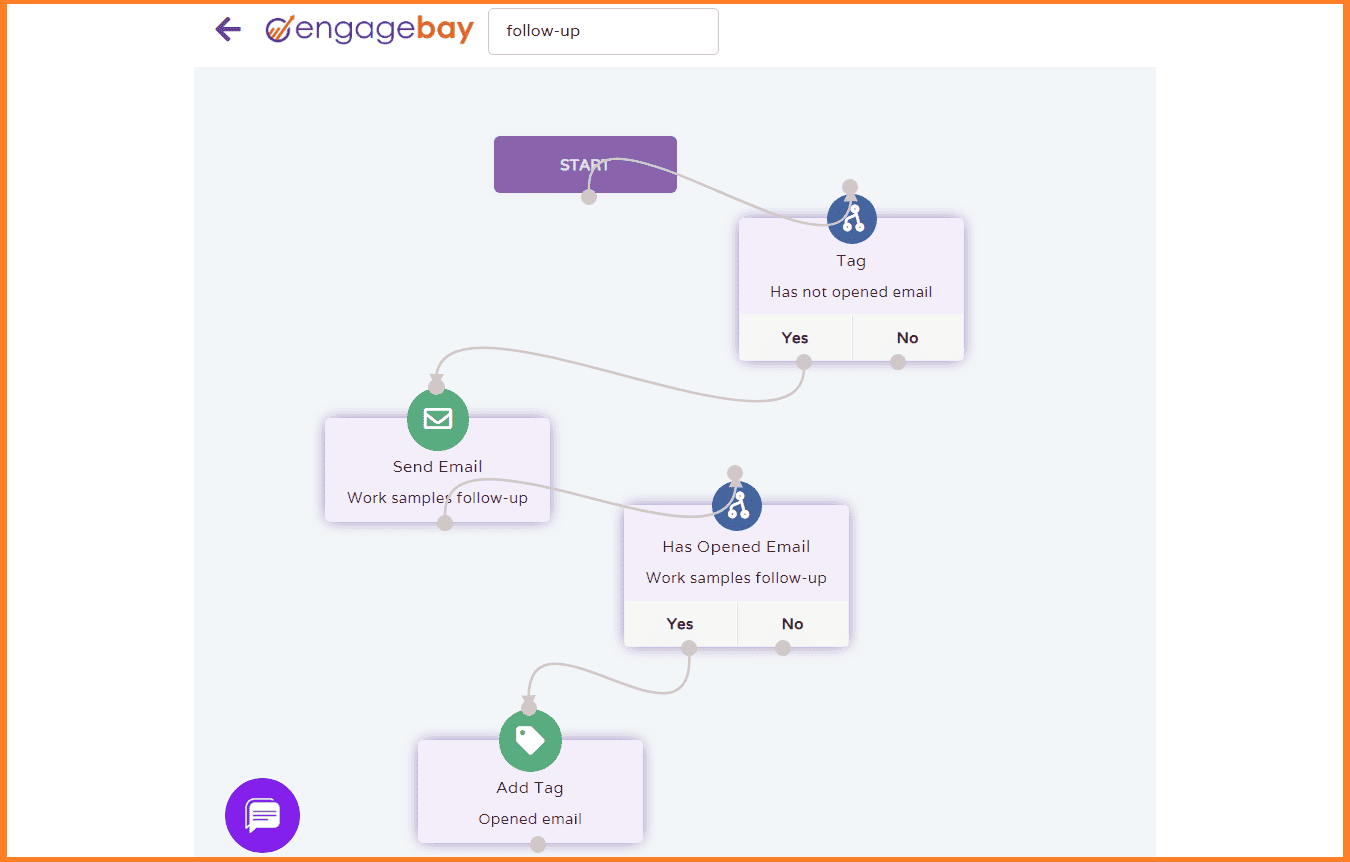
You can easily automate lead scoring by setting triggers based on real user activity—such as email clicks, page visits, or form submissions—without needing enterprise-level upgrades.
Bottom line (2026):
-
-
-
Choose HubSpot if you need enterprise-grade CRM depth and have the budget to scale.
-
Choose GetResponse if webinars and email campaigns are your primary focus.
-
Choose EngageBay if you want powerful automation, CRM, and omnichannel marketing at a predictable, small-business-friendly price.
-
-
Learn more about EngageBay:
Sign up with EngageBay for free
Wrapping Up
GetResponse is more affordable than HubSpot and works well for teams focused on email campaigns, automation, and webinars without the need for a full CRM. It’s a solid choice if your marketing efforts are primarily campaign-driven and you want predictable pricing with unlimited email sends.
However, compared to other modern email marketing platforms in 2026, GetResponse can feel less intuitive for complex workflows, and costs still rise as your contact list grows.
When it comes to CRM capabilities, the difference is more pronounced. HubSpot clearly leads with a native, full-featured CRM, deeper automation, and stronger alignment across marketing, sales, and support—making it the better option for businesses that require CRM-driven growth and long-term scalability.
Check this simple comparison that clearly shows which platform is the best for small businesses:
| Feature | EngageBay | GetResponse | HubSpot |
|---|---|---|---|
| Marketing automation plan | Growth / Pro (full automation included) | Marketing Automation | Professional |
| Contact limit | Unlimited contacts | 25,000 contacts | 25,000 marketing contacts |
| Approx. monthly cost (2026) | ~$49–$99 / month | ~$215 / month | ~$3,000 / month (excluding onboarding) |
What this table clearly shows
-
-
-
EngageBay is the most small-business–friendly option: full CRM + marketing automation at a fraction of the cost, with no contact-based pricing pressure.
-
GetResponse sits in the middle: reasonable pricing for email, automation, and webinars—but costs rise steadily as lists grow.
-
HubSpot is the most powerful platform—but at enterprise-level pricing, making it difficult to justify for most small businesses once contact volume increases.
-
-
Related reading:
- The best CRM Tools for Small Businesses
- The 14 Best CRM Automation Software in 2024
- 15 Best Marketing Automation Tools for Small Businesses
- Is HubSpot Worth It? In-Depth Review for Small Businesses
If you have around 1 k contacts, GetResponse’s Email Marketing tier costs about $19 per month with unlimited sends. HubSpot’s Starter tier is roughly $20 per month but caps sends at five times your contact limit, so costs climb faster as you scale.
HubSpot originated as a CRM and still bundles contact, deal, and pipeline management for free across all plans—plus a unified inbox for email, chat, and Messenger. GetResponse focuses on email marketing and e-commerce automation; it offers no native CRM or shared inbox.
GetResponse ships with a full webinar studio—live or on-demand sessions, registration pages, polls, CTAs, and YouTube/Facebook streaming—at no extra cost on its Marketing Automation tier. HubSpot has no built-in webinar tool; you must integrate Zoom, GoToWebinar, or a similar app.
HubSpot Marketing Hub Pro unlocks ABM workflows, automated company scoring, and target-account reports. This lets B2B teams orchestrate multi-contact outreach from one place. GetResponse lacks any ABM functions, so users have to bolt on third-party tools or manage accounts manually.
GetResponse offers native promo code generation, product-recommendation widgets powered by AI, and an integrated Social Ads Creator for banner or video ads—all within the same dashboard. HubSpot relies on external integrations for promo codes and recommendations and provides no built-in social ad designer.
