
Last updated on 25 August 2026
HubSpot and Insightly are two well-known CRM platforms, but in 2026, they’re built for very different types of businesses.
While both help you manage contacts, deals, and pipelines, the way they approach automation, AI, pricing, and scale sets them apart in meaningful ways.
HubSpot positions itself as an all-in-one CRM platform. Its unified ecosystem combines CRM, marketing, sales, service, CMS, and operations software, with shared customer data across every hub.
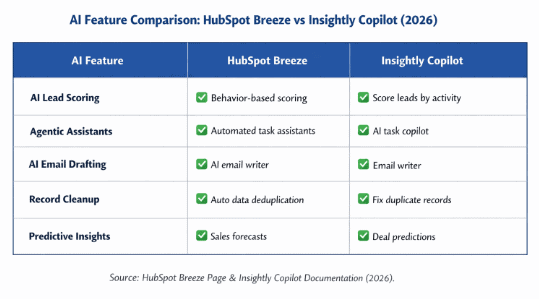
In recent years, HubSpot has doubled down on AI with Breeze and AI agents embedded across the platform—helping teams generate content, prioritize deals, automate follow-ups, and support customers from a single system.
That level of depth and automation is powerful—but it also comes with a catch.
As you move up HubSpot’s tiers or add more hubs, seats, and contacts, costs can increase sharply.
So the real question is whether HubSpot’s expansive feature set and AI-driven workflows justify the long-term pricing for your business.
Insightly, on the other hand, takes a more focused approach. It’s primarily a sales-centric CRM with built-in project management and separate marketing and service modules.
Insightly allows you to route leads automatically, trigger task assignments, manage post-sale projects, and run basic email campaigns—all without the complexity of a multi-hub ecosystem.
In late 2025, Insightly also introduced Copilot, its AI assistant designed to help with deal insights, summaries, and productivity tasks.
However, Insightly isn’t without trade-offs. Its marketing and support capabilities are more limited compared to HubSpot’s, and some users report constraints around advanced automation and customer support unless they move to higher-tier plans.
To cut through the marketing claims, we tested both HubSpot and Insightly hands-on, checked their current pricing pages directly, and analyzed hundreds of recent user reviews.
In this in-depth HubSpot vs Insightly comparison, you’ll learn:
-
-
- The key differences between HubSpot and Insightly in 2026
- How their AI, automation, and integrations compare
- A clear, corrected breakdown of HubSpot vs Insightly pricing
- Which CRM fits different business sizes and use cases
- A more affordable alternative worth considering
-
Table of Contents
TL;DR: HubSpot vs Insightly at a Glance in 2026
|
Factor |
HubSpot CRM Suite |
Insightly CRM |
Quick Verdict |
|
Core focus |
All-in-one customer platform spanning CRM, Marketing, Sales, Service, CMS & Operations hubs |
Sales-first CRM with built-in project management and optional Marketing & Service modules |
HubSpot for full-funnel operations; Insightly for sales + delivery workflows |
|
Ideal user |
Growing and mid-market teams needing one system across marketing, sales & support |
SMB sales teams that want pipeline + project tracking without heavy marketing automation |
Depends on how marketing-led your business is |
|
Pricing (entry → top tier) |
Starter tier from ~$20/Core seat/month; Professional ~$800–$1,300/month per hub; Enterprise ~$3,600–$4,300/month per hub. Costs rise quickly as you add hubs, seats & contacts, and Professional/Enterprise carry mandatory onboarding fees. |
14-day free trial (no permanent free plan); paid tiers run $29–$99/user/month billed annually, plus a one-time onboarding fee on top |
Insightly is significantly more predictable and budget-friendly at the seat level |
|
Ease of use & onboarding |
Polished UI, guided onboarding, in-app tips, live chat & large learning ecosystem |
Clean UI but more manual setup; onboarding can feel technical; support limited on lower tiers |
HubSpot is easier for most teams |
|
Customization & pipeline management |
Custom fields on all tiers; custom objects only on Enterprise; pipelines flexible but opinionated |
Strong pipeline flexibility; advanced customization and project conversion on higher tiers |
Insightly offers more flexibility for sales workflows |
|
Marketing & campaign tools |
Advanced marketing automation, landing pages, forms, blogs, ads, social & multichannel campaigns |
Basic email marketing; limited automation; no native landing pages |
HubSpot dominates marketing capabilities |
|
Sales automation & AI |
Sequences, workflows, forecasting, and Breeze AI agents for drafting, prioritization & insights |
Rule-based workflows, activity sets, and Copilot AI for summaries & productivity |
HubSpot offers broader AI and automation |
|
Reporting & analytics |
Extensive dashboards, custom report builder, revenue attribution, funnel analytics |
Solid reporting and dashboards, but less depth and visualization |
HubSpot provides richer analytics |
|
Integrations & ecosystem |
2,000+ apps in the HubSpot App Marketplace across marketing, sales & ops |
500+ pre-built connectors via AppConnect; strong but smaller ecosystem |
HubSpot wins on ecosystem scale |
|
Lead management |
Advanced lead scoring, live chat, unified inbox, lifecycle stages & automation |
Structured lead records, assignment rules, and auto-conversion to contacts/projects |
HubSpot is more comprehensive |
|
Customer support |
Knowledge base, community, tickets & live chat (24/7 on higher plans) |
Self-serve support on lower plans; priority support costs extra |
HubSpot offers stronger default support |
|
Key strengths |
Unified platform, deep marketing automation, AI agents, massive ecosystem |
Affordable per-seat pricing, sales + project management combo, customization |
— |
|
Key drawbacks |
Rapid price escalation, complex pricing, mandatory onboarding fees on Professional & Enterprise, annual commitments at higher tiers |
No permanent free plan, limited marketing depth, paid premium support, its own onboarding and setup fees, steeper setup for advanced workflows |
— |
**All information updated August 2026
CRM Wars: HubSpot vs Insightly – The Heavyweight Showdown!
What Is the Difference Between HubSpot and Insightly in 2026?
The biggest difference between HubSpot and Insightly lies in platform depth and intent.
HubSpot is designed as a broad, all-in-one customer platform that supports marketing, sales, customer service, content management, and operations from a single CRM.
Insightly, while expanding its capabilities in recent years, remains primarily sales-centric, with marketing and service offered as optional add-ons rather than deeply integrated hubs.
In late 2025, Insightly introduced a more unified platform experience across its CRM, Marketing, and Service products.
However, this unification focuses on data continuity rather than providing the same level of cross-functional tooling, automation, and ecosystem depth that HubSpot offers.
HubSpot – An all-in-one CRM
HubSpot is built for growing businesses that want one system to manage the entire customer lifecycle.
Its modular hub structure allows teams to start small and expand into marketing automation, sales engagement, customer support, and operations as their needs evolve.
All hubs share a central CRM database, giving marketing, sales, and support teams a single source of truth across the customer journey.
In 2026, HubSpot further strengthened this model by embedding Breeze AI and AI agents across hubs to assist with content creation, deal prioritization, forecasting, and customer interactions.
HubSpot’s core hubs include:
-
-
- Marketing Hub — Designed to attract and convert leads at scale. Key features include marketing automation, landing pages, forms, email campaigns, social media tools, ads tracking, and AI-assisted content creation.
- Sales Hub — Built to help sales teams close deals faster. It includes pipeline management, email tracking, sequences, forecasting, meeting scheduling, document tracking, live chat, and AI-driven deal insights.
- Service Hub — Centralizes customer support and success operations. Features include shared inboxes, ticketing, knowledge base, customer feedback surveys, automation, and AI-powered support tools.
- Content Hub (formerly CMS Hub) — Allows teams to build and manage websites directly on HubSpot without relying on external CMS platforms. It includes website themes, personalization, SEO tools, and native CRM integration.
- Operations Hub — Focuses on data sync, automation, and process alignment across connected apps. It helps maintain clean, consistent customer data while automating backend workflows.
-
Insightly – A sales-oriented CRM with Project Management
Insightly is primarily designed for sales teams that want a structured CRM combined with built-in project management.
It covers core CRM needs such as contact management, deal tracking, workflow automation, and email communication without the complexity of a multi-hub ecosystem.
Insightly’s workflow engine supports both simple and advanced automation—such as updating records, triggering emails, assigning tasks, and syncing data when conditions are met.
In late 2025, Insightly introduced Copilot, its AI assistant aimed at improving productivity through summaries, insights, and deal assistance.
One of Insightly’s standout capabilities is its record-linking model. Contacts, organizations, opportunities, and projects are tightly connected, giving teams a clear, contextual view of how every record relates to one another.
Insightly also includes native project management, allowing teams to transition seamlessly from closed deals into onboarding, delivery, or internal projects.
This makes it especially useful for service-based businesses that manage post-sale work alongside sales pipelines.
Overall verdict
Choose HubSpot if you want a comprehensive, all-in-one platform that supports marketing, sales, customer service, content, and operations in one ecosystem.
It’s ideal for businesses that prioritize automation, AI-driven insights, and cross-team alignment—but are comfortable with higher costs, including onboarding fees, as they scale.
Choose Insightly if your primary need is a powerful CRM for sales teams, with strong pipeline management and integrated project tracking.
It’s a better fit for organizations that don’t require advanced marketing automation and want more predictable, per-user pricing—keeping in mind that Insightly no longer offers a permanent free plan, only a 14-day free trial.
Comparing HubSpot vs Insightly in 2026
To compare HubSpot vs Insightly fairly, we tested both platforms hands-on using their free trials and evaluated them across the factors that matter most to modern CRM buyers in 2026.
For each category, we looked at:
-
-
- How quickly a new team can configure the CRM and start using it
- How intuitive the interface feels during daily use
- How responsive and accessible customer support is on lower-tier plans
- How easy it is to build workflows, automation, and reports without heavy training
-
Ease of use – HubSpot vs Insightly
Ease of use plays a major role in CRM adoption. If your team struggles to navigate the system or needs extensive setup before seeing value, productivity suffers. Here’s how HubSpot and Insightly compare.
HubSpot: Guided, Polished, and Beginner-Friendly
HubSpot’s interface is clearly designed for usability. Navigation across hubs—Marketing, Sales, Service, Content, and Operations—is consistent, visually clean, and easy to understand even for first-time users.
Each hub groups its features logically, reducing the learning curve despite the platform’s breadth.
HubSpot also invests heavily in guided onboarding. Tooltips, walkthroughs, setup checklists, and AI-assisted recommendations help users configure pipelines, workflows, and reports faster.
In 2026, Breeze AI further improves usability by suggesting next steps, drafting content, and summarizing records directly inside the CRM.
As John Line, a sales rep at Nutrafarms says:
“Hubspot is very intuitive. It makes things a whole lot easier overall, and I especially like that you can entirely find out all the essential metrics. I am also a big fan of the efficiency/ease of use of everything.”
HubSpot’s support ecosystem is also one of the strongest in the CRM market. Even during trials and lower-tier plans, users have access to:
-
-
- Extensive step-by-step documentation
- In-app guidance and product tours
- Community forums with instant answers
- Live chat and ticket-based support on paid plans
-
Insightly: Clean UI with a Steeper Workflow Learning Curve
Insightly’s interface is simpler than HubSpot’s largely because it focuses on CRM and project management rather than a multi-hub ecosystem. Core objects—leads, contacts, opportunities, projects, tasks, emails, and calendars—are easily accessible from the main navigation.
Its integration with Google Workspace is a standout usability win. Capturing emails from Gmail, syncing calendars, and tracking communication feels seamless for teams already working inside Google’s ecosystem.
Insightly also includes a real-time activity feed on the home dashboard—something many CRMs lack. It provides visibility into deals closed, projects created, and recent updates across the organization, which is especially useful for managers.
However, Insightly’s workflow automation takes more time to master. While powerful, the setup isn’t as visually guided as HubSpot’s, and advanced workflows often require trial and error.
Support is another limitation. Insightly’s standard plans rely heavily on self-service resources, including:
-
-
- Knowledge base articles
- Webinars and documentation
- In-product guides
- Email-based support
-
In-app or priority technical support is reserved for Premier Success Plans, which cost an additional 20% of your total Insightly spend, making hands-on support significantly more expensive than HubSpot’s.
Ease of use verdict
HubSpot is easier to use overall. Its guided onboarding, in-app assistance, AI-powered recommendations, and accessible support make it faster for most teams to get up and running.
Insightly remains usable and efficient for sales teams, but its workflow configuration and limited support on lower plans introduce a steeper learning curve—especially for teams new to CRM automation.
Read also: The Perfect Insightly Alternative
Pricing – HubSpot vs Insightly (2026)
HubSpot and Insightly follow fundamentally different pricing philosophies, which is why their costs diverge so sharply as teams scale.
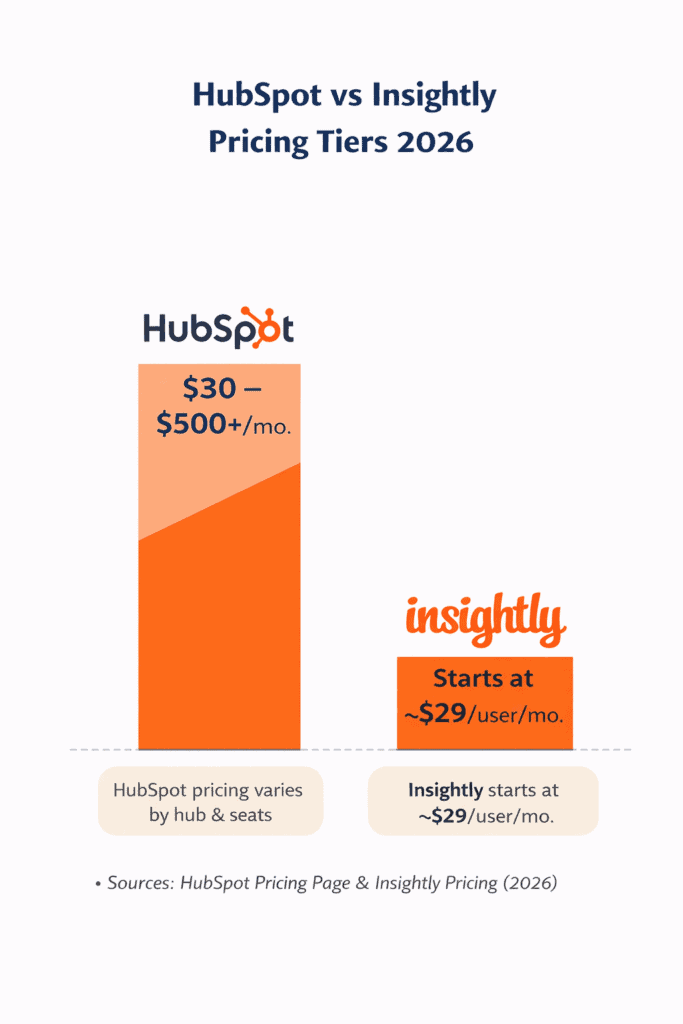
HubSpot prices its platform by hubs, seats, and usage (especially marketing contacts). While it offers a unified CRM, costs rise quickly as you add paid seats or unlock advanced automation and reporting.
Insightly, by contrast, uses a straightforward per-user pricing model, making it easier for sales teams to predict their base subscription cost as they grow — though, as covered below, it carries its own one-time setup costs that are easy to miss.
How much does HubSpot cost in 2026?
Insightly vs HubSpot: Which One Fits Your Business?
HubSpot no longer follows a simple “bundle pricing” model. Instead, pricing is built around:
-
-
- The hubs you choose (Marketing, Sales, Service, Content, Operations)
- The number of Core (paid) seats
- Usage-based limits (especially marketing contacts)
- Mandatory annual commitments on most paid tiers
-
|
Plan Tier |
Typical Starting Cost* |
What You Get |
|
Free |
$0 |
Basic CRM, view-only seats, limited sales & service tools |
|
Starter |
~$20–$30 per Core seat/month |
Entry-level sales, service & marketing tools |
|
Professional |
~$800–$1,300/month per hub |
Advanced automation, reporting, AI features. A one-time onboarding fee of roughly $1,500 typically applies. |
|
Enterprise |
~$3,600–$4,300/month per hub |
Custom objects, advanced permissions, AI insights. A one-time onboarding fee of roughly $3,500–$7,000 typically applies. |
*Pricing varies by hub, number of Core seats, and usage limits. Marketing Hub pricing increases with contact volume.
What becomes apparent quickly
-
-
- Pricing escalates sharply when upgrading from Starter to Professional tiers
- Annual contracts are mandatory for Professional and Enterprise plans—even if billed monthly
- Core seats are paid (editing access); View-Only seats are free
- Additional Core seats typically cost $25–$120 per seat/month, depending on the hub and tier
- Professional-tier plans carry a one-time onboarding fee of roughly $1,500; Enterprise-tier onboarding runs roughly $3,500–$7,000 depending on the hub — neither is optional
-
As a result, HubSpot becomes expensive very fast—especially for teams that only need a few advanced features.
As Kashif Kadri, a consultant puts it:
“For a small business, it is very difficult to afford the pricing of automated email services.”
HubSpot’s Seat Pricing Shift (Still Relevant in 2026)
HubSpot’s seat-based pricing change—introduced in 2024—continues to impact buyers in 2026.
This table can help you understand better:
|
User requirement |
Before seat changes |
Current structure |
|
View-only access to records & dashboards |
Included in free users |
Free View-Only seats |
|
Edit access to CRM records, reports & email tracking |
Included in free users |
Paid Core seats required |
|
Sales & Service power users |
Dedicated paid seats |
Still paid seats |
Key takeaway:
What used to be free edit access now requires paid Core seats, significantly increasing costs for managers and admins.
Read also: HubSpot Pricing and Comparison with Affordable Alternatives
How much does Insightly cost
in 2026?
Insightly keeps its subscription pricing simple and transparent with per-user tiers and no contact-based pricing.
One change worth flagging up front: Insightly discontinued its permanent free plan in October 2024.
Today, the entry point is a 14-day free trial rather than a free-forever tier for small teams.
Insightly Pricing Plans (2026)
|
Plan |
Price |
Best For |
|
Free trial |
$0 for 14 days, no credit card required |
Teams evaluating whether Insightly fits before committing to a paid tier |
|
Plus |
~$29/user/month |
SMB sales teams needing email & pipeline tracking |
|
Professional |
~$49/user/month |
Teams needing automation & reporting |
|
Enterprise |
~$99/user/month |
Advanced customization & large datasets |
What’s included as you scale
-
-
-
- Predictable per-user pricing
- No marketing-contact penalties
- Built-in project management
- AI Copilot included on higher tiers
- Email-based support on all paid plans
-
-
One cost that doesn’t appear on the plan card itself: Insightly charges a one-time guided onboarding fee (roughly $1,500) for new accounts, and teams that need AppConnect for integrations should budget for its separate technical setup fee (roughly $3,000) as well.
Neither of these one-time costs is included in the per-user price shown above, so it’s worth asking for both quotes in writing before you commit to a plan.
Pricing Comparison Snapshot (2026)
|
Factor |
HubSpot |
Insightly |
|
Entry pricing |
Free CRM tools available, but limited |
14-day free trial (no permanent free plan) |
|
Pricing model |
Hub-based + seat-based + usage |
Flat per-user |
|
Typical paid range |
~$20 → $5,000+/month |
~$29 → $99/user/month |
|
One-time setup/onboarding costs |
~$1,500 (Professional) to ~$3,500–$7,000 (Enterprise) |
~$1,500 onboarding, plus ~$3,000 AppConnect setup if needed |
|
Contract requirement |
Annual (Professional & Enterprise) |
Annual (paid tiers) |
|
Cost predictability |
Low |
High at the seat level; lower once onboarding and setup fees are included |
HubSpot’s jump from ~$20 per seat to thousands per month dwarfs Insightly’s $29 → $99 per-user tiers.
Pricing verdict
Insightly clearly wins on pricing simplicity and affordability at the per-seat level. Its per-user structure makes it easier for sales teams to scale without cost surprises on the subscription itself, though the onboarding and AppConnect setup fees are worth factoring into a first-year budget.
HubSpot makes sense only if you truly need an all-in-one platform spanning marketing, sales, service, content, and operations—and are prepared for rapid cost escalation, plus onboarding fees, as you grow.
Read also: Is HubSpot CRM Free? An Unbiased Guide (with User Reviews)
Customization and pipeline management – HubSpot vs Insightly
Both HubSpot and Insightly offer solid, table-stakes customization and pipeline management capabilities.
However, their philosophies differ: HubSpot favors structured, marketing-aligned workflows, while Insightly prioritizes flexibility and post-sale execution.
HubSpot: Structured Customization with Enterprise-Level Limits
HubSpot allows teams to customize key CRM objects and build reports tailored to sales and revenue tracking.
Users can create custom fields across core records such as:
-
-
- Deals
- Contacts
- Companies
- Products
- Quotes
-
HubSpot also provides a large library of pre-built report templates and forecasting tools, making it easier for managers to track performance without building everything from scratch.
That said, custom objects—which allow businesses to model unique data structures beyond standard CRM records—are only available on Enterprise-tier plans.
In 2026, this remains a significant gating factor for organizations with complex or non-standard workflows.
Pipeline management in HubSpot is functional and visually clean, but it’s opinionated.
Deal stages, lifecycle transitions, and reporting are closely tied to marketing and attribution logic.
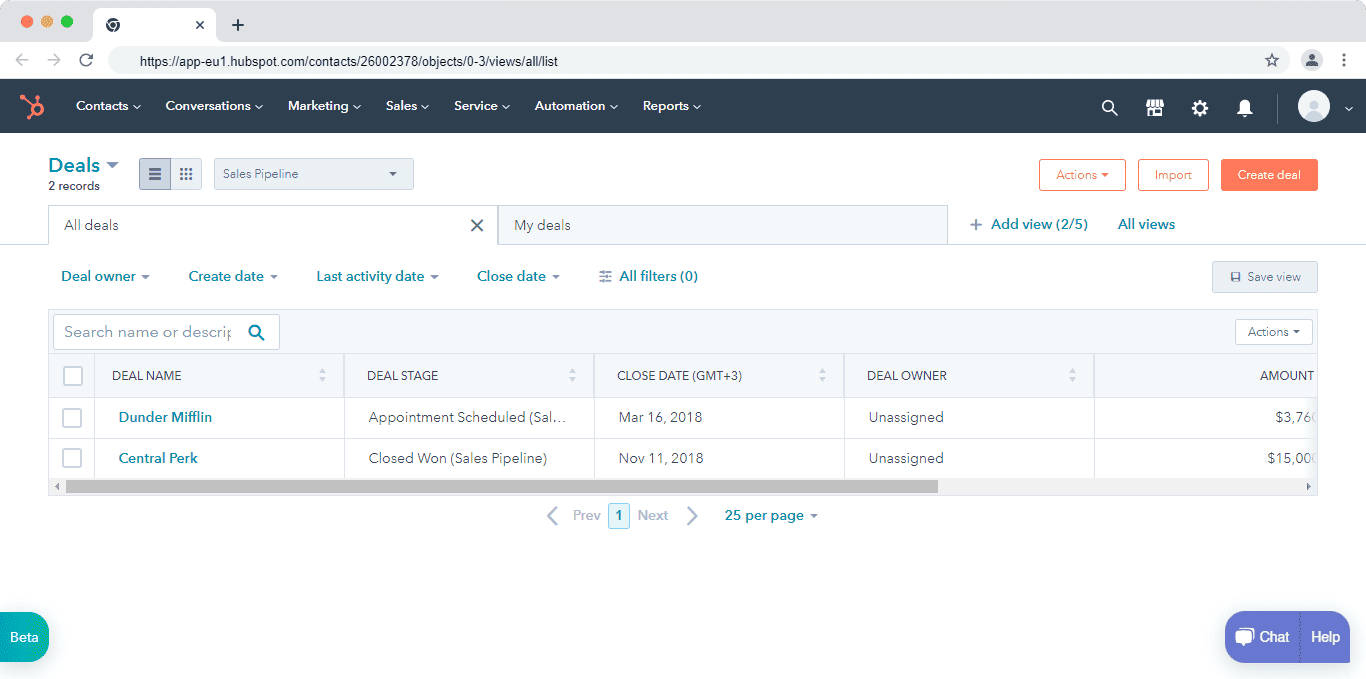
While this works well for revenue reporting and forecasting, some sales teams find it less intuitive for day-to-day deal progression—especially when moving a lead from “deal” to “customer” status.
Here’s how Damien Frye, an enterprise sales representative at WordRake, sums it up:
“The way deals and pipelines are used don’t help the salesperson, they help the manager. It is designed for the marketing side. I feel like we need a revenue management solution where both are considered and it is easy to progress a lead to a customer.”
In short, HubSpot’s customization is powerful—but more restrictive unless you’re on higher tiers, and its pipeline UX favors reporting consistency over sales flexibility.
Read also: The Best HubSpot Alternative
Insightly: Flexible Data Modeling and Sales-First Pipelines
Insightly offers a more flexible approach to customization, especially for sales teams that want to adapt the CRM to their processes rather than adapt their processes to the CRM.
Insightly supports custom fields, tags, and categories across a wide range of records, including:
-
-
- Leads and contacts
- Opportunities
- Projects and tasks
- Events and activities
- Custom objects (availability increases with higher plans)
-
Custom fields allow teams to store unique data points, while tags make it easy to apply multi-dimensional labels—for example, identifying a contact as both a customer and a vendor, or marking opportunities as hot, warm, or cold.
Categories act as customizable dropdown menus that bring structure to records like opportunities, tasks, and projects—useful for organizing products, services, or deal types without over-engineering the setup.
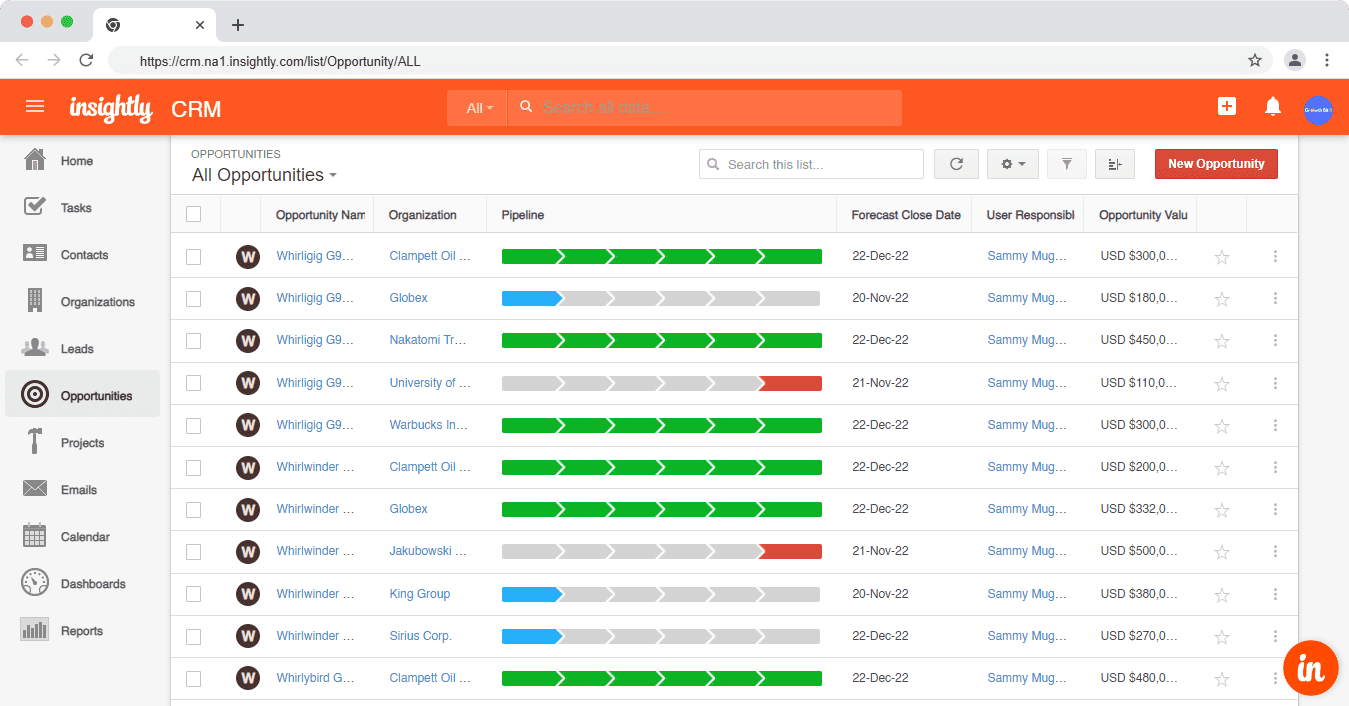
Insightly’s pipeline management is intentionally simple and sales-driven.
One of its standout features is the ability to convert a won opportunity directly into a project, allowing teams to move seamlessly from sales into onboarding or delivery without switching tools.
This makes Insightly particularly appealing for service-based businesses and teams that manage post-sale work.
Customization and pipeline management verdict
Insightly edges ahead in customization flexibility and pipeline usability. Its support for tags, categories, custom objects, and post-sale project conversion gives sales teams more control over how the CRM adapts to their workflows.
HubSpot excels in structured reporting and forecasting, but its customization limits on lower tiers and manager-centric pipeline design may feel restrictive for hands-on sales teams.
Looking for a more flexible alternative to Insightly? Our guide to the top Insightly alternatives can help you find the right fit for your sales process.
Read also: CRM Showdown — HubSpot vs Zoho Review and Comparison
Marketing and campaign management – HubSpot vs Insightly
When it comes to marketing and campaign management, the gap between HubSpot and Insightly is significant.
HubSpot is built as a full-funnel marketing platform, offering content, automation, analytics, and AI-assisted tools designed to attract, nurture, and convert leads at scale.
Insightly, even in 2026, remains primarily a sales-focused CRM with basic email marketing capabilities rather than a comprehensive marketing suite.
HubSpot: Full-Funnel Marketing with Campaign Intelligence
HubSpot’s Marketing Hub provides one of the most complete marketing toolsets available in a CRM-centric platform.
It supports both inbound and outbound marketing strategies and scales from simple email campaigns to complex, multi-channel automation.
With HubSpot, marketing teams can:
-
-
- Create and publish blog content
- Build landing pages and forms
- Run email marketing and A/B tests
- Track paid ad performance across platforms
- Manage and schedule social media posts
- Build advanced marketing automation workflows
- Use AI to generate, optimize, and personalize content
-
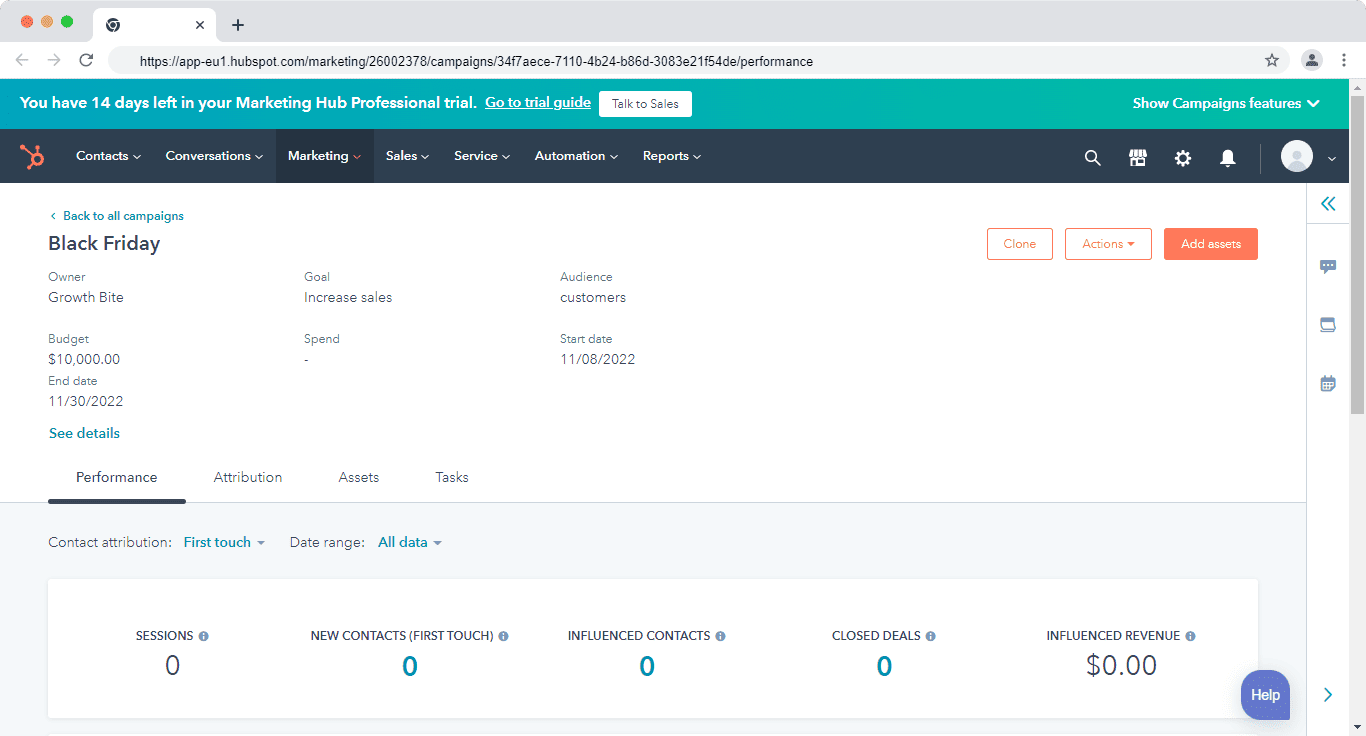
One of HubSpot’s most powerful features is its Campaigns tool.
Campaigns allow marketers to group related assets—emails, ads, landing pages, workflows, social posts, and blogs—under a single campaign goal and budget.
Performance is tracked both at the campaign level and at the individual asset level, giving teams a clear view of ROI.
For example, a Black Friday campaign can include promotional blog posts, paid ads, dedicated landing pages, and email nurture sequences — all tied to one campaign dashboard with unified performance metrics.
Here’s how one of HubSpot’s customers summed it up:
“The system is incredibly powerful with some great analytics, particularly with the marketing and website features. We can bring all of our social, paid ads, and forms into one platform and that has allowed our marketing team to become incredibly efficient and agile.”
In 2026, HubSpot further enhances marketing execution with AI-assisted content creation, campaign insights, and optimization recommendations, helping teams move faster without sacrificing quality.
👉HubSpot competitors on your radar? Get all details of the top nine in our blog post.👌
Insightly: Basic Email Marketing for Sales-Led Teams
Insightly’s marketing capabilities are limited compared to HubSpot’s.
While Insightly offers a separate Marketing product, most CRM users rely on its native email tools, which focus on simple outreach rather than campaign orchestration.
Within Insightly, teams can:
-
-
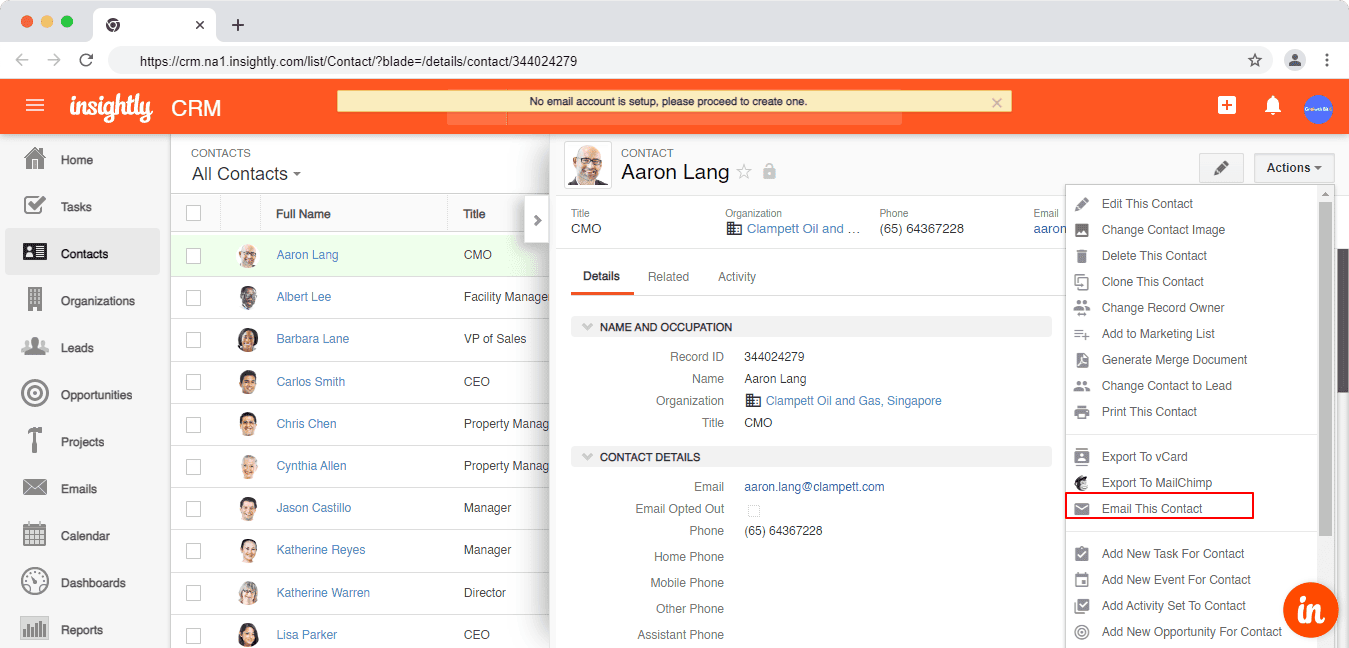
- Send one-to-one emails directly from contact records
- Schedule and track emails
- Create and send basic email broadcasts using templates
- Monitor opens and engagement
-
Creating an email broadcast involves selecting contacts or leads, choosing a template, and sending or scheduling the message.
Sending individual emails is quick and convenient—often just one click from a contact record—but the functionality stops there.
Insightly does not offer native landing pages or forms, blog or content management, multi-step marketing automation, or campaign-level budgeting or attribution.
As a result, Insightly’s marketing tools are best suited for sales follow-ups and simple announcements, not full-scale marketing campaigns.
Marketing and campaign management verdict
HubSpot clearly outperforms Insightly in marketing and campaign management. It enables teams to attract leads, run multi-channel campaigns, track ROI, and automate nurturing workflows—all from a single platform.
Insightly is suitable only if your marketing needs are minimal, and your primary goal is sending and tracking sales emails rather than running structured marketing campaigns.
Read also: EngageBay vs HubSpot — Market Leader or Emerging Powerhouse?
Integrations – HubSpot vs Insightly
Integrations play a critical role in CRM adoption.
Connecting your CRM with marketing tools, sales software, finance systems, and collaboration apps ensures your teams work from a single, accurate source of data instead of jumping between disconnected tools.
Here’s how HubSpot vs Insightly compare in 2026.
HubSpot: Large Native Marketplace with Enterprise-Grade Depth
HubSpot offers one of the largest CRM ecosystems on the market.
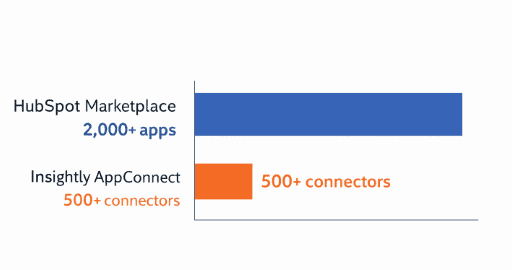
As of 2026, the HubSpot App Marketplace includes 2,000+ apps and integrations across a wide range of categories, including marketing and advertising, sales enablement, customer support and success, scheduling and meetings, finance, billing, and payments, project management and collaboration, and data enrichment and analytics.
Most HubSpot integrations are native or partner-built, meaning they install quickly and sync data bi-directionally with minimal setup.
HubSpot also supports custom integrations via APIs and Operations Hub, allowing businesses to build advanced workflows and data syncs between tools.
HubSpot even supports integrations with other CRMs—including Salesforce, Pipedrive, Copper, and Insightly—making it easier for teams to migrate or maintain hybrid CRM environments.
Insightly: AppConnect for Flexible, Recipe-Based Integrations
Insightly approaches integrations differently.
Instead of relying on a massive native marketplace, Insightly uses AppConnect, its built-in integration and automation platform.
In 2026, Insightly AppConnect provides access to 500+ pre-built connectors and recipes across categories such as productivity and collaboration, sales and marketing tools, project management, finance and accounting, and HR and internal operations.
AppConnect works similarly to Zapier or Make, allowing users to create event-based automations between Insightly and other apps without writing code.
This makes it easier for teams to build custom workflows—even when a direct, native integration doesn’t exist.
However, Insightly’s ecosystem is smaller than HubSpot’s, and many integrations rely on AppConnect workflows rather than deep, native feature-level connections.
It’s also worth noting that AppConnect usage beyond the base plan can incur its own separate charges, on top of the CRM subscription itself.
Integration verdict
HubSpot wins on ecosystem scale and native integration depth, making it a better choice for businesses with complex or rapidly growing tech stacks.
Insightly offers solid flexibility through AppConnect, which works well for teams that need custom workflows but don’t require thousands of native integrations.
Verdict: HubSpot edges ahead—not a tie—especially for teams with multi-tool marketing, sales, and operations environments.
Sales automation – HubSpot vs Insightly
Sales automation plays a critical role in helping teams scale efficiently.
By automating follow-ups, task creation, lead handoffs, and data updates, CRMs reduce manual work and ensure no opportunity is overlooked.
Here’s how HubSpot and Insightly compare in 2026.
HubSpot: Advanced, AI-Assisted Sales Automation
HubSpot: Advanced, AI-Assisted Sales Automation
HubSpot’s sales automation is built around two core features: Sequences and Workflows, both deeply integrated with the CRM and enhanced by AI in 2026.
Sequences
Sequences are designed to keep leads and deals moving forward without constant manual follow-ups. Sales reps can:
-
-
- Create multi-step sequences with timed emails and tasks
- Automatically enroll contacts into follow-up cadences
- Personalize emails using CRM data (contacts, companies, deals)
- Pause or adjust sequences based on prospect engagement
-
Sequences ensure consistent outreach while giving reps flexibility to intervene when needed.
Workflows
Workflows handle more complex, system-level automation across the sales process. Teams can automate tasks such as assigning and routing leads, updating lifecycle stages and deal statuses, creating tasks and follow-ups, handing off leads from marketing to sales, and triggering internal notifications and updates.
In 2026, HubSpot workflows support multiple trigger types, including contact-based, company-based, deal-based, ticket-based, quote-based, conversation-based, and feedback-submission triggers.
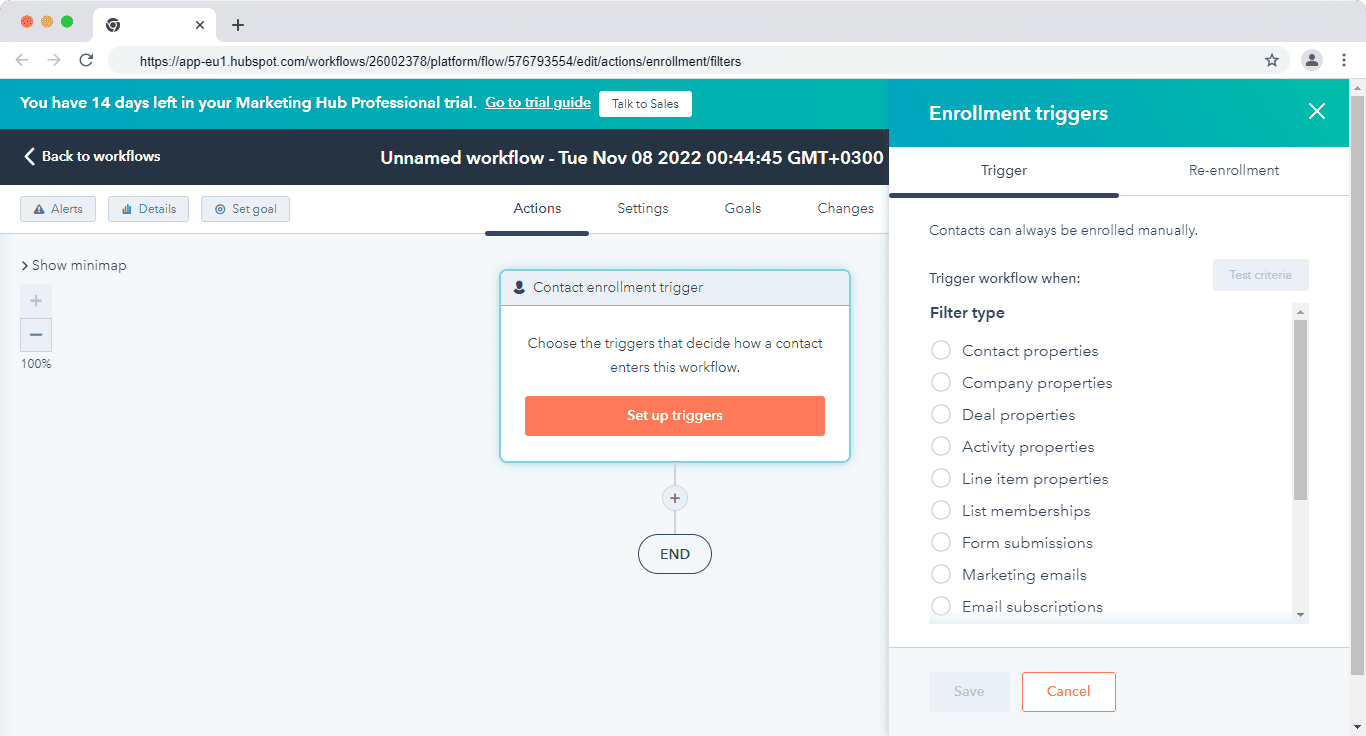
HubSpot also provides a large library of pre-built workflow templates for common use cases like lead conversion, meeting follow-ups, and pipeline updates.
Combined with its visual workflow builder and AI recommendations, HubSpot makes automation accessible even for non-technical users.
Insightly: Practical Automation for Sales-Led Teams
Insightly takes a more modular approach to sales automation, focusing on structured pipelines and task automation rather than complex, multi-branch workflows.
Insightly offers three primary automation mechanisms:
Pipelines with Activity Sets
Activity sets automatically create predefined tasks or events when a lead or opportunity reaches a specific pipeline stage. This ensures reps follow consistent steps—such as scheduling calls or sending follow-ups—at each stage of the sales process.
Workflows
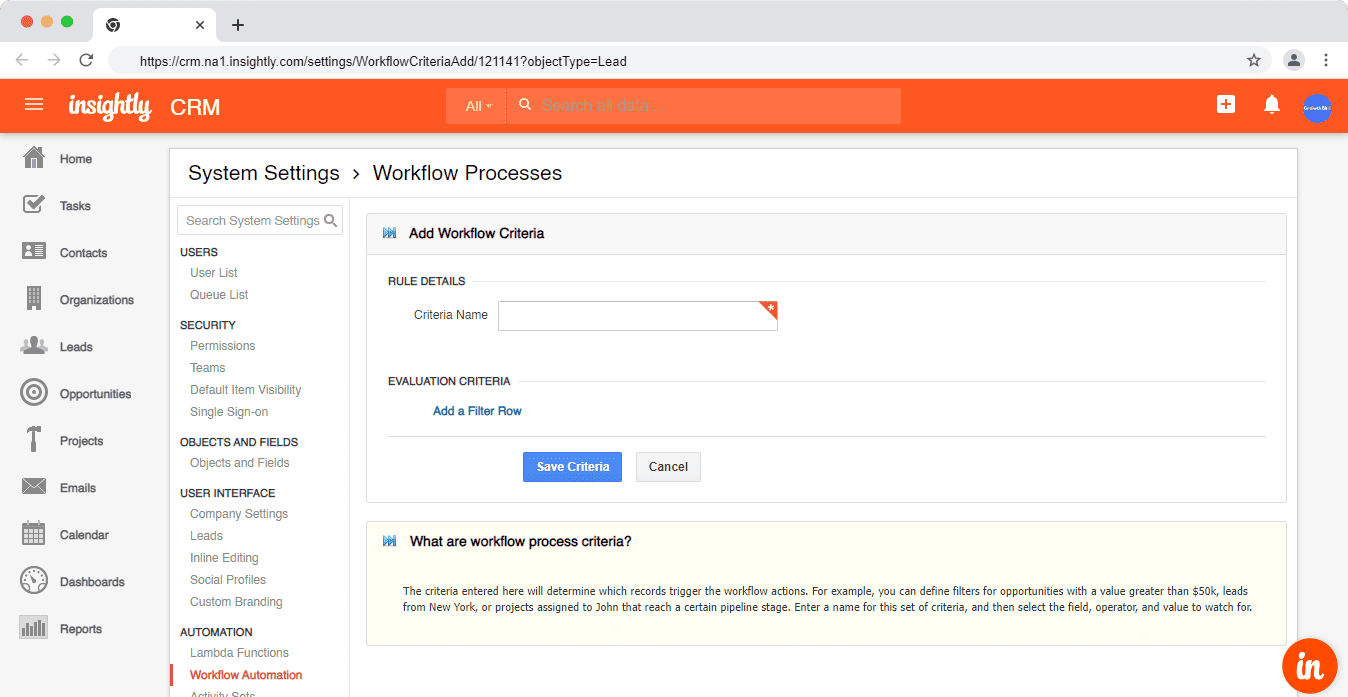
Insightly workflows allow teams to automate rule-based actions when conditions are met. Common use cases include sending automated emails to new leads after a set delay, updating records when fields change, and assigning leads or opportunities to specific reps.
While powerful, Insightly’s workflow builder is more linear and less visual than HubSpot’s, which can increase setup time for complex automations.
You can, for example, automatically send emails to new leads after 3 days.
AppConnect Automations
AppConnect extends automation beyond the CRM by connecting Insightly with other apps using Recipes—predefined or custom automation steps that sync data or trigger actions across tools.
This is particularly useful for teams integrating finance, project management, or external marketing platforms.
Sales automation verdict
HubSpot leads in sales automation depth and usability. Its combination of sequences, visual workflows, AI assistance, and pre-built automation templates makes it easier to build, manage, and scale automation across the sales lifecycle.
Insightly offers solid automation for sales-focused teams, especially those that rely on structured pipelines and task-driven processes—but it lacks the flexibility and AI-driven automation breadth that HubSpot provides.
Read also: An In-Depth Look at HubSpot vs Pipedrive
Reporting – HubSpot vs Insightly
CRM reporting is essential for understanding pipeline health, forecasting revenue, and measuring individual and team performance. The best reporting tools make it easy to surface insights, share them with stakeholders, and act on them quickly.
When comparing HubSpot vs Insightly in 2026, here’s what matters most: how easy it is to build and customize reports, the depth and variety of available report types, and how visual, shareable, and presentation-ready dashboards are.
HubSpot: Deep, Visual, and Forecast-Driven Reporting
HubSpot’s reporting capabilities draw data from across its CRM and hubs, giving teams a unified view of marketing, sales, and service performance.
This makes it especially useful for pipeline analysis, forecasting, and revenue attribution.
HubSpot offers 90+ pre-built reports that can be added to dashboards with just a few clicks.
These reports cover a wide range of sales and marketing use cases, allowing teams to start analyzing performance without building reports from scratch.
Common pre-built sales reports include deals closed vs. goal, deal leaderboard by rep (lifetime and period-based), activity leaderboard by rep with breakdown by activity type, and open deals by close date.
HubSpot also includes several ready-made dashboards, such as the Sales Opportunity Review Dashboard, which provides a monthly snapshot of pipeline health and deal progression, and the Sales Dashboard, focused on deal performance, activity tracking, and individual rep metrics.
Funnel reports help teams understand how contacts and deals move through lifecycle and pipeline stages, making it easier to identify bottlenecks and optimize conversions.
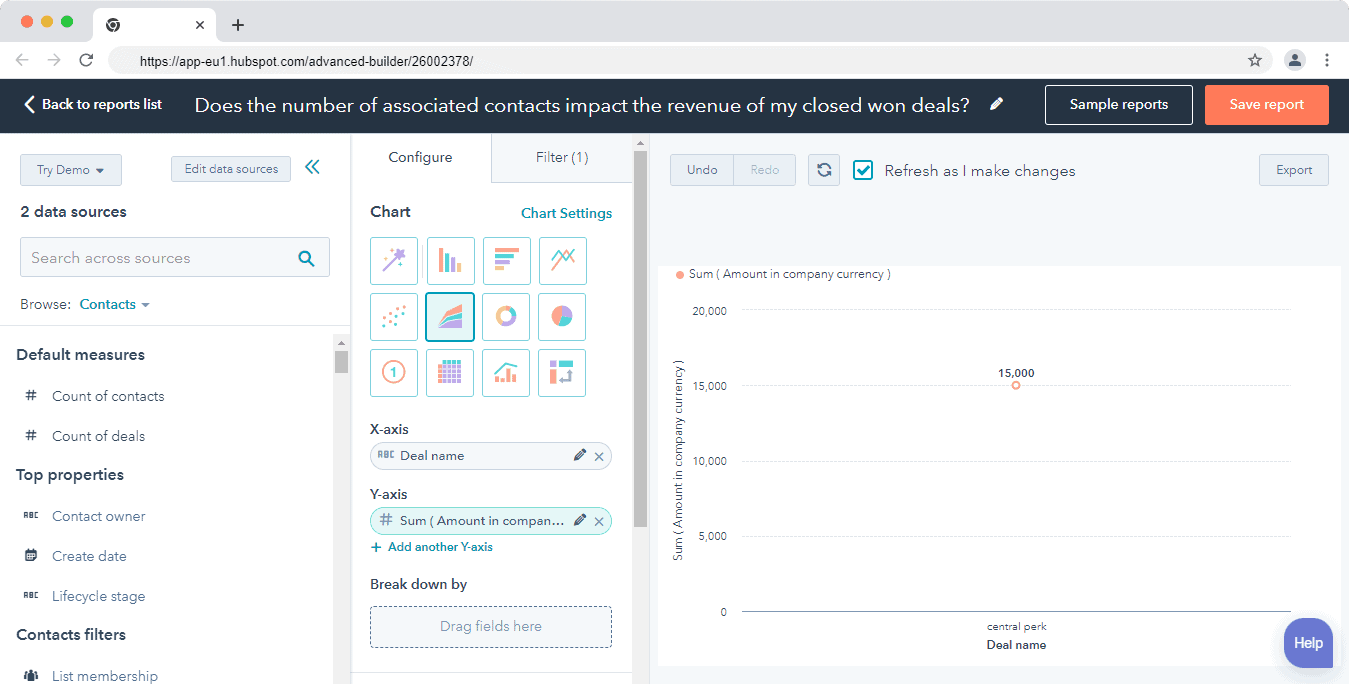
For advanced needs, HubSpot’s Custom Report Builder allows users to combine multiple data sources—such as deals, contacts, companies, and activities—into a single report.
Reports can be visualized through charts, tables, and graphs and shared easily with leadership or clients.
In 2026, HubSpot also enhances reporting with AI-assisted insights and forecasting, helping managers spot trends, risks, and opportunities faster.
Insightly: Flexible Reporting with Solid Dashboarding
Insightly offers a capable reporting system that covers a broad range of CRM data. Users can build reports based on contacts and organizations, leads and opportunities, tasks and activities, and projects and events.
Insightly allows teams to create custom reports and schedule them to be emailed automatically to stakeholders—useful for recurring performance updates.
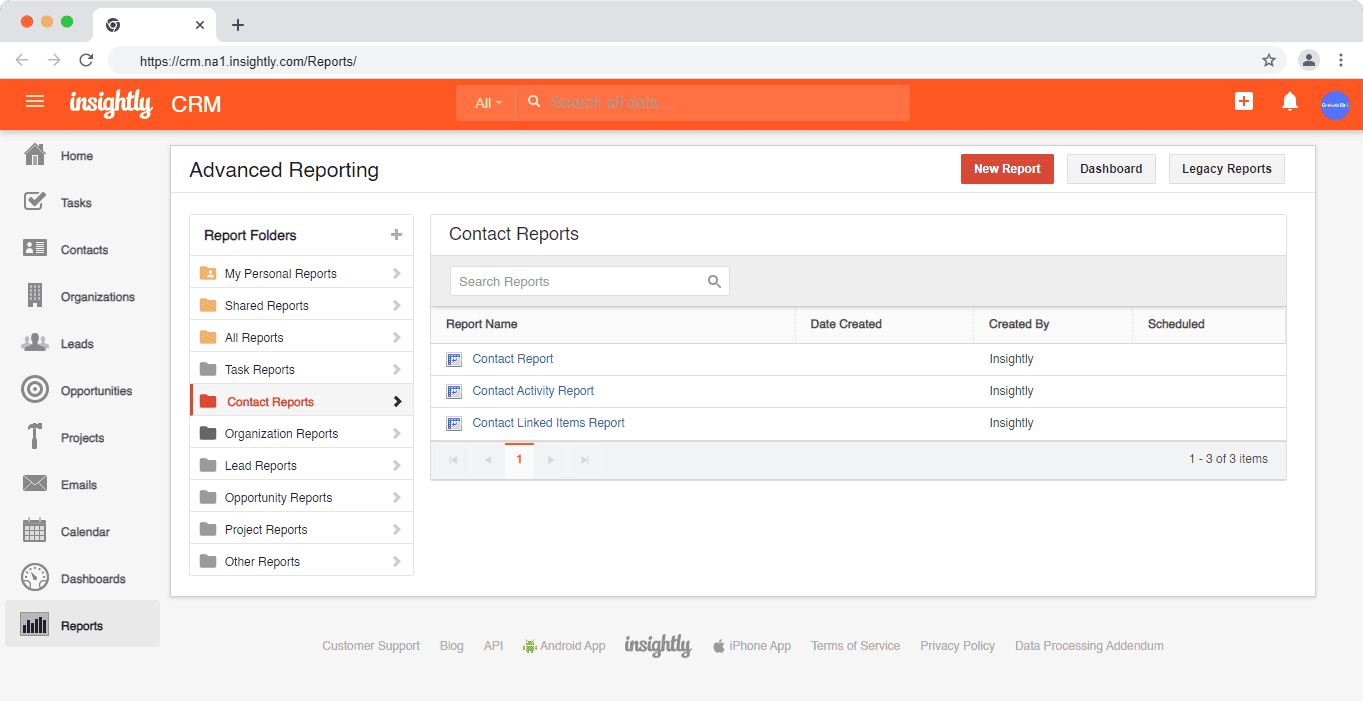
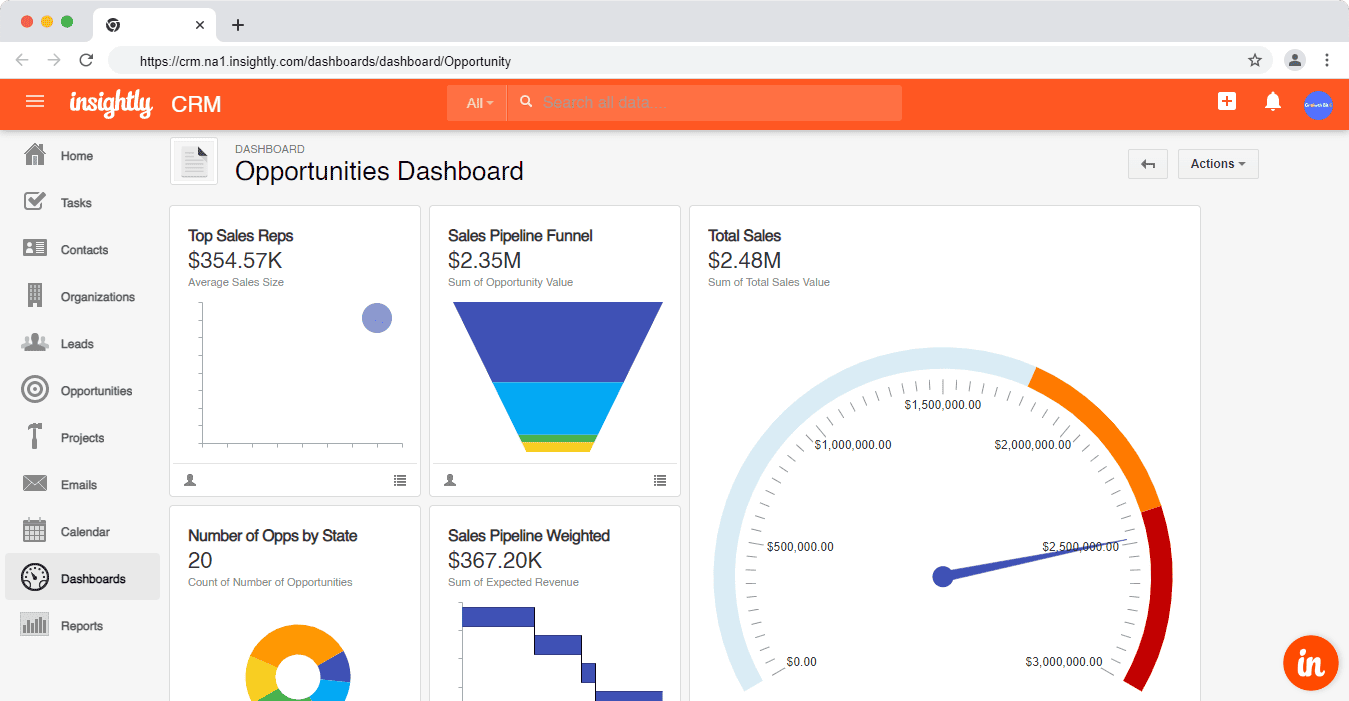
Reporting in Insightly
Reports can be visualized using charts and graphs, and multiple reports can be grouped into dashboards made up of modular cards.
Dashboards provide a high-level view of performance and are well suited for monitoring day-to-day sales activity.
While Insightly’s reporting is flexible, it generally lacks the depth of cross-object analysis and forecasting found in HubSpot—particularly when it comes to revenue attribution and multi-stage funnel reporting.
Reporting verdict
HubSpot delivers stronger reporting and analytics overall. Its extensive library of pre-built reports, powerful custom report builder, and forecasting tools make it easier to generate actionable insights and present them clearly to stakeholders.
Insightly’s reporting is solid for sales teams, especially those tracking tasks, opportunities, and projects—but it falls short of HubSpot’s depth and polish for advanced analytics and executive-level reporting.
Read also: HubSpot Pros And Cons — A Candid Assessment
Lead management – HubSpot vs Insightly
Both HubSpot and Insightly offer solid, table-stakes lead management features.
The difference lies in how far each platform supports the lead journey—from initial capture to qualification and conversion.
Here’s a review of each platform’s capabilities.
HubSpot: End-to-End, AI-Assisted Lead Management
HubSpot’s lead management is designed to support the entire customer lifecycle, not just sales qualification.
From the moment a lead is captured to the point it becomes a customer, all interactions are stored in a unified CRM record.
Within HubSpot, teams can view complete communication histories (emails, calls, meetings, chats), manage and prioritize leads using filters and views, score leads automatically based on behavior and attributes, and track lifecycle stages across marketing, sales, and service.
HubSpot’s smart contact database captures engagement data across multiple touchpoints, including website activity, email interactions, forms, and conversations.
This gives sales reps deeper context before reaching out.
Lead acquisition and engagement tools are built directly into the platform. HubSpot allows teams to attract and nurture leads using web forms and pop-ups, live chat and chatbots, marketing and sales automation, and a universal conversations inbox shared across marketing, sales, and support.
In 2026, HubSpot enhances lead management with AI-driven insights—helping reps prioritize leads, identify buying intent, and determine next-best actions more effectively.
Insightly: Structured, Sales-Focused Lead Tracking
Insightly’s lead management is designed around a clear, sales-centric qualification process.
When a lead is converted in Insightly, the platform automatically creates and links a contact record, an organization record, and an opportunity record.
This ensures clean data relationships and a consistent structure across the CRM.
However, Insightly does not allow contacts to be converted back into leads, meaning the sales process must begin with lead creation.
Insightly enforces validation rules during lead conversion, ensuring required fields are completed before a lead moves forward—useful for maintaining data quality.
The platform includes five default lead statuses to track progress: OPEN – Not Contacted, OPEN – Attempted Contact, OPEN – Contacted, CLOSED – Disqualified, and CLOSED – Converted.
Insightly also supports lead assignment rules, enabling automatic routing of leads based on criteria such as owner, region, or lead source.
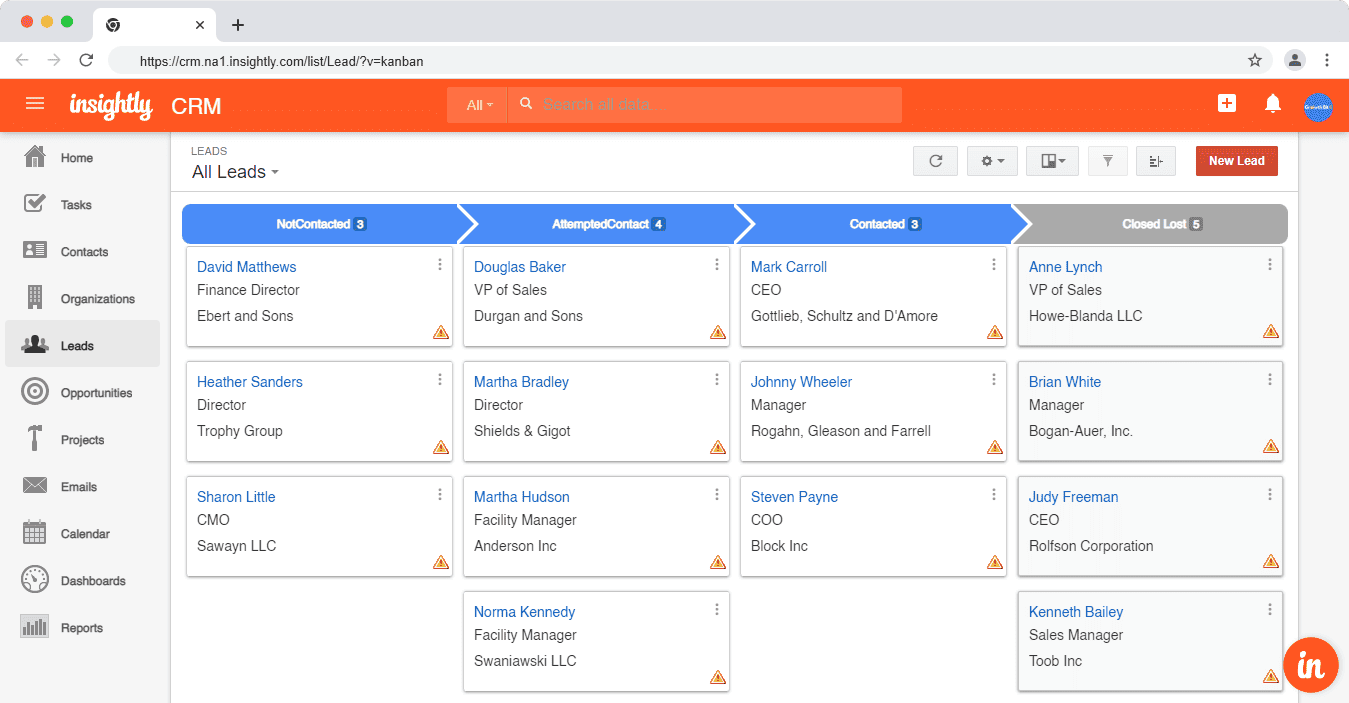
While effective for qualification and handoff, Insightly lacks native lead capture tools like forms, chat, or bots, and relies more heavily on external integrations for top-of-funnel activities.
Lead management verdict
HubSpot offers more comprehensive lead management overall. Its built-in lead capture tools, automation, AI-assisted prioritization, and unified inbox make it better suited for managing the entire customer journey from first touch to close.
Insightly is well-suited for sales teams that want structured lead qualification, clean data relationships, and predictable workflows—but it doesn’t offer the same depth across marketing-driven lead generation and nurturing.
EngageBay: A More Affordable and Powerful Alternative
EngageBay is an all-in-one CRM platform built specifically for small and growing businesses that need marketing, sales, and customer support tools—without enterprise-level pricing or complexity.
While HubSpot delivers advanced automation and replaces multiple standalone tools, its pricing escalates quickly as teams scale, and Professional and Enterprise plans both carry onboarding fees on top. Insightly, on the other hand, offers a cost-effective sales CRM but lacks native, full-funnel marketing capabilities, and it too has its own onboarding and AppConnect setup costs.
EngageBay bridges this gap by offering a unified CRM with marketing automation, sales tools, and customer support features at a fraction of the cost. It’s designed for teams that want an all-in-one system without juggling multiple apps—or paying premium prices and setup fees to unlock core functionality.
Why EngageBay Stands Out in 2026
EngageBay provides a complete customer lifecycle platform, allowing businesses to manage leads, deals, campaigns, and support conversations from a single dashboard.
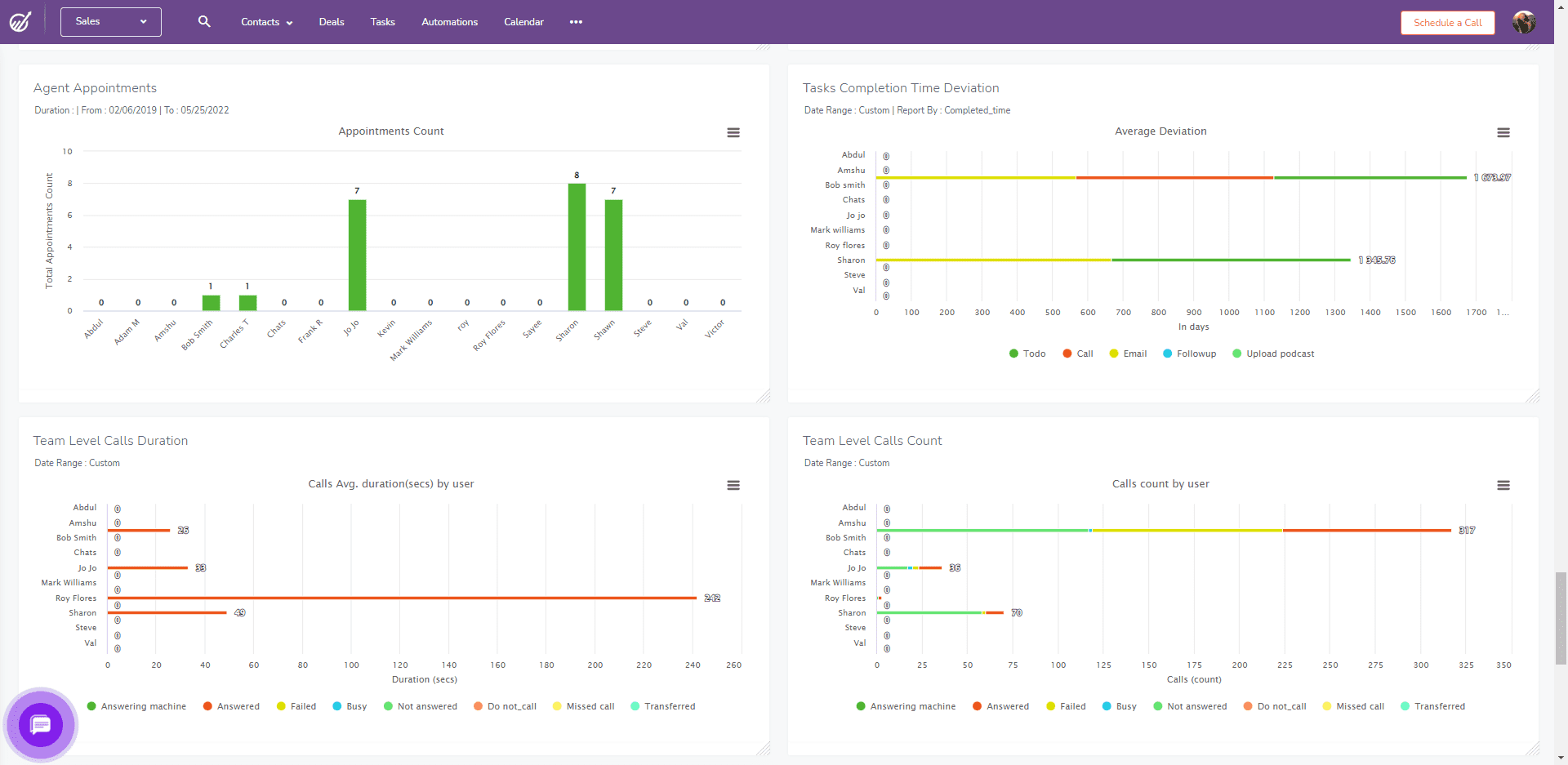
Sales teams can:
-
-
-
Create and manage multiple deal pipelines for different products or services
-
Automate follow-ups and deal progression using multi-trigger workflows
-
Track activities, emails, and interactions in one place
-
Gain visibility into the entire customer journey from first touch to close
-
-
Here’s how David Pryor, a marketing consultant summed up EngageBay:
“The customer service is pretty great. They have all of the automations and workflows you need for a small business. It’s a great platform for an all-in-one sales, marketing, and support tool, and it’s a pretty good option considering the price point. It’s not too complex to use once you get into the swing of things. They even implemented a feature in two days in the forms that I thought would be useful and easy to execute after talking to support about it once.”
Built-In Marketing Automation
EngageBay’s marketing automation platform enables businesses to run sophisticated campaigns without relying on external tools. Teams can:
-
-
-
Build drip and nurture campaigns
-
Create forms and landing pages
-
Automate lead scoring and segmentation
-
Trigger workflows based on user behavior and engagement
-
-
These features allow businesses to attract, nurture, and convert leads efficiently—capabilities that Insightly lacks natively and HubSpot reserves for higher-tier plans.
Customer Support, Helpdesk, and Live Chat
EngageBay includes free helpdesk and live chat software, making it easier to support customers without additional tools or costs.
Support teams can:
-
-
-
Manage tickets and automate ticket routing
-
Assign tasks to agents
-
Track conversations across email, chat, and support channels
-
View complete customer interaction histories in one unified inbox
-
-
This contextual view helps teams deliver faster, more personalized support—something typically gated behind higher pricing tiers on enterprise platforms.
Why Choose EngageBay Over HubSpot or Insightly?
-
-
-
Choose HubSpot if you need enterprise-grade marketing automation and have the budget to support long-term scaling costs
-
Choose Insightly if you want a sales-focused CRM with simple workflows and predictable per-user pricing
-
Choose EngageBay if you want a true all-in-one CRM with marketing automation, sales pipelines, and customer support—without enterprise pricing or complexity
-
-
For small and mid-sized businesses looking for value, flexibility, and functionality in 2026, EngageBay is one of the strongest HubSpot and Insightly alternatives available.
Compare EngageBay with HubSpot
Learn more about EngageBay:
Sign up with EngageBay for free
Wrapping Up
Choosing between HubSpot, Insightly, and EngageBay ultimately comes down to how broad your needs are, how much complexity you’re willing to manage, and how predictable you want your costs to be.
Insightly is a good fit if you’re primarily looking for a sales-focused CRM to manage leads, deals, and post-sale projects.
Its structured pipelines and data relationships work well for sales teams, but its workflow automation and marketing capabilities are limited compared to more full-funnel platforms, and its onboarding and AppConnect setup fees are worth budgeting for up front.
HubSpot makes sense if you need a company-wide platform that marketing, sales, and support teams can all use from a single system.
Its unified CRM, advanced automation, reporting, and AI capabilities are powerful—but costs increase quickly as you add hubs, paid seats, and usage-based limits, and Professional and Enterprise tiers both carry mandatory onboarding fees.
EngageBay offers a strong middle ground. It delivers marketing automation, sales pipelines, and customer support tools in one platform without the complexity or steep pricing associated with enterprise CRM suites.
For small and growing businesses in 2026, it provides a practical all-in-one alternative with predictable pricing and responsive customer support.
In short:
-
-
- Choose Insightly for a straightforward, sales-led CRM — just budget for its onboarding and setup fees
- Choose HubSpot for enterprise-grade depth and cross-team alignment — and budget for its onboarding fees too
- Choose EngageBay for an affordable, all-in-one solution that scales with your business
-
If you’re looking for maximum value without sacrificing core CRM, marketing, and support functionality, EngageBay stands out as a compelling alternative in 2026.
Why I Switched from Insightly to HubSpot CRM
Related reading:
- The best CRM Tools for Small Businesses
- 15 Best Marketing Automation Tools for Small Businesses
- Is HubSpot Worth It? In-Depth Review for Small Businesses
Which CRM is cheaper?
Which platform offers better marketing automation?
HubSpot dominates marketing automation. Even the Starter tier includes email sequences, landing pages, forms, ad‑to‑contact syncing, and basic segmentation. Professional unlocks sophisticated workflows, A/B tests, smart content, and multichannel nurturing across chat, social, and ads. Insightly only allows bulk emails and scheduled sends; advanced journeys require the cost‑extra Marketing App, which still lacks HubSpot’s depth and channel coverage.
Insightly shines on structural flexibility. All paid tiers let you add unlimited custom objects, fields, tags, and relationships, plus convert closed‑won deals directly into project records. HubSpot supports custom properties for contacts, companies, and deals on every plan, but true custom objects—such as Assets or Subscriptions—are gated behind Enterprise, putting them out of reach for many small teams.
Both marketplaces are strong, but the flavour differs. HubSpot boasts a polished App Marketplace with 1,000‑plus vetted integrations covering email, ads, commerce, and support; most install in a click and sync bi‑directionally. Insightly’s AppConnect offers 2,000‑plus connectors Zapier‑style, letting admins build recipes without code, yet some advanced actions require paid AppConnect credits and careful field mapping.
HubSpot includes 24/7 live chat, phone, email, and a vast academy of interactive courses on every paid tier, alongside implementation specialists for Professional and above (though onboarding fees apply). Insightly offers email support on all plans, with phone or priority assistance only via a 20 % Premium Support add‑on; its knowledge base and short video tutorials are helpful but limited.
