
Last updated with verified pricing: August 18, 2026. Always confirm current pricing on each vendor’s official website before purchasing.
If you’re evaluating HubSpot and Keap for your business, you’re weighing two very different philosophies: HubSpot’s all-in-one enterprise growth suite versus Keap’s focused small business automation platform. Both tools have loyal user bases, but they serve different team sizes, budgets, and growth needs.
We’ve tested both platforms firsthand. When we set up HubSpot’s free CRM, the contact timeline and workflow builder were genuinely impressive — but hitting the ceiling of Starter’s automation was fast and frustrating. When we tested Keap, the drag-and-drop automation canvas got us to a working lead follow-up sequence in under an hour, and the built-in invoicing saved a separate tool entirely. Both experiences informed this guide.
Our verdict: HubSpot wins on scalability, reporting, and AI depth. Keap wins on all-in-one simplicity and built-in invoicing for small teams. Neither is perfect for cost-conscious growing businesses; which is where EngageBay comes in.
In this guide you’ll learn:
-
-
- The core differences between HubSpot and Keap in 2026
- How their CRM, automation, AI, and sales features compare side by side
- Corrected August 2026 pricing — including the major Keap plan restructure
- A real 5-user cost walkthrough showing what you actually pay
- Specific automation limitations to know before you commit
- A category-by-category final verdict table
- A structured switching guide if you’re migrating between the two
-
TL;DR — HubSpot vs Keap at a Glance
| Feature | HubSpot | Keap |
|---|---|---|
| Best for | Growing teams, inbound marketing, enterprise scale | Small service businesses, solopreneurs |
| Free plan | ✅ Yes (up to 2 users, 1,000 contacts) | ❌ No (14-day free trial only) |
| Starting price (monthly billing) | $20/seat/month (Starter) | $299/month (single all-inclusive plan) |
| Starting price (annual billing) | $20/seat/month | $249/month |
| CRM | ✅ Yes | ✅ Yes |
| Email marketing | ✅ Yes | ✅ Yes |
| Marketing automation | ✅ Yes (paid tiers) | ✅ Yes (all plans) |
| SMS messaging | Add-on / integration | ✅ Built-in (500/month included) |
| Built-in invoicing | ❌ No (lower tiers) | ✅ Yes (all plans) |
| Helpdesk / live chat | ✅ Yes (Service Hub) | ⚠️ Limited |
| Mandatory onboarding fee | ❌ No (Starter); $1,500–$7,000 (Pro/Enterprise) | ✅ Yes — from $500 (all new customers) |
A quick note on Keap’s pricing: Keap changed its pricing structure in 2026. The previous three-tier setup—Ignite, Grow, and Scale—is no longer available to new customers. Instead, Keap now offers a single all-inclusive plan. We cover the details in the full pricing section below.
HubSpot is the better fit if you’re managing a larger team of 10 or more users and need a platform that can scale with you. Its advanced reporting and broad range of marketing channels also make it a strong choice for businesses where multiple departments need to work from the same system.
Keap makes more sense for smaller service businesses with fewer than 10 users. Its all-in-one approach brings CRM, email marketing, SMS follow-ups, and invoicing together under a single flat-rate plan, which can make things simpler for teams that don’t want to piece together multiple tools.
EngageBay is worth considering if you want many of the capabilities associated with HubSpot—such as CRM, marketing automation, helpdesk, and email marketing—without the same level of cost. It also doesn’t require a mandatory onboarding fee, making it an appealing option for budget-conscious businesses.
Table of Contents
HubSpot vs Keap in 2026
HubSpot is better for growing teams that need scalable CRM, advanced automation, analytics, and multi-channel marketing, while Keap is better suited for small businesses that want basic CRM, email automation, and built-in invoicing but may outgrow the platform as they scale.
Pricing varies significantly based on usage, making cost a key deciding factor.
HubSpot vs Keap 2026 Pricing Comparison
| Platform | Free Tier | Base Monthly (Annual Billing) | Notes |
|---|---|---|---|
| HubSpot CRM | ✅ Yes | $20/seat/month (Starter) | Professional bundle starts at $1,300/month for 6 seats |
| Keap | ❌ No | $249/month | Single all-inclusive plan; 2 users + 1,500 contacts; mandatory $500+ implementation fee |
What’s the Difference Between HubSpot and Keap in 2026?
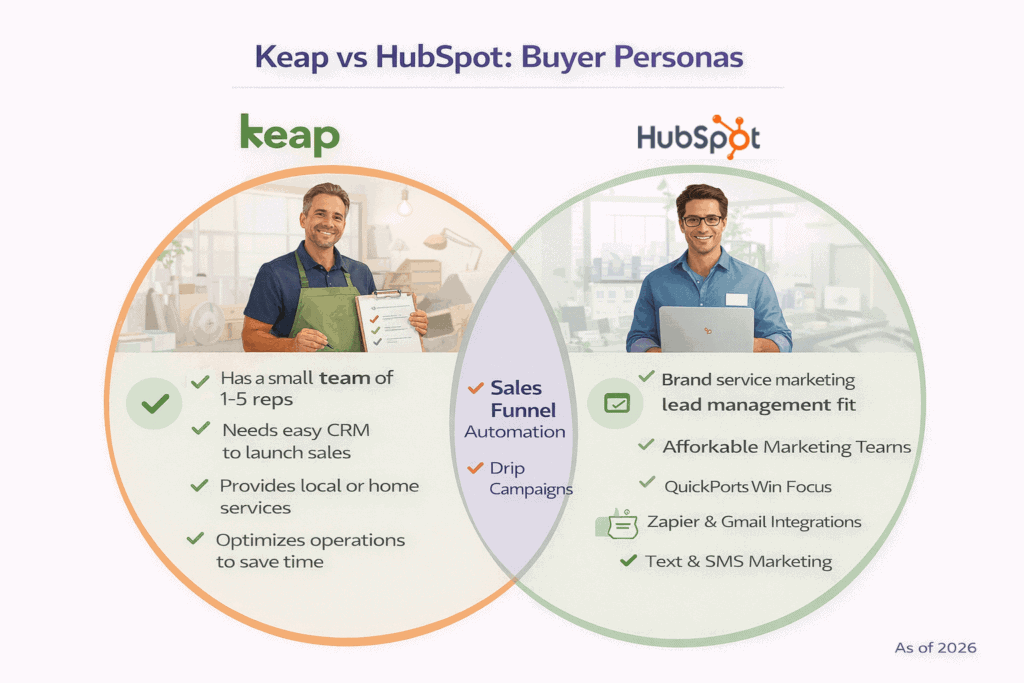
The core difference comes down to platform depth versus simplicity.
Both offer contact management, lead tracking, email marketing, and automation, but they are designed for different operating models and different stages of business growth.
HubSpot is more feature-rich, with advanced analytics, multi-channel marketing, Breeze AI across all hubs, and a 1,000+ app integration marketplace. It is designed to scale from a free CRM to an enterprise platform without switching tools.
Keap is more intuitive and easier to get running quickly. It bundles CRM, email marketing, SMS, invoicing, payments, and appointment scheduling into one flat-rate subscription — which means fewer decisions, fewer add-ons, and more predictable monthly costs. The tradeoff is limited reporting depth and a smaller integration ecosystem.
What Is HubSpot?
HubSpot is a comprehensive inbound marketing and sales platform built for growing businesses. It organises its products into “Hubs” — Marketing Hub, Sales Hub, Service Hub, Content Hub, and Operations Hub — which can be purchased individually or as a bundled Customer Platform.
HubSpot Pros:
-
-
-
- Genuinely useful free CRM for startups and very small teams
- Best-in-class reporting and revenue attribution at Professional tier
- 1,000+ native integrations through the App Marketplace
- Breeze AI embedded across all hubs
- Scales from 2 users to enterprise without migration
-
-
HubSpot Cons:
-
-
-
- Steep jump from Starter to Professional ($20/seat to $1,300/month)
- Mandatory onboarding fees at Professional and Enterprise ($1,500–$7,000)
- Contact-based pricing adds cost as marketing list grows
- New HubSpot Credits system makes AI usage a variable cost
- Complex pricing model with seat types, contact tiers, and hub bundles
-
-
The platform’s free CRM is genuinely feature-rich, making it popular with startups. Most teams discover, though, that meaningful automation and reporting require the Professional tier — which is a significant investment.
What Is Keap?
Keap (formerly Infusionsoft) is a small business CRM and automation platform built specifically for service-based businesses with lean teams. Its core strength is bundling CRM, email marketing, SMS, appointment scheduling, invoicing, and payments into one flat-rate plan.
Keap Pros:
-
-
- All features included in one plan — no hub-by-hub purchasing
- Built-in invoicing and payment processing
- Native SMS messaging included (500 texts/month)
- Visual drag-and-drop automation builder with short learning curve
- Predictable monthly cost that doesn’t change with feature upgrades
-
Keap Cons:
-
-
- No free plan — 14-day trial only
- Mandatory implementation fee from $500 (cannot be waived)
- Basic reporting compared to HubSpot
- Fewer than 30 native integrations
- Pricing scales steeply as contact list grows beyond 1,500
-
Important 2026 update: Keap has simplified to a single all-inclusive plan. The named tiers (Ignite, Grow, Scale) that previously appeared in our coverage are no longer available to new customers. Every new subscriber gets access to every feature; pricing is determined by contacts and users only.
Overall verdict: HubSpot vs Keap
HubSpot is best suited for businesses that want a scalable, all-in-one customer platform to replace multiple tools across marketing, sales, support, and content management.
It offers powerful automation, analytics, and a strong ecosystem; but comes at a premium as teams and feature requirements grow.
Keap is better suited for small businesses and solopreneurs that need essential CRM, email marketing, and automation with minimal setup.
While easier to use, it can become restrictive and costly as businesses scale.
For teams looking beyond both platforms, more affordable and flexible alternatives—such as EngageBay, Freshsales Suite, or Zoho CRM Plus—often provide broader functionality at a lower total cost.
Note: This is a long article. If you want to watch a video instead, here’s Megan Grant on HubSpot vs Keap:
HubSpot vs Keap showdown
HubSpot vs Keap (Infusionsoft) Comparison: Detailed
In this HubSpot vs Keap (Infusionsoft) comparison, we evaluate how both platforms perform across key usability and experience factors that directly impact adoption and productivity.
The goal is to understand not just what each tool offers—but how easily teams can start using it effectively in 2026.
Below, we compare ease of use, onboarding experience, navigation, and customer support for both platforms.
Ease of use
HubSpot is widely praised for its modern, intuitive interface. The dashboard is clean, onboarding is guided, and there’s an extensive free training library (HubSpot Academy).
As you adopt more Hubs and advanced features, the platform does grow in complexity — admins managing workflows, custom properties, and reporting can spend significant time in setup.
Keap is designed for simplicity. Its campaign builder uses a visual drag-and-drop canvas, and the platform’s menus are straightforward for non-technical users.
When we built a lead capture → automated follow-up → invoice flow inside Keap, it took roughly 45 minutes with no prior Keap experience.
The tradeoff is less flexibility: Keap’s interface can feel limiting when you want granular control over multi-step automation logic.
HubSpot: Clean Interface with Scalable Usability
HubSpot’s interface remains one of its strongest advantages in 2026.
The platform is designed around a clean, modern UI that allows users to access each hub—Marketing, Sales, Service, CMS, and Operations—directly from a unified navigation bar.
Each hub expands into contextual drop-down menus, making it easy to jump directly to specific features without digging through settings. For example, hovering over the Service Hub reveals options such as tickets, feedback surveys, knowledge base, and customer portal—reducing friction for day-to-day tasks.
HubSpot also provides a robust self-service and assisted support ecosystem, including:
-
-
-
Step-by-step product guides and tutorials
-
Live chat and ticket-based support
-
In-app contextual help
-
Community-driven answers and training resources
-
-
Here’s how Stephanie Gemmen, a partnership development rep sums up HubSpot’s ease of use:
“Hubspot Sales Hub is very user-friendly and easy to learn. As a former teacher, I thought it would be much more difficult, but the training videos and ease of use all came very quickly!”
Overall, HubSpot’s usability scales well—from first-time CRM users to advanced teams managing complex workflows.
Keap: Guided Onboarding with a Steeper Initial Setup
Keap’s interface in 2026 continues to prioritize simplicity and guided onboarding, especially for small businesses.
Its UI resembles pipeline-focused CRMs, with a left-side navigation panel that surfaces core features such as contacts, automations, campaigns, and reporting.
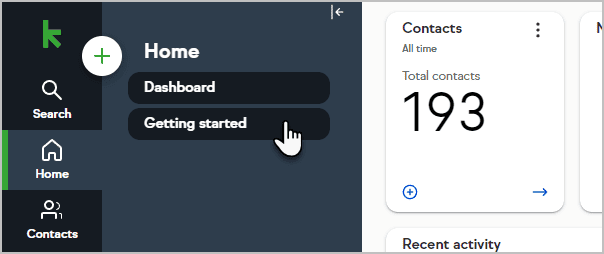
One of Keap’s standout usability features is its “Getting Started” section, which walks users through an onboarding checklist. This includes instructional videos and prompts for tasks such as importing contacts, connecting third-party apps, and organizing data using tags.
Keap also offers strong support access across all paid plans, including:
-
-
-
Phone support
-
24/7 live chat
-
Dedicated onboarding assistance
-
-
Despite these advantages, recent user feedback still highlights challenges during initial setup.
While the average CRM scores around 8.6 for ease of use and 8.5 for ease of setup, Keap typically scores lower—around 7.2 for ease of use and 6.6 for ease of setup—indicating that many users struggle during early configuration.
This suggests that while Keap is intuitive once set up, the onboarding process may require more hands-on effort compared to HubSpot.
Ease of use verdict
HubSpot wins for teams that expect to grow into the platform; Keap wins for small teams that want to get running in hours, not days.
Third-Party Ratings Overview
| Platform | G2 Rating | No. of Reviews | Ease of Use Score (G2) |
|---|---|---|---|
| HubSpot Sales Hub | 4.4 / 5 | 14,500+ | 8.6 / 10 |
| Keap | 4.2 / 5 | 1,500+ | 7.2 / 10 |
| EngageBay | 4.6 / 5 | 500+ | 9.1 / 10 |
Note: Ratings verified August 2026. Check G2.com for the most current figures.
Check out our take on the Best HubSpot Alternative
HubSpot vs Keap Pricing (Updated August 2026)
Pricing is the biggest decision factor for most buyers — and both platforms have changed significantly in 2026. Here is the accurate picture as of August 18, 2026.
While both platforms position themselves as all-in-one CRM and marketing solutions, their pricing models—and how costs scale over time—are very different.
HubSpot uses a modular, hub-based pricing model with bundled suite options, while Keap follows a tier-based pricing structure that includes CRM, automation, and sales tools in every plan.
How much does HubSpot cost in 2026?
HubSpot offers individual hub pricing as well as a bundled Customer Platform. The Customer Platform is the most common path for teams that need marketing, sales, and service in one place.
HubSpot Customer Platform Pricing (2026)
| Plan | Monthly Billing | Annual Billing | Included Seats | Notes |
|---|---|---|---|---|
| Free | $0 | $0 | 2 users | 1,000 contacts (new accounts post Sept 2024); basic CRM only |
| Starter | $20/seat/month | ~$7/seat/month (promotional for new customers) | Per seat purchased | No onboarding fee; basic features across all hubs |
| Professional | $1,450/month | $1,300/month | 6 Core Seats included | Required onboarding fee: $1,500–$4,500 depending on hubs |
| Enterprise | $4,700+/month | Annual commitment | 8 Core Seats included | Required onboarding fee: $3,500–$7,000 |
The Starter plan is suitable for very small teams that need basic CRM and marketing tools.
The Professional plan unlocks advanced automation, personalization, and analytics, while Enterprise adds deeper reporting, governance, and AI-powered insights.
Individual hub pricing (most common standalone purchases)
| Hub | Professional (Annual) | Professional (Monthly) | Onboarding Fee |
|---|---|---|---|
| Marketing Hub | $800/month | $890/month | $3,000 (required) |
| Sales Hub | $90/seat/month | $100/seat/month | $1,500 (required) |
| Service Hub | $90/seat/month | $100/seat/month | $1,500 (required) |
Additional Core Seats (above what’s included):
-
-
- Professional: $45/seat/month
- Enterprise: $75/seat/month
-
Hidden Costs: HubSpot’s Seat-Based Pricing Changes
In recent years, HubSpot introduced View-Only and Core seats, fundamentally changing how access is priced.
-
-
-
View-Only seats allow users to see reports and records but not edit them. These are unlimited and free.
-
Core seats provide edit access and are now paid, replacing the free edit-access seats HubSpot previously offered.
-
-
This means teams that previously relied on free collaborators now need to purchase Core seats for anyone who needs to make changes—adding to overall cost.
Seat Comparison Table
| User requirement | Previous pricing structure | New pricing structure |
|---|---|---|
| View-only access to reports and records | Included for free | Free via View-Only seats |
| Edit access to CRM records, emails, and reports | Included for free | Requires paid Core seats |
| Sales or service-specific functionality | Dedicated seats | Dedicated Sales & Service seats |
New in 2026: HubSpot Credits. HubSpot now uses a monthly Credits system to power Breeze AI agents and data enrichment features.
Every plan includes a monthly pool — 500 credits on Starter, 3,000–5,000 on Professional, up to 10,000 on Enterprise. Extra credits cost $0.010 each.
Credits reset monthly with no rollover, making AI-heavy usage a variable cost on top of your subscription.
Not happy with HubSpot’s pricing? See our top picks for the best HubSpot alternatives here
Here’s how James Craddock a COO sums up HubSpot’s pricing:
“The biggest downfall is the price point when adding contact lists that exceed the initial pricing range of 1000. The price increase for 1–2k contacts creates a drastic price increase that becomes prohibitively expensive for smaller companies.”
Bottom line: HubSpot offers powerful capabilities, but its pricing model in 2026 favors teams with larger budgets and long-term scale in mind.
Is HubSpot Really Free? Hidden Costs Explained
Know more about HubSpot’s Pricing and Comparison with Affordable Alternatives
How much does Keap cost in 2026?
Important update: Keap significantly restructured its pricing in 2026.
The three named tiers — Ignite, Grow, and Scale — are no longer offered to new customers. Keap now operates on a single all-inclusive plan where every subscriber gets access to every feature. Pricing is determined only by the number of users and contacts.
Keap Single Plan (August 2026)
| Billing | Price | Included | Additional Users |
|---|---|---|---|
| Annual | $249/month ($2,988/year) | 2 users, 1,500 contacts, all features | $39/month each |
| Monthly | $299/month | 2 users, 1,500 contacts, all features | $39/month each |
Every Keap plan includes:
-
-
- Full CRM and lead management
- Email marketing and automation
- SMS messaging (500 texts + 100 voice minutes/month; overage at $0.015/text)
- Appointment scheduling
- Invoicing, quotes, and payment processing
- Pipeline management
- Landing pages and web forms
- Reporting
-
Contact scaling: Keap’s price increases as your contact list grows. At 5,000 contacts, expect approximately $449/month. At 25,000 contacts, approximately $719/month. Keap doesn’t publish a fixed per-tier table — use their online calculator or request a quote for exact scaling costs.
Mandatory implementation fee: Keap charges a one-time implementation fee starting at $500 for all new subscribers. This covers data migration, done-for-you automations, and integration setup. This fee cannot be waived and is separate from your monthly subscription. Budget it as a Year 1 cost.
Note on legacy plan names: Keap’s help documentation still references Pro, Max, Ultimate, and Max Classic. These apply only to existing/legacy accounts and are not available to new customers.
What Do You Actually Pay? A Real-World Cost Example
Pricing pages show base rates; but what does a real 5-person team actually spend?
On Keap (annual billing): The single plan at $249/month includes 2 users.
Three additional users at $39/month each add $117/month, bringing the real monthly cost to $366/month.
Add the mandatory implementation fee (minimum $500 one-time), and your Year 1 total is approximately $4,892. That’s a predictable number with no feature-gate surprises.
On HubSpot: Starter at $20/seat/month for 5 users is $100/month — genuinely affordable.
But most teams that need real automation and reporting find they need the Professional Customer Platform at $1,300/month (includes 6 Core Seats).
In Year 1, add the required onboarding fee ($1,500–$4,500 depending on which hubs you buy), and your total climbs to between $17,100 and $20,100 before any contact overages or Credit usage.
The lesson: Keap’s cost is predictable from day one. HubSpot’s Starter is a genuine entry point, but Professional — where most of the useful features live — is a fundamentally different budget commitment.
🏆 Pricing verdict: Keap wins on cost predictability for small teams. HubSpot wins on value per feature at Professional tier for organisations that need enterprise-grade capabilities.
See our deep-dive: Keap pricing & Comparison with EngageBay
AI Features and Intelligence (2026)
AI has become a major differentiator in modern CRMs. Both platforms have invested significantly in AI, but they serve different use cases.
HubSpot: Enterprise-Scale AI with Breeze AI Across Hubs
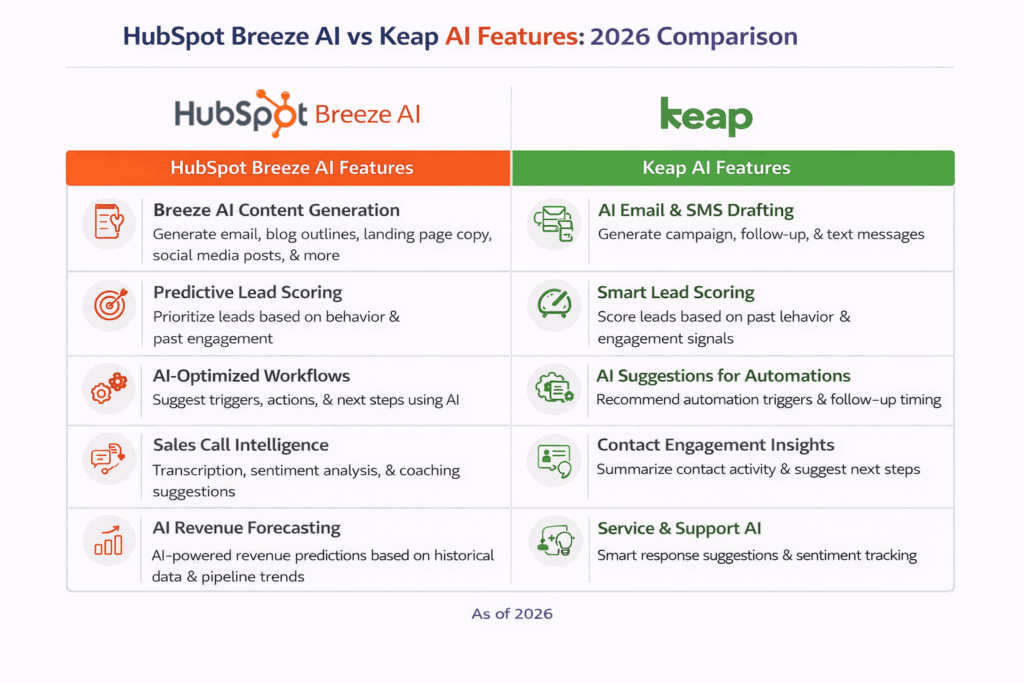
HubSpot has fully embedded AI throughout its platform under the Breeze AI umbrella, covering content creation, predictive analytics, automation suggestions, and customer intelligence.
Key HubSpot AI capabilities:
-
-
- Breeze AI Content Assistant — generates email copy, blog outlines, landing page text, and social posts optimised for engagement and brand voice
- Predictive Lead Scoring — analyses engagement data, behavioural signals, and historical trends to surface the most promising leads
- AI-Optimised Workflows — suggests workflow triggers, actions, and next steps to improve pipeline velocity
- Sales Call Intelligence — automated transcription, sentiment analysis, talk/listen ratios, and call summaries
- Revenue Forecasting — AI models incorporating historical trends, pipeline velocity, deal signals, and seasonality
- Service Intelligence — AI response suggestions, automated ticket tagging, and next-best-action recommendations
-
HubSpot’s AI is not siloed — it is woven across all hubs, making it usable by marketing, sales, and support teams from a single platform. The caveat: advanced AI usage now consumes HubSpot Credits, which adds a usage-based variable cost.
Keap: Practical AI for Small Business Efficiency
Keap’s AI focuses on speed and simplicity for small business workflows:
-
-
- AI Email & SMS Drafting — generate follow-up sequences and campaign messages from simple prompts
- Smart Lead Scoring — AI assigns scores based on engagement patterns to help small teams prioritise outreach
- AI Automation Suggestions — contextual prompts for when to send follow-ups and which triggers to use
- Contact Engagement Insights — AI summaries surfacing key behaviours and recommended next actions
-
Keap’s AI is narrower than HubSpot’s but genuinely useful for the small-business workflows it’s designed for.
🏆 AI verdict: HubSpot wins on AI breadth and depth — especially for teams running multi-channel campaigns and needing cross-hub intelligence. Keap’s AI is simpler but effective for solo operators and small teams that want to work faster without complexity.
Customization and pipeline management
When comparing HubSpot vs Keap on customization and sales pipeline management, the difference comes down to depth versus usability.
Both platforms support basic CRM customization, deal stages, and workflow automation.
They also offer certified partner marketplaces where businesses can hire experts for advanced configurations.
However, in 2026, HubSpot clearly leads in customization depth, while Keap delivers a simpler and more intuitive pipeline experience.
HubSpot: Deep Customization with Enterprise Gating
HubSpot allows extensive customization across nearly every CRM element, including deals, contacts, companies, quotes, and products.
Teams can tailor properties, views, and layouts to match their sales processes, while advanced reporting and forecasting provide deeper visibility into pipeline performance.
HubSpot’s reporting tools also allow teams to:
-
-
-
Customize dashboards by role
-
Build custom reports using the report builder
-
Analyze pipeline health, deal velocity, and revenue forecasts
-
-
As Alison Bekolay, a BDR at Casetext puts it:
“You’re able to customize fields, easily drop down different sections, and create a view that makes sense for you – all without having information overload.”
One important limitation: custom objects — critical for businesses with unique data models — are only available on HubSpot Enterprise (from $4,300–$4,700/month). This pricing barrier limits advanced customisation for small and mid-sized businesses.
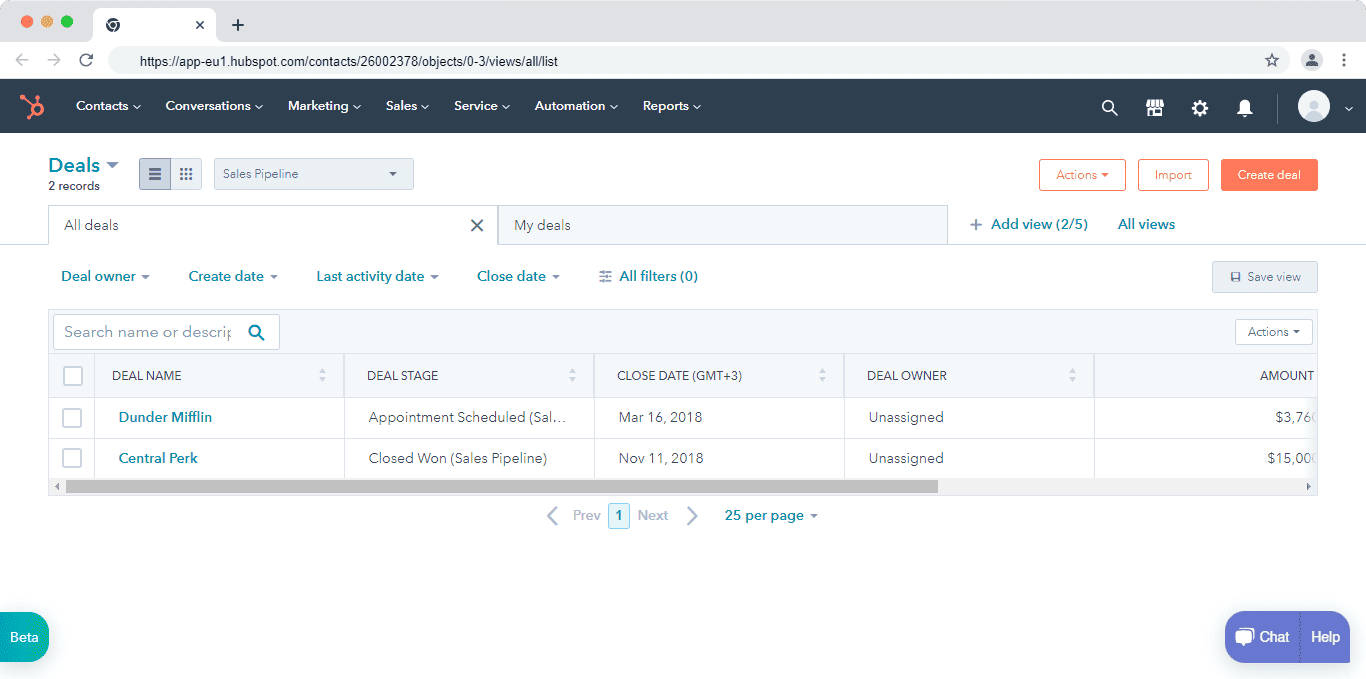
Keap: Simpler Customisation, Stronger Day-to-Day Pipeline
Keap allows custom fields for contacts and companies, covering most small-business customisation needs without complexity.
It does not support custom objects or deep schema-level customisation.
Where Keap stands out is pipeline management.
Its kanban-style sales pipeline is clean, visual, and easy to navigate.
Sales teams can drag and drop deals across stages, quickly review deal status, and trigger automations directly from the deal card—without switching screens or digging into workflows.
This makes Keap particularly appealing for small teams that want to:
-
-
-
Move deals quickly through the pipeline
-
Automate follow-ups and reminders inline
-
Maintain visibility without heavy configuration
-
-
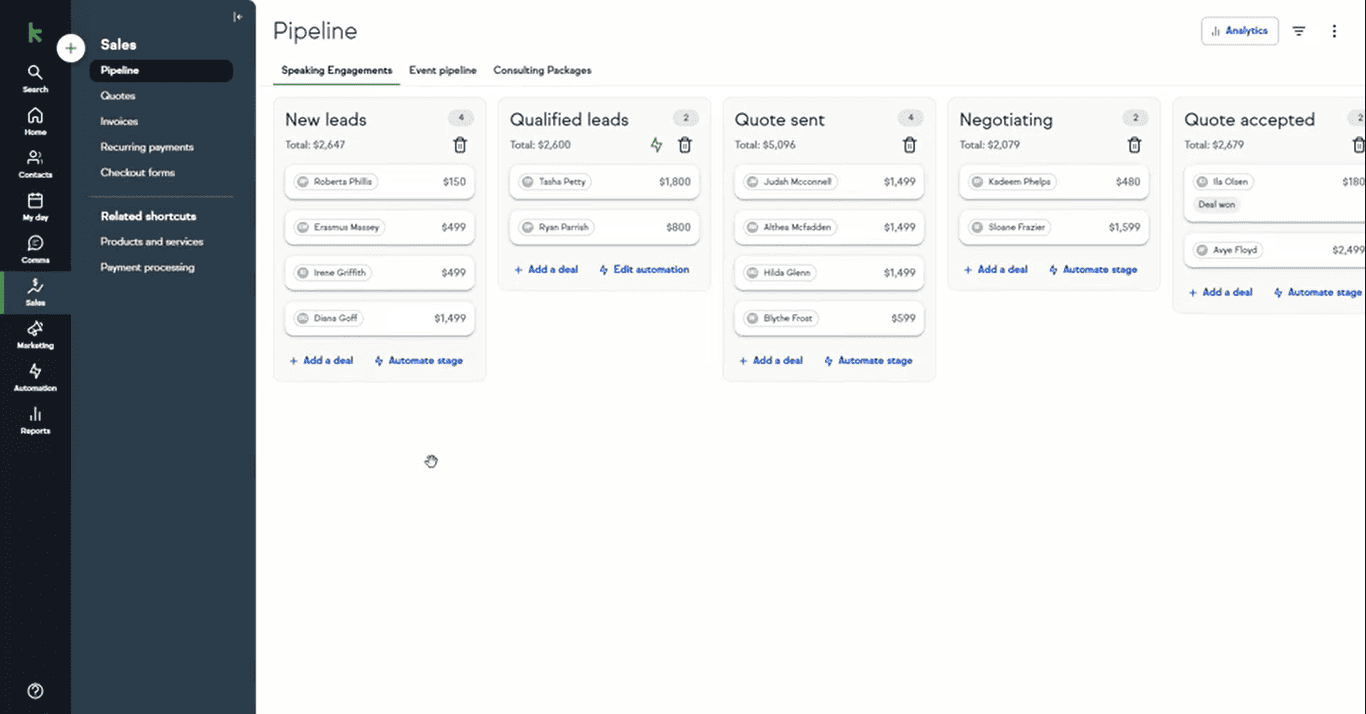
Keap’s pipeline experience is generally more intuitive than HubSpot’s, especially for first-time CRM users or sales-driven teams.
🏆 Customisation verdict: HubSpot for deep customisation and advanced reporting. Keap for intuitive day-to-day pipeline management.
In short:
-
-
-
Choose HubSpot for customization depth and advanced reporting
-
Choose Keap for simplicity and intuitive pipeline management
-
-
Have a look at: HubSpot Pros And Cons — A Candid Assessment
Marketing and campaign management
When comparing HubSpot vs Keap on marketing and campaign management, the difference is clear: HubSpot is a full-fledged marketing platform, while Keap offers essential marketing tools designed primarily for small businesses.
Both platforms support lead capture, email marketing, and basic automation.
However, in 2026, HubSpot delivers a significantly broader and more integrated marketing ecosystem, especially for teams running multi-channel campaigns and tracking ROI at scale.
HubSpot: A Full-Stack Marketing Platform
HubSpot’s Marketing Hub manages the entire inbound marketing lifecycle — content creation, lead generation, campaign attribution, and performance analytics. Marketers can create blog posts, build landing pages, manage paid ads, schedule social media, run A/B tests, and automate lead nurturing — all from one place.
The Campaigns feature ties every asset (blogs, emails, ads, workflows) to a single objective with unified reporting, so you can measure the combined revenue impact of an entire campaign without switching tools.
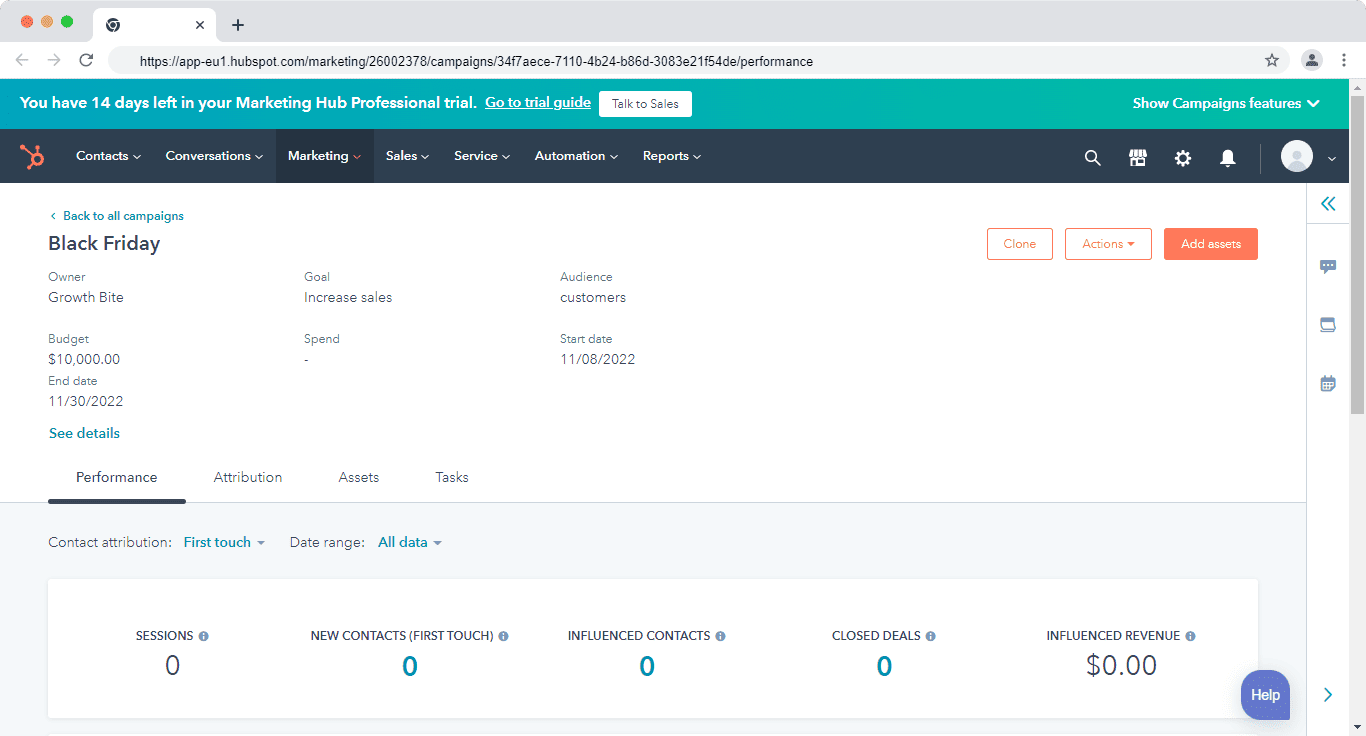
Campaign management in HubSpot
Here’s how Joshua Lewin summed up HubSpot’s marketing capabilities:
“Hubspot has useful tools for creating drip campaigns, automating email outreach, and it allows you to track your campaigns’ success. If you have a marketing-driven approach to sales it can be effective.”
In 2026, HubSpot’s marketing stack continues to appeal to content-driven, inbound-focused teams that require advanced automation, analytics, and cross-channel campaign visibility.
Keap: Essential Marketing for Small Teams
Keap’s marketing tools focus on what small service businesses actually need: web forms, a basic landing page builder, and email and SMS broadcasts. Forms feed directly into automations — a new lead triggers a follow-up sequence without manual intervention. This is lean by design, and it works well for the target customer.
Advanced campaign attribution, multi-channel tracking, and A/B testing are limited compared to HubSpot.
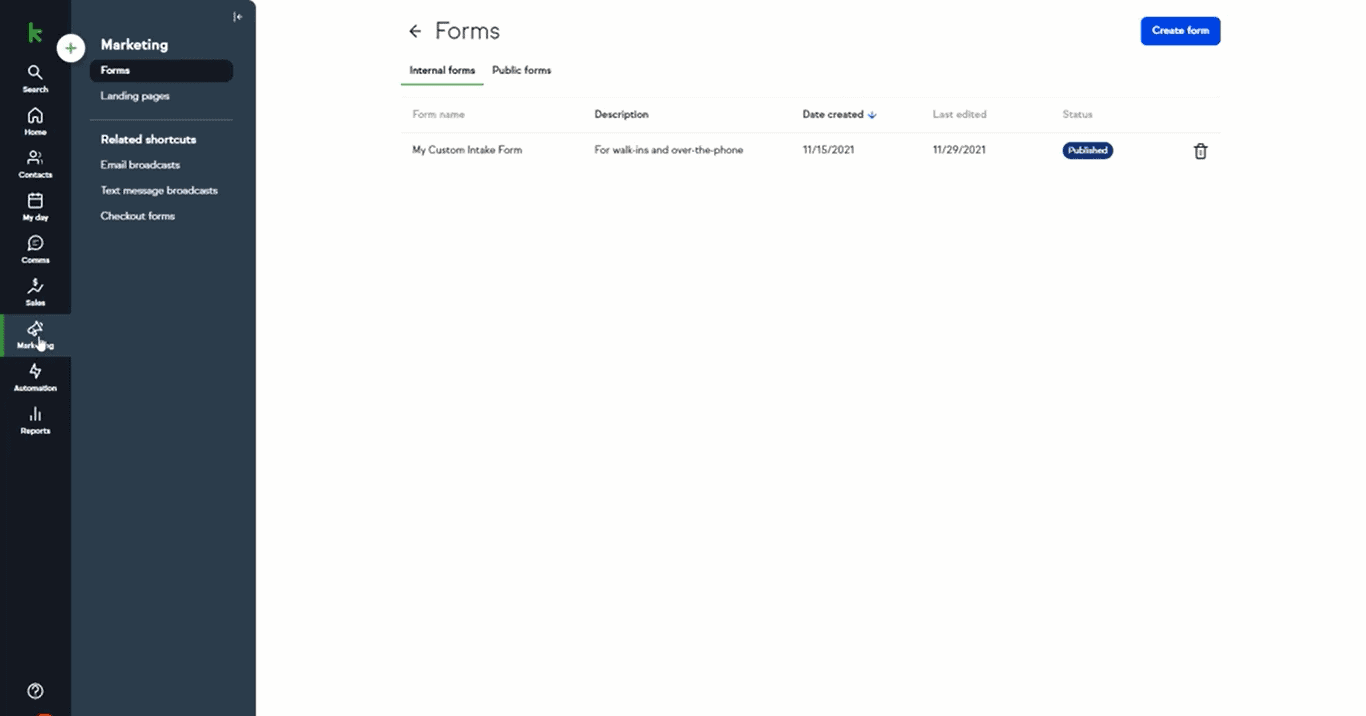
🏆 Marketing verdict: HubSpot clearly leads. Keap covers everyday email marketing and automated follow-ups well, but it is not a campaign management platform.
In short:
-
-
-
Choose HubSpot if marketing is a core growth driver and you need advanced campaign tracking
-
Choose Keap if you need simple, entry-level marketing tools without complexity
-
-
Here are 9 Amazing Marketing Automation CRM Software [Comparison Table]
Integrations and Ecosystem Compatibility
Integrations play a critical role when evaluating HubSpot vs Keap, especially for businesses that rely on multiple tools across marketing, sales, customer support, and operations.
A well-integrated CRM eliminates data silos, improves visibility, and enables teams to automate workflows across their entire tech stack.
In 2026, the gap between HubSpot and Keap is less about whether integrations exist—and more about ecosystem depth, scalability, and native extensibility.
HubSpot: 1,000+ Integrations and Deep Ecosystem Control
HubSpot’s App Marketplace offers over 1,000 native integrations spanning customer support, sales enablement, scheduling, project management, accounting, and data enrichment. Its Operations Hub enables custom data syncs, programmable automation, and bi-directional data flows — giving teams full control over how tools work together as their stack grows.
Check out our detailed analysis that introduces nine strong HubSpot alternatives.
Keap: Fewer Than 30 Native Integrations
Keap covers essential use cases (Google Workspace, Zoom, payment processors) but its integration library remains significantly smaller. Teams with complex tech stacks often rely on Zapier or middleware, which adds cost and setup friction.
🏆 Integration verdict: HubSpot wins outright. Keap is sufficient for lean stacks but becomes a bottleneck as businesses add tools.
In short:
-
-
-
Choose HubSpot if integrations and ecosystem scalability are a priority
-
Choose Keap if you run a lean tech stack and prefer simplicity over extensibility
-
-
Which is the perfect Keap Alternative?
Sales automation
Sales automation is a critical factor in the HubSpot vs Keap comparison, as it directly impacts productivity, lead response time, and deal velocity.
In 2026, both platforms offer automation tools to reduce manual work—but they differ significantly in scope, flexibility, and ease of use.
While HubSpot delivers enterprise-grade automation with deep CRM triggers, Keap focuses on simpler, sales-first automations designed for small teams.
HubSpot: Sequences and Multi-Object Workflows
HubSpot’s sales automation is built around Sequences (timed outreach cadences for individual reps) and Workflows (automated operations at scale across the CRM). Workflows support seven trigger types — contact, company, deal, ticket, quote, conversation, and feedback-submission — enabling cross-functional automation that spans marketing, sales, and support.
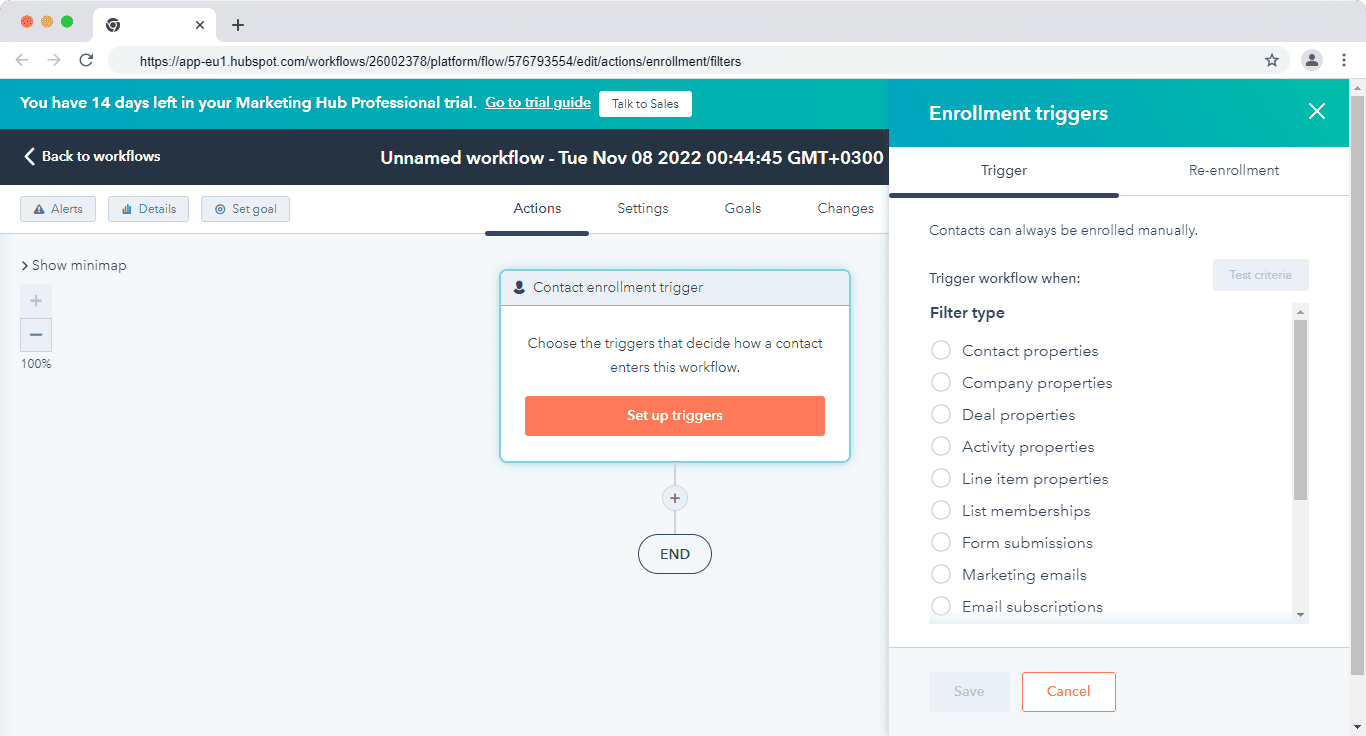
HubSpot also offers a library of pre-built automation templates, enabling teams to launch workflows quickly—from lead conversion to meeting follow-ups to post-sale engagement.
Keap: Easy and Advanced Automations
Keap separates automation into Easy Automations (event-driven triggers like invoice paid, deal stage change, or tag applied) and Advanced Automations (behavioural triggers like email opened, form submitted, or task completed). The visual automation builder is approachable for non-technical users and gets most small-business workflows running quickly.
One known limitation worth flagging: Keap’s automation builder does not allow connecting a goal directly to another goal, which makes complex multi-stage sequences more cumbersome to build than they should be.
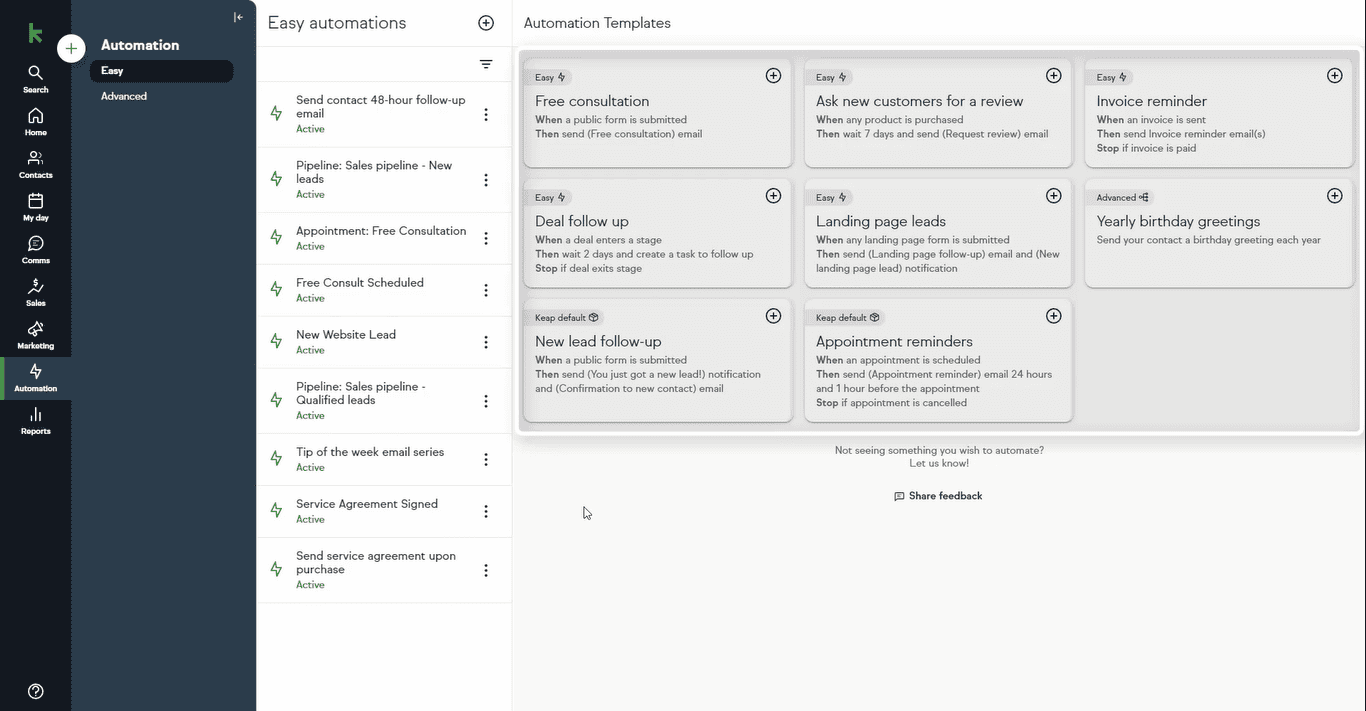
🏆 Sales automation verdict: HubSpot offers more powerful and flexible automation at scale. Keap is faster to get running and better suited to simple, sales-first workflows.
In short:
-
-
-
Choose HubSpot for advanced, scalable sales automation
-
Choose Keap for simplicity and ease of use
-
-
Read also: EngageBay vs HubSpot — Market Leader or Emerging Powerhouse?
Reporting and Analytics
CRM reporting is a core differentiator in the HubSpot vs Keap comparison, especially for teams that rely on data to optimize sales performance, forecast revenue, and measure marketing effectiveness.
In 2026, a CRM’s reporting capabilities are judged not just on volume—but on clarity, flexibility, and decision-making value.
When evaluating CRM reporting, here are the key factors to consider:
-
-
-
Ease of creating reports and dashboards
-
Depth and variety of available report types
-
Visual clarity and presentation quality
-
Customization and filtering capabilities
-
-
HubSpot: 90+ Pre-Built Reports and a Custom Report Builder
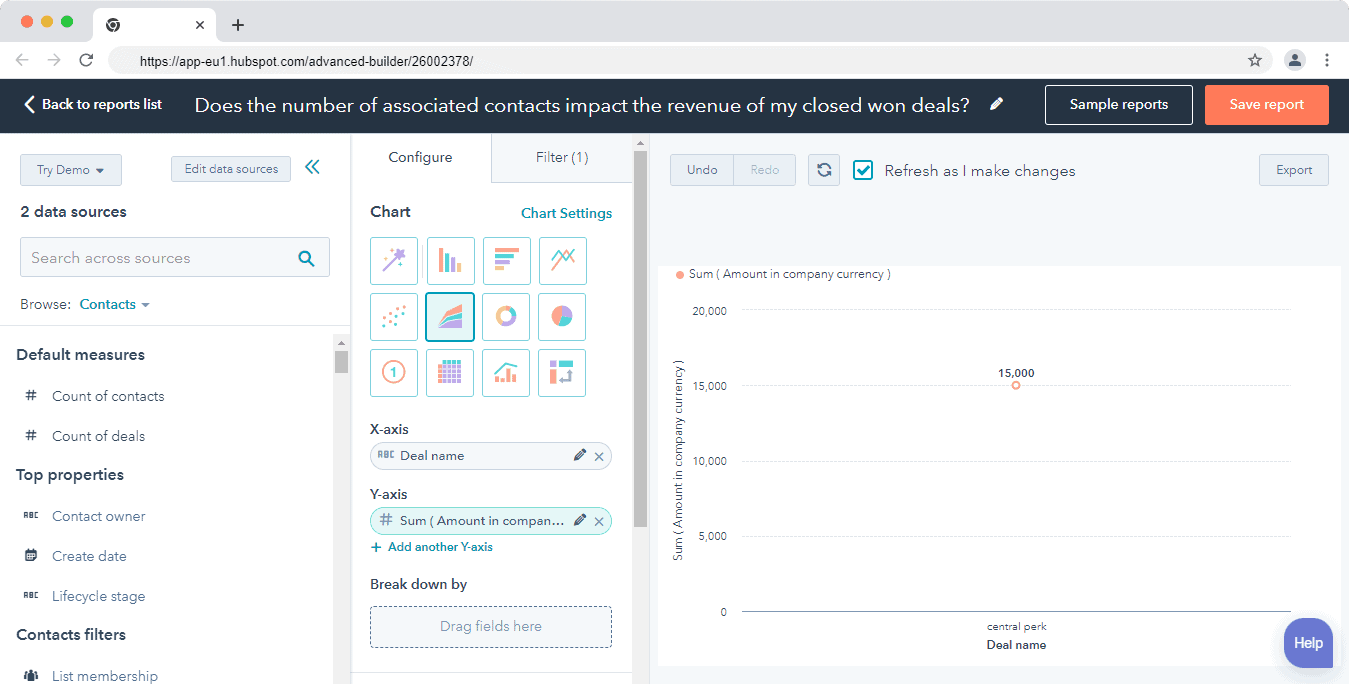
HubSpot’s dashboards combine CRM, marketing, sales, and service data into a unified view. Teams can monitor pipeline health, forecast revenue, track rep activity, and analyse funnel conversion rates across lifecycle stages. The Custom Report Builder allows complex, multi-object reports filterable by any CRM property.
Keap: Lightweight Reporting Focused on Visibility
Keap’s reports cover sales, email performance, campaigns, and web forms. The pipeline report shows deal performance over time with basic charts. There is no multi-object reporting, advanced segmentation, or revenue forecasting. For a solo operator or small service business, this is sufficient. For any team that needs to defend numbers to a leadership team or investor, it is not.
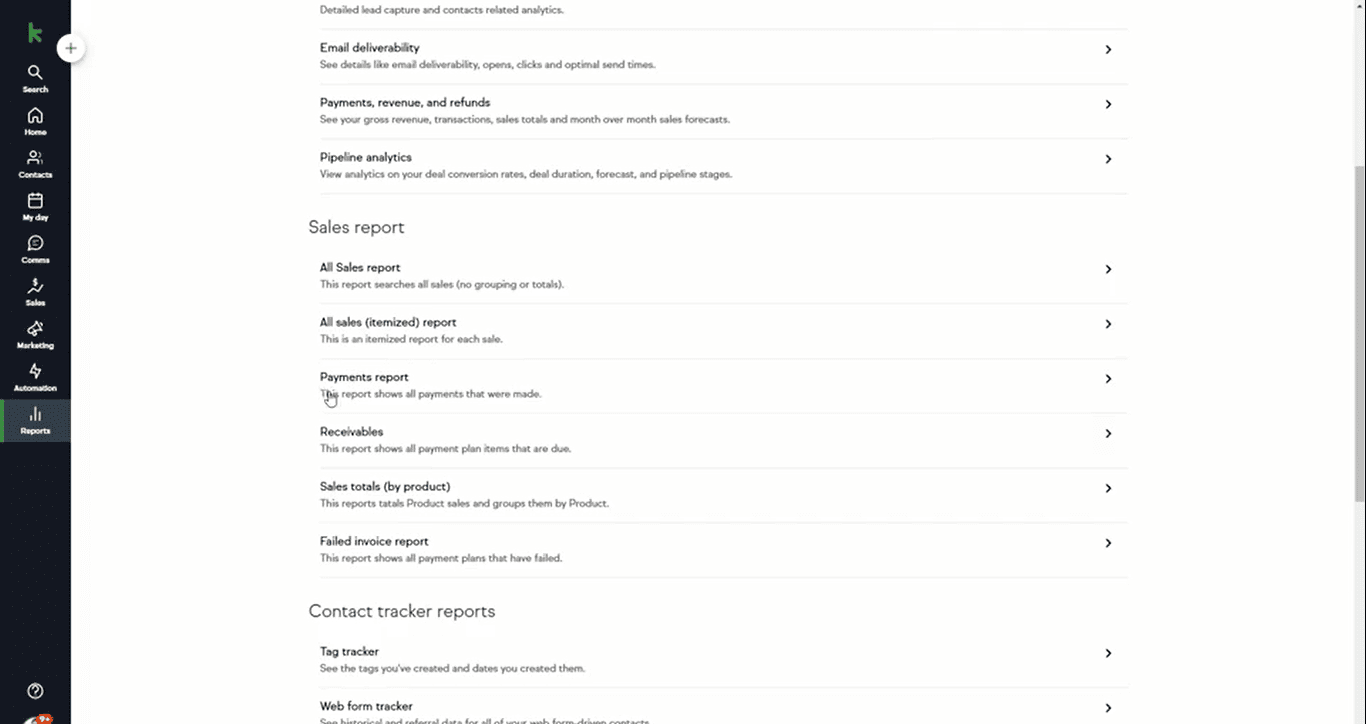
🏆 Reporting verdict: HubSpot wins clearly. Keap’s reporting is adequate for basic tracking but not for data-driven decision making at any meaningful scale.
In short:
-
-
-
Choose HubSpot for advanced reporting, forecasting, and analytics
-
Choose Keap for simple, high-level visibility without complexity
-
-
Lead management
Lead management is a foundational capability in the HubSpot vs Keap comparison, as it determines how effectively businesses capture, qualify, nurture, and convert prospects into customers.
In 2026, strong lead management goes beyond contact storage—it requires context, automation, and cross-team visibility.
Both HubSpot and Keap offer lead management tools, but they differ significantly in depth, flexibility, and scalability.
HubSpot: End-to-End Lead Management
HubSpot centralises all prospect activity — full communication history across email, chat, calls, and meetings — in a single contact record. Lead scoring runs automatically based on behaviour, attributes, and interactions. Web forms, chatbots, live chat, and marketing workflows all feed the same database, ensuring seamless handoffs between marketing and sales.
Keap: Tag-Based Lead Management
Keap captures leads through web forms and landing pages, then organises them via tags for segmentation and follow-up. Contact dashboard, interaction history, and pipeline tracking are all present and functional. For teams with high lead volume or complex multi-channel journeys, the tag-based approach becomes limiting.
🏆 Lead management verdict: HubSpot for advanced lead tracking and lifecycle management. Keap for straightforward lead organisation and immediate follow-up.
In short:
-
-
-
Choose HubSpot for advanced lead tracking, scoring, and lifecycle management
-
Choose Keap for straightforward lead organization and sales follow-ups
-
-
Thinking of Switching? Migrating Between HubSpot and Keap
If you’re currently on one platform and considering moving to the other, here’s what to expect.
Switching from Keap to HubSpot
✅ What you’ll gain:
-
-
- Cleaner data architecture and stronger lifecycle reporting
- Access to HubSpot’s broader marketing toolset and 1,000+ integrations
- A free CRM starting point if team size is still small
-
❌ What you’ll lose:
-
-
- Built-in invoicing and payment processing
- Native SMS in the base plan
- Keap’s flat, predictable pricing
-
How to switch:
-
-
- Export your contacts, companies, deals, tags, and notes from Keap as a CSV file
- Map your Keap custom fields to equivalent HubSpot properties before importing
- Create a HubSpot account (start free if evaluating; plan for Professional if you need automation)
- Import contacts and verify data integrity
- Manually rebuild your Keap automations as HubSpot workflows — this takes the most time; budget at least 2–4 weeks for established accounts
-
Note: If you’re on a legacy Keap tier (pre-2026 Ignite, Grow, or Scale plan), confirm your current plan terms with Keap before migrating, as legacy pricing and features may differ from the current single-plan structure.
Switching from HubSpot to Keap
✅ What you’ll gain:
-
-
- Built-in invoicing, payments, and SMS in one plan
- Simpler, more intuitive interface with a shorter learning curve
- Predictable flat-rate pricing without seat multipliers or contact tier surprises
-
❌ What you’ll lose:
-
-
- HubSpot’s free CRM entry point
- Advanced reporting, revenue attribution, and custom dashboards
- The large integration marketplace and Operations Hub capabilities
-
How to switch:
-
-
- Export your HubSpot contacts, companies, deals, and notes as CSV files
- Start a 14-day Keap free trial to test the platform before committing
- Import contacts and set up your tags for segmentation
- Rebuild pipelines, deal stages, and automation flows in Keap
- Budget for Keap’s mandatory implementation fee (from $500) — this is required and cannot be waived
-
If cost is the primary driver behind switching from either platform, EngageBay offers migration assistance and covers the feature gap between Keap and HubSpot at a fraction of the combined cost.
EngageBay: A More Affordable and AI-Ready All-in-One Alternative
If you’ve read this far and found yourself thinking “I want HubSpot’s features but can’t justify HubSpot’s price” — EngageBay was built for exactly that position.
| Feature | HubSpot | Keap | EngageBay |
|---|---|---|---|
| Free plan available | Yes (2 users, 1,000 contacts) | No | Yes (500 contacts) |
| CRM included | Yes | Yes | Yes |
| Email marketing | Yes | Yes | Yes |
| SMS Messaging | Add-on | Yes (500/month built-in) | Check EngageBay pricing |
| Marketing automation | Yes (paid tiers) | Yes (all plans) | Yes |
| Helpdesk / live chat | Yes (Service Hub) | Limited | Yes (built-in) |
| Built-in invoicing | No (lower tiers) | Yes | No |
| Mandatory onboarding fee | No (Starter); $1,500–$7,000 (Pro/Enterprise) | Yes — from $500 | No mandatory fee |
| Starting paid price | $20/seat/month | $249/month (annual) | Check current pricing |
When to Choose EngageBay: EngageBay is the best fit for small to mid-sized businesses that need the full feature stack of HubSpot—CRM, email marketing, automation, live chat, and helpdesk—but cannot justify HubSpot’s Professional tier pricing. It’s especially strong for teams moving off Keap who need more marketing depth without a significant cost increase.
Here’s how Zoran Bencak, head of IT, summed up EngageBay:
“With [an] all-in-one suite, you have an overview of all company segments. From marketing to sales team. When you correctly set up your account, your work becomes very easy and fast. With a new design, dashboards are even more user-friendly. We have different integrations, and everything works smoothly.”
Sales, Marketing & Support—Fully Integrated
EngageBay lets teams create multiple deal pipelines, automate workflows with multi-trigger logic, and track every interaction across the customer lifecycle from first touch to post-sale support. In 2026, EngageBay also incorporates AI-assisted features including AI-generated email drafts, smart lead prioritisation, suggested automation actions, and activity summaries.
Marketing Automation Without the Complexity
EngageBay’s marketing automation enables drip and nurture campaigns, form and landing page creation, automated lead scoring and segmentation, and behaviour-triggered campaigns — without the steep learning curve or cost of enterprise tools.
Built-In Helpdesk and Live Chat
EngageBay includes free helpdesk and live chat software, letting support teams automate ticket routing, set task reminders, and view complete customer interaction histories — all from the same platform used for sales and marketing.
Bottom line:
In 2026, EngageBay stands out as a powerful, AI-ready alternative for businesses that want the functionality of HubSpot, better value than Keap, and a single platform to manage marketing, sales, and support—without overpaying.
Final Verdict: HubSpot vs Keap vs EngageBay
| Category | Winner | Why |
|---|---|---|
| 💰 Pricing transparency | Keap | Flat single plan vs. HubSpot’s complex hub + seat + contact model |
| 🆓 Free entry | HubSpot | Genuinely free CRM with no time limit; Keap has no free plan |
| 📊 Reporting & analytics | HubSpot | 90+ pre-built reports, custom builder, revenue attribution |
| ⚙️ Ease of automation | Keap | Faster to set up; visual canvas; no-code approachable |
| 🤖 AI capabilities | HubSpot | Breeze AI across all hubs; far deeper than Keap’s AI |
| 🔌 Integrations | HubSpot | 1,000+ native integrations vs. Keap’s fewer than 30 |
| 📱 SMS messaging | Keap | Built-in; HubSpot requires add-on or integration |
| 🧾 Built-in invoicing | Keap | Native in every plan; HubSpot requires add-ons |
| 🎯 Ease of use | Keap | Shorter learning curve; faster time-to-value for small teams |
| 📈 Scalability | HubSpot | Designed to grow from startup to enterprise on one platform |
| 💼 Best for small service businesses | Keap | All-in-one at a flat price; built for the sub-10-person team |
| 🚀 Best for growing teams | HubSpot | Scale, reporting, AI, and ecosystem are unmatched at this tier |
| 🏆 Best value alternative | EngageBay | HubSpot features + Keap simplicity at a lower price point |
Learn more about EngageBay:
Sign up with EngageBay for free
Quick Decision Guide: Which Platform Is Right for You?
Choose HubSpot if:
-
-
- You have 10+ users across marketing, sales, and customer support teams
- You need enterprise-level reporting, revenue attribution, and forecasting
- You plan to scale significantly and want one platform to grow into without migration
- You are comfortable budgeting for the Professional tier ($1,300/month) from the start
-
Choose Keap if:
-
-
- You run a service business with fewer than 10 people
- SMS follow-ups, appointment scheduling, and built-in invoicing are central to your daily workflow
- You want one predictable all-inclusive price ($249/month annual) rather than modular hub costs
- You are comfortable paying the one-time implementation fee (from $500) to get started
-
Choose EngageBay if:
-
-
- You want HubSpot-level features — CRM, automation, helpdesk, and email marketing — at a significantly lower price
- You are a small business that has outgrown Keap’s limited reporting and integrations
- You need a free plan to start and a clear, affordable upgrade path with no mandatory onboarding fees
-
Related reading:
- The best CRM Tools for Small Businesses
- The 14 Best CRM Automation Software in 2026
- 15 Best Marketing Automation Tools for Small Businesses
- Is HubSpot Worth It? In-Depth Review for Small Businesses
- Keap Pricing & Comparison with EngageBay: 12X More Affordable Alternative
- 11 of the Best Keap (Infusionsoft) Alternatives: A Detailed Guide
Exciting HubSpot Alternatives to Watch in 2026
FAQs: HubSpot vs Keap
It depends on the tier you compare. Keap’s single plan starts at $249/month (annual billing) for 2 users, which is higher than HubSpot’s Starter at $20/seat/month. However, Keap’s plan includes automation, SMS, invoicing, and payments — tools that would cost extra on HubSpot Starter. If you need HubSpot Professional (the tier where real automation lives), it starts at $1,300/month, making Keap the significantly cheaper option. Factor in Keap’s mandatory implementation fee ($500+ one-time) in Year 1.
Keap has a shorter initial learning curve, especially for non-technical users. Its visual automation canvas and all-in-one dashboard mean less configuration before you’re operational. HubSpot’s interface is clean and modern, but the complexity grows substantially as you adopt more hubs and advanced features. For a solo operator or small team, Keap is faster to get productive on. For a larger team with a dedicated admin, HubSpot pays off over time.
Yes. Export contacts, companies, deals, tags, and notes from Keap as a CSV file, map fields to HubSpot properties, then import. Automations, sequences, and workflows must be rebuilt manually in HubSpot’s workflow editor — there is no automated migration for logic. Budget 2–4 weeks for this work on an established account. Many teams use a HubSpot partner to accelerate the process and avoid data loss.
4. Does Keap still have the Ignite, Grow, and Scale plans?
No — not for new customers. Keap restructured its pricing in 2026 and now offers a single all-inclusive plan starting at $249/month (annual) or $299/month (monthly). All features are included at every price point; you pay more only as your user count and contact list grow. Legacy account holders may still be on the old named tiers — contact Keap to confirm your current plan if you’re an existing customer.
5. What is the best HubSpot and Keap alternative?
EngageBay is our recommendation for businesses that want the breadth of HubSpot and the simplicity of Keap at a lower price. It includes CRM, email marketing, marketing automation, helpdesk, and live chat in a single platform — with a free plan to start and paid tiers that scale affordably. There’s no mandatory implementation fee, and no hub-by-hub purchasing required.
6. What are HubSpot Credits?
HubSpot Credits are a usage-based currency introduced in 2025–2026 to power Breeze AI agents and data enrichment features. Every paid plan includes a monthly allotment (500 on Starter; 3,000–5,000 on Professional; up to 10,000 on Enterprise). Extra credits cost $0.010 each. Credits reset monthly with no rollover — meaning heavy AI usage becomes a variable cost on top of your subscription that most pricing comparisons still don’t mention.
