
Last updated: August 27, 2026
HubSpot vs SharpSpring is one of the most common CRM and marketing automation comparisons for growing businesses in 2026; and for good reason.
Both platforms promise an all-in-one CRM experience with marketing automation, sales pipelines, and reporting tools.
On the surface, they may look similar. But once you factor in pricing models, feature depth, integrations, and scalability, the differences become very clear.
HubSpot is positioned as a powerful, enterprise-grade CRM with modular hubs, AI-driven automation, and a seat-based pricing model that has evolved significantly since 2024.
SharpSpring—now marketed as Constant Contact Lead Gen & CRM—continues to appeal to agencies and SMBs with contact-based pricing and unlimited users, but with a more limited ecosystem and feature set.
While SharpSpring is often seen as the more affordable alternative to HubSpot, the real question in 2026 is: what do you gain—and what do you give up—at that lower price point?
Choosing between HubSpot and SharpSpring isn’t just about cost. It’s about long-term value, usability, automation flexibility, and how well the platform grows with your business.
In this updated HubSpot vs SharpSpring comparison, you’ll learn:
-
-
- The core differences between HubSpot and SharpSpring in 2026
- Where the platforms are similar—and where they diverge
- A clear breakdown of pricing models and real costs
- Whether either tool is the right fit—or if there’s a more affordable and better alternative for growing teams
-
Table of Contents
HubSpot vs SharpSpring Features Comparison (2026)
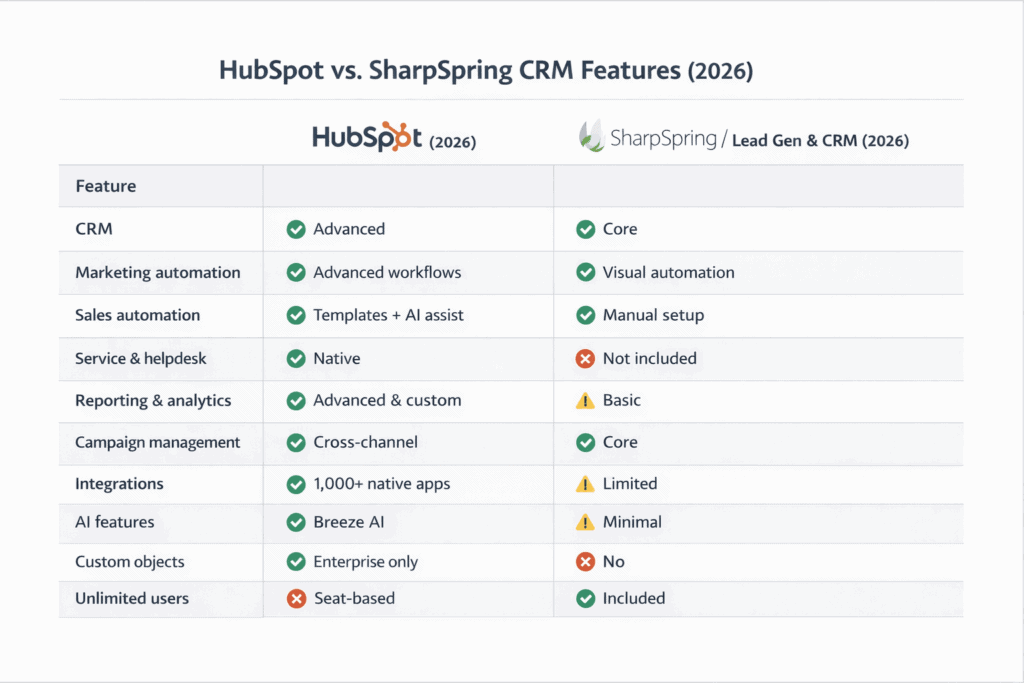
When comparing HubSpot vs SharpSpring in 2026, the biggest differentiator is still price versus depth.
SharpSpring—now marketed as Constant Contact Lead Gen & CRM—is noticeably cheaper than HubSpot and covers many core marketing automation and sales CRM use cases.
However, when you look closer, several critical feature details and ecosystem advantages make HubSpot the more powerful and scalable platform.
HubSpot delivers more advanced reporting, deeper automation logic, AI-assisted insights, and a significantly larger integrations ecosystem.
Its analytics and attribution reports are more granular and customizable than what SharpSpring currently offers, especially for revenue tracking across complex funnels.
HubSpot also provides access to thousands of native integrations and prebuilt workflow templates, giving teams far more flexibility to scale operations, connect tools, and automate processes without workarounds—an area where SharpSpring remains limited in comparison.
HubSpot – An all-in-one CRM for marketing, sales, service, and operations teams
HubSpot is designed as a unified CRM platform where all tools share a single customer database. This architecture allows teams to access real-time insights across marketing campaigns, sales pipelines, customer interactions, and operational workflows—all from one centralized system.
Rather than being a single product, HubSpot is made up of multiple specialized hubs, each built to work seamlessly together:
-
-
- HubSpot Marketing Hub — Designed for modern marketers, this hub includes marketing automation, email marketing, landing pages, forms, live chat, social media management, attribution reporting, and AI-powered content tools.
- HubSpot Sales Hub — Built for sales teams, it offers pipeline management, email tracking, sales automation, forecasting, deal analytics, and conversation intelligence to help close deals faster and more predictably.
- HubSpot Service Hub — Focused on customer support, this hub connects service teams directly to CRM data. Features include shared inbox, helpdesk and ticketing, customer portals, knowledge base, and omnichannel messaging.
- HubSpot CMS Hub — A fully integrated content management system with dynamic content, drag-and-drop website builder, secure hosting, custom domains, and native CRM integration—ideal for conversion-focused websites.
- HubSpot Operations Hub — Designed to eliminate data silos and operational friction, this hub offers workflow extensions, programmable automation, data sync, app integrations, and data quality automation.
-
Read also: What is HubSpot? Definition, Features, Pricing, Who it’s Best for
SharpSpring – A lower-cost marketing and sales CRM for small businesses and agencies
SharpSpring no longer exists as a standalone brand.
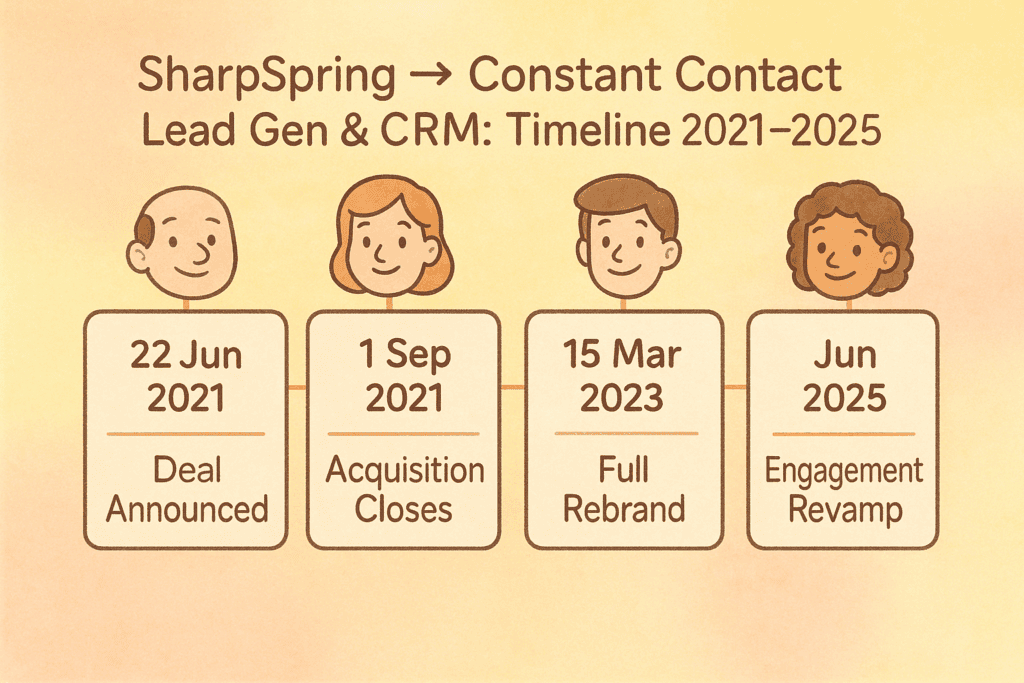
Constant Contact, which acquired SharpSpring for $240 million in September 2021, folded the platform into its portfolio and renamed it “Constant Contact Lead Gen & CRM.”
The rebrand, announced in March 2023, aligns the product more closely with Constant Contact’s email marketing ecosystem while retaining SharpSpring’s original automation and CRM capabilities.
Users benefit from a refreshed interface, tighter integrations with Constant Contact’s email designer, and updated documentation and support resources—while the core pricing structure and feature set remain largely unchanged.
When evaluating SharpSpring today, buyers should look specifically for “Lead Gen & CRM” within Constant Contact’s product lineup.
Functionally, SharpSpring remains an all-in-one marketing and sales CRM, similar in scope to HubSpot—but with notable limitations.
It does not include native customer service tools such as ticketing systems, helpdesk automation, or omnichannel support features found in HubSpot or EngageBay.
Its primary appeal is still cost efficiency. SharpSpring offers many essential capabilities—email marketing, visual automation workflows, and sales CRM—at a significantly lower price point than HubSpot.
Key features include:
-
-
- A drag-and-drop email designer with prebuilt templates
- A visual automation builder for marketing and sales workflows (e.g., drip campaigns triggered by website behavior)
- A sales CRM with pipeline dashboards, deal reminders, contact history tracking, and opportunity notes
-
Overall verdict: HubSpot vs SharpSpring in 2026
HubSpot is the better choice if you need a fully integrated, enterprise-ready CRM platform that supports marketing, sales, service, and operations at scale.
Its reporting depth, automation flexibility, AI features, and integrations ecosystem make it especially well-suited for growing teams and larger sales organizations.
SharpSpring (Constant Contact Lead Gen & CRM) remains a viable lower-cost alternative for small businesses and agencies that primarily need marketing automation and sales CRM functionality without advanced service tools.
While it delivers solid value for the price, subtle differences in feature depth and extensibility set the two platforms apart.
As Gareth Roberts, a campaign and marketing manager says:
“SharpSpring doesn’t quite live up to HubSpot in terms of the intricacies of its features. But what it does, when compared to the cost of using other premium marketing automation systems, it does well to help meet marketing objectives.”
Read also: What’s The Best HubSpot Alternative?
Comparing HubSpot vs SharpSpring in 2026
To deliver a fair and up-to-date HubSpot vs SharpSpring comparison, we tested both platforms hands-on and evaluated them across nine critical criteria that matter most to modern marketing, sales, and customer success teams.
This breakdown focuses on real-world usability, onboarding, and support—so by the end, you’ll know which CRM fits your workflow and team structure best in 2026.
Ease of use
Both HubSpot and SharpSpring (Constant Contact Lead Gen & CRM) are feature-rich, all-in-one platforms.
As expected, that comes with a learning curve—especially for first-time CRM users.
That said, both vendors invest heavily in onboarding resources, documentation, and customer support to help teams get productive quickly.
HubSpot
HubSpot is widely regarded as one of the most user-friendly CRMs in the market—even as its feature set has expanded in recent years.
The platform follows a hub-based navigation model, making it easy for users to find tools relevant to their role.
For instance, the service hub leads to tickets, a knowledge base, and all other service-related tools.
Each hub is clearly structured:
-
-
- The Service Hub leads directly to tickets, helpdesk views, knowledge base management, and customer communication tools.
- The Sales Hub surfaces pipelines, deals, tasks, and forecasting in a clean, intuitive layout.
- Marketing and operations tools are equally well-segmented, reducing friction as teams scale.
-
Beyond the interface, HubSpot excels in enablement and support.
Its Community Center allows users to ask questions and receive detailed responses from certified HubSpot partners and experienced users.
The extensive knowledge base helps teams resolve common issues without needing live support.
HubSpot also stands out for its HubSpot Academy, which offers free certification programs in marketing, sales, customer service, and operations.
Combined with a large library of step-by-step video tutorials, this makes HubSpot especially approachable for teams adopting a CRM for the first time—or expanding usage across departments.
Support options include email, chat, and phone assistance, with availability depending on the subscription tier.
SharpSpring
SharpSpring—now branded as Constant Contact Lead Gen & CRM—takes a more utilitarian approach to usability.
Its interface is functional but less polished, with a layout that will feel familiar to users of platforms like Zoho CRM or Insightly.
While the UI may appear more generic, it remains efficient for day-to-day marketing and sales tasks.
Navigation is straightforward, and most users can adapt quickly once they understand where key features live.
Where SharpSpring truly shines is self-service support.
It offers one of the most comprehensive knowledge bases in the CRM space, allowing users to find answers and troubleshoot issues without constantly contacting support.
This significantly reduces onboarding friction and saves time for lean teams.
In addition, SharpSpring consistently ranks above average on G2 for ease of use, quality of support, and ease of setup, indicating that most customers can get up and running quickly.
Support teams are responsive, and implementation tends to be faster than more complex enterprise platforms.
Ease of use verdict
In 2026, both HubSpot and SharpSpring are accessible despite their all-in-one complexity.
HubSpot offers a more polished, intuitive user experience backed by industry-leading training and certification resources.
SharpSpring, on the other hand, compensates for its simpler UI with excellent documentation and efficient support.
Ultimately, when it comes to ease of use, neither platform has a decisive edge.
Both provide enough onboarding resources and support to help teams become productive quickly—making this category a tie.
Read also: What’s The Best SharpSpring Alternative
Pricing: HubSpot vs SharpSpring (2026)
Pricing is the single biggest differentiator when comparing HubSpot vs SharpSpring in 2026.
While both platforms offer robust CRM, marketing automation, and sales tools, their pricing philosophies are fundamentally different.
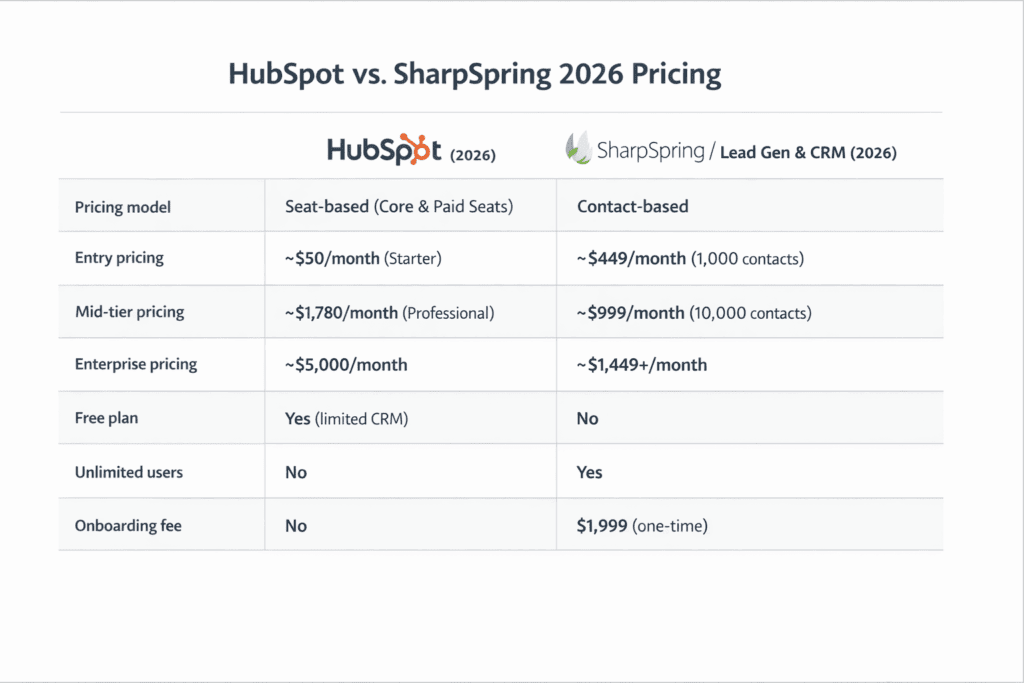
HubSpot follows a modular, seat-based pricing model with both individual hub pricing and bundled Customer Platform plans.
SharpSpring—now rebranded as Constant Contact Lead Gen & CRM—uses a contact-based pricing structure, which has historically made it more predictable, and in many cases cheaper, than HubSpot.
In this comparison, we’ll analyze HubSpot’s bundled pricing and compare it with SharpSpring’s contact-based model to clearly highlight the cost, flexibility, and trade-offs of each platform.
How much does HubSpot cost in 2026?
HubSpot’s pricing underwent a major structural shift in March 2024, and this seat-based model is now universal across all hubs and tiers in 2026.
HubSpot Seat-Based Pricing Model (2026)
Every HubSpot tier—Starter, Professional, and Enterprise—now requires paid seats for users who need editing or AI-powered capabilities.
Seat types include:
-
-
- Core Seat – Required for users who need edit access, automation tools, reporting, and AI features across hubs.
- View-Only Seat – Free and unlimited for users who only need read-only access.
-
Key pricing rules:
-
-
- Starter Hub extra Core Seats: $20/month per seat
- Professional extra Core Seats: $50/month per seat
- Enterprise extra Core Seats: $75/month per seat
- Sales or Service paid seats (unlock advanced hub features):
- $100/month (Professional)
- $150/month (Enterprise)
- Seat minimums removed (teams can now start with a single paid seat)
-
Bundles still include seats:
-
-
- Professional bundles include 3 Core Seats
- Enterprise bundles include 5 Core Seats
-
Legacy customers are temporarily grandfathered, with expected ≤5% renewal uplift
Is HubSpot Really Free? Hidden Costs Explained
HubSpot CRM Suite Pricing (Bundled)
Starter (Customer Platform) – from $20/month per seat
Covers Marketing, Sales, Service, CMS, and Operations hubs at Starter level. There is no flat monthly starting price anymore—cost scales with the number of paid seats you add. Best suited for very small teams that need basic CRM and automation features.
Professional (Customer Platform) – from $1,170/month
Includes 5 Core Seats. Additional Core Seats are $50/month each. A one-time Professional onboarding fee of $4,500 applies. Designed for scaling teams that need advanced automation, custom reporting, attribution, and workflow flexibility across departments.
Enterprise (Customer Platform) – from $4,300/month
Includes 7 Core Seats. Additional Core Seats are $75/month each. A one-time Enterprise onboarding fee of $12,000 applies. Built for large organizations with complex structures, multiple teams, advanced permissions, predictive lead scoring, and deep reporting.
The Hidden Cost Challenge with HubSpot
A closer look at HubSpot’s pricing reveals several friction points:
-
-
- The jump from Starter (as low as $20/seat/month) to Professional (starting at $1,170/month) is steep, even if you only need one missing feature.
- All plans require a 12-month commitment, whether paid monthly or annually.
- While seat minimums are gone, costs scale quickly as teams grow.
- Core Seats—previously bundled—are now paid add-ons, increasing total cost of ownership.
- The bundled Professional and Enterprise tiers also carry one-time onboarding fees ($4,500 and $12,000 respectively) on top of the monthly seat costs.
-
HubSpot does offer a free CRM, but once you outgrow its limitations, costs rise fast.
Here’s how one of its users summed up its pricing:
“Pricing-wise can be a little pricey compared to some other CRMs out there, and a lot of the features that make it useful are not accessible unless you pay for the premium accounts.”
How much does SharpSpring cost in 2026?
SharpSpring’s pricing—now sold by Constant Contact as “Lead Gen & CRM”—is still based on contact volume rather than user seats, which keeps costs more predictable as your team grows.
However, Constant Contact has moved away from publishing fixed price tiers: as of August 2026, its official pricing page no longer lists specific monthly rates for any contact-volume bracket. Getting a price now requires booking a live demo and requesting a custom quote directly from Constant Contact.
What we can confirm:
-
-
- Contact-based pricing model (cost scales with database size, not number of users)
- Unlimited user seats remain a headline feature, unlike HubSpot’s per-seat model
- A dedicated onboarding specialist is still part of the offering
-
Because exact current dollar figures are no longer published, and third-party sources disagree with one another, we’re not listing specific prices here.
If you’re comparing options and want a real number to work from, request a live quote from Constant Contact for a sample contact count (for example, 1,000 and 10,000 contacts).
Unlike HubSpot, SharpSpring does not charge per user, which makes it especially attractive for agencies and teams with many collaborators.
Pricing verdict: HubSpot vs SharpSpring
SharpSpring has historically offered a more affordable pricing structure compared to HubSpot while delivering many of the same core marketing automation and CRM features—though as of 2026, getting an exact number for SharpSpring now takes a conversation with sales rather than a glance at a pricing page.
For businesses that prioritize unlimited users and a contact-based cost structure over per-seat billing, SharpSpring still has a structural advantage, even without published list prices.
As Raymond Leffelaar, a marketing automation specialist, puts it:
“It’s like HubSpot but then with 1/3 of their pricing”
That said, HubSpot justifies its higher pricing with deeper reporting, broader integrations, AI-driven features, and native service and operations tools—capabilities SharpSpring does not fully match.
Pricing Update Note (2026)
Following its acquisition and rebranding, SharpSpring is now offered as “Lead Gen & CRM” within Constant Contact’s product lineup.
Pricing is now fully custom-quoted for new customers, with packages that include lead generation, lead scoring, marketing automation, CRM, pipeline management, sales automation, and analytics.
If you don’t have the time to read, you can watch our video on HubSpot vs SharpSpring:
Marketing Automation Showdown: HubSpot vs SharpSpring
AI Features in 2026:
AI has become a deciding factor for many buyers comparing HubSpot vs SharpSpring in 2026.
Both platforms now include AI-powered capabilities, but their strategies and depth of AI integration differ significantly.
In this section, we’ll break down how each platform uses AI to improve productivity, automation, content creation, and analytics—so you can see which solution delivers the smarter experience for your team.
HubSpot – Advanced, Integrated AI with Breeze AI at the Core
HubSpot has heavily invested in native AI tools over the past few years, embedding intelligence directly into every hub.
The centerpiece of HubSpot’s AI strategy in 2026 is Breeze AI, which acts as a unified assistive layer across marketing, sales, service, and operations.
Key HubSpot AI capabilities (2026):
-
-
- Breeze AI Insights: Uses predictive analytics to surface deal risks, pipeline health alerts, and campaign performance suggestions without manual report building.
- AI Content Generation: Native AI for blog outlines, email copy, ad creatives, SEO recommendations, and landing page text—contextually aware of your brand voice and audience.
- Automated Workflows with AI Logic: Smart automation that can branch based on predicted lead scores, behavior patterns, and engagement likelihood.
- AI-Powered Reporting: Natural language summaries of reports that highlight key trends and anomalies across marketing and sales data.
- Conversation Intelligence + AI Coaching: AI summarization and sentiment analysis for calls and chat interactions, with real-time coaching cues for sales reps.
-
HubSpot’s Breeze AI works across hubs, meaning content creation, predictions, and automation aren’t siloed.
It’s available in Professional and Enterprise tiers with increasing levels of access and capacity.
AI Strengths in HubSpot:
-
-
- Predictive scoring and revenue forecasting
- Cross-hub AI automation triggers
- Built-in AI content and campaign helpers
- Intelligent customer service triage
-
SharpSpring – Practical AI with a Focus on Automation
SharpSpring (marketed as Constant Contact Lead Gen & CRM) has also introduced AI enhancements in 2026, but its focus remains on practical automation tools rather than generative AI features integrated across every user role.
SharpSpring’s AI capabilities are functional and automation-focused, with tools designed to help teams save time on repetitive tasks:
Key SharpSpring AI capabilities (2026):
-
-
- Automated Nurture Logic: AI-assisted optimization of drip sequences based on open rates, click behavior, and conversion signals.
- Basic Predictive Lead Scoring: Uses engagement data to prioritize leads automatically for sales follow-ups.
- Smart Email Recommendations: Suggests subject lines and send times based on historical recipient behavior.
- Automation Suggestions: Contextual prompts within the workflow builder to help identify triggers and actions based on campaign patterns.
-
SharpSpring’s AI tools are tied into its visual automation builder and CRM workflows, making them useful for teams that want automated optimization without needing deep data science expertise.
AI Strengths in SharpSpring:
-
-
- Lead prioritization and scoring automation
- Automated nurture sequence adjustments
- Smarter send time and subject line suggestions
- Practical AI recommendations inside workflow builder
-
AI Capabilities by Category (2026)
| AI Feature | HubSpot | SharpSpring |
|---|---|---|
| AI content generation (email/copy) | ✔️ Advanced native AI (Breeze) | ⚠️ Limited/basic |
| Predictive analytics & forecasting | ✔️ AI-driven insights & alerts | ⚠️ Basic lead scoring |
| Smart automation logic | ✔️ AI triggers, branching paths | ✔️ AI optimization prompts |
| AI reporting summaries | ✔️ Natural language AI outputs | ❌ Not available |
| Conversation intelligence + coaching | ✔️ AI summarization & cues | ❌ Not available |
| Personalized send time/subject line AI | ✔️ Yes (Breeze assisted) | ✔️ Yes (behavior based) |
AI Features Verdict
In the HubSpot vs SharpSpring AI comparison for 2026, HubSpot clearly leads in advanced AI maturity.
HubSpot’s Breeze AI offers deeper generative capabilities, cross-hub insights, and automation that doesn’t just follow rules—but learns and predicts outcomes.
This makes HubSpot especially valuable for large marketing teams, sales orgs seeking intelligent coaching tools, and businesses that want AI-assisted content creation natively within their workflow.
SharpSpring’s AI capabilities are pragmatic and useful for marketing and sales automation optimization—especially for teams that prefer straightforward automation and lead scoring without complex setup requirements.
However, SharpSpring does not yet offer comprehensive generative AI features, advanced predictive analytics, or AI-based reporting summaries that are built into HubSpot’s Breeze AI ecosystem.
Bottom line: If AI power and future-proof automation are priorities, HubSpot’s AI suite gives you a richer, smarter set of tools.
SharpSpring provides practical automation enhancements that help teams work faster, but it does not match HubSpot’s breadth or depth of AI-driven capabilities in 2026.
Customization and pipeline management
Customization and pipeline flexibility play a major role when evaluating HubSpot vs SharpSpring—especially for teams managing complex sales processes or unique data requirements.
Both platforms offer extensive customization options, but they differ significantly in depth, pricing access, and flexibility.
Let’s take a closer look at how each CRM handles customization and pipeline management in 2026.
HubSpot
HubSpot offers powerful customization options, particularly for reporting, forecasting, and deal management.
Teams can tailor dashboards using prebuilt templates or create fully custom reports.
Custom fields can be added across contacts, companies, deals, tickets, quotes, and products, making it easy to align the CRM with your sales process.
However, when it comes to advanced data modeling, there’s a clear limitation.
Creating custom objects—such as subscriptions, partners, renewals, or any entity outside HubSpot’s default objects—is still restricted to the Enterprise plan, which now starts at $4,300 per month before onboarding fees.
For many growing businesses, this pricing barrier can be a dealbreaker.
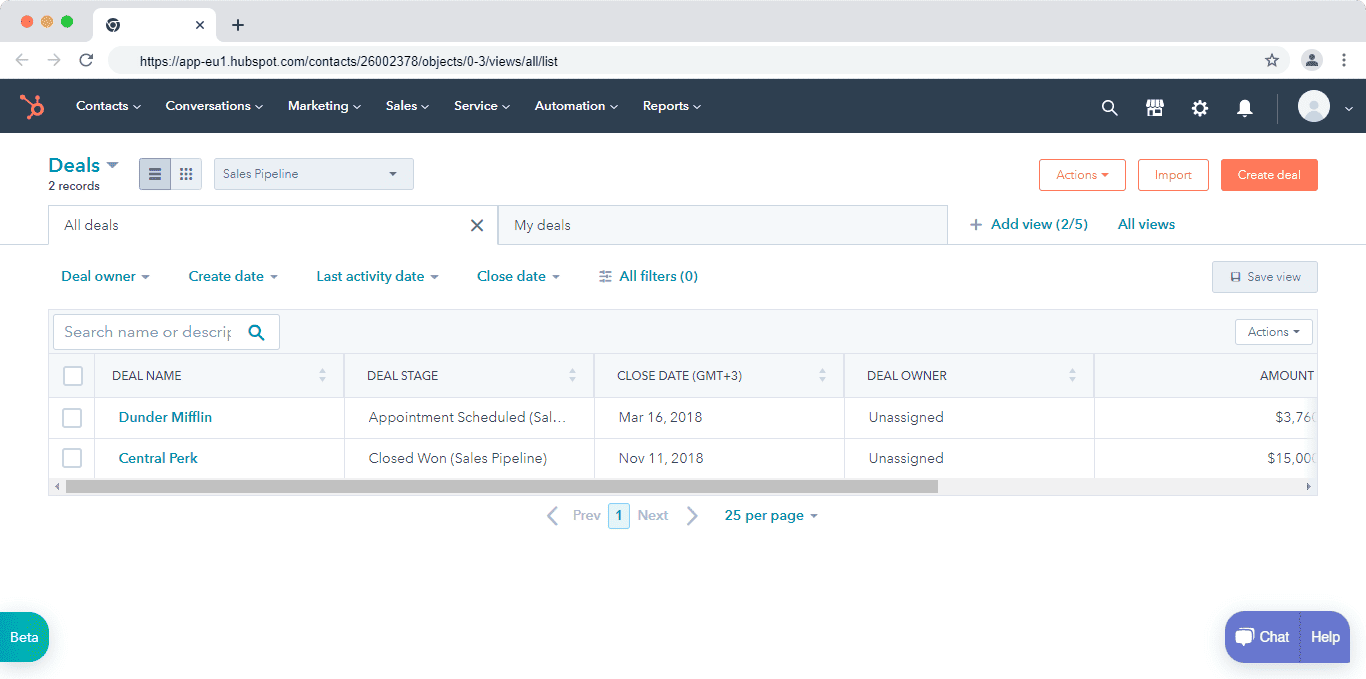
Pipeline Management in HubSpot
HubSpot’s pipeline management is robust and well-suited for scaling sales teams:
-
-
- Multiple pipelines can be created for different sales motions or teams
- Deal stages can be fully edited, reordered, or removed
- Tasks and automated actions can be triggered as deals move between stages
- Forecasting and revenue projections are built directly into the pipeline view
-
While functionally strong, the pipeline user interface can feel dense, especially as pipelines grow more complex or when managing multiple pipelines simultaneously.
Some users find that the visual clarity lags behind newer, more streamlined CRM interfaces.
Read also: SharpSpring vs Hubspot vs EngageBay — Which CRM Software is the Best?
SharpSpring
SharpSpring—now offered as Constant Contact Lead Gen & CRM—approaches customization with a more accessible and design-friendly mindset, particularly for marketers and small teams.
Customization Capabilities
SharpSpring allows users to customize forms beyond basic field insertion. Its Visual Form Styler lets you adjust layout, colors, fonts, and spacing while previewing changes in real time. Customization is organized into logical categories, making it easy to fine-tune individual form elements without touching code.
Lead scoring is also highly flexible. Teams can create custom scoring rules based on behaviors like page visits, email interactions, or custom attributes. You can modify scoring logic to match your sales qualification criteria, including scoring based on custom fields.
Reporting and Pipeline Management
SharpSpring’s custom reporting uses a widget-based system, allowing teams to assemble dashboards that range from high-level performance summaries to highly granular sales insights. Widgets can be mixed and matched to track KPIs across marketing and sales activities.
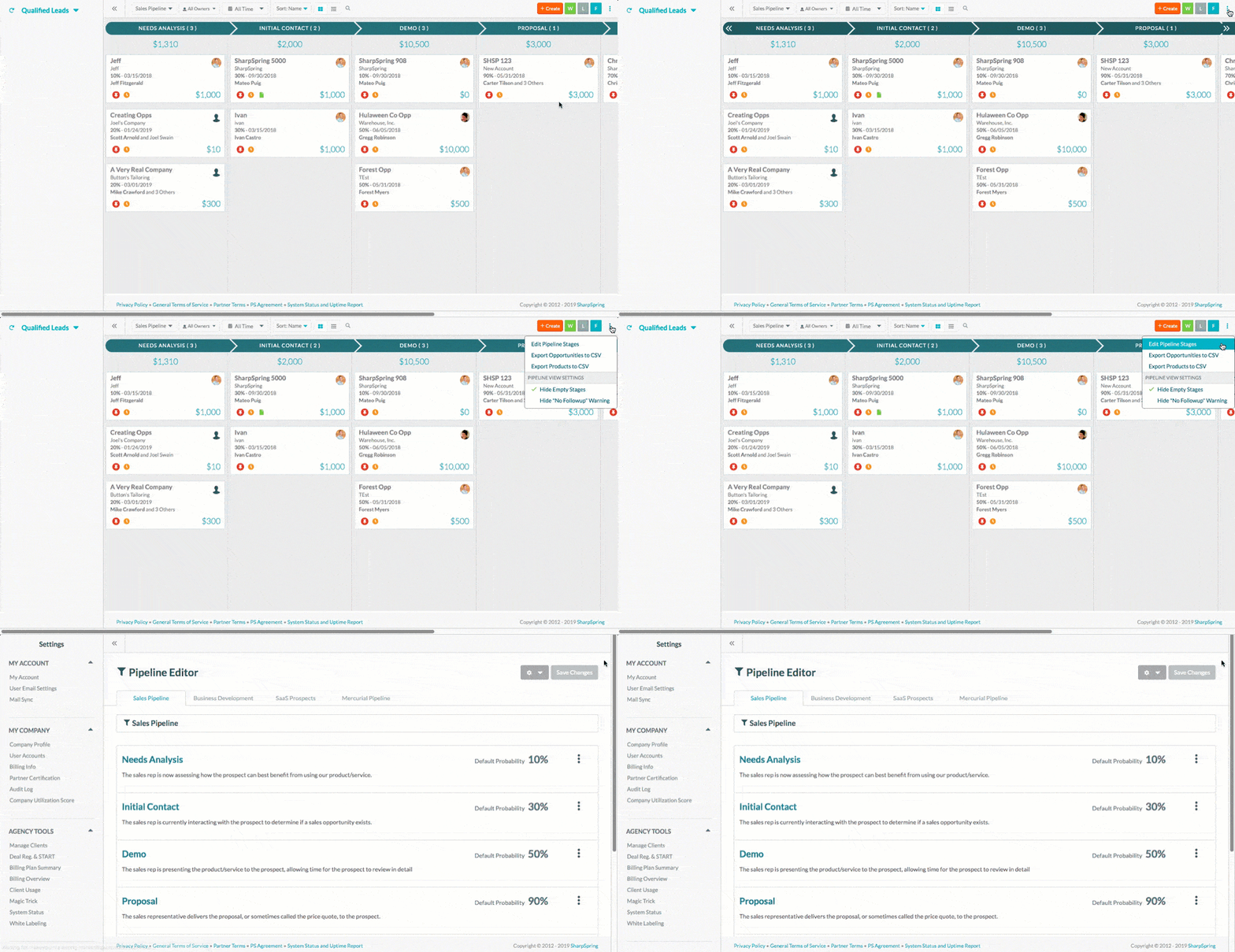
Pipeline management supports:
-
-
- Multiple pipelines for different sales types or business units
- Editable and removable pipeline stages
- Opportunity-level management, including export and deletion
-
One limitation remains: the default Sales Pipeline cannot be edited or deleted, and CRM-only users may be restricted to a single pipeline depending on their plan. Still, for many SMBs, the available flexibility is sufficient.
Customization and pipeline management verdict
Both platforms offer solid customization and pipeline management capabilities, but they cater to different types of teams.
HubSpot excels in enterprise-grade reporting, forecasting, and pipeline automation, making it ideal for large organizations with complex sales hierarchies—provided they can afford the Enterprise plan for advanced customization like custom objects.
SharpSpring, on the other hand, stands out for making customization accessible across all plans.
From form design and lead scoring to reporting and pipeline setup, users get meaningful flexibility without expensive upgrades.
Verdict: If you need deep, enterprise-level customization and advanced forecasting, HubSpot delivers—at a premium.
If you want flexible customization and pipeline control without escalating costs, SharpSpring is the better choice.
Marketing and campaign management
Marketing and campaign management is one of the most closely contested areas in the HubSpot vs SharpSpring comparison.
Following SharpSpring’s acquisition by Constant Contact, the platform has evolved into a more competitive email marketing and marketing automation solution, putting it in direct competition with HubSpot for SMBs and agencies.
Let’s break down how both platforms handle lead generation, campaign execution, and performance tracking in 2026.
HubSpot
HubSpot offers one of the most comprehensive inbound marketing and campaign management ecosystems available today.
The platform is built to attract, engage, and convert leads across multiple channels—while tying every interaction back to the CRM.
Lead Generation & Engagement
HubSpot allows marketers to attract the right audience using:
-
-
- SEO-optimized blogs and content tools
- Paid ads management (Google, LinkedIn, Meta)
- Social media scheduling and monitoring
- Live chat, chatbots, and conversational marketing
- Native video hosting and tracking
-
Once leads enter the system, HubSpot’s email marketing and automation tools allow teams to run A/B tests, personalize campaigns, and build behavior-based drip workflows using advanced triggers and branching logic.
Campaign Management
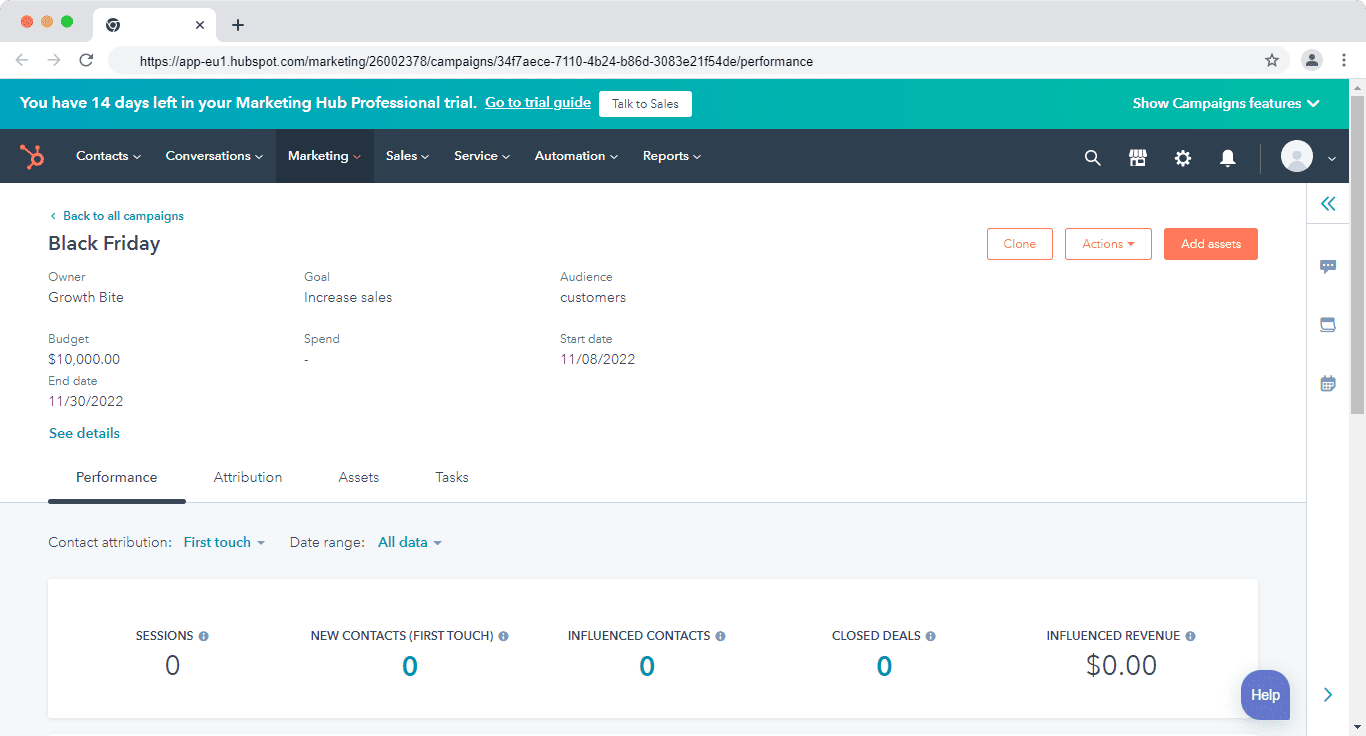
One of HubSpot’s strongest differentiators is its Campaigns tool, which unifies all marketing assets in a single, centralized dashboard.
Marketers can associate ads, landing pages, forms, emails, CTAs, and blog posts with a campaign and track overall performance in real time.
This provides a holistic view of campaign ROI, including:
-
-
- Traffic and conversion metrics
- Lead and contact attribution
- Cross-channel performance insights
-
As campaigns scale, HubSpot’s reporting and AI-assisted insights help teams identify what’s working and where optimization is needed.
Read also: HubSpot vs Keap — Is HubSpot Really a Better Product?
SharpSpring
SharpSpring—now offered as Constant Contact Lead Gen & CRM—provides a streamlined yet capable approach to marketing automation and campaign management, particularly for budget-conscious teams.
Lead Generation & Campaign Execution
Like HubSpot, SharpSpring enables lead acquisition through:
-
-
- Paid ads tracking
- Landing pages and forms
- Email marketing and automated campaigns
-
From the ads dashboard, marketers can analyze campaign performance by date, channel, or individual metrics and export reports for deeper analysis or client reporting.
Media Center & Campaign Tracking
A standout SharpSpring feature is the Media Center, which allows teams to create and track gated assets such as whitepapers, coupons, contracts, and PDFs. These assets can be embedded in emails or workflows, and every interaction—views, downloads, and engagement—is tracked at the contact level.
This makes it easier for sales teams to follow up with leads based on actual content engagement, not just form submissions.
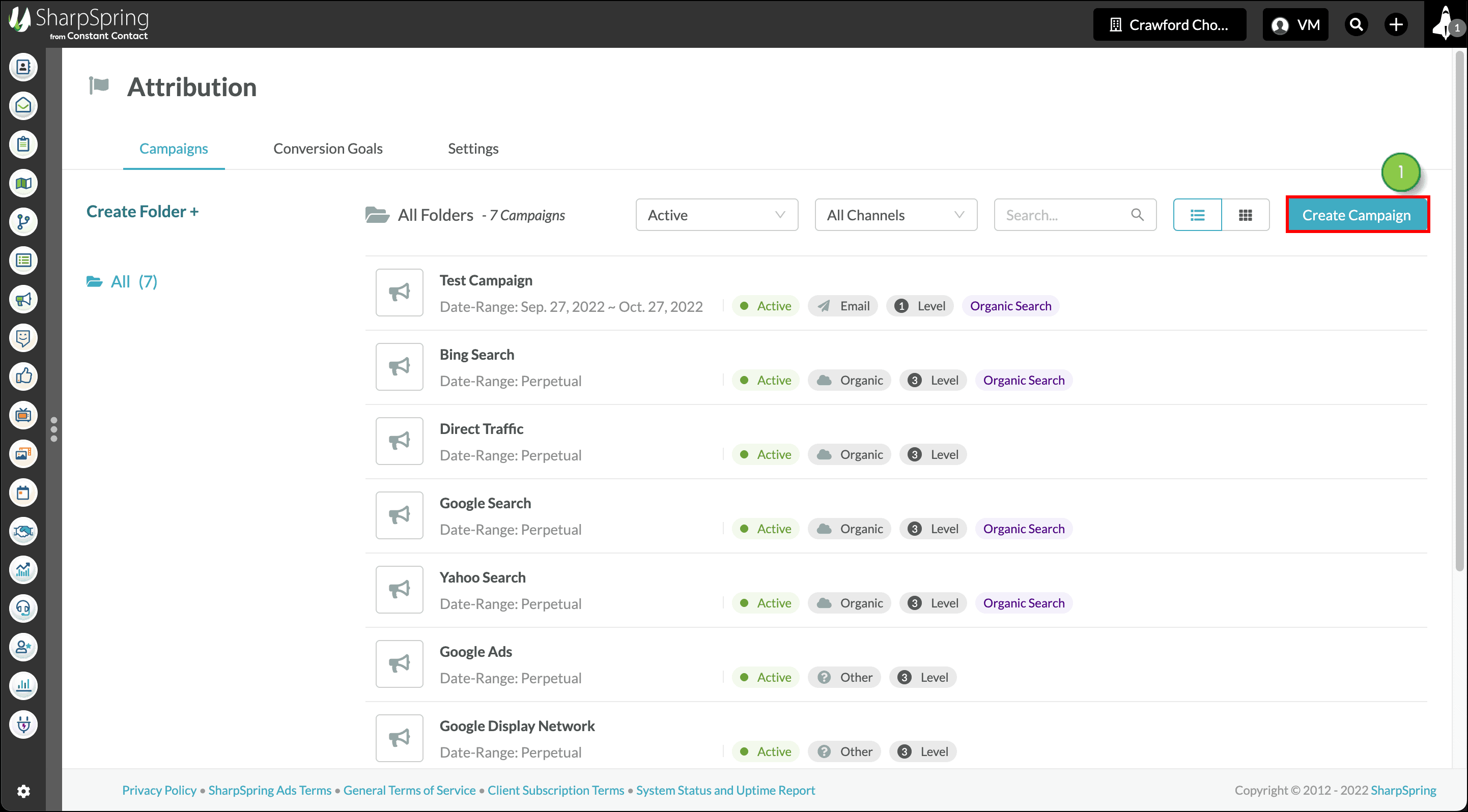
SharpSpring also includes a Campaigns feature, which—like HubSpot—helps track marketing initiatives across channels. Marketers can organize and view campaigns by:
-
-
- Status (active or inactive)
- Channel (email, social, ads, etc.)
- Date range
- Tags and attribution level
-
While the reporting is not as deep as HubSpot’s, it provides sufficient visibility for most SMB-level marketing efforts.
Marketing and campaign management verdict
Both platforms offer strong marketing automation and campaign management capabilities in 2026, but they cater to different needs.
HubSpot excels in enterprise-grade inbound marketing, multi-channel attribution, and unified campaign analytics, making it ideal for teams running complex, data-driven campaigns across multiple channels.
SharpSpring, on the other hand, delivers solid marketing and campaign functionality across all plans, including features that HubSpot often gates behind higher tiers.
For smaller teams and agencies that want a contact-based cost structure and built-in campaign tracking without paying for advanced hubs, SharpSpring offers better value.
Verdict: Feature-for-feature, the two platforms are comparable, but SharpSpring includes more marketing functionality by default, while HubSpot provides deeper insights, scalability, and advanced analytics at a higher cost.
Read also: SharpSpring Pricing, Features, and Top 3 Alternatives
Integrations
Integrations remain one of the most decisive factors when comparing HubSpot vs SharpSpring in 2026.
As businesses rely on increasingly complex tech stacks, the ability to connect a CRM seamlessly with other tools can directly impact productivity, data accuracy, and scalability.
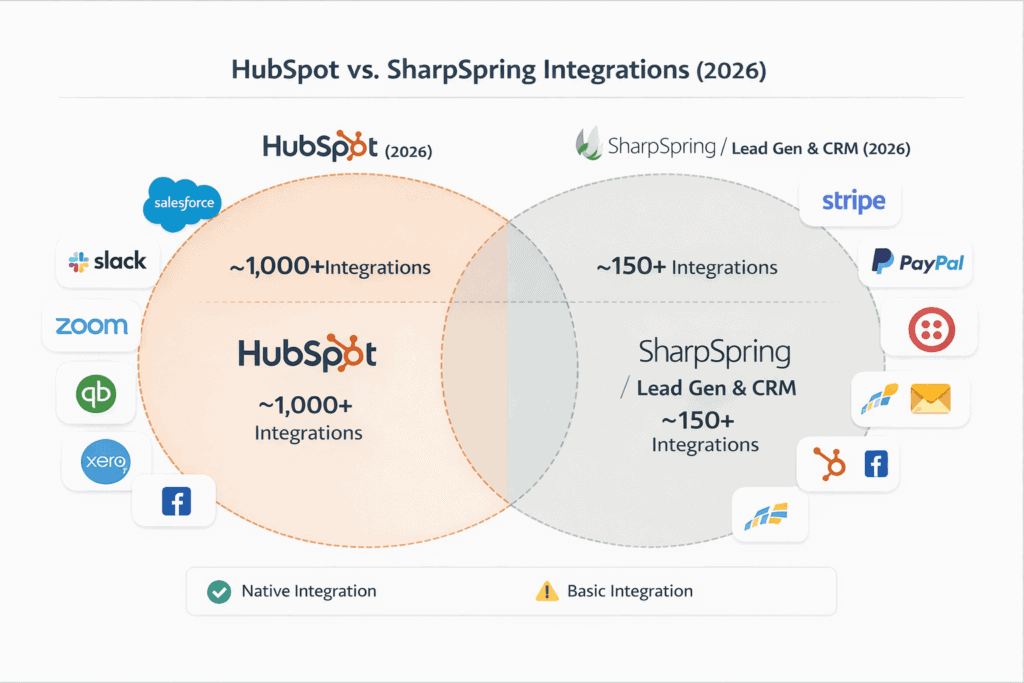
This is an area where the two platforms differ significantly.
HubSpot
HubSpot offers one of the largest and most mature integrations ecosystems in the CRM market.
As of 2026, HubSpot’s App Marketplace has grown to nearly 2,000 native integrations across a wide range of categories, including:
-
-
- HR and recruiting
- Productivity and collaboration tools
- Billing, invoicing, and accounting software
- E-commerce and payment platforms
- Advertising, analytics, and data enrichment tools
-
These native integrations allow teams to connect HubSpot to their existing tech stack with minimal setup and without relying heavily on third-party connectors.
As businesses grow, new integrations can be added easily, reducing the need for custom development.
In addition to native apps, HubSpot provides robust APIs and webhooks, enabling deeper custom integrations for advanced use cases.
That said, even HubSpot’s ecosystem isn’t flawless. Some users have reported challenges when syncing data with complex external systems—particularly enterprise CRMs.
For example, here’s what Heather Bakire, a Content Marketing Manager at Revenue.io had to say:
“One downside is the Salesforce integration, which is less than perfect. The fields aren’t always 1:1 and the metrics don’t always transfer properly.”
SharpSpring
SharpSpring—now branded as Constant Contact Lead Gen & CRM—takes a more limited approach to integrations.
SharpSpring offers far fewer native integrations compared to HubSpot.
Most third-party connections are handled through Zapier or require custom development using its API.
While this approach can work for simpler workflows, it often introduces additional costs, setup complexity, and maintenance overhead.
Native integrations with commonly used platforms—such as Gmail, Facebook Ads, or Google Ads—are more restricted, meaning teams often need workarounds or third-party automation tools to replicate functionality that HubSpot supports natively.
For technically capable teams, SharpSpring’s API does provide flexibility.
However, for non-technical users or fast-growing businesses, the lack of a robust native app marketplace can become a bottleneck.
Integrations verdict
When it comes to integrations in HubSpot vs SharpSpring, the difference is clear.
HubSpot offers a significantly stronger integrations ecosystem, with a large library of native apps, reliable APIs, and minimal dependency on third-party automation tools.
This makes it easier to scale, adapt, and connect new tools as business needs evolve.
SharpSpring, while functional for basic integrations, relies heavily on Zapier and custom API work—making it less suitable for teams that need seamless, out-of-the-box connectivity.
Verdict: HubSpot has the superior app marketplace and integration flexibility, making it the better choice for businesses with growing or complex tech stacks.
Read also: HubSpot Pros And Cons — A Candid Assessment
Sales automation
Sales automation is a core capability when comparing HubSpot vs SharpSpring in 2026.
Both platforms allow teams to build visual workflows that automate repetitive tasks, improve lead follow-up, and move deals through the pipeline faster.
However, the depth, usability, and scalability of their automation tools differ significantly.
HubSpot
HubSpot offers one of the most advanced and user-friendly sales automation engines in the CRM market. Its workflow builder is tightly integrated across marketing, sales, service, and operations—allowing automation to span the entire customer lifecycle.
Workflow Creation & Management
Users can create workflows from scratch or start with prebuilt templates designed for common sales scenarios.
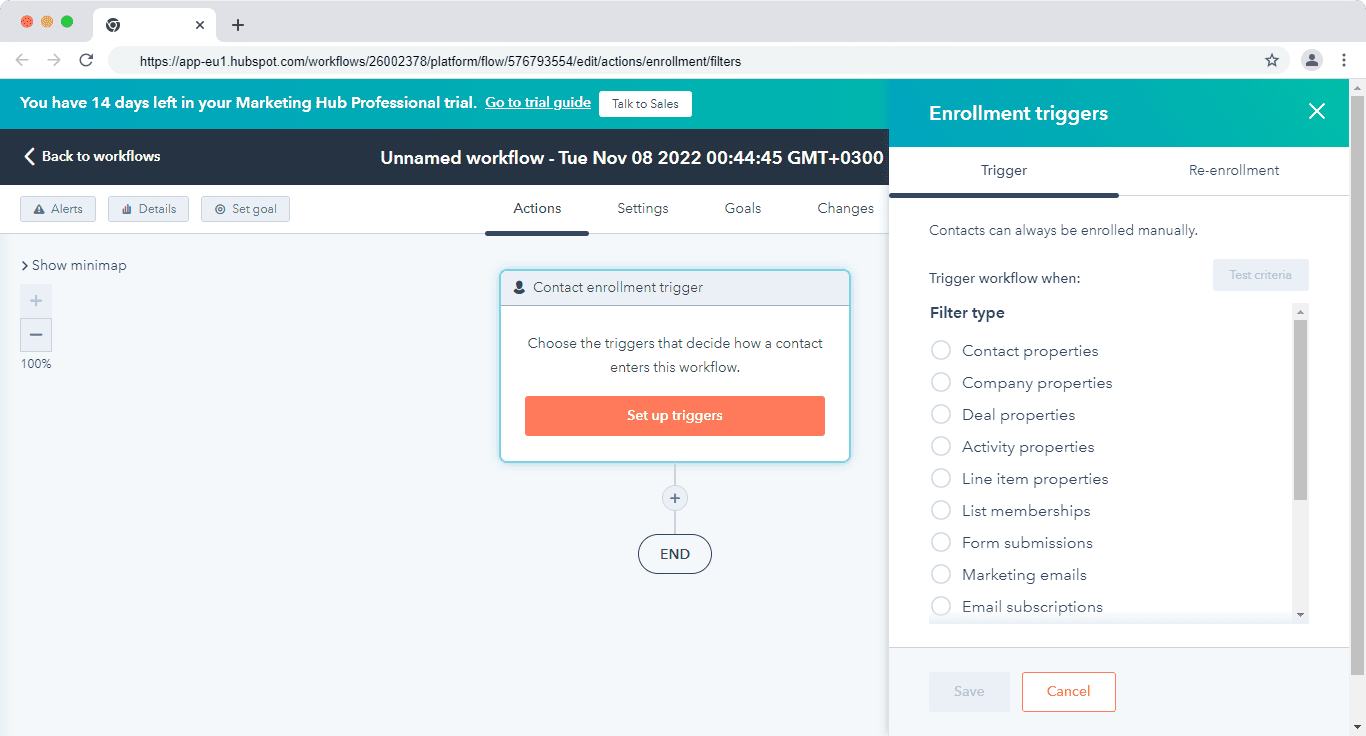
When building a workflow, you first select the object and workflow type—such as contacts, companies, deals, quotes, or tickets—ensuring automation logic aligns with your goals.
Enrollment triggers can be configured using behavioral data, lifecycle stages, property values, or engagement signals.
Once enrolled, workflows can execute a wide range of actions, including:
-
-
- Task creation and assignment
- Deal stage updates
- Email sends and internal notifications
- Data updates and record synchronization
-
Access to specific actions varies by subscription tier, but even mid-tier plans offer significant automation flexibility.
Advanced Automation Features
HubSpot allows teams to:
-
-
-
- Add multiple enrollment triggers
- Enable re-enrollment rules
- Clone workflows or individual actions
- Insert comments for documentation and collaboration
-
-
A standout feature is A/B testing within workflows, particularly for automated emails.
HubSpot gradually distributes variations across enrolled records, ensuring statistically meaningful splits as the audience grows.
Combined with HubSpot’s broader automation ecosystem—including sequences and AI-assisted recommendations—this makes sales automation easier to deploy and optimize at scale.
SharpSpring
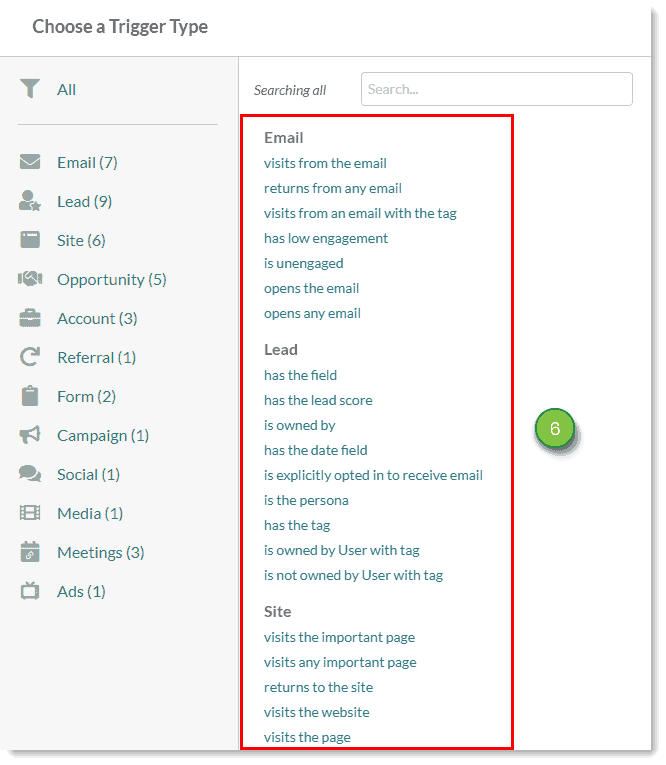
SharpSpring—now offered as Constant Contact Lead Gen & CRM—also provides a capable Visual Workflow Builder designed to map and automate lead journeys.
Visual Workflow Builder
SharpSpring’s automation tool allows users to design simple or complex workflows that control how leads progress toward conversion.
Workflows are built visually, making it easier to understand how actions and conditions are connected.
Once a workflow is created, users can add branch content, including:
-
-
- Actions (e.g., sending emails or updating fields)
- Filters to evaluate conditions
- Delays to control timing
- Action groups for grouped logic
-
Yes/No branching filters are commonly used to evaluate whether specific criteria are met, directing leads down different paths based on engagement or attributes.
This functionality is standard across most modern CRM and automation platforms.
Automation Limitations
While SharpSpring’s automation engine is powerful, it lacks the breadth of prebuilt templates and guided setup found in HubSpot.
As a result, building workflows often requires more manual configuration and planning—making the tool better suited for experienced users rather than beginners.
Sales automation verdict
When comparing HubSpot vs SharpSpring sales automation in 2026, HubSpot clearly offers a more refined experience.
HubSpot’s automation tools are easier to navigate, include ready-to-use templates and sequences, and support advanced testing and optimization—making them ideal for teams that want to move fast without sacrificing control.
SharpSpring delivers solid automation capabilities but demands more hands-on setup and lacks the guided experience and templates that simplify adoption.
Verdict: HubSpot has the stronger sales automation platform, combining usability, flexibility, and scalability—especially for growing sales teams that rely heavily on automation to drive results.
Read also: 9 Amazing Marketing Automation CRM Software [Comparison Table]
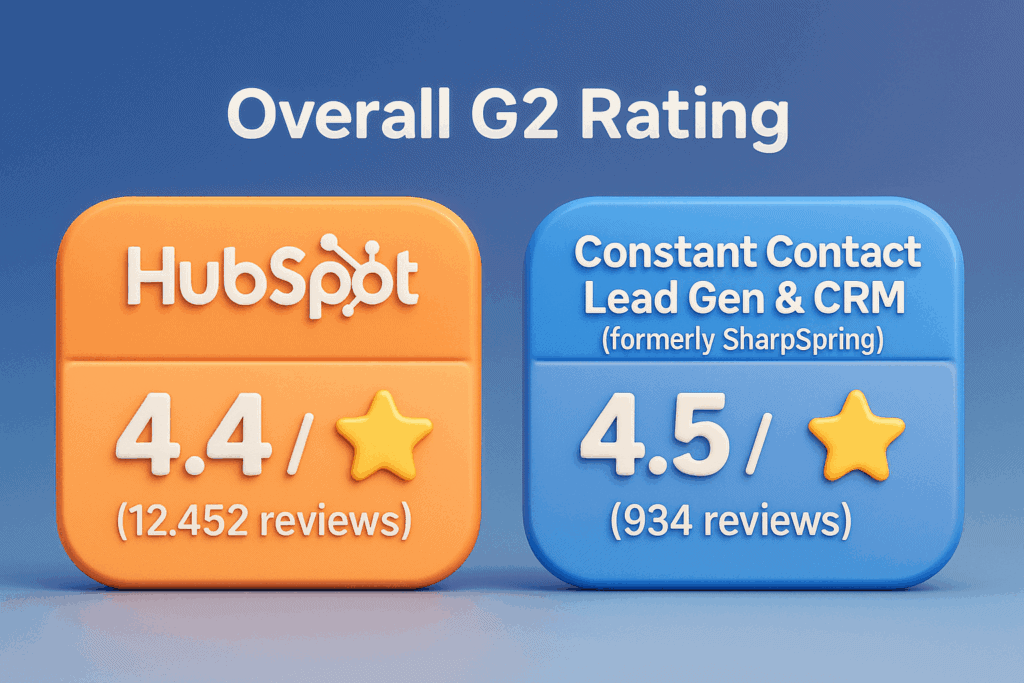
G2 Snapshot (August 2026) (G2)
| Metric | HubSpot Marketing Hub / Sales Hub | Constant Contact Lead Gen & CRM* |
|---|---|---|
| Overall G2 Rating | 4.4 / 5 (≈15,000+ reviews) | 4.4–4.5 / 5 (≈1,100+ reviews) |
| Ease of Use | 8.6 / 10 | 8.4–8.5 / 10 |
| Quality of Support | 8.7 / 10 | 8.9–9.0 / 10 |
| Meets Requirements | 8.5–8.7 / 10 | 8.7 / 10 |
*Formerly SharpSpring
⚠️ Note: G2 ratings fluctuate daily. The numbers above reflect rounded August 2026 averages, not point-in-time screenshots.
Reporting
Reporting is one of the most important differentiators in any HubSpot vs SharpSpring comparison, and in 2026, the gap between the two platforms is more pronounced than ever.
While both tools offer standard sales and marketing reports, HubSpot delivers significantly deeper, more customizable, and more scalable reporting capabilities than SharpSpring.
Let’s break down how each platform handles analytics, dashboards, and data visibility.
HubSpot
HubSpot offers one of the most comprehensive reporting systems in the CRM market, designed for teams that rely on data-driven decision-making across marketing, sales, service, and operations.
HubSpot’s reporting framework is built around two core components:
Dashboards
Dashboards allow users to organize multiple related reports into a single, shareable view.
Teams can create dedicated dashboards for specific roles or goals—such as sales leadership, marketing performance, or customer support—and control who has access to each dashboard.
HubSpot includes a wide range of prebuilt dashboard templates to accelerate setup.
For example, the Sales Manager Dashboard typically includes reports like:
-
-
-
- Deals open by close date (current month)
- Deals closed–won over time by sales rep
- Pipeline value and forecast accuracy
-
-
Dashboards can be cloned, edited, or deleted as business needs evolve, making long-term reporting management flexible and scalable.
Reports & Custom Analytics
Beyond dashboards, HubSpot allows users to create and manage individual reports directly from the Reports tool.
Users can filter, organize, and maintain their reporting library with ease.
Depending on the subscription tier, teams can build:
-
-
- Single-object reports (deals, contacts, quotes, payments, custom objects, etc.)
- Funnel reports to measure conversion rates between lifecycle stages or deal stages
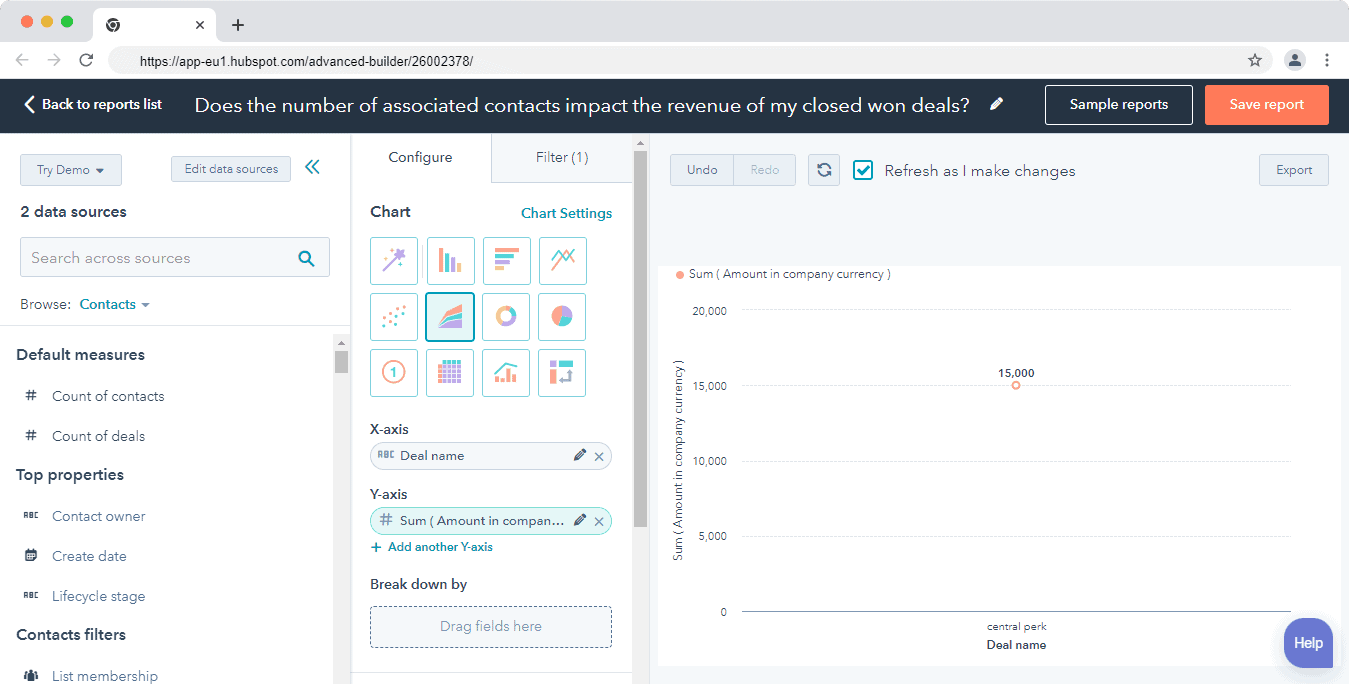
- Custom reports using HubSpot’s Custom Report Builder to combine multiple data sources
-
The Custom Report Builder is especially powerful for organizations that need cross-functional insights, such as tying marketing campaigns to revenue or tracking service interactions against churn.
Read also: CRM Showdown — HubSpot vs Zoho Review and Comparison
SharpSpring
SharpSpring—now offered as Constant Contact Lead Gen & CRM—provides a set of standard, prebuilt reports focused primarily on sales pipeline visibility and activity tracking.
Available reports include:
-
-
- Pipeline Value Report, showing opportunities expected to close within a given timeframe
- Opportunity Health Report, used to assess pipeline performance
- Conversion Analysis Report, displaying opportunity stages over a selected date range
- Won/Lost Report, summarizing closed deals across pipelines
- Sales Optimizer Tasks Report, detailing automated task activity by user or team
- Activity Report, highlighting tasks, notes, and statuses
- Follow-Up Report, comparing expected outreach with actual calls and emails
-
While these reports cover essential sales metrics, SharpSpring’s reporting system lacks the depth, flexibility, and customization required for advanced analytics.
Custom reporting is limited, and the ability to analyze data using custom field values or complex filters is restricted.
Here’s how Grant Eggleston, summed up his experience with SharpSpring’s reporting:
“Reports can lack depth and detail, making it difficult to draw meaningful insights from the data. In addition, the lack of queries based on custom field values limits the ability to perform granular analysis. These issues call into question SharpSpring’s effectiveness as an analytics platform and need to be addressed for satisfactory performance.”
Reporting verdict
In the HubSpot vs SharpSpring reporting comparison for 2026, HubSpot clearly comes out ahead.
HubSpot’s reporting is more diverse, customizable, and intuitive, making it well-suited for mature organizations that require advanced dashboards, cross-object analytics, and scalable reporting workflows.
It empowers teams to visualize performance, share insights, and make informed decisions across departments.
SharpSpring’s reporting, while adequate for basic pipeline tracking, falls short for businesses that depend on deep analytics and granular data exploration.
Verdict: If reporting and analytics are a priority, HubSpot is the superior choice, especially for growing or enterprise-level teams that need a centralized, data-driven view of their business.
Read also: An In-Depth Look At HubSpot vs Pipedrive
Lead management
Lead management is a critical area in any HubSpot vs SharpSpring comparison, especially for teams focused on converting interest into revenue.
While both platforms offer tools to capture, track, and nurture leads, they differ significantly in usability, depth of data, and cross-team visibility.
HubSpot
HubSpot delivers a comprehensive, lifecycle-based lead management system designed to support marketing, sales, service, and operations teams from first touch to long-term customer engagement.
Lead Tracking & Engagement
HubSpot’s CRM allows teams to:
-
-
- View complete communication histories for every lead
- Prioritize and segment leads using properties and lifecycle stages
- Apply lead scoring to measure engagement and sales readiness
-
At the core of HubSpot’s lead management is its smart contact database, which automatically captures and unifies interactions across email, forms, live chat, meetings, social engagement, website activity, and automation workflows.
This gives teams a 360-degree view of each contact without manual data entry.
Lead Capture & Collaboration
HubSpot supports lead capture and early engagement through:
-
-
- Forms and landing pages
- Live chat and chatbots
- Automated workflows and sequences
-
Once leads enter the system, HubSpot’s universal conversations inbox ensures that marketing, sales, and support teams can collaborate in one shared workspace.
Every interaction—past and present—is logged and accessible, reducing handoff friction and preventing leads from falling through the cracks.
This unified approach makes it easy to tailor messaging, trigger timely follow-ups, and maintain context throughout the buyer journey.
Read also: EngageBay vs HubSpot — Market Leader or Emerging Powerhouse?
SharpSpring
SharpSpring—now offered as Constant Contact Lead Gen & CRM—covers the fundamentals of lead management, with a strong focus on visibility and scoring rather than deep cross-team orchestration.
Lead Capture & Scoring
SharpSpring enables lead capture through:
-
-
- Forms and landing pages
- Email campaigns and automation
- Chatbots and basic engagement tools
-
Lead scoring is flexible and customizable. Teams can define scoring rules based on behaviors that matter most to them—such as page visits, email interactions, or media asset engagement.
Custom attributes can be assigned point values, allowing reps to focus on higher-intent leads.
SharpSpring also lets users:
-
-
- Group leads by score thresholds
- Categorize leads using color-coded labels
-
This visual approach helps sales reps quickly identify which leads are “hot” and ready for outreach.
Life of the Lead
A standout SharpSpring feature is Life of the Lead, which displays a chronological history of all interactions a contact has had with your website and marketing assets—even before conversion.
This provides valuable context into how prospects engaged with your brand prior to becoming leads.
Functionally, Life of the Lead serves a similar purpose to HubSpot’s smart contact record, offering visibility into behavioral data and engagement history.
Lead management verdict
In the HubSpot vs SharpSpring lead management comparison for 2026, HubSpot offers the more advanced and cohesive experience.
HubSpot centralizes all lead touchpoints across marketing, sales, service, and operations, making it easier to manage complex buyer journeys and automate nurturing at scale.
Its lead scoring, automation, and shared inbox capabilities are also more intuitive and robust.
SharpSpring provides solid lead tracking and scoring features, but its automation depth and cross-team visibility are more limited.
Verdict: If you need end-to-end lead management with powerful nurturing and collaboration tools, HubSpot is the stronger platform.
SharpSpring remains a capable option for teams that need basic lead scoring and visibility without enterprise-level complexity.
Read also: SharpSpring vs Hubspot vs EngageBay — Which CRM Software is the Best?
EngageBay: A More Affordable and Powerful HubSpot Alternative in 2026
When comparing HubSpot vs SharpSpring, many businesses quickly realize that cost-to-value is the biggest challenge.
HubSpot delivers an impressive set of enterprise-grade features, but its seat-based pricing, paid add-ons, and premium tiers make it expensive for startups and growing teams.
While it can replace multiple standalone tools, the total cost often outweighs the benefits for small and mid-sized businesses.
SharpSpring (now Constant Contact Lead Gen & CRM) has traditionally been more affordable and offers similar core marketing and sales functionality, though getting an exact price now requires a custom quote rather than a published rate card.
However, that trade-off comes with other costs too—limited reporting depth, a less intuitive user interface, fewer native integrations, and a lack of ready-to-use automation templates.
This is where EngageBay stands out as a compelling alternative in 2026.
Why EngageBay Stands Out
EngageBay combines the feature depth of HubSpot with pricing that stays transparent and predictable, without forcing businesses to compromise on usability or scalability.
It delivers advanced marketing automation, sales CRM, and customer support tools in a single, unified platform—at a fraction of the cost of HubSpot.
Here’s how Nadeem Ahmed summed up his experience with EngageBay:
“It is a helpful tool for small and medium-sized businesses, providing a range of automation and workflow features for sales, marketing, and support. The platform is easy to use and offers good customer service, including the ability to quickly implement new features upon request. Its all-in-one solution and affordable price point make it a good choice for startups and small businesses.”
Built for Growth Without Enterprise Pricing
With EngageBay, teams can:
-
-
- Create custom pipelines for different products or sales motions
- Build automation workflows with multiple triggers and conditions
- Get a complete view of every customer touchpoint across marketing, sales, and support
-
EngageBay also supports essential growth tools such as:
-
-
- Drip email campaigns and marketing automation
- Forms and landing pages for lead capture
- Automated lead scoring and behavioral segmentation
-
Integrated Support & Customer Engagement
Unlike SharpSpring—and without the extra cost of HubSpot—EngageBay includes free helpdesk and live chat software. Teams can engage with customers in real time, deliver contextual support, and maintain continuity across every interaction.
Additional capabilities include:
-
-
- Ticket automation and assignment
- Task management for sales and support teams
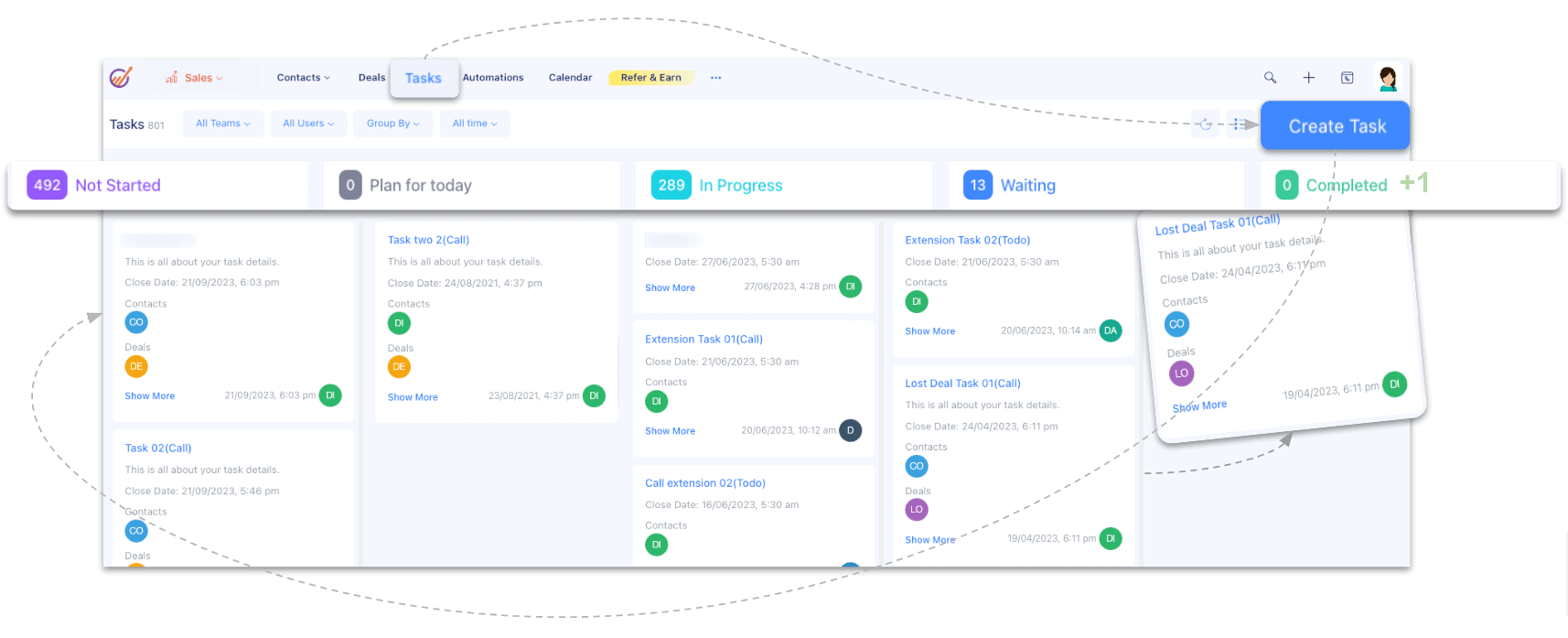
- A centralized dashboard showing all customer interactions in one place
-
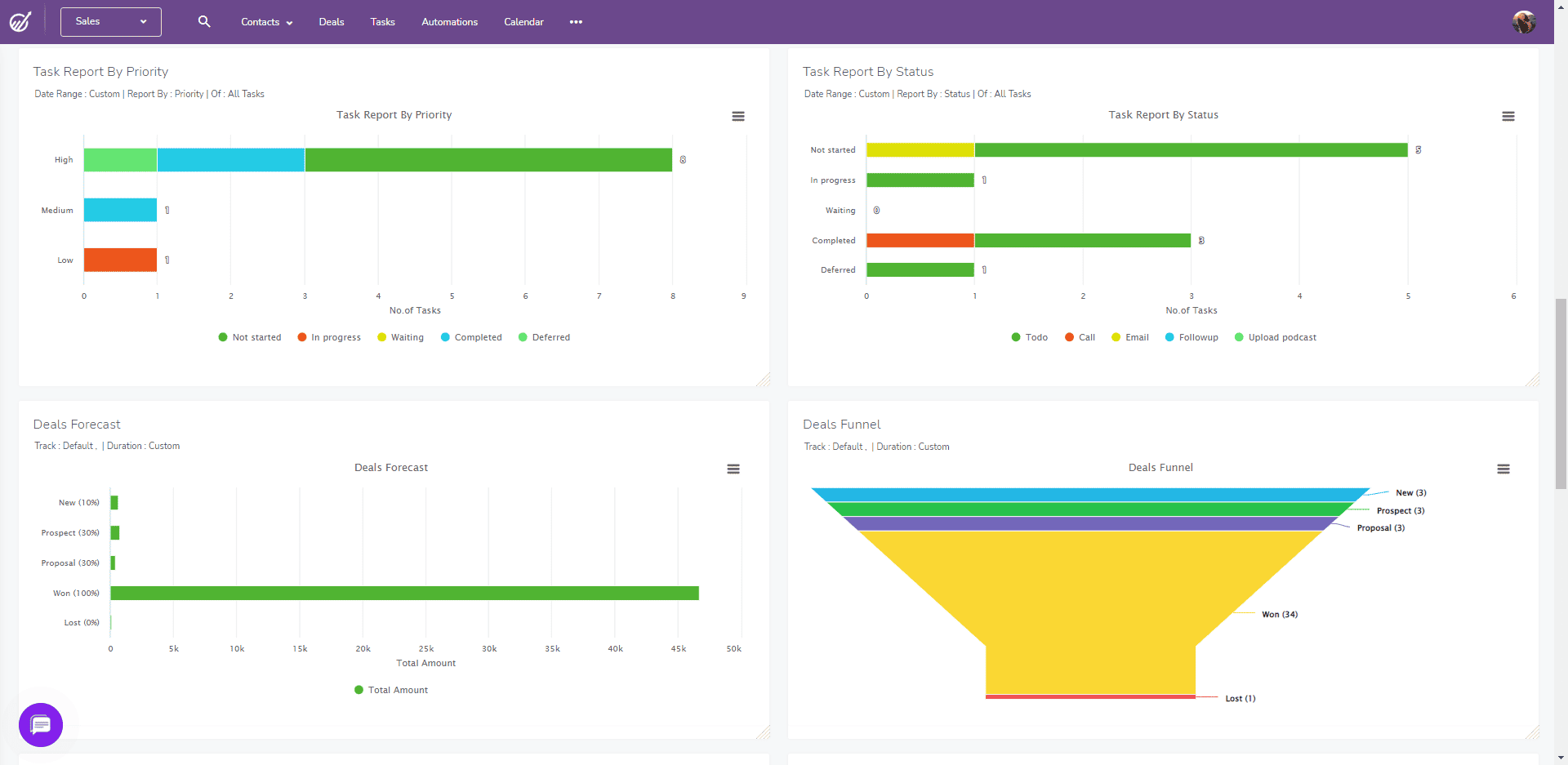
A (customizable) sales dashboard in EngageBay
Final Takeaway
For businesses evaluating HubSpot vs SharpSpring in 2026, EngageBay offers a smarter middle ground. It delivers powerful CRM, automation, and support features without the complexity or high price tag—making it an ideal choice for startups, SMBs, and fast-growing teams that want enterprise-grade functionality without enterprise-level costs.
If affordability, ease of use, and an all-in-one experience matter, EngageBay is the most balanced alternative to both HubSpot and SharpSpring.
Learn more about EngageBay:
Exciting HubSpot Alternatives to Watch out for
Sign up with EngageBay for free
Wrapping Up
Choosing the right CRM in 2026 depends on how much automation depth, reporting sophistication, integration flexibility, and budget control your business needs.
HubSpot is the right choice if you’re looking for a powerful, enterprise-ready CRM with advanced reporting, a massive integrations ecosystem, AI-driven automation, and tools that help sales and marketing teams save time at scale.
It’s best suited for growing or large organizations that can justify higher costs in exchange for deep analytics, robust workflows, and long-term scalability.
SharpSpring (Constant Contact Lead Gen & CRM) works well if a contact-based cost structure and unlimited users are your primary concern and you need a solid marketing automation and sales CRM platform without enterprise complexity — keeping in mind that pricing is now quote-based rather than published.
While it delivers good value, its limited native integrations, simpler reporting, and less intuitive UI can become constraints for larger or more data-driven teams.
EngageBay, however, offers the most balanced alternative. It combines much of HubSpot’s feature depth with the affordability, transparency, and simplicity that SharpSpring users look for—without sacrificing usability or flexibility.
For startups and SMBs, EngageBay delivers advanced automation, CRM, and customer support tools in one easy-to-use platform at a price that’s actually sustainable 😊
Final Recommendation
-
-
- Choose HubSpot if budget is not a limitation and you need enterprise-grade analytics and automation
- Choose SharpSpring if you want a contact-based pricing model and unlimited users, and can live with fewer integrations, simpler reports, and a quote-based pricing process
- Choose EngageBay if you want maximum value, ease of use, and powerful all-in-one functionality without paying enterprise prices
-
If you’re looking for a CRM that grows with you—without growing your costs—EngageBay is the smartest choice in 2026.
Related reading:
- The best CRM Tools for Small Businesses
- The 14 Best CRM Automation Software in 2024
- 15 Best Marketing Automation Tools for Small Businesses
- Is HubSpot Worth It? In-Depth HubSpot Review for Small Businesses
- 9 Affordable SharpSpring Alternatives For SMBs [With Pricing, Features]
Yes, in most standard use cases. HubSpot’s Starter Customer Platform starts at $20/month per seat, with the Professional bundle starting at $1,170/month (5 seats) and Enterprise starting at $4,300/month (7 seats) — plus one-time onboarding fees of $4,500 (Professional) and $12,000 (Enterprise). Constant Contact’s Lead Gen & CRM (formerly SharpSpring) no longer publishes fixed pricing; cost is quoted individually based on your contact volume, though unlimited user seats remain included regardless of team size.
No. Constant Contact offers a free demo and trial period before moving to a paid plan, but it no longer publishes a fixed entry-level price for Lead Gen & CRM — pricing is now quoted individually based on your contact volume after a sales conversation. Unlimited user seats are included regardless of plan size.
HubSpot. Its App Marketplace has grown to nearly 2,000 native integrations spanning marketing, e-commerce, finance, comms, and service tools; connectors install in clicks and are maintained by HubSpot or partners. Constant Contact Lead Gen & CRM leans on Zapier or custom API work, so diverse stacks connect faster through HubSpot.
