
Last updated on 14 August 2026
For nearly every marketer or business owner, inbound marketing and all-in-one CRM bring one name to mind.
HubSpot.
HubSpot is an AI-powered customer platform that unifies marketing, sales, customer service, content management, and operations into a single system; built around a central CRM that gives every team a shared view of the customer journey.
Founded in 2006 by Brian Halligan and Dharmesh Shah at MIT, HubSpot pioneered the concept of inbound marketing and has since evolved into one of the most widely used business platforms in the world, serving companies of all sizes across more than 135 countries.
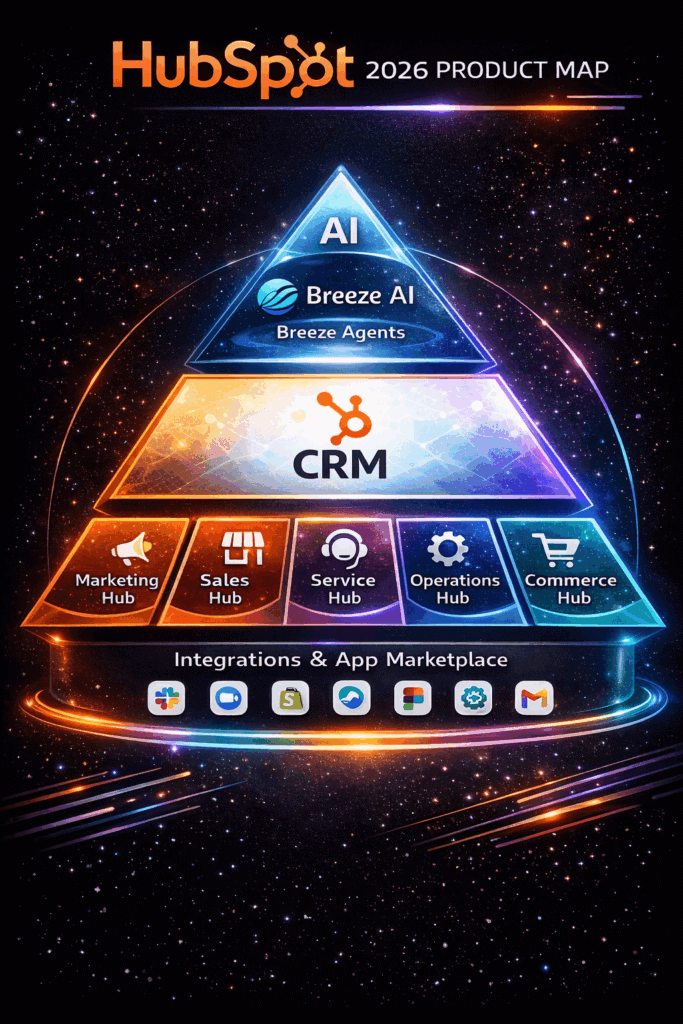
Today, HubSpot organizes its tools into six core product areas called ‘Hubs’ — Marketing, Sales, Service, Content (formerly CMS Hub), Data (formerly Operations Hub), and Revenue (formerly Commerce Hub) — all connected through its Smart CRM at the center.
For many businesses, especially those in the mid-market and enterprise space, HubSpot is a powerful and comprehensive solution. But for small and mid-sized businesses (SMBs), it raises a critical question: is the investment worth it?
In this guide, we’ll give you an honest, plain-English answer to “what is HubSpot” — covering what it does, how it’s priced, who it’s built for, and where it falls short for SMBs. We’ll also look at a more budget-friendly alternative.
Before we dive deeper, here’s a quick 2026 snapshot of how HubSpot compares with two popular CRM alternatives—EngageBay and Zoho CRM.
Table of Contents
What Is HubSpot? The Simple Definition
HubSpot refers to its CRM as the “Smart CRM” — a term it introduced to reflect how the platform now uses AI to enrich, clean, and activate your contact data automatically, rather than relying on manual data entry.
HubSpot is a cloud-based CRM and customer platform that stores every interaction your business has with a contact — emails, calls, website visits, form submissions, and deal history — in one centralized, shared database.
Every Hub (product module) inside HubSpot runs off this shared CRM, meaning your marketing team, sales team, and customer service team all look at the same customer record in real time.
HubSpot’s Six Core Hubs at a Glance
| Hub | What It Does | Best For |
|---|---|---|
| Marketing Hub | Lead generation, email marketing, automation, SEO, ads | Marketing teams |
| Sales Hub | Pipeline management, deal tracking, sequences, forecasting | Sales teams |
| Service Hub | Ticketing, live chat, knowledge base, AI support | Customer service teams |
| Content Hub | Website hosting, page building, CMS, personalization | Marketing / web teams |
| Data Hub | Data sync, workflow automation, data quality, deduplication | RevOps / IT teams |
| Revenue Hub | Quoting, invoicing, subscription billing, payments — quote to cash | Finance / RevOps teams |
All six hubs connect to HubSpot’s Smart CRM, which acts as the shared data layer across the platform.
**Revenue Hub (formerly Commerce Hub) and Data Hub (formerly Operations Hub) were renamed by HubSpot in 2026.
What Is HubSpot Used For?
Businesses use HubSpot to manage the entire customer lifecycle — from the moment a visitor lands on their website to long after they become a paying customer.
Here are the most common use cases:
Attracting new visitors Teams use HubSpot’s blog tools, SEO recommendations, social media scheduling, and paid ads management to drive traffic to their website and grow their audience organically.
Converting visitors into leads HubSpot’s landing page builder, pop-up forms, live chat, and lead capture tools help turn anonymous website visitors into trackable leads stored in the CRM.
Nurturing leads with email marketing Marketing teams set up automated email sequences that send personalized messages based on a lead’s behavior — such as which pages they visited, which forms they filled out, or how long ago they last engaged.
Closing deals faster Sales teams use HubSpot’s pipeline management, email tracking, deal forecasting, and meeting scheduling tools to move prospects through the funnel with less manual work.
Supporting customers after the sale Service teams use HubSpot’s ticketing system, shared inbox, knowledge base, and AI-assisted chatbots to resolve issues faster and improve customer satisfaction scores.
Connecting data across departments Operations teams use HubSpot to sync data between other tools, clean up duplicate records, and build custom reporting dashboards that give leadership a real-time view of business performance. This is where marketing automation plays a big role — reducing the manual work of moving data between systems.
In short, HubSpot is used as a single source of truth that replaces the hodgepodge of disconnected tools many businesses use — removing the need to export spreadsheets or manually sync contacts between platforms.
Who Is HubSpot For?
HubSpot is designed to scale with your business — but it isn’t the right fit for everyone at every stage. Here’s a quick breakdown:
Best suited for:
-
-
- Mid-market to enterprise companies (100+ employees) with mature marketing and sales teams, complex workflows, and the budget to match.
- Marketing-led organizations that rely heavily on inbound content, SEO, and multi-channel automation.
- Teams already using multiple disconnected tools who want to consolidate into one platform.
- Companies with a dedicated HubSpot admin or RevOps function to manage and optimize the platform.
-
Less ideal for:
-
-
- Early-stage startups and small businesses with tight budgets — HubSpot’s Professional and Enterprise tiers can easily cost $20,000–$60,000+ per year.
- Teams that need only one or two features (e.g., just email marketing or just CRM), since HubSpot’s pricing bundles many tools together whether or not you use them.
- Businesses without a technical resource — HubSpot’s more advanced features have a meaningful learning curve, and its onboarding fees at higher tiers can reach $6,000.
-
For SMBs that need the full power of a marketing + sales + service platform without the enterprise price tag, HubSpot alternatives like EngageBay are often a smarter starting point.
How HubSpot Works in Practice
The best way to understand what HubSpot actually does is to follow a single customer from first touch to long-term retention — entirely inside one platform.
In a traditional business setup, marketing uses one tool, sales uses another, and support uses a third.
Someone spends their evenings reconciling spreadsheets, and context gets lost every time a customer moves between departments.
HubSpot replaces that fragmented setup with a single environment where every team reads from and writes to the same customer record — at every stage of the journey.
Here is what that looks like in practice.
Step 1: A Visitor Lands on Your Website
A potential customer finds your blog post through a Google search. HubSpot’s tracking code logs the visit anonymously — which pages they viewed, how long they stayed, where they came from, and which links they clicked.
At this point, they are an unknown visitor. HubSpot is already building their story.
Step 2: They Fill Out a Form and Become a Contact
The visitor downloads a free guide through a HubSpot landing page. The moment they submit the form, a named contact record is created in the Smart CRM — automatically populated with their name, email, company, and every page they visited before converting.
No manual data entry. No CSV import. The contact exists in the system instantly, with full context attached.
Step 3: Marketing Nurtures Them Automatically
Based on which page they converted on, a Marketing Hub workflow enrolls the contact in a relevant email sequence. Over the next two weeks, they receive a series of personalized emails based on their behavior — which emails they opened, which links they clicked, which pages they revisited.
If they open the pricing page twice in three days, HubSpot automatically creates a task for a sales rep to follow up — without any human having to watch for it.
Step 4: The Sales Rep Gets Context, Not Just a Name
When the rep opens the contact record, they do not see a cold lead. They see a complete timeline — every page visit, every email open, every form fill, every link clicked — going back to the first anonymous visit.
They can call, email, schedule a meeting, or send a quote without leaving HubSpot. Every interaction they have is logged automatically to the same record, so nothing is lost if the deal gets handed to a colleague.
Step 5: The Deal Moves Through the Pipeline
As the prospect progresses toward a decision, the deal moves through pipeline stages — either manually by the rep or automatically triggered by contact behavior. The sales manager has a real-time view of the full pipeline with revenue forecasting, without needing to chase anyone for updates.
If the deal stalls, HubSpot can automatically send a re-engagement sequence, flag the deal for review, or reassign the task — all based on rules the team sets once.
Step 6: The Quote Is Created and the Contract Is Closed
Using Revenue Hub, the rep generates a professional, branded quote directly inside HubSpot. The quote pulls in the correct product lines, pricing, and approval workflows without the rep needing to switch to a separate tool.
Once the prospect signs, the contact’s lifecycle stage automatically moves to “Customer.” A handoff task is created for the onboarding or customer success team. The deal is marked closed-won. All of this happens in the same system where the journey started.
Step 7: Support Inherits the Full Commercial Picture
When the new customer opens their first support ticket through Service Hub, the agent does not need to ask “can you remind me what you purchased?” They can see the customer’s full history — what they bought, who sold it, what was promised during the sales process, and every previous interaction — all in the same record the sales rep was working from.
This eliminates the single most frustrating experience in customer service: having to repeat yourself to a team that should already know you.
Step 8: Retention and Growth Run on Autopilot
Thirty days after onboarding, a satisfaction survey goes out automatically. If the score is low, a customer success task is triggered. If the score is high, a referral or upsell sequence begins.
Renewal reminders, check-in emails, and expansion offers all run on pre-built workflows. Leadership has a single dashboard showing marketing ROI, sales conversion rates, customer satisfaction scores, and churn — all pulling from the same database, with no manual reconciliation.
Quick Answers
Q: Is HubSpot CRM really free?
A: Yes, HubSpot offers a free‐forever tier with 20‑plus tools (contact management, email marketing, live chat, basic dashboards, etc.). However, advanced reporting, automation workflows, and removal of HubSpot branding are locked behind paid plans—so most growing teams upgrade sooner rather than later.
Q: Which core hubs make up the HubSpot CRM Suite?
A: The suite bundles five hubs—Marketing, Sales, Service, CMS, and Operations—under one login. Each hub can be bought separately, but the all‑in‑one CRM plan unlocks every tool for campaign automation, content hosting, ticketing, analytics, and data sync in a single dashboard.
Q: What’s a strong alternative to HubSpot for small businesses?
A: EngageBay provides comparable all‑in‑one marketing, sales, and service tools but starts at $0 (free plan) and scales to just $101.99 per user on its top Pro tier—without onboarding fees or seat‑based surcharges—making it budget‑friendly for startups and SMBs.
The Bottom Line
This is what makes HubSpot more than a CRM. It is a connected system where the same customer record travels with the customer through every department — marketing, sales, service, and finance — without ever being recreated, re-imported, or lost in a handoff.
For businesses that have experienced the cost of that context loss firsthand, this continuity is HubSpot’s most compelling selling point.
For SMBs weighing whether the platform justifies its price, it is also the most important question to ask: does your current setup lose context between teams?
If the answer is yes, a connected platform like HubSpot — or a more affordable alternative like EngageBay — is almost certainly worth the investment.
Is HubSpot CRM Free to Use?
Uhmmm…this question is a tough nut to crack. And a single-word answer wouldn’t do it justice.
Let’s walk through HubSpot’s free plans to help you get the full picture.
HubSpot’s free CRM software allows you to use up to 23 free features such as ad management, email marketing, list segmentation, contact management, ticketing, deal pipeline, and app marketplace integrations.
The functionality of HubSpot can be further extended through its rich ecosystem of HubSpot-certified apps, such as SuperJoin (a HubSpot and Google Sheets integration app), which further enhances its capabilities.
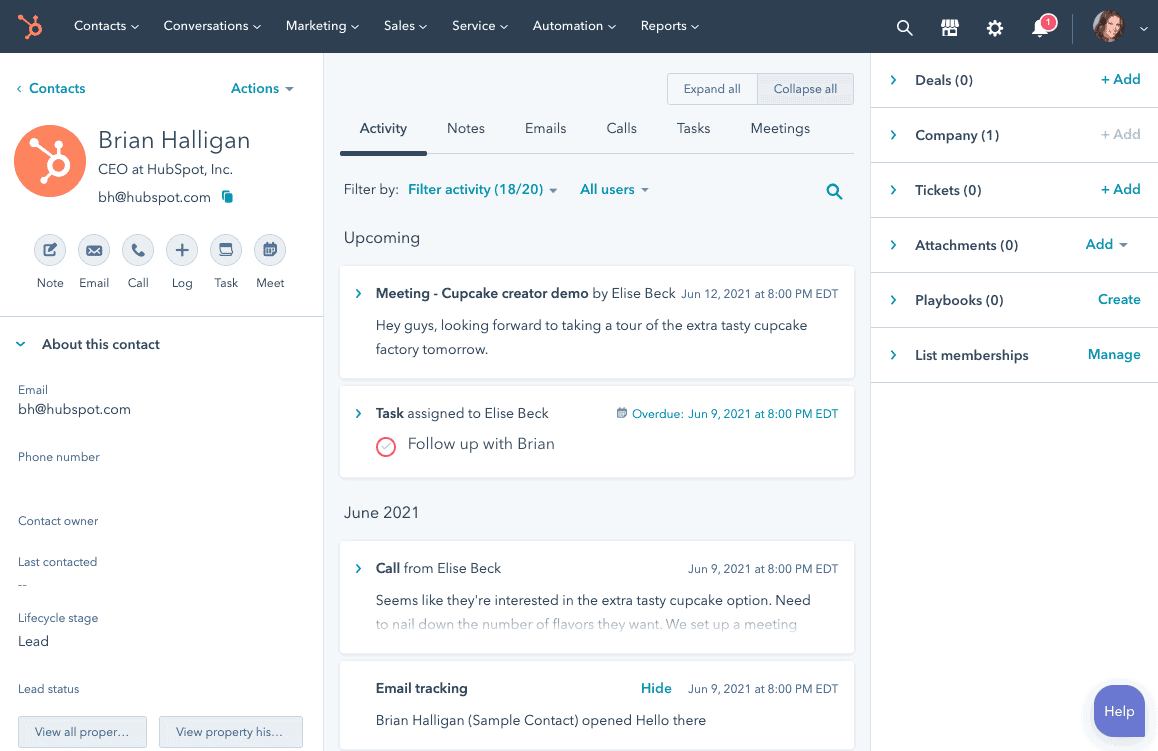
On its standalone solutions such as the HubSpot all‑in‑one marketing hub, you also have access to any of these free features relevant to each hub.
But that’s where the good news ends.
While these features are free, they have considerable limitations.
An example is HubSpot’s built-in reporting—a critical tool for every business.
On the free plan, you only have access to basic analytics. With insufficient data, optimizing your processes and scaling your business becomes an uphill battle.
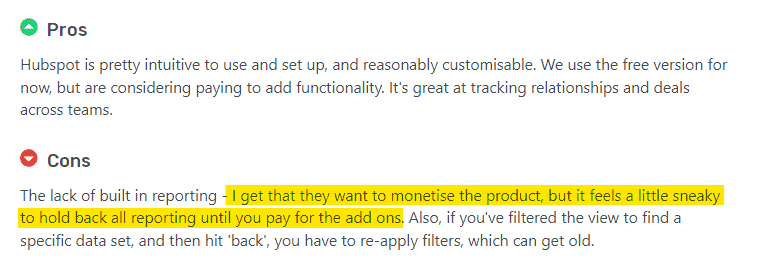
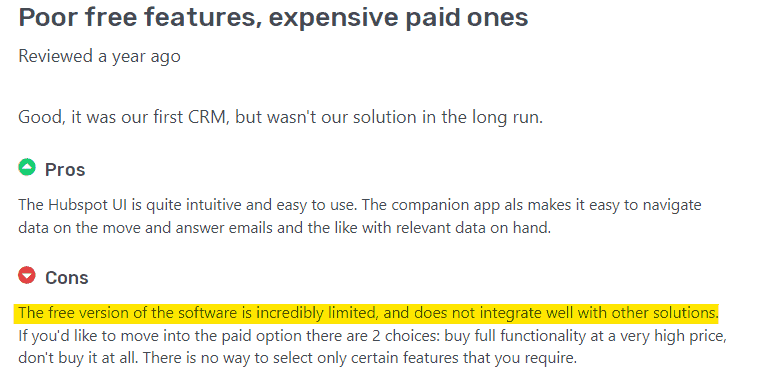
So even though you might start out free, you need to upgrade to a paid plan for better functionality of these essential features.
Read also: Is HubSpot CRM Truly Free? An Unbiased Guide (with User Reviews)
Modern HubSpot Features Powered by AI (2026 Update)
HubSpot has steadily evolved from a traditional CRM into an AI-assisted revenue platform.
In 2026, many of its core capabilities are now augmented with AI to reduce manual work, improve decision-making, and personalize customer experiences at scale.
Key AI-powered features include:
Breeze AI Agents for Automated Workflows
HubSpot’s Breeze AI agents help automate routine CRM workflows such as task assignment, follow-ups, pipeline updates, and content generation—reducing operational overhead for sales and marketing teams.
Predictive Lead Scoring & AI-Assisted Sales Insights
AI models analyze historical deal data, engagement signals, and behavioral patterns to predict which leads are most likely to convert—helping sales teams prioritize high-intent prospects more effectively.
AI-Driven Customer Segmentation & Personalization
HubSpot uses AI to dynamically segment contacts based on behavior, lifecycle stage, and engagement patterns, enabling more personalized email campaigns, on-site experiences, and sales outreach.
AI Content Generation for Marketing & Sales Teams
Built-in AI tools assist with generating email copy, landing page content, ad variations, and blog drafts—speeding up campaign execution while maintaining brand consistency.
Conversation Intelligence & AI Email Insights
AI analyzes emails, chats, and sales conversations to surface intent signals, suggest responses, and identify deal risks or opportunities earlier in the funnel.
Predictive Reporting & Forecasting
AI-assisted analytics help teams forecast revenue, spot pipeline bottlenecks, and identify performance trends without deep manual analysis.
HubSpot AEO (Answer Engine Optimization)
Launched at HubSpot’s Spring 2026 Spotlight, HubSpot AEO helps marketing teams track and optimize how their brand appears in AI-powered answer engines like ChatGPT, Gemini, and Perplexity. It directly addresses a trend HubSpot disclosed publicly: organic traffic for its customers was down 27% year-over-year as of early 2026, while AI referral traffic has roughly tripled — and converts at higher rates.
These AI features are designed to enhance productivity rather than replace human decision-making—making HubSpot more accessible to SMBs while still supporting complex enterprise workflows.
HubSpot 2026 UI Redesign
In 2026, HubSpot launched a two-phase redesign of its entire platform interface. The first phase, a visual refresh with lighter typography and cleaner spacing, is live now and becomes mandatory for all customers by August 31, 2026.
The second phase is a deeper Breeze AI-first reimagining of CRM record pages and dashboards, rolling out over the following months. For existing HubSpot users, this means a changed interface on login, AI-prioritized dashboards, and more proactive Breeze suggestions surfaced directly inside contact and deal records.
HubSpot Paid Plans & Pricing
HubSpot’s paid offerings are structured around two core models: individual hubs (Sales, Marketing, Service, CMS, Operations) and the bundled Customer Platform (often referred to as the all-in-one CRM suite).
The all-in-one Customer Platform bundles multiple hubs into a single subscription, but costs scale quickly as you unlock advanced automation, AI features, and higher usage limits.
In 2026, moving from HubSpot’s free tools to a Professional-level Customer Platform setup can easily exceed $4,000–$5,000 per month, depending on the number of hubs, seats, and contacts.
That puts the annual spend north of $50,000–$60,000, before accounting for add-ons, additional contacts, or mandatory onboarding fees that often apply to higher-tier plans.
For many small and mid-sized businesses, a $60,000+ annual CRM commitment isn’t a minor upgrade—it’s a major operational investment that needs to be justified by scale, complexity, and long-term growth plans.
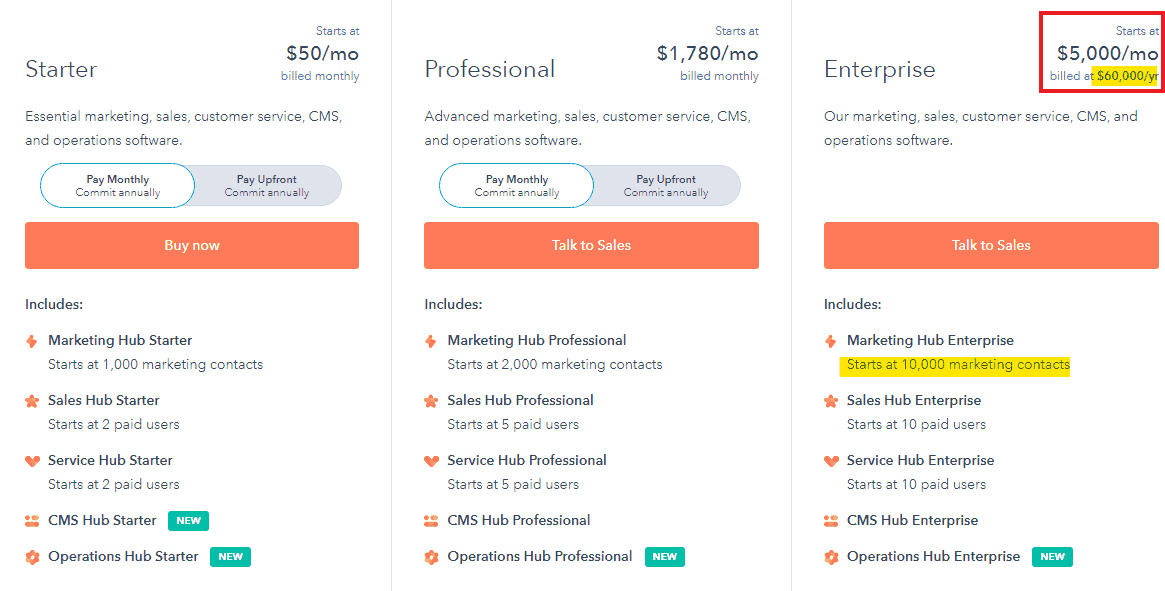
How about you opt for a single hub? Well, you’ll pay a lower but still substantial amount.
A hub is a system within a CRM suite that caters to specific processes.
These systems can function independently of others. For example, EngageBay’s Marketing Bay, CRM & Sales Bay, and Service Bay are equivalents of hubs.
There are 5 hubs within HubSpot’s CRM suite. Let’s briefly look at each one, its pricing plan, and its functionalities.
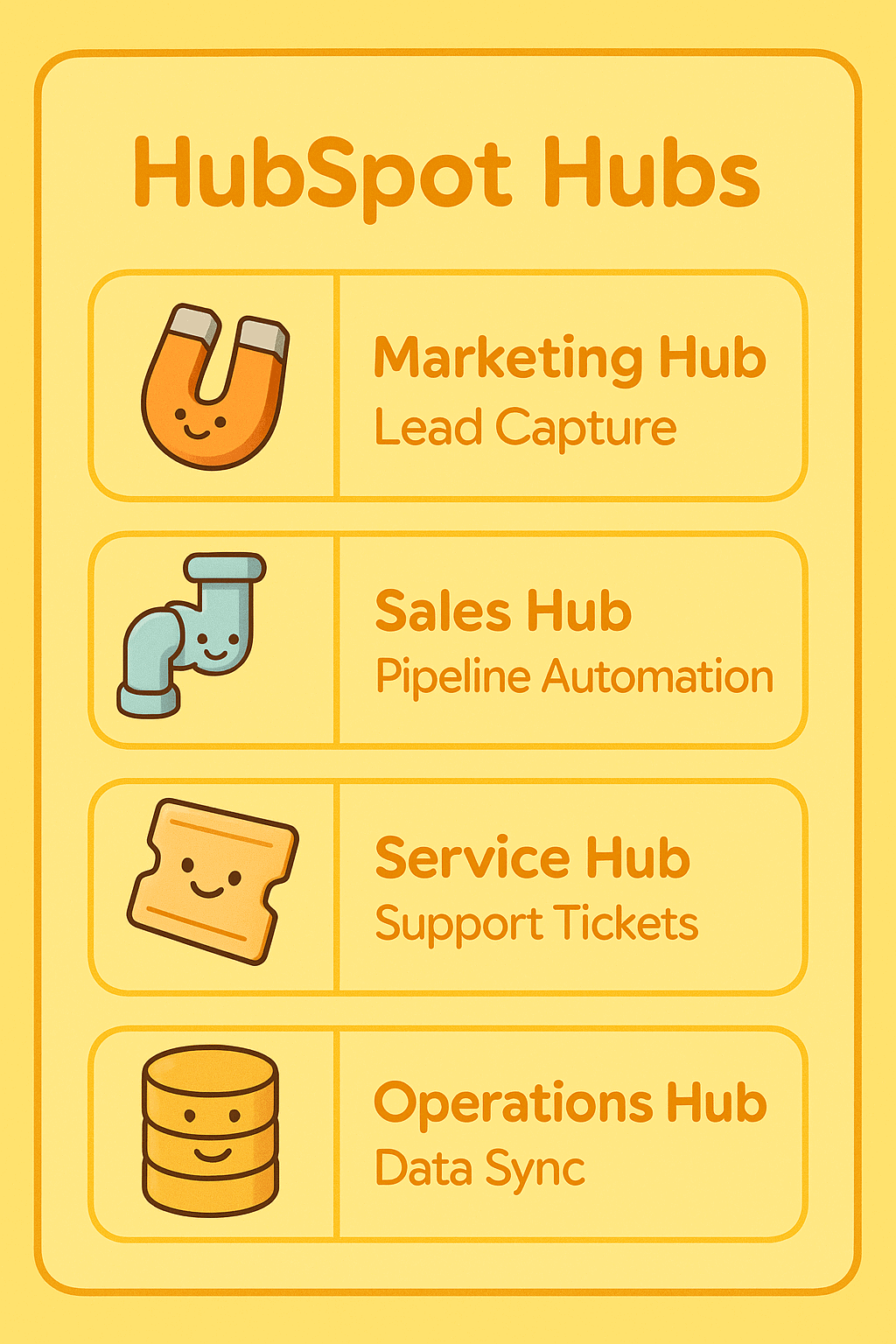
HubSpot Marketing Hub
The HubSpot all‑in‑one marketing software provides marketing tools businesses need to attract visitors, convert leads, and generate reports.
Notable features in HubSpot’s marketing hub include tools for content creation, SEO, ads management, social media management, landing page builder, marketing automation, multi-touch revenue attribution, and reporting & analytics.
HubSpot Marketing Hub Pricing
HubSpot Marketing Hub is available across three paid tiers—Starter, Professional, and Enterprise—with pricing primarily driven by marketing contacts, feature access, and required onboarding at higher tiers.
Marketing Hub Starter (2026)
Marketing Hub Starter typically starts around $20–$50 per month, depending on how it’s bundled, and includes approximately 1,000 marketing contacts. This tier unlocks basic email marketing, forms, and reporting beyond the free tools, but remains limited in automation and customization.
Best for: Solopreneurs and very small teams running simple campaigns.
Marketing Hub Professional (2026)
Marketing Hub Professional is where advanced automation and AI-assisted marketing features begin. Pricing generally starts around $800–$900 per month, including ~2,000 marketing contacts, with costs increasing as contact volume scales.
This tier includes everything in Starter, plus:
-
-
-
Advanced workflows and automation
-
Campaign management
-
Deeper reporting and attribution
-
AI-powered content and optimization tools
-
-
A mandatory one-time onboarding fee, typically around $3,000, is usually required.
Estimated annual cost:
-
-
-
Subscription: ~$10,000–$11,000/year
-
Onboarding (one-time): ~$3,000
-
-
Total first-year spend: $13,000–$14,000+, excluding additional contacts.
Marketing Hub Enterprise (2026)
Marketing Hub Enterprise is built for large, distributed teams and complex marketing operations.
Pricing typically starts around $3,200–$3,600 per month when billed annually, with ~10,000 marketing contacts included and support for up to 300 teams.
In addition to Professional features, Enterprise adds:
-
-
-
Advanced permissions and governance
-
Custom objects and reporting
-
Predictive lead scoring and AI insights
-
Higher scalability and compliance controls
-
-
A mandatory onboarding fee, often around $6,000, applies at this level.
Estimated annual cost:
-
-
-
Subscription: ~$38,000–$43,000/year
-
Onboarding (one-time): ~$6,000
-
-
Total first-year spend: $44,000–$49,000+, before add-ons or contact overages.
When Does This Hub Make Sense?
Worth it when marketing is generating demand consistently and someone owns it full-time. Underused when marketing is still sporadic or untargeted.
Why this matters for 2026 buyers
While HubSpot’s Marketing Hub is powerful, costs increase rapidly as teams grow, automation needs expand, or contact databases scale.
For SMBs, the jump from Starter to Professional isn’t incremental—it’s a step-change in annual spend that should be evaluated carefully against expected ROI.
HubSpot Sales Hub
The sales hub allows sales teams to track leads and prospects, optimize sales processes, and close more deals.
Popular features include email templates & tracking, conversation intelligence, live chat, pipeline management tool, sales automation, sales analytics & reporting dashboards.
HubSpot Sales Hub Pricing
HubSpot Sales Hub is offered across three tiers—Starter, Professional, and Enterprise—with pricing primarily influenced by paid seats, automation access, and required onboarding at higher levels.
Sales Hub Starter (2026)
Sales Hub Starter typically begins around $20–$50 per month, depending on bundling, and includes up to 2 paid sales users.
This tier removes many limitations of the free CRM and unlocks basic sales tools such as email tracking, meeting scheduling, and simple reporting.
Best for: Very small sales teams running lightweight pipelines without automation needs.
Sales Hub Professional (2026)
Sales Hub Professional is where automation, forecasting, and advanced sales workflows become available.
Pricing generally starts around $500–$600 per month, which includes approximately 5 paid users, with additional seats available at extra cost.
This tier includes:
-
-
-
Sales automation and workflows
-
Advanced reporting and analytics
-
Deal and pipeline personalization
-
CPQ (quotes, pricing, and product libraries)
-
AI-assisted sales insights and forecasting
-
Priority technical support
-
-
A mandatory one-time onboarding fee, typically around $375, is commonly required.
Estimated annual cost:
-
-
-
Subscription: ~$6,000–$7,200/year
-
Onboarding (one-time): ~$375
-
-
Total first-year spend: $6,400–$7,600+, excluding additional users.
Sales Hub Enterprise (2026)
Sales Hub Enterprise is designed for larger sales organizations that require advanced governance and customization.
Pricing typically starts around $1,200–$1,500 per month when billed annually, with around 10 paid users included.
In addition to Professional features, Enterprise adds:
-
-
-
Advanced permissions and team partitioning
-
Custom objects and extensibility
-
Predictive lead scoring and AI-driven insights
-
Enhanced reporting and compliance controls
-
-
A mandatory onboarding fee, often around $3,000, applies at this tier.
Estimated annual cost:
-
-
-
Subscription: ~$14,000–$18,000/year
-
Onboarding (one-time): ~$3,000
-
-
Total first-year spend: $17,000–$21,000+, before adding extra seats or hubs.
When Does This Hub Make Sense?
Delivers value when the pipeline is defined, deal volume has outgrown spreadsheets, and follow-up needs to be standardized. The free CRM tools may suffice for a solo rep with light volume.
Why this matters in 2026
While HubSpot Sales Hub scales well for growing teams, costs rise quickly as automation, AI features, and user counts increase.
The jump from Starter to Professional—and again to Enterprise—represents a significant increase in annual CRM spend, especially for SMBs evaluating long-term ROI.
HubSpot Customer Service Hub
HubSpot Service Hub is built for customer support and success teams and includes tools for omnichannel communication, ticketing, automation, self-service, and AI-assisted support workflows.
Core features include shared inboxes, live chat and chatbots, automation, knowledge bases, reporting, and customer portals.
Service Hub Starter (2026)
Service Hub Starter typically starts around $20–$50 per month, depending on how it’s bundled, and expands on HubSpot’s free service tools. This tier unlocks essential support capabilities such as:
-
-
-
Shared inbox and ticketing
-
Live chat and basic conversational bots
-
Email templates and canned snippets
-
Calling features and basic ticket automation
-
-
Best for: Small teams handling low to moderate support volume without advanced automation needs.
Service Hub Professional (2026)
Service Hub Professional introduces advanced automation, analytics, and self-service tools.
Pricing generally starts around $450–$500 per month, with costs increasing as features and usage scale.
This tier includes everything in Starter, plus:
-
-
-
Help desk workflows and advanced automation
-
Knowledge base and customer self-service portal
-
Customer experience and service analytics
-
AI-assisted ticket routing and insights
-
-
A mandatory one-time onboarding fee, typically around $375, is commonly required.
Estimated annual cost:
-
-
-
Subscription: ~$5,400–$6,000/year
-
Onboarding (one-time): ~$375
-
-
Total first-year spend: $5,800–$6,400+, excluding add-ons.
Service Hub Enterprise (2026)
Service Hub Enterprise is designed for larger support organizations that need scale, governance, and advanced reporting. Pricing typically starts around $1,200–$1,500 per month when billed annually.
In addition to Professional features, Enterprise adds:
-
-
-
Advanced permissions and team partitioning
-
Custom objects and extensible workflows
-
Predictive support insights and AI-driven reporting
-
Higher scalability and compliance controls
-
-
A mandatory one-time onboarding fee, often around $3,000, applies at this tier.
Estimated annual cost:
-
-
-
Subscription: ~$14,000–$18,000/year
-
Onboarding (one-time): ~$3,000
-
-
Total first-year spend: $17,000–$21,000+, before adding extra users or hubs.
When Does This Hub Make Sense?
Becomes essential when support volume has grown beyond a shared inbox, SLAs exist, or retention is a revenue metric. Over-engineered at paid tiers for occasional, informal support.
Why this matters in 2026
HubSpot Service Hub offers a strong, tightly integrated support experience—but costs rise sharply as teams move beyond basic ticketing into automation, analytics, and AI-assisted service workflows.
For SMBs, the upgrade from Starter to Professional represents a significant step-change in annual spend, making ROI evaluation essential.
 Not happy with HubSpot? Take a look at our blog post introducing the top HubSpot competitors.
HubSpot CMS Hub
HubSpot CMS Hub provides content and website management tools for building, hosting, and optimizing websites.
Core capabilities include managed hosting, drag-and-drop page editing, built-in security, SEO recommendations, contact attribution reporting, and native payment support.
CMS Hub Starter (2026)
CMS Hub Starter typically starts around $20–$25 per month, depending on bundling.
This tier includes premium website hosting with CDN, SSL security, basic page and blog creation tools, forms, live chat, and standard performance reporting.
Estimated annual cost:
-
-
-
Subscription: ~$240–$300/year
-
-
Best for: Small businesses and simple marketing sites that don’t require personalization or advanced optimization.
CMS Hub Professional (2026)
CMS Hub Professional unlocks personalization, optimization, and deeper reporting features. Pricing generally starts around $400–$450 per month when billed annually.
In addition to Starter features, Professional includes:
-
-
-
Dynamic content and personalization
-
Advanced SEO tools and Google Search Console integration
-
Custom user and team permissions
-
Enhanced contact attribution and reporting
-
-
Estimated annual cost:
-
-
-
Subscription: ~$4,800–$5,400/year
-
-
Best for: Growing marketing teams focused on lead generation and conversion optimization.
CMS Hub Enterprise (2026)
CMS Hub Enterprise is designed for organizations managing complex websites and multiple teams.
Pricing typically starts around $1,200–$1,500 per month when billed annually.
Along with Professional features, Enterprise adds:
-
-
-
Single sign-on (SSO)
-
Site performance monitoring and governance controls
-
Adaptive testing and advanced optimization
-
Web apps and extensibility for custom experiences
-
-
Estimated annual cost:
-
-
-
Subscription: ~$14,000–$18,000/year
-
-
Best for: Large teams and enterprises requiring scalability, security, and advanced site governance.
When Does This Hub Make Sense?
Makes sense when the website and blog are active acquisition channels and marketing needs to publish without a developer. Less justified for a mostly static brochure site.
Why this matters in 2026
While HubSpot CMS Hub offers a tightly integrated content and CRM experience, costs increase sharply as teams move from basic site hosting to personalization, optimization, and enterprise-grade controls.
For SMBs, the jump from Starter to Professional represents a significant annual spend increase that should be evaluated against traffic volume, conversion goals, and in-house technical needs.
HubSpot Data Hub (formerly Operations Hub)
HubSpot renamed Operations Hub to Data Hub in 2026, reflecting its expanded role as the central data layer connecting all other hubs.
HubSpot Data Hub is designed to help businesses unify data, automate processes, and keep systems in sync across the CRM.
Core capabilities include data sync across apps, data quality automation, programmable workflows, custom process automation, and advanced reporting.
Data Hub Starter (2026)
Data Hub Starter typically starts around $45–$50 per month, depending on bundling.
This tier builds on HubSpot’s free CRM and introduces foundational data and operations tools such as:
-
-
-
Two-way customer data sync
-
Reporting dashboards and list segmentation
-
Multiple currency support
-
Email and in-app support
-
-
Estimated annual cost:
-
-
-
Subscription: ~$540–$600/year
-
-
Best for: Small teams needing basic data cleanup and simple system synchronization.
Data Hub Professional (2026)
Data Hub Professional unlocks programmable automation and deeper customization.
Pricing generally starts around $750–$850 per month, with usage-based scaling for more advanced operations.
In addition to Starter features, Professional includes:
-
-
-
Programmable automation and workflow extensions
-
Record customization and advanced data properties
-
Standard customer scoring
-
Webhooks and API-based automation
-
Custom report builder enhancements
-
-
Estimated annual cost:
-
-
-
Subscription: ~$9,000–$10,200/year
-
-
Best for: Growing businesses with multiple tools and complex internal workflows.
Data Hub Enterprise (2026)
Data Hub Enterprise is built for organizations with sophisticated data and process requirements.
Pricing typically starts around $2,000–$2,200 per month when billed annually.
Along with Professional features, Enterprise adds:
-
-
-
Advanced data governance and permissions
-
Scalable custom process automation
-
Large-volume data sync and transformation
-
Enhanced reporting, controls, and extensibility
-
-
Estimated annual cost:
-
-
-
Subscription: ~$24,000–$26,000/year
-
-
Best for: Mid-market and enterprise teams managing complex systems, integrations, and data integrity at scale.
When Does This Hub Make Sense?
The right choice when multiple tools aren’t syncing, data quality is hurting decisions, or programmable automation is needed beyond standard workflows.
Why this matters in 2026
Data Hub delivers powerful backend automation, but costs rise quickly as businesses move beyond basic data sync into programmable workflows and large-scale process automation.
For SMBs, the jump from Starter to Professional represents a significant increase in annual spend, making it essential to assess whether these operational gains justify the investment.
HubSpot Revenue Hub (formerly Commerce Hub)
HubSpot renamed Commerce Hub to Revenue Hub in June 2026, reflecting its expanded scope to cover the full revenue cycle — from quoting and invoicing through subscription billing and payment processing.
HubSpot Revenue Hub is designed to help businesses close the financial loop inside the CRM, connecting every quote, invoice, and payment directly to the relevant contact and deal record — eliminating the need for a separate billing tool.
Core capabilities include quote creation, invoice generation, subscription and recurring billing, payment collection, automated sales tax calculation, and financing options for buyers.
Revenue Hub Professional (2026)
Revenue Hub Professional is the entry point for teams that need to manage quoting, billing, and payments inside HubSpot.
Pricing generally starts around ~$95 per month, depending on bundling and usage.
This tier includes:
- Quote creation with locked templates and approval workflows
- Subscription and recurring billing management
- Invoice generation and online payment collection
- Automated sales tax calculation
- Financing options for buyers
- Native connection to deal and contact records in the Smart CRM
Estimated annual cost:
- Subscription: ~$1,140/year
Best for: Growing businesses where quoting and billing are part of the sales cycle and who want to manage the full quote-to-cash process without switching to a separate billing or ERP system.
Revenue Hub Enterprise (2026)
Revenue Hub Enterprise is built for larger organizations that need advanced governance, customization, and scale across their revenue operations.
Pricing typically starts around ~$140 per month when billed annually.
Along with Professional features, Enterprise adds:
- Advanced permissions and revenue workflow governance
- Custom objects and extensibility across the revenue cycle
- Higher scalability for complex billing and subscription models
- Enhanced reporting and compliance controls
Estimated annual cost:
- Subscription: ~$1,680/year
Best for: Mid-market and enterprise teams managing complex quoting, billing, and subscription revenue at scale within HubSpot.
When Does This Hub Make Sense?
Revenue Hub earns its place when quoting, invoicing, and billing are active parts of your sales cycle and the back-and-forth between your CRM and a separate billing tool is costing your team time and creating data gaps. If your billing is already handled cleanly by a dedicated ERP or accounting platform and the integration works well, weigh that switching cost carefully before adding another paid hub to your stack.
Why this matters in 2026
Revenue Hub represents a significant evolution of what HubSpot can do — moving the platform beyond CRM and marketing into the full financial cycle of a business. For teams already using HubSpot for sales and service, keeping quoting and billing inside the same system removes a major handoff point and keeps all revenue data connected to the same customer record.
For SMBs evaluating Revenue Hub, the Professional tier is an accessible entry point — but it is worth assessing whether your current billing setup already handles these workflows before adding another paid hub to your stack.
Read also: HubSpot vs MailChimp — A Complete Product Comparison
HubSpot’s Seat-Based Pricing Model: What You Need to Know
Based on the above information, you might already have guessed that HubSpot is quite expensive.
How would you feel if I told you HubSpot’s new pricing changes indirectly makes the software even more expensive?
Let’s get started.
HubSpot now uses a seat-based pricing model for all users; introduced in March 2024 and fully in effect across all plans, which distinguishes between two types of user access:
-
-
- The two new seats: Core seats and View-Only seats.
- The View-Only seat does not offer any edit access. All plans offer unlimited free View-Only seats. The Core Seat offers users edit access to all the features in their subscriptions.
- The free edit-access seats that HubSpot was offering previously no longer exist – they are now the paid ‘Core Seats’. This means that those who enjoyed having free edit access previously should now purchase at least a Core seat to continue editing (or do away with a View-Only seat).
- The Sales & Service seat offers core seat capabilities as well as extra features for sales and service.
-
This table can help you understand the new pricing updates further:
| User requirement | Previous pricing structure | New pricing structure |
| Users requiring view-only access to reports, records, and other data | Included in the free plan | Now offered in the free, View-Only seat |
| Users requiring edit access to records and reports, email tracking, and other editable tasks | Included in the free plan | Now offered in the paid, Core seat |
| Users requiring sales and service-specific features | Dedicated Sales and Service seat | Dedicated Sales and Service seat |
HubSpot Pricing Decoded: What They Don’t Want You to Know
2026 Updated Pricing Comparison
Even though HubSpot offers a powerful and mature CRM ecosystem, pricing behavior and scale economics vary significantly across platforms.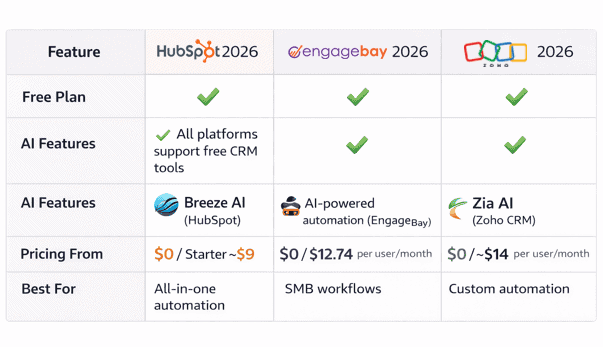
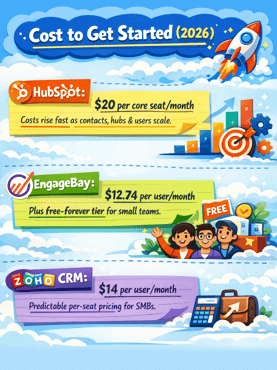
Cost to Get Started (2026)
-
-
-
HubSpot:
HubSpot’s Starter Customer Platform typically starts around $20 per core seat/month, but total costs increase quickly as contacts, hubs, and users scale—especially once marketing features are added. -
EngageBay:
EngageBay continues to offer one of the lowest entry points in the market, with its Basic plan starting at $12.74 per user/month, plus a free-forever tier for small teams. -
Zoho CRM:
Zoho’s Standard plan starts at approximately $14 per user/month, maintaining a predictable per-seat pricing model attractive to SMBs.
-
-
Automation Unlock Point
-
-
-
HubSpot:
Advanced workflow automation, predictive tools, and AI-assisted processes are largely gated behind Professional tiers, which typically begin around $800–$900/month across hubs. -
EngageBay:
Multi-channel automation becomes available at the Growth plan ($55.24 per user/month), with basic automation triggers available even on the Free plan. -
Zoho CRM:
Zoho introduces advanced automation features (Blueprints, orchestration) at the Professional tier (~$23 per user/month)—one of the lowest automation entry points in the market.
-
-
Hidden Fees & Branding Considerations
-
-
-
HubSpot:
HubSpot often requires mandatory onboarding fees (commonly ranging from $1,500 to $7,000+) for Professional and Enterprise plans. Free tools also retain HubSpot branding. -
EngageBay & Zoho CRM:
Neither platform enforces mandatory onboarding fees, and branding is removed once you move to a paid plan, keeping total ownership costs more predictable.
-
-
Free-Tier User Limits
-
-
-
HubSpot Free: Limited to 2 users
-
Zoho CRM Free: Supports up to 3 users
-
EngageBay Free: Allows up to 15 users, making it notably flexible for lean or cross-functional teams
-
-
Best-Fit Snapshot (2026)
-
-
-
HubSpot → Best suited for mid-market to enterprise teams heavily invested in inbound marketing, with budgets that can absorb contact-based and hub-based pricing.
-
EngageBay → A strong all-in-one sales, marketing, and support platform for startups and SMBs seeking predictable pricing
(Basic: $12.74 | Growth: $55.24 | Pro: $101.99) -
Zoho CRM → Ideal for cost-conscious growing businesses that value customization and per-user pricing over bundled marketing depth.
-
-
Why Is HubSpot CRM So Expensive for SMBs?
First off, HubSpot’s suite of tools can serve organizations with up to 300 teams.
This makes it ideal for larger businesses. That said, it’s no surprise that their pricing plan reflects this targeting, even if you’re on their lowest-paid package.
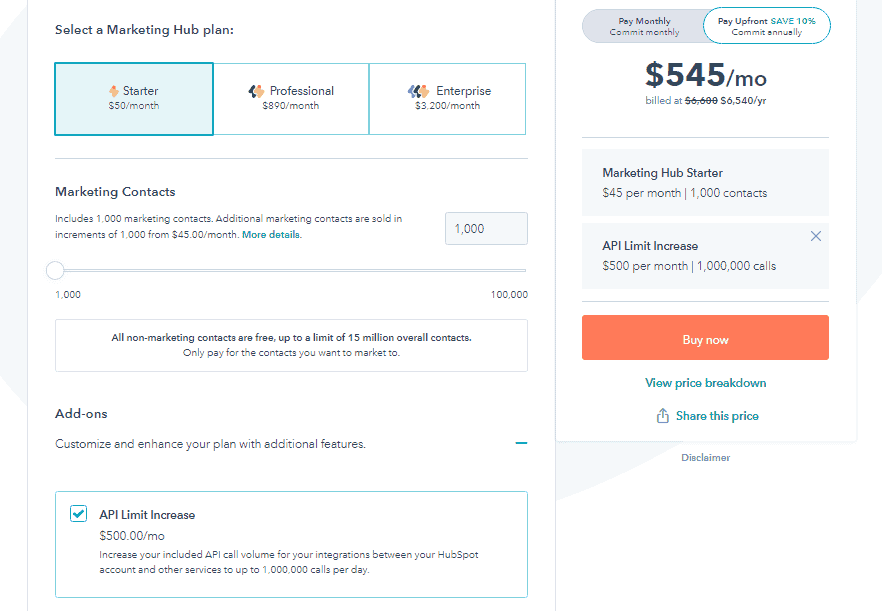
Besides the plans, add-ons follow the same route and can quickly result in huge bills.
Say you’re using the starter package, which costs $50, and you decide to get a little functionality boost.
The only API limit increase available for this level costs $500. That’s 10x higher than the initial plan.
Let that sink in for a second.
Of course, large companies with higher needs and bigger budgets can afford these astronomical fees and justify their use.
But for startups and small businesses with limited resources, using the HubSpot CRM platform requires lots of thought because of the hefty price tags. This results in the big question …
Read also: HubSpot vs SharpSpring — A Side-by-Side Comparison of Key Features
Is HubSpot Worth The Money For Small Businesses?
To understand if HubSpot is a good choice for your small business, there are three main factors to consider:
Your Business Needs
The value of CRM software depends on how well it meets your business needs.
Carefully evaluate your immediate and future needs against the features in HubSpot.
Does it fit into your processes?
Does it support your overall marketing goals and objectives?
Is it scalable?
Also, what is HubSpot used for?
It’s important to know that while the HubSpot CRM platform has some cool features, critical tools that you’ll need in the future are likely locked away in more expensive plans that cost at least 1,000% more than their starter plans.
Here’s what a customer says about this:
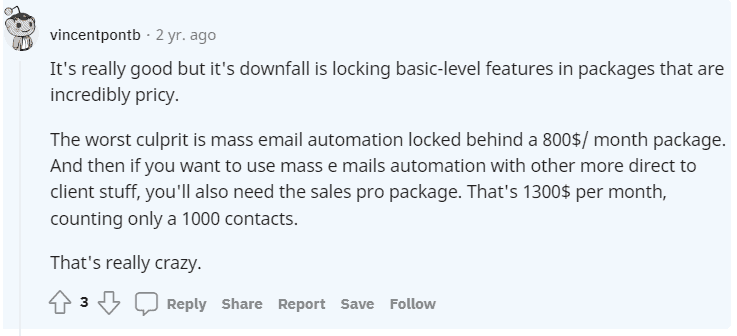
This was two years ago. Today, the outlook is still the same.
Read also: 9 CRM Best Practices for Small to Large-scale Businesses
Your CRM Budget
How much do you want to invest in a CRM? Your budget goes beyond the monthly/yearly cost of the software.
You need to factor in implementation costs, future upgrades, add-ons, and integrations.
For a clearer view of what HubSpot might cost you, imagine you want to create sequences.
To do this, you’ll have to choose the PRO VERSION within the CRM suite.
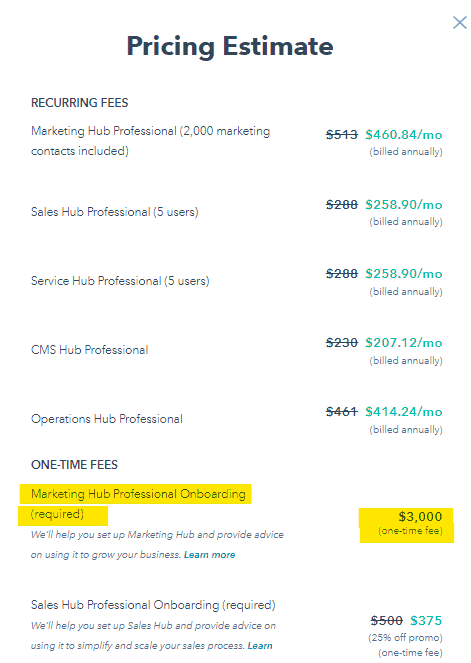

A simple breakdown:
-
-
- Depending on the discount offered, this plan = $1,600
- Billed annually, we have= $19,200
- Add a combined one-time HubSpot onboarding fee= $3,750
- You’ll have to cough up $22,950
-
That’s a huge bill that’s out of reach of many small businesses.
As such, you’ll have better chances with other tools that offer these HubSpot CRM features for a fraction of the cost.
For example, on EngageBay, you can create a limited number of email sequences for free!
Technical Support
There’s only so much that free help guides and tutorials can cover.
To get quality help for your CRM implementation success, you need specialized training and support that aligns with your processes.
Most software like EngageBay that targets small businesses offers extra functionality like email & chat support in the free CRM, free onboarding, and more.
But in the HubSpot CRM platform, you won’t have that support in the free tools.
Also, getting implementation guidance is tricky as onboarding fees can get up to $6,000 in most plans.
If, after evaluating these factors, HubSpot isn’t exactly what you’re looking for, below is a powerful alternative worth checking out.
Read also: 9 Challenges of CRM Implementation & How to Dust Them Off
What is a Great HubSpot Alternative for SMBs?
Like HubSpot, EngageBay is an all-in-one CRM platform with tools that can transform your digital marketing, sales, and customer service.
EngageBay Vs HubSpot – Which is Better for CRM?
However, what makes it an excellent choice for SMBs is its affordable pricing, powerful features, flexible plan, and exceptional customer service.
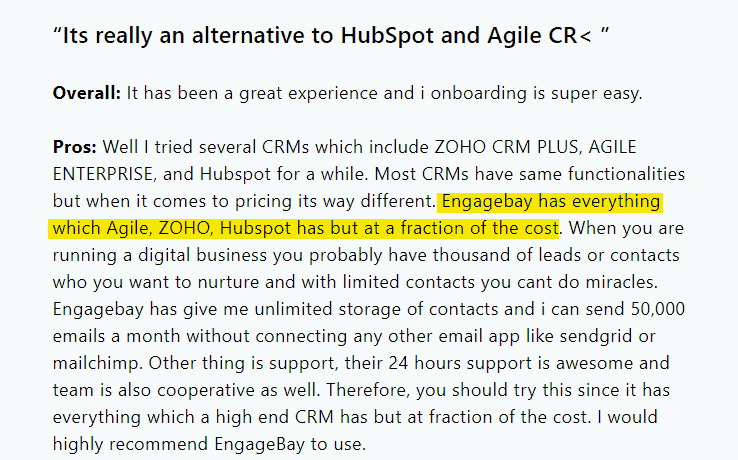
Here’s a closer look at what makes EngageBay a prime choice:
Affordable Pricing Plans
EngageBay pricing plans are a match made in heaven for SMBs.
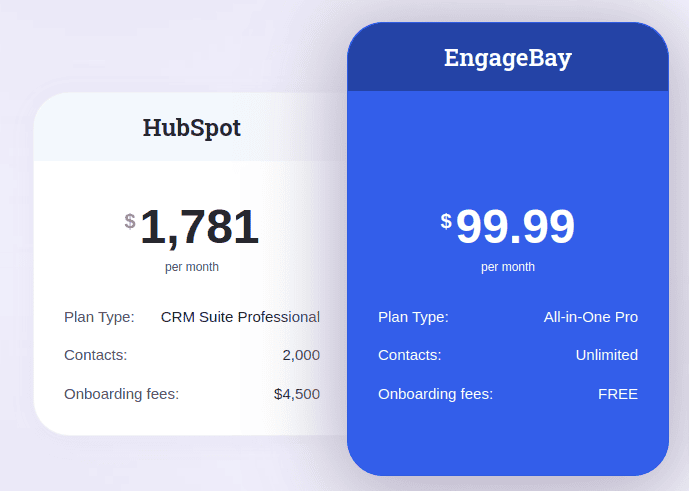
Source: HubSpot vs EngageBay
You can start at $0 on the free plan and get additional features for as low as $12.74/month (biennially) in the all-in-one CRM basic plan.
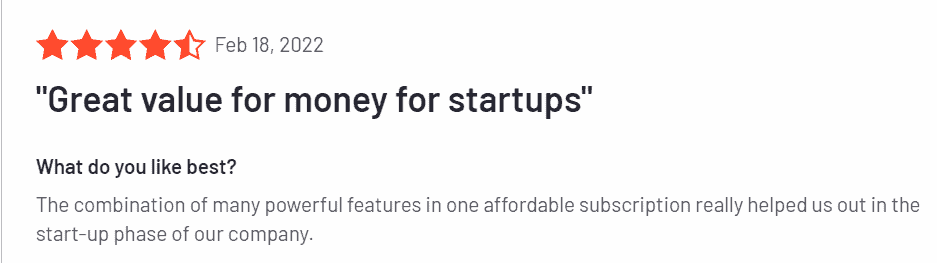
As your business grows, you can advance to the growth package from $55.24/month for comparative features in the HubSpot Pro plan.
The highest package, which gives you access to all the features you need plus a dedicated account manager, costs $101.99/month only.
You’ll scarcely find any HubSpot alternatives that offers such functionality at this friendly pricing.
EngageBay also offers 10% off on all yearly plans and 20% off on biennial plans.
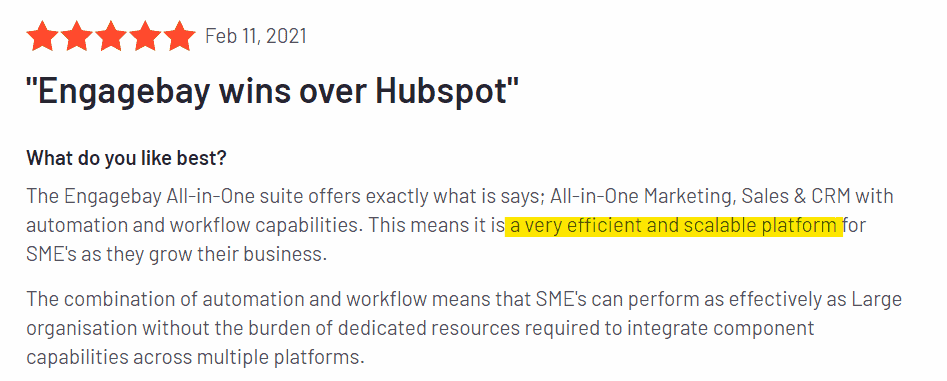
Rich Functionality
EngageBay has an impressive arsenal of tools for SMBs.
From the free CRM tool, you get lots of features like email marketing to 500 contacts, live chat, email sequences, landing pages, 360-degree contact view, lead grabbers, and autoresponders.
The basic plan comes with additional features like SMS marketing, ticketing management, a social suite, web pop-ups, canned responses, and group management.
You’ll also get 1000 contacts, 3000 branded emails, and an SSL for your landing pages.

For the Growth package, you’ll have access to A/B testing, marketing automation, push notifications, proposals, call reports, and more.
Finally, the Pro EngageBay plan not only comes with advanced functionality of what exists but adds role management, conversational inbox, role management, web analytics, etc.
These are highlights. To know what tools are available for your business, check out EngageBay’s extensive features for free & paid plans.
Read also: HubSpot vs Keap — Is HubSpot Really a Better Product?
Easy To Use
A common scenario: You buy a CRM, try setting it up, and find out it’s as complex as navigating a spaceship.
This leaves you no choice but to waste huge amounts of time setting up simple tasks or spend lots of money on onboarding.
That’s not the case in EngageBay.
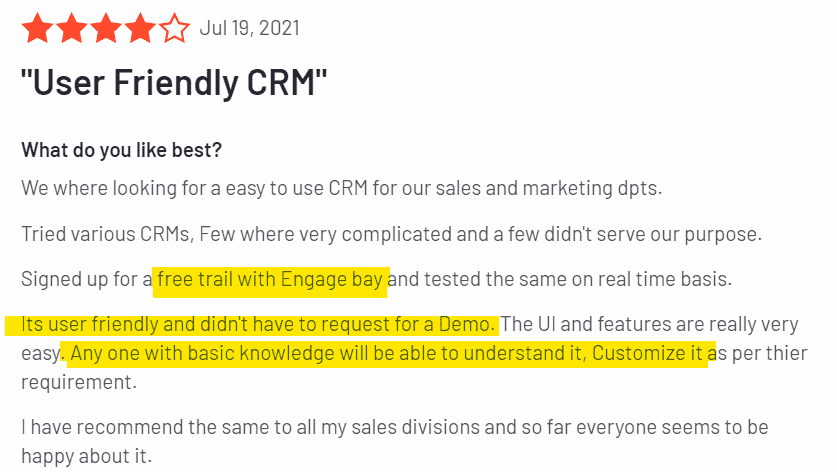
Our software is intuitive and super easy to use whether you’re a seasoned marketer or a beginner.
In fact, each feature and bay is designed to help you perform tasks in just a few clicks.
You Aren’t Locked Into Annual Contracts
Flexible pricing is the way forward, and we’re here to help. Regardless of which plan you choose, you have access to monthly and yearly plans.
There’s no mandatory annual commitment.
You can use EngageBay for as many months as you like and cancel anytime.
Read more: 8 Fantastic HubSpot Alternatives for Small Businesses (Features, Pricing)
Responsive Customer Support Team
Run into a snag? Our customer support team is always available to offer technical support.
It doesn’t matter if you’re not using a paid plan. All EngageBay users can get help from our email or chat support to solve from the simplest issues to complex ones.
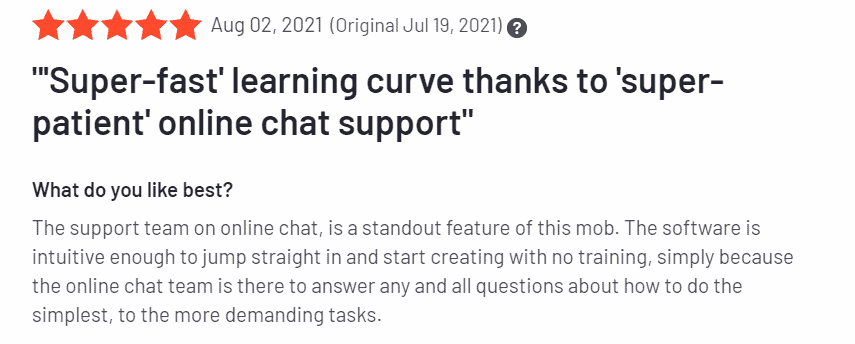
If you’re looking for highly specialized assistance beyond these options, you can also get a dedicated account manager in the pro plan.
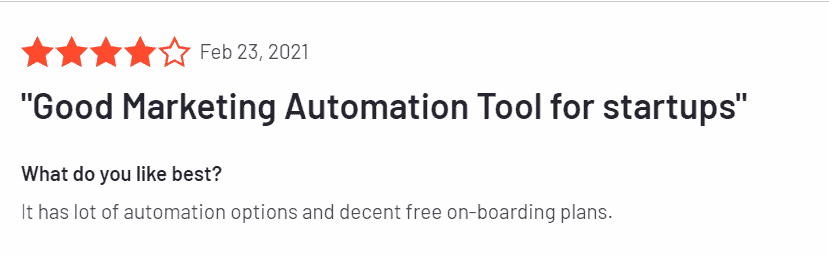
Are you looking to see what EngageBay offers? You can sign up for a free trial; no credit card is required.
What’s more? If you eventually commit to any package after the trial, we offer free onboarding that saves you thousands of dollars.
Marketing Madness: HubSpot vs EngageBay Face‑Off!
Learn more about EngageBay:
Sign up with EngageBay for free
Wrap Up: What Is HubSpot and Is It Right for You?
HubSpot is one of the most powerful and comprehensive business platforms available today.
Its Smart CRM, five connected hubs, and expanding AI capabilities make it a genuinely impressive system — particularly for mid-market and enterprise teams with complex marketing and sales operations.
But “powerful” and “right for you” are two different things.
For small and growing businesses, HubSpot’s pricing structure can become a significant constraint. For a deeper look, see the full pros and cons of HubSpot.
The free tools come with meaningful limitations, and the jump from free to Professional-tier features represents a step-change in annual spend, often reaching $22,950 or more once onboarding fees are included, and significantly more for enterprise packages.
If your business is ready to make that investment and you have the team to manage the platform, HubSpot can deliver real ROI.
But if you need the same core features — marketing automation, CRM, email marketing, live chat, ticketing, and reporting — at a fraction of the cost, there are alternatives worth exploring.
EngageBay is one such alternative. Built specifically for SMBs, it offers comparable all-in-one functionality starting at $0 on the free plan, with paid plans beginning at just $12.74 per user/month.
Unlike HubSpot, there are no mandatory onboarding fees, no annual lock-in, and support is available to all users — including free plan users, via email and chat.
If you’d like to see how EngageBay compares to HubSpot for your specific business size and needs, sign up for free — no credit card required.
Related reading:
- The best CRM Tools for Small Businesses
- The 14 Best CRM Automation Software in 2024
- 15 Best Marketing Automation Tools for Small Businesses
- Is HubSpot Worth It? In-Depth Review for Small Businesses
Q: Why does HubSpot get pricey as you grow?
A: HubSpot’s paid tiers charge per “core seat” and by the size of your contact list, plus one‑time onboarding fees on most Professional and Enterprise packages. Add‑ons (like additional API calls or reporting modules) can quickly multiply the bill, pushing annual costs well past $20K for even mid‑sized teams.
A: The free tier caps you at 1,000 marketing contacts, limits dashboards to basic metrics, imposes HubSpot branding on forms and emails, offers no workflow automation, and restricts support to community forums. Those constraints can hamper scaling efforts once your pipeline or email volume grows.
Q: What is HubSpot Revenue Hub?
A: Revenue Hub (formerly Commerce Hub, renamed June 2026) is HubSpot’s product for managing the full financial cycle inside the CRM — quoting, invoicing, subscription billing, and payment collection. It starts at the Professional tier (~$95/month) and links every transaction to the relevant contact and deal record in the Smart CRM.
Q: What is HubSpot Data Hub?
A: Data Hub (formerly Operations Hub, renamed in 2026) is HubSpot’s data and integration layer — handling two-way sync between HubSpot and other tools, programmable automation, data quality cleanup, and deduplication. It’s the hub most valued by RevOps teams managing complex multi-tool stacks.
Q: What is the HubSpot 2026 redesign?
A: HubSpot launched a two-phase platform redesign in 2026. Phase one is a visual refresh that becomes mandatory for all customers by August 31, 2026. Phase two, rolling out over the following months, is a Breeze AI-first reimagining of CRM record pages and dashboards with smarter, proactive recommendations surfaced in daily workflows.
Q: How many hubs does HubSpot have in 2026?
A: HubSpot now has six core hubs: Marketing Hub, Sales Hub, Service Hub, Content Hub (formerly CMS Hub), Data Hub (formerly Operations Hub), and Revenue Hub (formerly Commerce Hub). Each can be purchased individually or bundled in the HubSpot Customer Platform.
