
Last updated on 13 August 2026
HubSpot offers a “free forever” CRM—but is HubSpot actually free in 2026?
Quick Answer
Yes, HubSpot CRM is genuinely free forever. But “free” has a ceiling, and most growing teams hit it faster than they expect.
On the free plan you get basic contact management, email tracking, a single deal pipeline, and up to 2,000 email sends per month. Automation, custom reporting, branding removal, and AI features all require paid upgrades.
This guide breaks down every limit, every hidden cost, and exactly when HubSpot stops being free in practice.
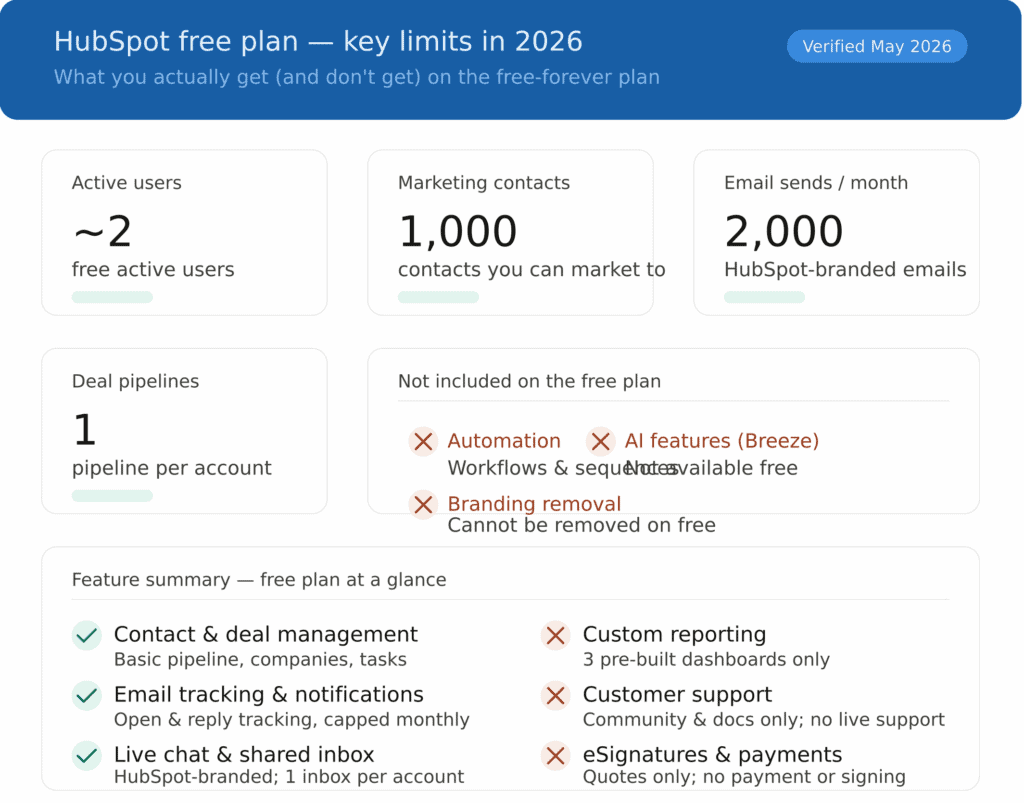
At-a-Glance: HubSpot Free Plan Limits (2026)
| Feature / Capability | Free Plan Status |
|---|---|
| Users | ✅ ~2 active users |
| Marketing contacts | ✅ ~1,000 |
| Website pages | ✅ 30 website pages included (with branding) |
| Blog posts | ✅ 100 blog posts included |
| Email sends per month | ✅ ~2,000 (HubSpot-branded) |
| Deal pipelines | ✅ 1 pipeline |
| Email templates | ✅ Up to 5 |
| Email tracking | ✅ 200 tracking notifications/month |
| Email Systems Support | ✅ Gmail, Outlook, and Exchange supported |
| AI features (Breeze AI) | ✅ Breeze Assistant exists in limited form on free |
| Automation / workflows | ❌ Not included |
| Branding removal | ❌ Cannot be removed |
| Custom reporting | ❌ Basic dashboards only |
| Customer support | ❌ Community & knowledge base only |
| eSignatures / payments | ❌ Not included |
Source: HubSpot Product & Services Catalog, 2026. Verify current figures at hubspot.com/pricing.
TL;DR — Is HubSpot Free Worth It in 2026?
-
-
- ✅ Strong starting point — Ideal for solo users and tiny teams who need basic contact management, deal tracking, email tracking, and live chat with no upfront cost.
- ✅ Genuinely free forever — No trial expiry. The free plan doesn’t disappear.
- ⚠️ Limits appear fast — Most teams hit the contact, email, or branding limits within weeks of real use.
- ❌ No automation on free — Workflows and sequences are locked behind paid plans.
- ❌ No support on free — You’re on your own with community forums and documentation.
- ❌ Costs jump steeply — Moving to Professional can push annual costs into five figures.
-
Who Is This Guide For?
This guide is for you if:
-
-
- You’re evaluating HubSpot for the first time and want to know what “free” actually means
- You’re already on the free plan and wondering when you’ll need to pay
- You’re comparing HubSpot with other CRM options and want an honest cost picture
-
What You Actually Get With HubSpot Free (2026)
Before we talk limits, here’s what the free plan genuinely does include — and does well.
Core CRM (Free)
-
-
- ✅ Contact and company management (up to ~1,000 marketing contacts)
- ✅ Deal tracking with basic pipeline customization
- ✅ Shared inbox for team email conversations
- ✅ HubSpot-branded live chat and messaging
- ✅ Email tracking and open notifications (capped usage)
- ✅ Basic reporting dashboard (up to 10 dashboards, 50 reports each)
- ✅ Standard contact and deal properties
- ✅ User access controls and team email connection
- ✅ Mobile CRM apps (iOS & Android)
- ✅ Basic event tracking and simple automation triggers
- ✅ Meeting scheduling with one personalized booking link
- ✅ Basic Slack integration for deal and activity alerts
-
Sales Hub (Free)
-
-
- ✅ Single deal pipeline per account
- ✅ Basic deal stages and task tracking
- ✅ Email scheduling
- ✅ Up to 3 email templates and 3 canned snippets
- ✅ Up to 5 HubSpot-branded sales documents
- ✅ Quote creation (no eSignature, payments, or Stripe support)
-
Marketing Hub (Free)
-
-
- ✅ Forms including pop-ups (up to ~10,000 total submissions)
- ✅ Email marketing up to ~2,000 sends/month (HubSpot-branded)
- ✅ Up to 30 simple landing pages on HubSpot subdomains
- ✅ Basic list segmentation (up to 5 active lists, 1,000 static lists)
- ✅ One automated follow-up email per form submission
- ✅ Ad management across 2 connected accounts (Google, Facebook, LinkedIn)
- ✅ Ad retargeting with tracked spend up to ~$1,000
-
Advanced analytics, AI insights, custom objects, automation workflows, A/B testing, and branding removal are all available only on paid plans.
Note: This a detailed guide — it’ll take some time to read through it. If you want a quick overview instead, watch Megan Grant’s video decoding HubSpot’s free plan.
Let’s get into it.
Table of Contents
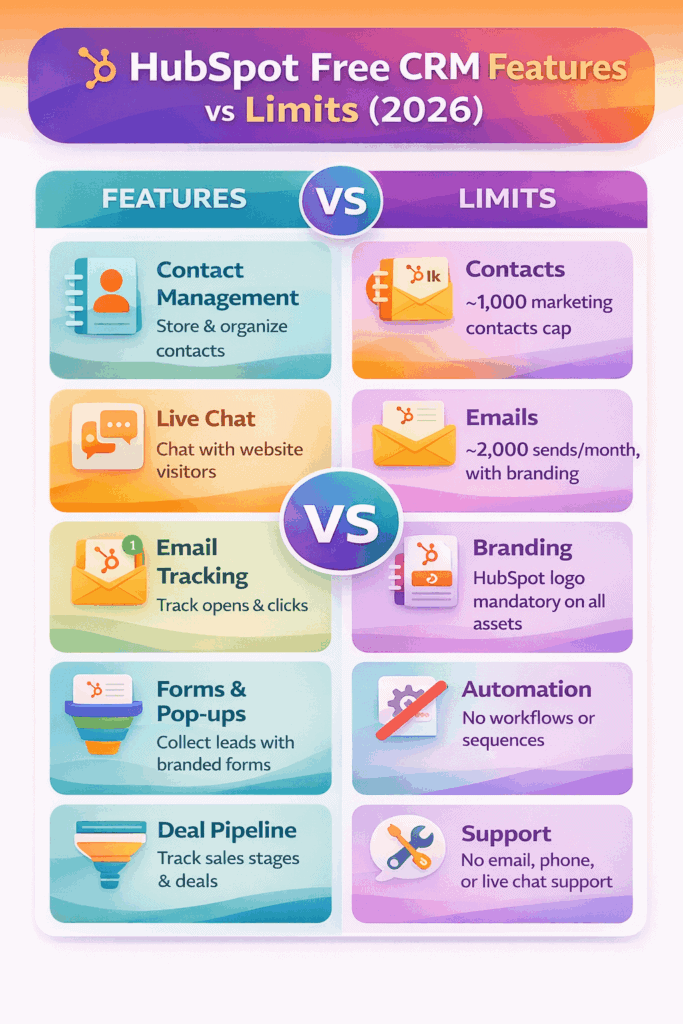
Key Limitations of HubSpot Free CRM (2026)
HubSpot’s free plan is one of the most generous free CRMs on the market — but these are the constraints that push most teams toward paid plans.
1. Marketing Contacts Are Capped at ~1,000
Many older guides claim you can store 1,000,000 contacts for free. That applied to older accounts. For newer accounts in 2026, the practical marketing contact limit is around 1,000 — meaning you can store more contacts internally, but you can only actively market to ~1,000 without upgrading.
Once you exceed that limit and move to a paid Marketing Hub plan, HubSpot charges based on the number of marketing contacts. More contacts = higher cost, and the jumps are steep.
2. No Automation — At All
Workflows, email sequences, and automated follow-ups are not included on the free plan. Every follow-up has to be done manually. For small teams with a handful of contacts, this is manageable. For anyone running sales outreach or nurturing campaigns at any meaningful volume, the manual work piles up fast.
3. HubSpot Branding Cannot Be Removed
Every email you send, every chat widget that appears on your site, every form, every landing page — all carry mandatory HubSpot branding on the free plan. For teams where customer-facing professionalism matters, this is often the first reason to upgrade.
4. Support Is Self-Service Only
HubSpot does not offer live chat, email support, or phone access to free plan users. You get the Knowledge Base, HubSpot Academy, and community forums. That’s fine when everything works. When something breaks or you need setup help, resolution can be slow.
5. Custom Reporting Is Not Included
The free plan gives you 3 dashboards with up to 10 reports each — all pre-built. There’s no custom reporting, no funnel analytics, no attribution data, and no forecasting. For teams making decisions based on data, this gap becomes obvious quickly.
6. The Seat Model Changes Who Can Edit
HubSpot now uses a tiered seat structure: View-Only seats (free, read-only), Core seats (paid, editing access), and Sales/Service Hub seats (paid, full feature access). Many editing rights that used to be available on the free plan now require at least a paid Core seat. As your team grows and people need to do more than just view data, seat costs add up.
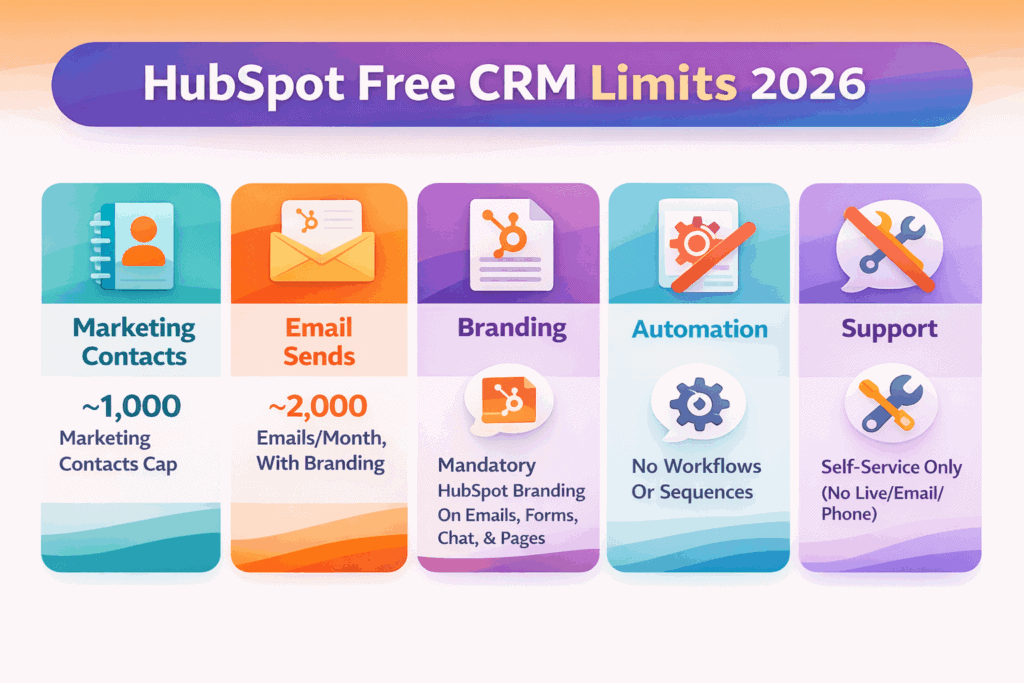
HubSpot Free: Key Limits at a Glance (2026)
| Feature / Capability | Free Plan Limitation |
|---|---|
| Marketing contacts | ~1,000 contacts eligible for active marketing |
| Automation | No workflows or sequences — requires paid plan |
| Branding | HubSpot branding on all emails, forms, chat, pages |
| Custom reporting | Basic pre-built dashboards only; no custom reports |
| Customer support | Community, Academy, and knowledge base only |
| Email templates & snippets | Limited to 3 each |
| Document storage | Up to 5 HubSpot-branded docs |
| Deal pipelines | 1 pipeline only |
| Seat editing access | Many edit rights require paid Core seat |
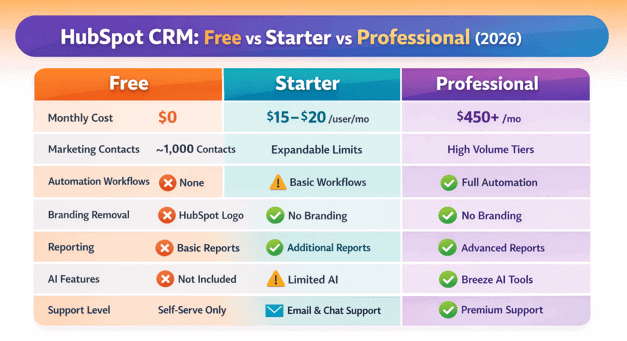
HubSpot Free vs Starter vs Professional (2026)
| Feature | Free | Starter | Professional |
|---|---|---|---|
| Monthly cost | $0 | ~$15–$20/user | ~$450+/month |
| Users | ~2 active | Paid seats | Multiple seats |
| Marketing contacts | ~1,000 | Starts at 1,000 | Expandable |
| Automation | ❌ | Limited | ✅ |
| Branding removed | ❌ | ✅ | ✅ |
| Custom reporting | ❌ | Limited | ✅ |
| AI features (Breeze) | Limited | Limited | ✅ |
| Customer support | ❌ Community only | ✅ Email, chat, phone | ✅ Priority |
| eSignatures / Payments | ❌ | ❌ | ✅ |
The practical difference: Free helps you start. Starter helps you operate. Professional helps you scale.
The moment branding removal, basic automation, or higher usage limits become necessary — which happens sooner than most expect — most teams move to Starter.
The Story Behind HubSpot’s Free CRM Plan
HubSpot is now one of the most recognizable names in CRM—but its “free” model didn’t start as generosity.
It evolved as a deliberate go-to-market strategy designed to acquire the right kind of customers and convert them over time.
In the mid-2000s, the CRM market was already crowded. Enterprise giants like Salesforce, SAP, Oracle, Siebel, and PeopleSoft dominated a multi-billion-dollar space, selling long contracts through demos and sales-heavy onboarding. HubSpot wasn’t part of that conversation yet.
In its early days, HubSpot followed the same playbook “Schedule a demo”; and quickly realized it wasn’t working.
Friction was high, adoption was slow, and prospects wanted to experience the product before committing.
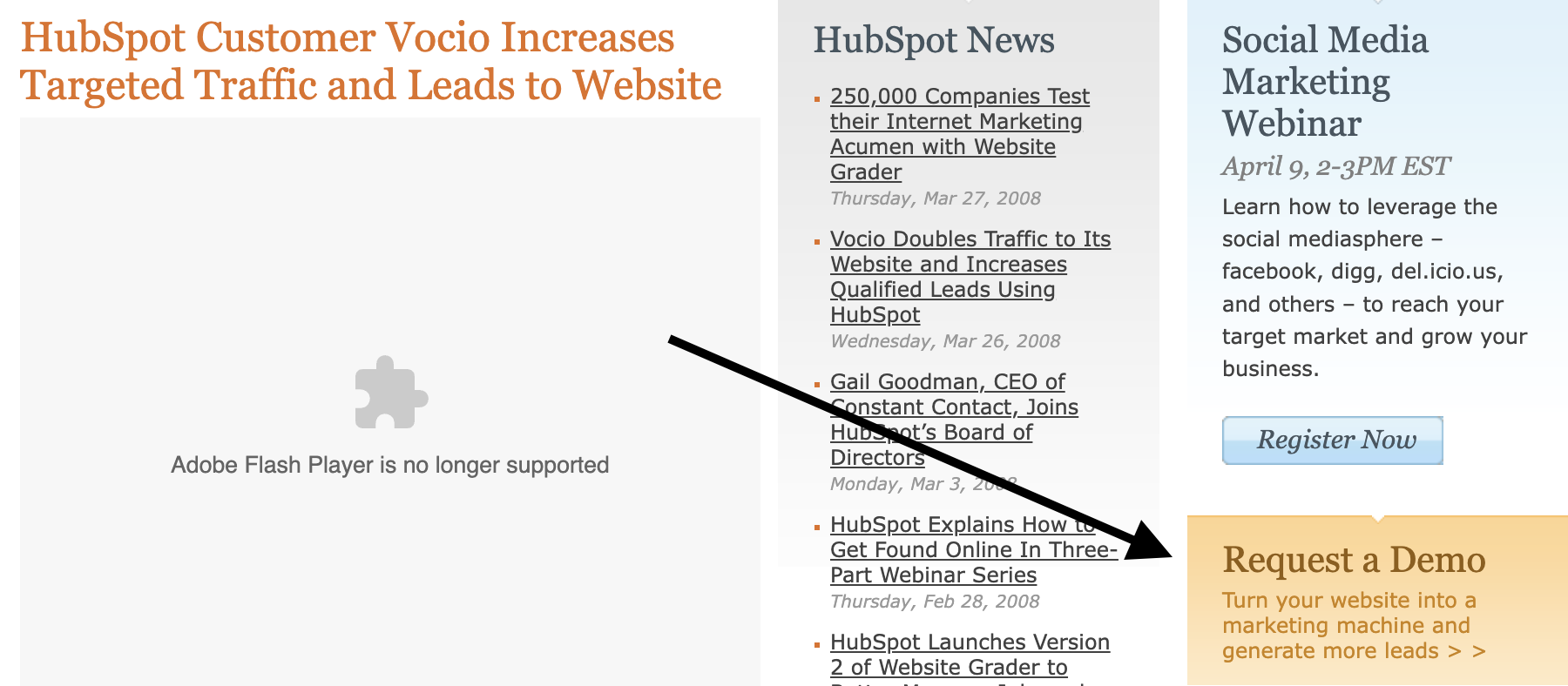
Because the “schedule a demo” lead generation approach wasn’t very effective, HubSpot decided to spice things up in 2009 by asking prospects to try HubSpot free for 7 days.
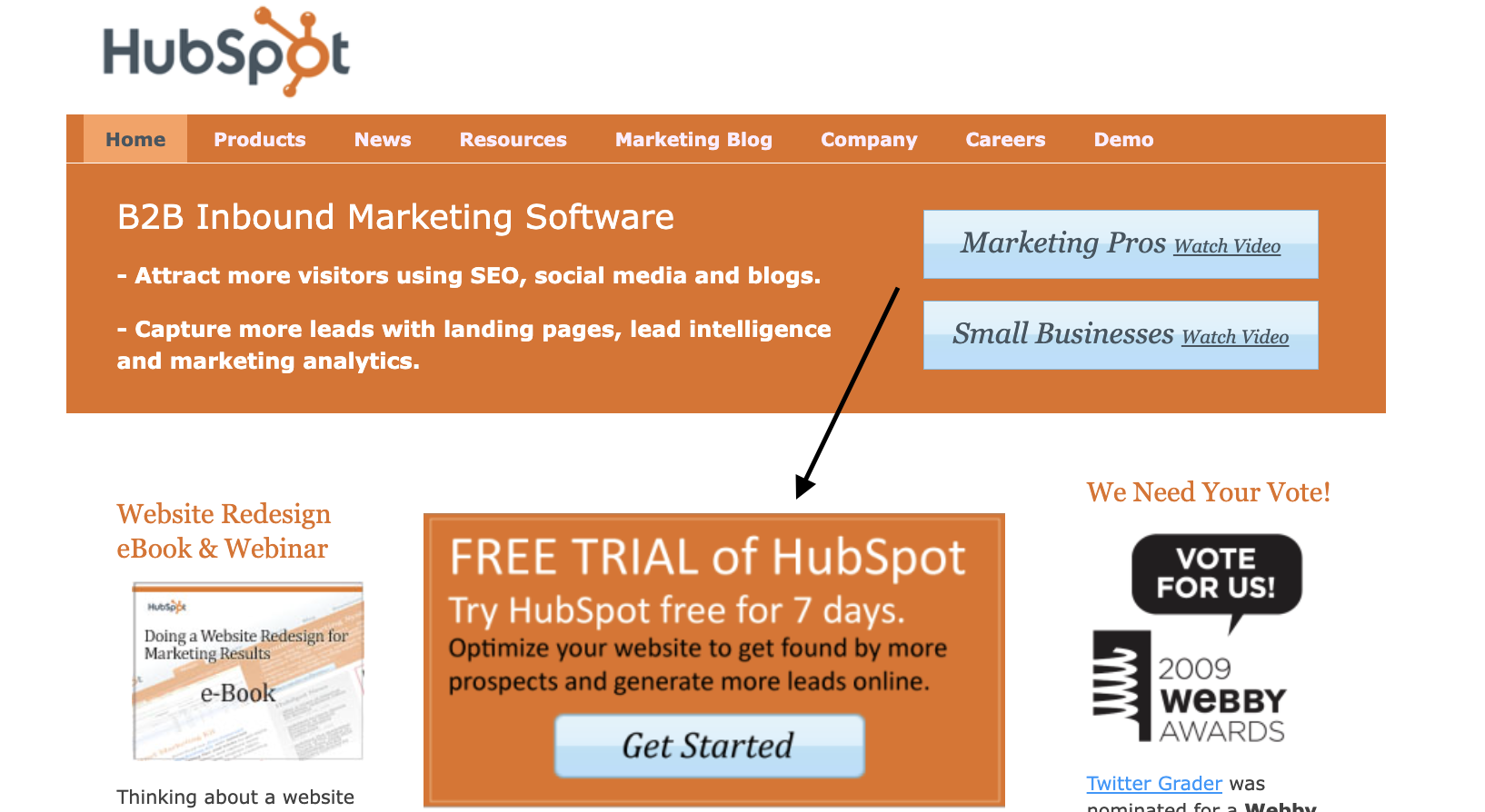
Did this work? Not quite.
So what did HubSpot do? They increased access to their free plan for 30 days.
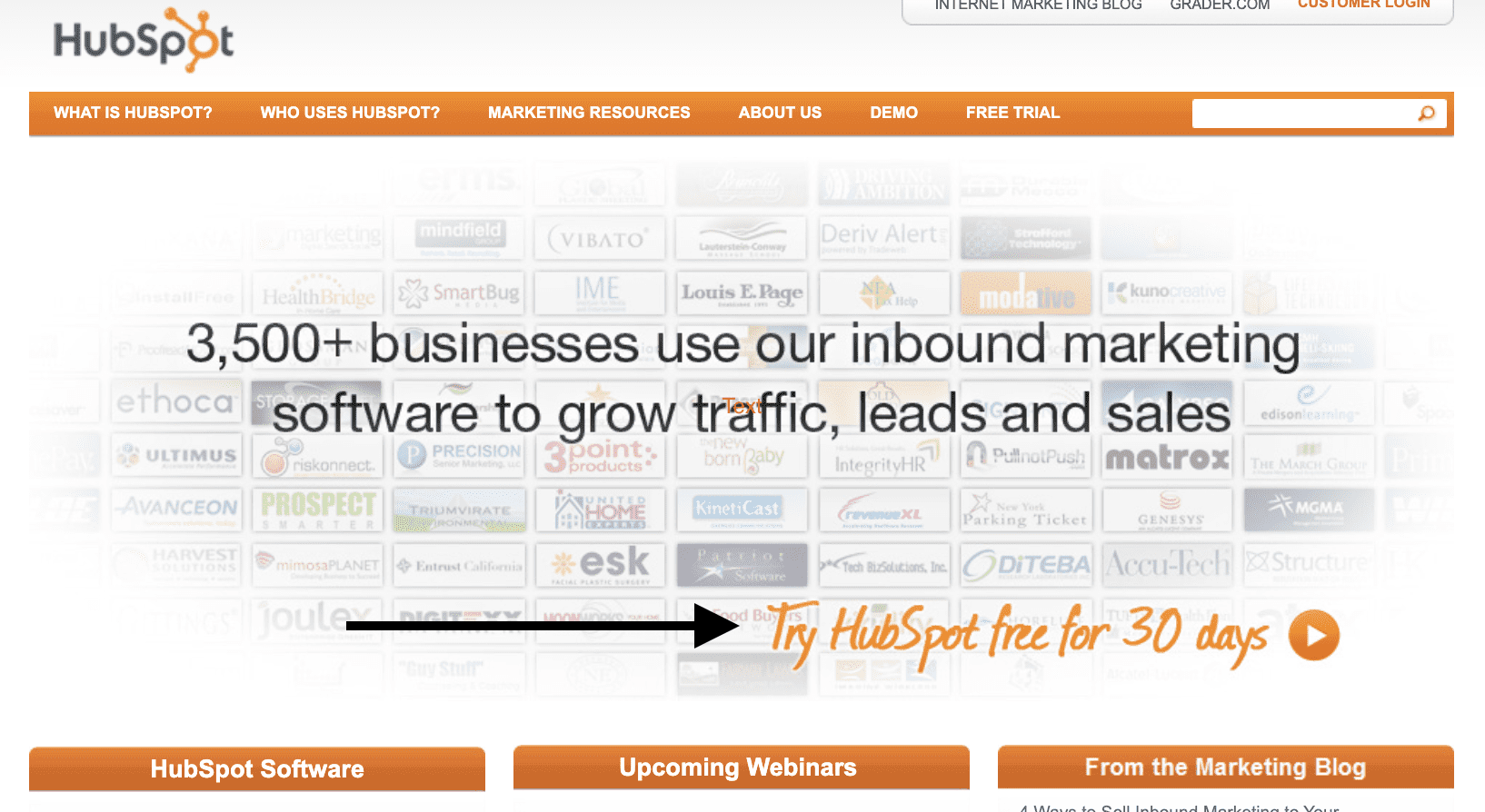
This strategy worked like magic because according to the SEC, HubSpot’s total revenue increased from $28.6 million in 2011 to $51.6 million in 2012 and $77.6 million in 2013.
These were huge growth figures for HubSpot, thanks to their ideal customers which were largely not small businesses, early-stage startups, but B2B businesses with a ton of deep pockets.
How do we know? Well, one of HubSpot’s early free trial sign-up pages says it all.
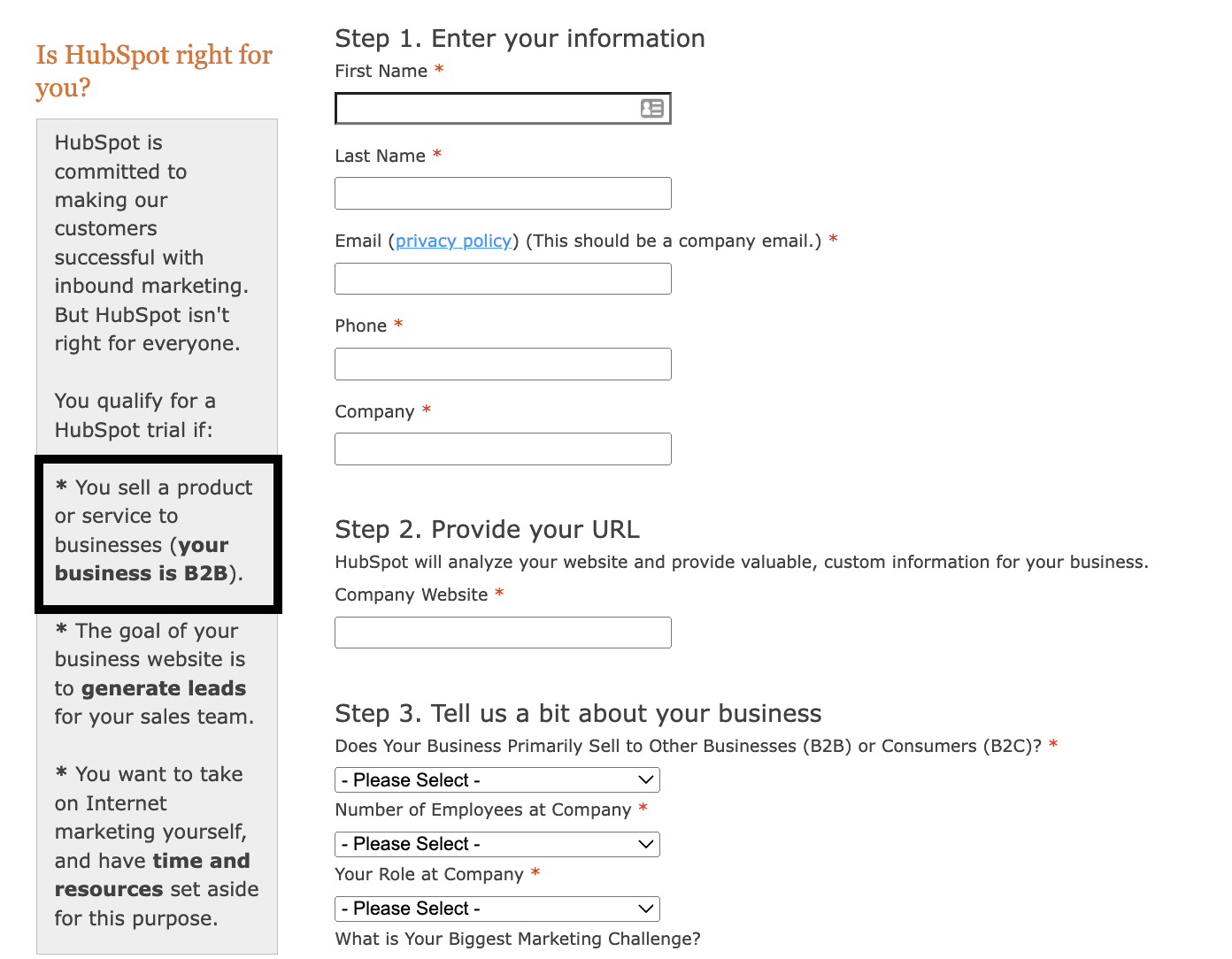
According to HubSpot, one element that qualifies you for a HubSpot trial at the time is this:
👉You sell a product or service to businesses (your business is B2B).
The copy on the sign-up page implies that if you’re not in B2B and you don’t have adequate resources, you don’t qualify for the free trial. Plus, it clearly shows who is best suited for the HubSpot CRM.
HubSpot made this clear because they want to define who they help (majorly B2B businesses).
Also, it doesn’t take rocket science to figure out that the goal of this trial is to convert the free HubSpot user to a paid customer. For sure, upselling isn’t wrong. We do it too.
It’s just that you don’t want a free CRM that becomes too expensive when your business gains steam and you need to upgrade to access more functionalities.
This is what some HubSpot users face today and HubSpot’s free forever plan doesn’t also help.
Take it from Leandro N., the owner of an e-learning company that used HubSpot for 2 long years.
In Leandro’s unfiltered feedback, he says:
“HubSpot is a potentially excellent business suite that is hobbled by its numerous paywalls. Overall, HubSpot has a great starter plan that resembles the software mechanics of “free-to-play” games. The user interface, integrations, email marketing, and contact tracking are all top-notch. As long as your contact list is small, your email marketing frequency is sparse, and you don’t need automations, you are good to go. However, as your business grows, your contact list will swell up, your email marketing frequency will increase, and the sheer scale will make automations a must.
So what is the problem?
Let me give you a quick rundown of the costs involved, using 2,000 contacts as a baseline:
-
-
- You can start with HubSpot’s Free CRM (0$ per month)
- Once you need a few features, then you upgrade to the Growth Starter suite, which is $67 per month, or $804 per year.
- Once you need automations, you must upgrade to the professional growth suite, which is currently at $1,253 a month, with a 12-month commitment, and a $3,500 onboarding fee, which means your yearly costs balloon to $18,536.”
-
You see that cost right there … $18,536.
That’s a boatload of money that’ll make a sizable number of SMBs and early-stage founders absolutely agree with Leandro’s final take on his HubSpot CRM experience.
“I do not think there is any startup or early business that can afford to increase its marketing and CRM suite costs by 2,300%. Most businesses must make the painful decision to abandon HubSpot and find new CRM suites with much more reasonable cost escalations.”
| Phase | Timeframe | Monthly Cost | What triggers it |
|---|---|---|---|
| Free plan | Months 1–6 | $0 | Starting out |
| HubSpot Starter | Month 7+ | ~$60/month (3 seats) | Hit contact or branding limit |
| HubSpot Professional | Month 13+ | $450+/month + $3,500 onboarding | Need automation |
| Annual cost at Professional | Year 2 | $8,900–$18,536+ | Fully scaled |
| EngageBay All-in-One | Any time | From $38.22/month (3 seats at $12.74/user) | Automation included from day one, no onboarding fee |
Summary of Key Differences: HubSpot Free vs Starter Plan (2026)
HubSpot Free Plan (2026)
The Free plan covers the basics needed to get started:
-
-
-
Core CRM for managing contacts, companies, deals, and tickets
-
Live chat and forms with HubSpot branding
-
Email tracking and notifications
-
Basic reporting dashboards
-
Limited email marketing and list segmentation
-
-
However, it’s intentionally restricted:
-
-
-
No multi-step automation or workflows
-
No custom reports or advanced analytics
-
Strict caps on contacts, emails, dashboards, and usage
-
HubSpot branding cannot be removed
-
Minimal AI functionality
-
-
Best suited for: solo users, very small teams, or businesses evaluating HubSpot
HubSpot Starter Plan (2026)
The Starter plan removes many of the early roadblocks and is often the first “real” upgrade:
-
-
-
Higher limits on contacts, email sends, and dashboards
-
HubSpot branding removed from emails, chat, and forms
-
Light automation and simple workflows enabled
-
More flexible integrations and app access
-
Email, chat, and phone support from HubSpot
-
-
While still limited compared to higher tiers, Starter allows teams to operate more professionally without immediate pressure to upgrade again.
Best suited for: small teams ready to scale beyond the free tier but not yet needing advanced automation
The Practical Difference in 2026
-
-
-
Free helps you start
-
Starter helps you operate
-
-
The moment branding removal, basic automation, or higher usage limits become necessary, most teams outgrow the Free plan and move to Starter.
The Cost Escalation Reality: What HubSpot Actually Costs as You Grow
Leandro N., owner of an e-learning company who used HubSpot for two years, shared a detailed cost breakdown on Capterra that tells the story clearly.
Starting from the free CRM, then needing the Growth Starter suite, then requiring automation — he calculated that his yearly costs ballooned to approximately $18,536 for just 2,000 contacts.
His conclusion: most early businesses cannot absorb a 2,300% cost increase as they grow.
That pattern — start free, hit a wall, upgrade, hit another wall, upgrade again — is the most common HubSpot user journey.
It’s not a design flaw so much as a deliberate go-to-market strategy. HubSpot’s free plan was never built for long-term SMB use. It was built to get the right companies in the door and convert them over time.
A common cost journey looks like this:
-
-
- Start on the free CRM (✅ $0/month)
- Upgrade to Starter to unlock branding removal and basic automation (~$7/user/month)
- Hit the wall on reporting and advanced automation — upgrade to Professional (~$450+/month + onboarding fees)
- Annual cost for a 3-person team: potentially $8,000–$20,000+
-
For some businesses, that investment makes sense. For others, it’s the reason they start evaluating alternatives.
The Core Takeaway
HubSpot’s Free CRM is not a trap—but it is not built for long-term use by growing SMBs.
It works well as:
-
-
-
A starting point
-
A testing environment
-
A low-volume CRM for small teams
-
-
It becomes challenging when:
-
-
-
Contact lists expand
-
Email volume increases
-
Automation becomes non-negotiable
-
AI and reporting move from “nice-to-have” to “essential”
-
-
In 2026, HubSpot’s free plan still does exactly what it was designed to do:
Get the right businesses in the door—and monetize growth aggressively afterward.
For some companies, that tradeoff makes sense. For others, it becomes the reason they eventually look elsewhere.
Read also: HubSpot vs MailChimp — A Complete Product Comparison
HubSpot CRM Free Features (2026)
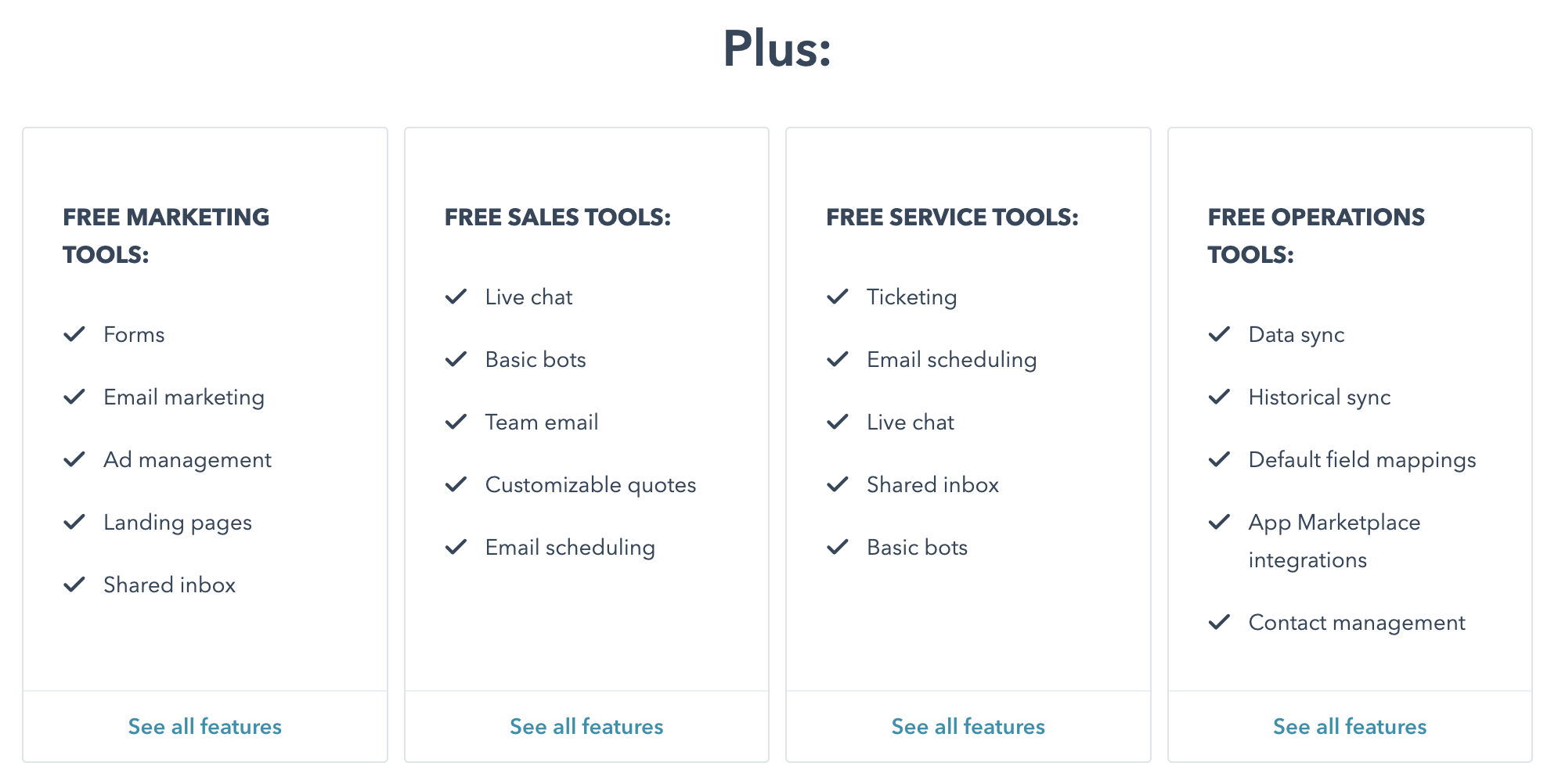
Now that you’ve seen how HubSpot’s free CRM came to be, let’s break down what the free-forever plan actually offers in 2026.
While HubSpot highlights the headline features, many of the practical limits and trade-offs aren’t immediately obvious.
This section looks beyond the marketing copy to explain what you can realistically expect—and where the free plan starts to fall short as your needs grow.
No guesswork needed—we’ve done the heavy lifting and mapped out exactly what HubSpot’s free plan includes in 2026, along with the limitations that matter in real-world use.
We’ll focus on the free CRM features across HubSpot’s most widely used hubs: Marketing Hub and Sales Hub; and then break down the key constraints that typically push teams toward paid plans as they scale.
Here’s what to expect from these hubs:
Free HubSpot CRM Features Across Marketing & Sales Hubs (2026)
HubSpot’s Free CRM includes a shared set of core features across both the Marketing Hub and Sales Hub.
These tools cover basic communication, tracking, and reporting—but with clearly defined limits designed to push upgrades as usage grows.
| Free HubSpot CRM Feature | 2026 Limitations (Free Plan) |
|---|---|
| Shared inbox | Limited to 1 shared inbox per account |
| Live chat | Includes mandatory HubSpot branding |
| Reporting dashboards | Up to 3 dashboards with a maximum of 10 reports per dashboard |
| Facebook Messenger integration | Send and receive basic messages and quick replies only |
| Email tracking & notifications | Basic open and reply tracking only; no advanced engagement insights |
| Email health reporting | High-level deliverability stats only; no AI-driven or optimization recommendations |
Advanced reporting, engagement analytics, and AI-based insights are available only on paid tiers.
Additional Free CRM Features Included in Both Hubs
The following tools are also available on HubSpot’s free plan, with limited customization and scale:
-
-
-
Standard custom properties
-
Team email connections
-
Basic chatbots and automation triggers
-
HubSpot mobile apps (iOS & Android)
-
Marketing events object (view and basic tracking only)
-
User management
-
Basic custom user permissions
-
-
Important Context for 2026
While these features are genuinely usable for small teams, most advanced capabilities such as deep automation, AI-powered insights, custom reporting, and scalable permissions, these remain locked behind paid plans.
As contact volume, reporting needs, or automation requirements increase, these limits are typically the first friction points users encounter.
Read also: An In-Depth Look At HubSpot vs Pipedrive
Free HubSpot CRM Features in Sales Hub (2026)
HubSpot’s Free CRM includes a slimmed-down version of Sales Hub, designed for basic deal tracking and one-to-one sales communication.
While the tools are usable for individuals and very small teams, most revenue-driving features remain locked behind paid tiers.
| Free Sales Hub Feature | 2026 Limitations (Free Plan) |
|---|---|
| Quote creation | No eSignature, payments, or Stripe integration |
| Email tracking & notifications | Capped monthly notifications |
| Canned snippets | Limited to 5 total |
| Sales documents | Up to 5 documents, all HubSpot-branded |
| Meeting scheduling | One personal booking link; not customizable and HubSpot-branded |
| Deal pipelines | Limited to 1 pipeline per account |
| One-to-one email | Includes HubSpot branding |
| Email templates | Limited to 5 templates |
Additional Sales Tools Included (Free)
The free Sales Hub also includes:
-
-
-
Email scheduling
-
Basic Slack integration for deal and activity notifications
-
-
What to Expect in 2026
HubSpot’s free Sales Hub works best as a personal sales tracker, not a scalable sales system. The moment teams need:
-
-
-
Multiple pipelines
-
Branded outreach
-
Automation or sequences
-
Forecasting or revenue analytics
-
-
…an upgrade becomes necessary.
Read also: HubSpot vs SharpSpring — A Side-by-Side Comparison of Key Features
Free HubSpot CRM Features in Marketing Hub (2026)
HubSpot’s Free CRM includes a lightweight version of Marketing Hub, built to help small teams capture leads and send basic campaigns.
While the tools are functional, they’re tightly limited in volume, branding, and automation, making upgrades necessary as soon as marketing activity scales.
Marketing Hub Features Available on the Free Plan
| Free Marketing Hub Feature | 2026 Limitations (Free Plan) |
|---|---|
| Forms (including pop-ups) | Up to ~10,000 form submissions total |
| Email marketing | Up to ~2,000 sends per month with mandatory HubSpot branding |
| Ad management | Limited to 3 connected ad accounts; website audience creation only |
| Landing pages | Up to 20 simple pages hosted on HubSpot subdomains; HubSpot branding required; no custom domains |
| List segmentation | Up to 5 active lists and 1,000 static lists; limited to basic filters (contact properties, form submissions, and email activity) |
| Form follow-up emails | Limited to 1 automated email per form |
| Ad retargeting | Tracked ad spend capped at ~$1,000; supported networks include Google, Facebook, and LinkedIn |
What This Means in Practice (2026)
HubSpot’s free Marketing Hub is best suited for:
-
-
-
Capturing early leads
-
Sending occasional branded emails
-
Testing basic forms and landing pages
-
-
It quickly becomes restrictive when teams need:
-
-
-
Custom domains and branding
-
Multi-step workflows
-
Advanced segmentation
-
A/B testing or AI-powered optimization
-
-
At that point, upgrading to a paid Marketing Hub tier is unavoidable.
Read also: Top HubSpot Competitors That Cost a Lot Less
Real-World Scenarios: Does HubSpot Free Fit You?
Scenario A — The Solo Consultant If you have fewer than 500 contacts and mostly need to track calls, meetings, and follow-up tasks, HubSpot Free may serve you well for a year or more. The single pipeline and basic email tracking cover the essentials.
Scenario B — The Small Sales Team (3 reps) If you have three reps, need multiple pipelines, and want automated follow-up sequences, you’ll outgrow the free plan within 30 days. The single pipeline limit alone becomes a daily friction point.
Scenario C — The Growing Startup If you’re scaling email marketing past 500 active contacts and need to remove HubSpot branding from customer-facing assets, you’ll need at least the Starter plan. At that point, the free plan becomes an obstacle rather than a foundation.
Is HubSpot Really Free? Uncovering the Hidden Costs”
Read also: HubSpot Pricing and Comparison with Other Alternatives
Should SMBs and Early-Stage Startups Use HubSpot Free CRM in 2026?
The short answer in 2026: yes—to start, but not to scale.
HubSpot’s Free CRM can be a solid entry point for small teams that are just getting organized.
It works well for managing a small contact list, tracking deals, responding to live chat, and getting basic visibility into sales activity—all without upfront cost.
However, SMBs and early-stage startups don’t all grow the same way.
Some rely heavily on inbound and outbound sales motion, layered campaigns, and structured follow-ups.
Others win business by responding fast on live chat or email and keeping conversations simple.
Because growth paths differ, HubSpot’s free plan fits some teams better than others.
In 2026, the key question isn’t “Is HubSpot Free usable?”
Well, it is.
The real question is “How long will it stay usable for your business model?”
For teams with low contact volumes and minimal automation needs, the free CRM can work for months or even longer.
But for startups that scale marketing, email outreach, or sales operations quickly, the free plan becomes restrictive fast, and upgrades become unavoidable.
Used intentionally, HubSpot Free CRM is a starting line, not a long-term destination.
Read also: 9 Amazing Marketing Automation CRM Software [Comparison Table]
Is HubSpot Free Right for You?
Not sure whether the free plan fits your situation? Answer these six questions honestly.
1. Does your team have 2 or fewer people who need active CRM access?
The free plan supports a maximum of 2 users with editing rights. If you already have a third person waiting to use the system, you’re starting above the ceiling.
2. Do you have fewer than 800 contacts you need to actively market to?
The hard cap is 1,000 marketing contacts, but in practice you’ll want some headroom before you hit it. If you’re already close to 800, the limit will arrive faster than expected — especially once you start running campaigns consistently.
3. Can your team handle all follow-ups manually, without automated sequences?
The free plan has no workflows and no email sequences. Every follow-up email, task reminder, and deal-stage action has to be triggered by a person. If your sales or marketing process depends on automation to function at any meaningful volume, the free plan won’t support it.
4. Are you comfortable with HubSpot branding on all customer-facing assets?
Every email, form, chat widget, landing page, and meeting link carries HubSpot’s logo on the free plan — and there is no way to remove it without upgrading. If your customers or prospects will see it and it creates a credibility problem, that’s a signal to move to Starter.
5. Do pre-built dashboards give you enough visibility?
The free plan’s reporting covers the basics — you can see activity and deal progress. But if you need to understand why something is happening, attribute revenue to specific campaigns, or build a custom report for a leadership meeting, you’ll hit a wall. Pre-built only means no custom logic, no cross-object reporting, and no funnel attribution.
6. Is your primary goal to test HubSpot before committing to a paid plan?
If yes, the free plan is genuinely good for this. You get real access to the interface, the pipeline, and the core CRM tools — not a stripped demo. It’s an honest way to evaluate the platform before spending.
How to read your answers:
5 or 6 Yes answers — HubSpot Free is a reasonable starting point for where you are right now. Go in knowing which limit you’ll hit first and plan your upgrade timeline before it becomes urgent.
3 or 4 Yes answers — You’ll likely outgrow the free plan within 6 months. It may be worth starting with Starter to avoid a disruptive mid-project migration once the limits arrive.
Fewer than 3 Yes answers — The free plan will slow you down more than it helps. A paid CRM built for SMBs — one that includes automation, higher contact limits, and branding removal from day one — will save you time and money sooner than you might expect.
Who Should Use HubSpot Free CRM in 2026?
HubSpot Free works best for a specific type of user. Outside these lanes, frustration tends to arrive fast.
1. Solo consultants and early-stage freelancers
If you’re managing a small contact list, scheduling occasional meetings, and tracking a handful of conversations, HubSpot Free gives you a clean, functional system at zero cost. The limits won’t bite until you launch campaigns or add team members.
Best fit: low-volume outreach, simple contact tracking, solo use.
2. Small businesses with occasional customer interaction
Local or service-based businesses that don’t rely heavily on email campaigns, automation, or detailed analytics can manage reasonably well on the free plan — provided contact volume stays low and manual follow-ups are feasible.
Best fit: low-frequency outreach, minimal pipelines, no automation needs.
3. Teams evaluating HubSpot before committing
The free plan is genuinely useful as a testing ground. If you want to understand the interface, get familiar with the deal pipeline, and explore whether HubSpot fits your team before spending, the free plan gives you real access — not a stripped demo.
Best fit: pre-purchase evaluation, pilot programs, founder-led sales.
4. Early-stage product-led SaaS companies
If users sign up, trial, and convert without direct sales involvement, HubSpot Free can act as a lightweight activity tracker. The caveat: as soon as lifecycle emails or behavior-based automation become necessary, the free plan runs out of road quickly.
Best fit: passive tracking of self-serve users, minimal outbound.
In short, HubSpot Free CRM is a strong starting point—but a poor long-term home for fast-growing SMBs and startups.
Marketing Madness: HubSpot vs EngageBay Face‑Off
Read also: HubSpot Pros And Cons — A Candid Assessment
Who Should Avoid HubSpot Free CRM in 2026?
1. SaaS businesses with a sales-led model
If your reps qualify leads, run demos, follow up, and close deals — the free plan will feel restrictive almost immediately. No sequences, no workflow automation, no multiple pipelines, no forecasting. The manual work piles up and performance tracking falls apart.
2. SMBs planning aggressive growth in the next 6–12 months
If you already know you’re going to scale marketing, sales, or outreach, HubSpot Free is rarely a smart long-term choice. Meaningful automation and reporting live in the Professional tier — and the cost jump from Free to Professional can be dramatic. Many teams discover the “real” HubSpot experience only after crossing into five-figure annual costs.
3. Businesses building or expanding a sales team
The moment you add a second or third rep, the free plan starts to crack. Sales teams can’t trigger deal-stage actions, can’t personalize multiple booking links, can’t use payment-enabled quotes, and can’t run outreach at scale without hitting limits. Most teams in this situation end up jumping past Starter into higher tiers to operate efficiently.
4. Teams that need hands-on customer support
HubSpot Free users get no 1:1 support. No live chat. No email support. No phone. When something goes wrong — a data issue, a broken integration, a configuration problem — you’re on your own with documentation and community posts. For businesses where delays directly cost revenue, this is a real risk.
The 2026 Bottom Line
You should avoid HubSpot Free CRM if:
-
-
-
Sales is core to your growth model
-
You plan to scale quickly
-
You’re building a sales team
-
You need reliable support
-
You want predictable, SMB-friendly pricing
-
-
HubSpot Free is a testing ground, not a growth platform.
If you’re serious about scaling and want fewer surprises as you grow, it’s worth considering CRM alternatives built specifically for SMBs from day one.
Read also: 8 Surprisingly Awesome HubSpot Alternatives
When Does HubSpot Free Stop Being Enough?
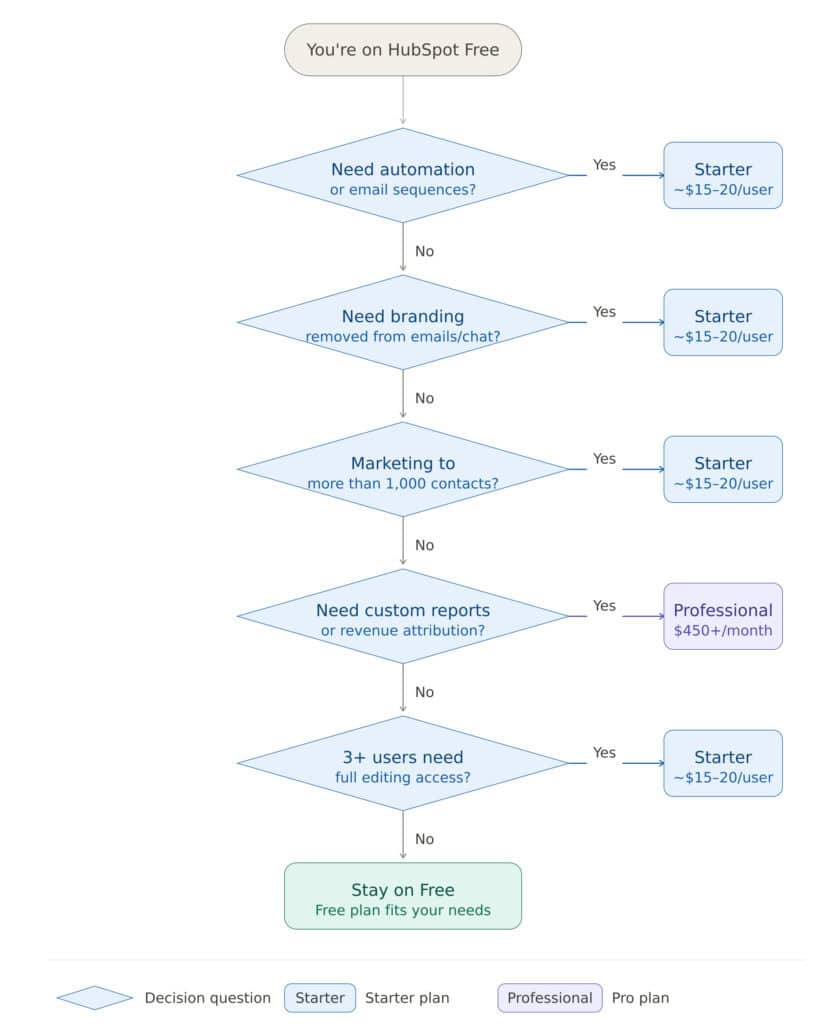
Here are the ten clearest signals that you’ve outgrown the free plan, and the cheapest upgrade that fixes each one.
1. Your contact list has grown past 1,000 marketing contacts
Once you need to run campaigns to more than ~1,000 contacts, you’ll hit the marketing contact wall. Every additional contact you market to past that threshold requires a paid plan — and HubSpot’s contact-based pricing means costs scale steeply with your list size. Permanently deleting inactive contacts buys you time once, but it’s not a long-term strategy.
Upgrade path: Any Starter Hub at $20/seat/month removes the contact ceiling entirely. If marketing emails are driving the limit, Marketing Hub Starter is the most targeted choice.
2. Manual follow-ups are costing your team more time than the tool saves
The moment you’re spending more time manually doing what should be automated — follow-up emails, task creation, deal-stage actions — the free plan has become a liability rather than an asset. There are no workflows, no sequences, and no branching logic on the free plan. Every touchpoint has to be triggered by a human.
Upgrade path: Basic automation starts at Marketing Hub Starter or Sales Hub Starter ($20/seat/month). For multi-step workflows, lead scoring, and branching logic, you’ll need Marketing Hub Professional ($890/month) or Sales Hub Professional ($100/seat/month).
3. You need to remove HubSpot branding from customer-facing assets
Every email you send, every chat widget on your site, every form, every landing page, every meeting link — all carry mandatory HubSpot branding on the free plan. The first time a prospect asks “what CRM are you using?” instead of engaging with your message, it’s usually time to upgrade.
Upgrade path: Sales Hub Starter ($20/seat/month) removes branding from sales documents, meeting links, and live chat. Marketing Hub Starter ($20/seat/month) removes it from emails, landing pages, and forms.
4. Your reporting needs have moved beyond basic dashboards
When you need to understand funnel performance, attribute revenue to specific campaigns, build forecasts for leadership, or create reports that pull data across contacts, companies, and deals simultaneously — the free plan’s pre-built dashboards won’t get you there. You can see what happened, but not why it happened.
Upgrade path: Custom report builder starts at any Professional Hub. Marketing Hub Professional, Sales Hub Professional, or Service Hub Professional all unlock the ability to build reports from scratch across objects.
5. Your team has grown past 2 active users who need editing access
Once more than two people need to actively work in HubSpot — creating records, updating pipelines, modifying contacts, configuring properties — you’ll need paid seats. View-only access is free. Full editing access is not. Deactivated users still count toward the limit until permanently removed, so headcount management only goes so far.
Upgrade path: Any Starter Hub at $20/seat/month unlocks additional editing seats. Pick the Hub that matches where your team is hitting the wall — Sales, Marketing, or Service.
6. You need a third team member with full CRM access
This is the user cap in practice. As soon as you hire a third rep, a second marketer, or bring on a support person who needs to do more than read data, the free plan’s 2-user ceiling blocks them. This is often the first limit that catches growing teams off guard.
Upgrade path: Any Starter Hub at $20/seat/month — add seats as your team grows. The Customer Platform Starter bundle is often the most cost-effective move if you need multiple Hubs at once.
7. You need more than 10 custom properties
Any real CRM setup — tracking lead source, industry, product interest, MRR, renewal date, churn risk — blows past 10 custom properties within the first week. The free plan caps you at 10 across all objects. Once you start building out your data model properly, this limit appears fast.
Upgrade path: Any paid Smart CRM edition raises this to 1,000 custom properties per object.
8. You need more than one deal pipeline
Businesses selling multiple products, serving different customer segments, or operating across regions quickly need separate pipelines with different deal stages. Managing all of it through a single pipeline with workarounds is friction your team shouldn’t have to deal with.
Upgrade path: Sales Hub Starter gives you 2 pipelines. Sales Hub Professional gives you 15. Sales Hub Enterprise gives you 100.
9. You need custom reports that combine data across objects
Free dashboards now include 10 dashboards with up to 50 reports each — a genuine improvement. But all of those reports are pre-built. The moment you need something specific — revenue by lead source by region, deals closed per rep per quarter, churn rate by customer segment — you need the custom report builder, which isn’t available on the free plan.
Upgrade path: Custom reporting is available on any Professional Hub — Marketing, Sales, or Service.
10. You need enterprise-grade security or compliance controls
If your business requires single sign-on (SAML SSO), field-level permissions to restrict what different team members can see and edit, custom objects for complex data structures, sandboxes for testing, or sensitive data controls for compliance purposes — none of these exist on the free plan, and most don’t appear until the Enterprise tier.
Upgrade path: Any Enterprise Hub ($150/seat/month and up, depending on the product).
The HubSpot CRM Alternative That Does More for Less
HubSpot is truly one of the pioneers in the CRM space.
While they have a great free forever plan, the truth is, the free plan limitations are way too much.
The ceiling on email templates, absence of automation, zero support for free plan users, inability to personalize the CRM experience for your customers, and of course, huge costs of upgrading are real bottlenecks.
Have we mentioned that you pay a $3,500 HubSpot onboarding fee when you decide to upgrade?
These and more are challenges that you won’t find with a HubSpot alternative like EngageBay CRM. EngageBay will not ask you to pay a dollar to get onboarded.
Take it from Kamran R. who used multiple CRMs before finding EngageBay.
“Overall, EngageBay is really an alternative to HubSpot and Agile CRM. It has been a great experience and the onboarding is super easy.
I tried several CRMs which include ZOHO CRM PLUS, AGILE ENTERPRISE, and HubSpot for a while. Most CRMs have the same functionalities but when it comes to pricing, it’s way different. EngageBay has everything that Agile, ZOHO, and HubSpot have but at a fraction of the cost. When you are running a digital business you probably have thousands of leads or contacts who you want to nurture and with limited contacts, you can’t do miracles.
EngageBay has given me unlimited storage of contacts and I can send 50,000 emails a month without connecting to any other email app like Sendgrid or Mailchimp.
Another thing is support, their 24 hours support is awesome and the team is also cooperative as well. Therefore, you should try this since it has everything which a high-end CRM has but at a fraction of the cost.”
Like Kamran, many other EngageBay customers switched from other CRMs.
An example is Pierpaolo V, who has used EngageBay for almost 12 months.
“I’ve tried EngageBay but now it’s our official automation platform. I tried other platforms and spent a lot of money assessing them (HubSpot, Sharpspring, ActiveCampaign, etc).
Some of them have too high prices, others don’t seem to listen to the request for new features, still others the support is slow to respond. In all the cases I tried something was missing: for EngageBay, nothing is missing and the costs are very affordable (it also includes a free version to let my customers try the product).
EngageBay is quick and easy to use. It has everything we need (integration, mail automation, sales automation, lead generation, Android and Ios apps, support ticket e-chat for visitors, etc…)”
If you want a CRM that’s not just affordable but has a ton of easy-to-use features, then you should try EngageBay’s free forever plan.
EngageBay vs HubSpot
EngageBay offers you 24/7 access to the customer support team, we don’t lock you into a contract, and all the advanced features that’ll make you win as a business owner or founder are right in our CRM.
Conclusion
So: is HubSpot free in 2026?
HubSpot CRM is genuinely free; and genuinely limited.
For a solo user, a freelancer, or a very small team just getting organized, the free plan offers real value at zero cost. You get a clean interface, functional deal tracking, email notifications, and basic lead capture — all without spending a dollar.
But for any business with growth ambitions, the free plan is a starting line, not a destination. The contact caps, the missing automation, the mandatory HubSpot branding, the absent support, and the steep upgrade costs are not hidden — they’re built in by design.
The question to ask before committing to HubSpot isn’t “Is it free?” The question is: “How long will free last for my business, and can I afford what comes next?”
If the answer gives you pause, it’s worth exploring CRM alternatives built from the ground up for SMB budgets and scale — before your data, habits, and workflows are locked into a platform you’ll eventually outgrow.
Read our full breakdown of HubSpot vs EngageBay
Related reading:
- The best CRM Tools for Small Businesses
- The 14 Best CRM Automation Software in 2024
- 15 Best Marketing Automation Tools for Small Businesses
- Is HubSpot Worth It? In-Depth Review for Small Businesses
Yes. HubSpot’s free CRM does not expire. Unlike a trial, the free plan remains accessible indefinitely — but with the same usage limits and feature restrictions. You’ll never be forced to upgrade by a deadline, but growth will push most teams toward paid plans naturally.
In practice, HubSpot Free supports around 2 active users before limitations appear. With the introduction of paid Core Seats, many editing and configuration rights now require a paid seat even on the free plan.
No. Email sequences, workflow automation, and automated follow-ups are not available on the free plan. You can send individual emails and set one automated follow-up per form submission, but multi-step automation requires at least a Starter plan.
If you exceed the marketing contact limit, HubSpot will prompt you to upgrade to a paid plan to continue marketing to those contacts. You won’t lose your data, but active marketing to contacts beyond the free threshold requires payment. Similarly, hitting email send caps or template limits will restrict your activity until the next billing period or until you upgrade.
HubSpot offers a nonprofit discount program that provides reduced pricing on paid plans. The free CRM is available to nonprofits under the same terms as any other user. Check HubSpot’s official nonprofit program page for current eligibility and discount details.
Yes — with limitations. You can track contacts, manage basic deals, and capture leads through forms. However, HubSpot Free lacks the e-commerce integrations, workflow automation, and advanced segmentation that most online stores need to run marketing effectively. For serious e-commerce use, a paid plan is typically necessary.
The most meaningful differences are: Starter removes HubSpot branding from emails, forms, and chat; Starter unlocks light automation and basic workflows; Starter provides email, chat, and phone support; and Starter raises contact, email send, and dashboard limits. Starter does not include advanced automation, custom reporting, or AI features — those start at Professional.
Breeze AI — HubSpot’s AI assistant — is extremely limited on the free plan. Most AI-powered features including content generation, predictive insights, and AI-driven automation are available only on paid tiers.
HubSpot occasionally offers trial periods for paid features, but there is no standard free trial structure in 2026. Most teams evaluate HubSpot through the free CRM plan itself before deciding whether to upgrade. Some paid tiers include a short trial period — check HubSpot’s current pricing page for the latest terms.
The most commonly compared free alternatives to HubSpot CRM include EngageBay (all-in-one CRM with marketing automation at lower price points), Zoho CRM (generous free tier for up to 3 users), HubSpot competitors like Pipedrive and Freshsales (limited free tiers), and Notion or Airtable for teams that prefer flexible database-style contact management.
What’s the difference between marketing contacts and non-marketing contacts on HubSpot Free?
Marketing contacts can receive marketing emails and be targeted with ads — these count toward your 1,000 contact limit. Non-marketing contacts are stored in the CRM but excluded from campaigns, so they don’t count against the cap. You can reclassify contacts between the two categories at any time, giving you some flexibility in managing your free plan limits.
This is one of the most common follow-on questions for this keyword and pulls “People Also Ask” traffic.
