
Last Updated: 20 August 2026
Choosing a CRM in 2026 is no longer just about managing contacts — it’s about picking the platform that shapes how your entire revenue team operates.
HubSpot and Pipedrive are two of the most popular options on the market, but they are built for very different types of businesses.
HubSpot is an all-in-one growth platform that connects marketing, sales, and customer service under one roof.
Pipedrive is a sales-focused CRM built around pipeline visibility and speed of adoption.
Both are excellent — but at their respective price points and feature depths, the wrong choice can cost your team months of frustration.
This in-depth comparison covers everything: features, pricing, AI capabilities, ease of use, mobile apps, customer support, data migration, and a clear verdict by business type.
We’ve also analyzed the top-ranking articles on this topic, so you get a perspective grounded in what actual buyers are searching for in 2026.
**Pricing data in this article has been verified against both platforms’ official pages as of 20 August 2026. Plan names, prices, and feature sets have been updated to reflect Pipedrive’s 2025 plan restructuring and HubSpot’s current seat-based pricing model.
Quick Verdict (2026)
-
-
- Choose HubSpot if your team spans marketing, sales, and service — and you need one unified platform with deep AI, automation, and a free starting point.
- Choose Pipedrive if you run a lean sales team that needs fast setup, a clean pipeline view, and no marketing complexity.
- Consider EngageBay if you want HubSpot’s all-in-one breadth at a fraction of the price — without the steep learning curve.
-
**Key pricing fact: Pipedrive’s plans are now called Lite, Growth, Premium, and Ultimate — starting from $14/user/month (annual). HubSpot Starter starts at $20/seat/month (standard) or as low as $12–$15 with promotional annual billing.
Table of Contents
What’s the Difference Between HubSpot and Pipedrive in 2026?
At a high level, HubSpot and Pipedrive solve the same problem, i.e. helping sales teams manage relationships and close more deals; but they approach it from fundamentally different directions.
The key difference between HubSpot and Pipedrive lies in their scope.
HubSpot is an all-in-one, AI-driven CRM platform that brings marketing, sales, service, operations, and content tools into a single ecosystem.
Its free CRM serves as an entry point, while advanced automation, AI-powered workflows, and cross-hub capabilities are unlocked as teams scale.
Pipedrive, by contrast, is a sales-first CRM built specifically around pipeline management and deal execution.
It prioritizes simplicity, visual workflows, and sales productivity over marketing automation, helping teams maintain clean pipelines and consistent follow-ups without the complexity of a full CRM suite.
In short, HubSpot is designed for businesses that want one unified platform across teams, while Pipedrive is optimized for sales teams that want a focused, easy-to-adopt CRM to close deals efficiently.
TL;DR:
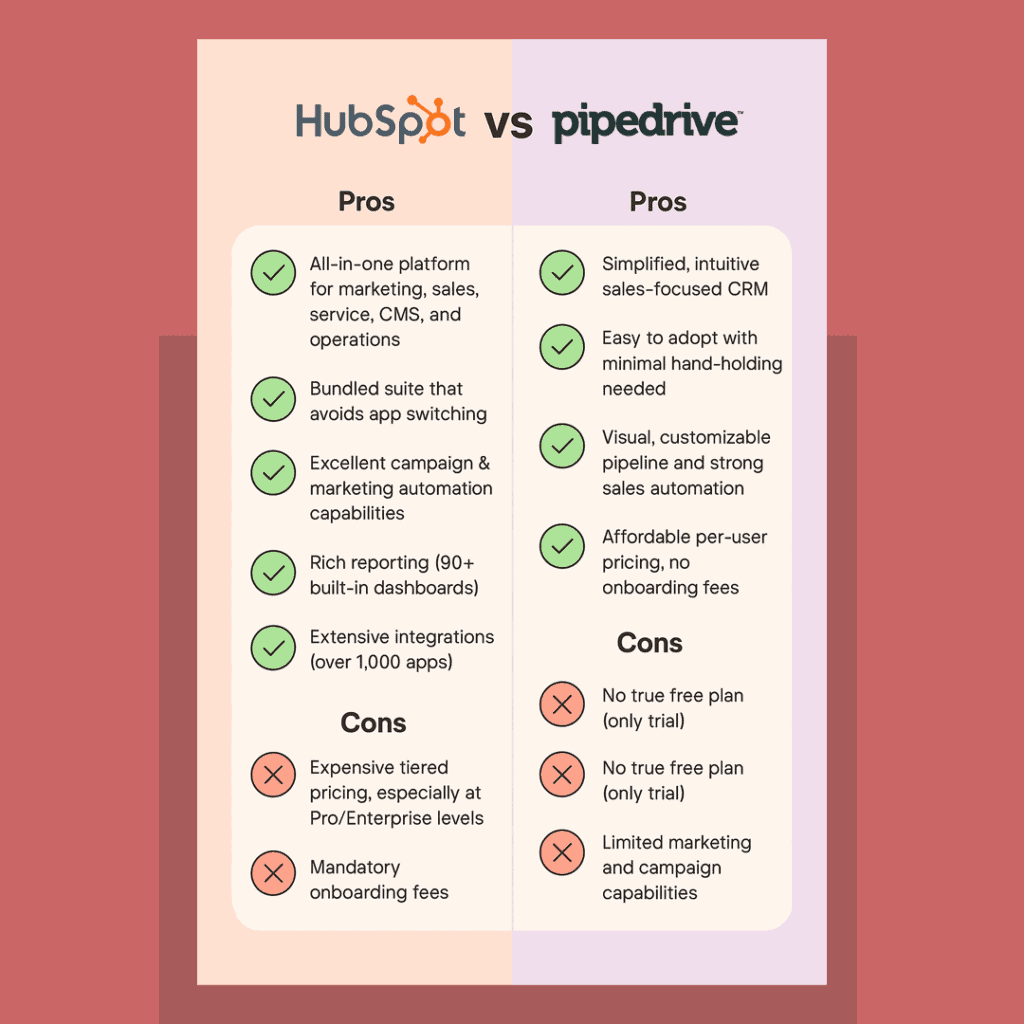
HubSpot vs Pipedrive pros and cons
What Is HubSpot CRM in 2026?
HubSpot started as a marketing platform and evolved into a full CRM suite covering marketing, sales, and customer service.
Its strength is breadth: a single platform where your marketing team runs email campaigns and manages SEO, your sales team tracks deals, and your support team handles tickets — all sharing the same contact database.
HubSpot’s AI capabilities are powered by its Breeze suite, which spans marketing, sales, and customer success — including the HubSpot Data Hub for connecting to data warehouses.
In 2026, HubSpot remains the dominant choice for businesses that need multi-department alignment.
Key HubSpot characteristics:
-
-
- All-in-one: Marketing Hub, Sales Hub, Service Hub, Content Hub, Operations Hub
- Free CRM tier with unlimited users
- Strong automation and AI across all hubs
- Pricing compounds significantly at Professional and Enterprise tiers
- Steeper learning curve for new users
-
Best for: Marketing-driven businesses, scaling startups, SaaS companies, and teams that want one unified CRM platform.
What Is Pipedrive CRM in 2026?
Pipedrive was built by salespeople, for salespeople. Its philosophy is simple: show every rep exactly where each deal stands, what action to take next, and how close they are to hitting their target.
It does this exceptionally well. Pipedrive’s visual pipeline, activity-based selling model, and guided onboarding make it one of the fastest CRMs to get value from.
As one user noted: ‘Very little hand‑holding is needed… Pipedrive solves adoption by being so easy to use’ — illustrating the HubSpot vs Pipedrive ease‑of‑use gap.
Key Pipedrive characteristics:
-
-
- Sales-focused; no native marketing automation
- Clean, visual pipeline as the core experience
- Activity-driven selling model
- Predictable per-user pricing
- Add-ons needed for lead generation and email marketing
-
In 2026, Pipedrive also launched Pulse: an AI layer that adds lead scoring based on email engagement, website visits, and call history, alongside AI-generated call summaries and follow-up drafts.
Pulse’s lead scoring and call summary features are available from the Growth plan upwards. Lite plan users do not have access to the full Pulse feature set.
This significantly narrows the AI gap with HubSpot for sales-specific use cases.
Best for: Small sales teams, SMBs, and companies needing a lightweight CRM without marketing complexity.
Overall verdict (2026):
Choose HubSpot if you want a unified, AI-driven CRM that connects marketing, sales, service, and operations in one ecosystem.
In 2026, HubSpot stands out for teams that need predictive insights, automated content and emails, smart lead scoring, and cross-hub automation—without juggling multiple tools.
Its free CRM with unlimited users makes it accessible for startups, while paid tiers support fast-scaling, marketing-led businesses and SaaS teams that want everything in one place.
Choose Pipedrive if your primary goal is simple, effective sales execution.
It excels at visual pipelines, deal tracking, and activity-based selling, with an interface that requires minimal onboarding.
Pipedrive’s AI Sales Assistant and sales automations help sales reps stay focused on closing deals, but it’s best suited for teams that don’t need built-in marketing or a broader CRM ecosystem.
In short: HubSpot is built for growth and cross-team alignment, while Pipedrive is ideal for lean sales teams that value speed, simplicity, and adoption over all-in-one complexity.
Read also: HubSpot Pros And Cons — A Candid Assessment
If you’ve got no time to read this comprehensive blog post, you can just sit back and watch our video comparing HubSpot and Pipedrive:
HubSpot vs. Pipedrive – Decoding the Battle in 2026!
Comparing HubSpot vs Pipedrive: Ease of Use, Features, Automations & Reporting (2026)
To help you decide between HubSpot and Pipedrive, we’ll compare them across eight critical factors that directly impact day-to-day usage, scalability, and ROI.
Each platform is evaluated based on real-world usability, automation depth, reporting strength, and overall experience in 2026.
Comparing HubSpot vs Pipedrive: Ease of use in 2026
Ease of use is one of the most cited reasons buyers choose one CRM over the other — and both tools have strong reputations, but for different audiences.
HubSpot has improved its onboarding considerably, but the sheer scope of the platform means new users face a longer ramp-up period. Setting up a single hub (like Sales Hub) is relatively straightforward. But as you activate marketing automation, contact workflows, and multi-hub features, the complexity increases. Teams that fully adopt HubSpot typically need 4–8 weeks before all members feel confident using it daily.
Pipedrive is consistently praised for being the fastest CRM to set up and use. The pipeline-centric interface means sales reps understand the tool within their first session. Pipedrive’s guided onboarding walks new users through deal stages, activity types, and pipeline creation in under an hour. For sales-only teams, this is a significant advantage.
User reviews on G2 and Capterra consistently reflect this divide: HubSpot users value its power and flexibility; Pipedrive users value its simplicity and speed.
Ease of Use Comparison Table
| Factor | HubSpot | Pipedrive |
|---|---|---|
| Onboarding Speed | Moderate (multi-hub setup) | Fast (sales-focused, guided) |
| Navigation Style | Top bar with hub dropdowns | Left-side panel |
| In-app Tutorials | Yes | Yes |
| Support During Trial | Live chat + docs | In-app chat (minutes response) |
| Best For | Multi-team adoption | Sales-only teams |
Pipedrive: Built for Fast Sales Adoption
Pipedrive is designed with one clear goal—helping sales teams close deals faster. From the moment you log in, the deal pipeline takes center stage, making it immediately clear what needs attention.
The visual pipeline allows sales managers to track activities, monitor deal progress, and customize pipeline stages to match their sales process. Activity-based selling ensures reps always know the next action to take.
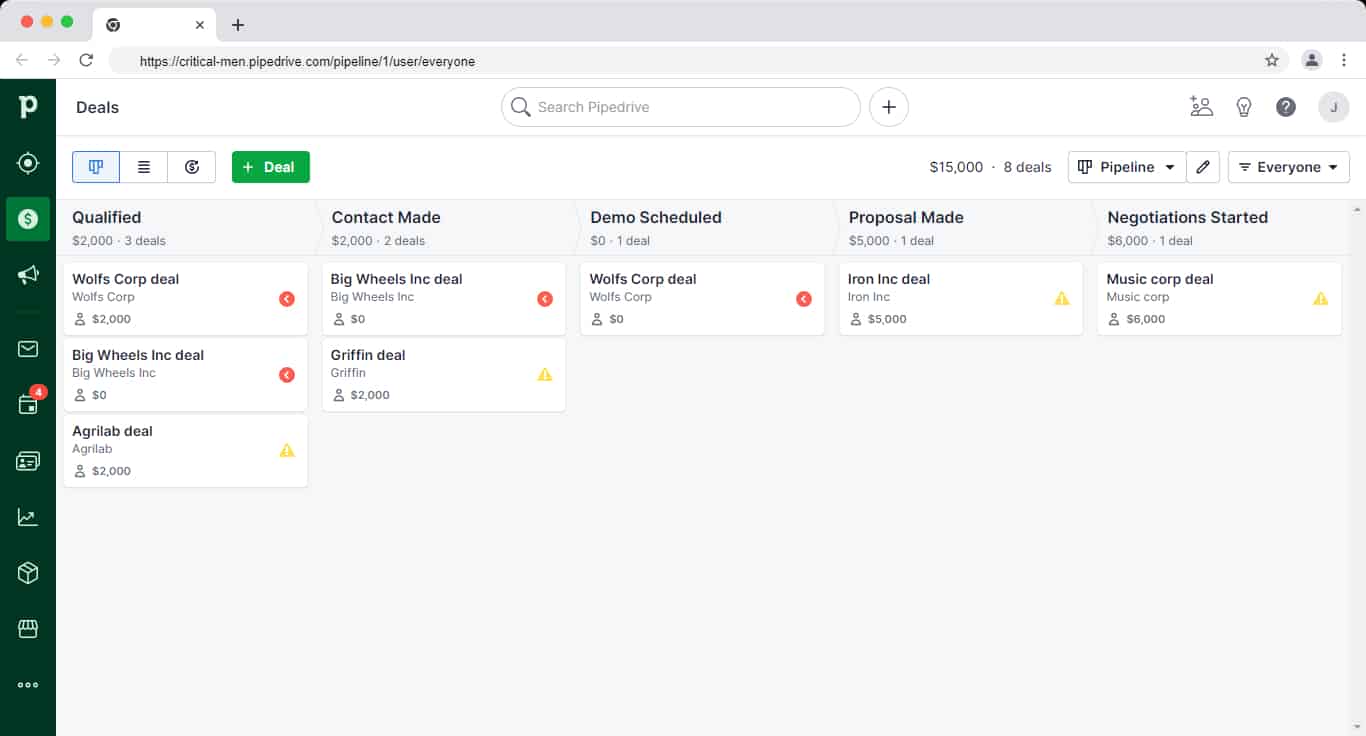
Pipedrive Deals Dashboard
Pipedrive also integrates easily with popular sales and productivity tools, allowing teams to automate routine tasks without complexity.
All essential areas—leads, deals, contacts, reports, and campaigns—are accessible from a clean left-hand navigation panel.
Built-in tutorials, contextual tips, and product walkthroughs help new users get started quickly, reducing onboarding time significantly.
As Eric J, head of sales, says:
“Very little hand-holding is needed to get your team ramped and up and running using Pipedrive. Adoption is a huge problem Pipedrive solves because it’s so easy to use there’s no reason not to use it.”
Pipedrive’s help center includes detailed step-by-step guides, and in-app chat support is available directly within the platform, with responses typically arriving within minutes.
Read also: HubSpot Pricing and Comparison with Affordable Alternatives
HubSpot: Powerful, Unified—but More Complex
HubSpot combines multiple tools across sales, marketing, service, operations, and content, so its interface naturally feels more feature-dense than Pipedrive’s.
That said, HubSpot’s top navigation bar makes it easy to switch between hubs, and each hub includes structured dropdowns for quick access to core features.
For example, within the Sales Hub, users can jump directly to deals, tasks, forecasts, meetings, or documents without digging through menus.
Teams that use multiple HubSpot hubs benefit from having everything connected in one system—contacts, conversations, automation, and reporting all live in the same ecosystem.
As Aneesha Nair, Account Manager at SurveySparrow says:
“HubSpot helps us make things organized and as everything is one tool, it becomes easy to navigate and reach out to the right leads and update things accordingly.”
HubSpot’s support ecosystem is robust, offering detailed documentation, live chat, ticket-based support, and an active user community for troubleshooting and best practices.
Ease of Use Verdict: Pipedrive Wins for Sales Teams, HubSpot Wins for Unified Teams
If your priority is getting a sales team productive in days, Pipedrive wins clearly.
If you need a platform your marketing, sales, and service teams will all use from one login, HubSpot’s learning investment pays off over time.
Read also: EngageBay vs HubSpot — Market Leader or Emerging Powerhouse?
HubSpot vs Pipedrive: Pricing Comparison (2026)
At a Glance: Pricing Comparison Table
| Plan | HubSpot | Pipedrive |
|---|---|---|
| Free Plan | ✅ Yes (unlimited users) | ❌ No (14-day free trial only) |
| Entry Paid Plan | From $20/seat/month (Starter) | $14/user/month — Lite (annual billing) |
| Mid-Tier | From $90–$100/seat/month (Sales/Service Pro) | $39/user/month — Growth (annual billing) |
| Upper-Mid Tier | From $150/seat/month (Enterprise seats) | $49/user/month — Premium (annual billing) |
| Top Tier | $1,170–$1,300/month — Professional Customer Platform | $79/user/month — Ultimate (annual billing) |
| Monthly Billing Premium | Higher (approx. 20–25% more) | Monthly: Lite $24, Growth $49, Premium $79, Ultimate $99 |
| Onboarding Fees | Mandatory for Pro & Enterprise ($3,000–$10,000) | None |
**Pipedrive pricing verified against official pricing page, August 2026. HubSpot pricing based on standard list prices at August 2026; promotional Starter rates (as low as $12–$15/seat/month for new customers billed annually) may apply.
Pipedrive vs HubSpot: Which is Better?
Pipedrive Pricing Breakdown in 2026
Pipedrive currently offers four plans, all priced per user per month. Annual billing saves 20–42% versus month-to-month pricing.
Pipedrive’s base pricing is transparent, but teams that need lead generation, email campaigns, or document management will need paid add-ons. Always calculate total monthly spend including add-ons, not just the base plan price.
Lite — $14/user/month (billed annually) | $24/user/month (monthly)
The entry-level plan for small sales teams. Includes deal and lead tracking, customizable pipeline, standard reporting, and basic integrations. Suitable for teams that want a lightweight CRM without automation. Note: email client sync and meeting scheduler are not available on Lite — making it more of a trial-level plan in practice.
Growth — $39/user/month (billed annually) | $49/user/month (monthly)
The most popular plan for small and growing sales teams. Adds email integration and two-way sync, workflow automation, email open/click tracking, and a meeting scheduler. This is the practical starting point for teams that want useful daily automation without add-ons.
Pipedrive Pricing in detail
Premium — $49/user/month (billed annually) | $79/user/month (monthly)
Includes everything in Growth, plus revenue forecasting, advanced reporting, document management (Smart Docs included), and enhanced collaboration tools. Designed for data-driven sales teams making decisions based on pipeline analytics.
Ultimate — $79/user/month (billed annually) | $99/user/month (monthly)
The highest tier. Includes everything in Premium, plus priority support, enhanced security, custom user permissions, and dedicated onboarding assistance. Best suited for larger sales teams that need governance and hands-on setup support.
Pipedrive Add-Ons (priced separately per account)
Teams that need capabilities beyond pipeline management will need these add-ons. They are purchased at the account level (not per user) unless noted:
| Add-On | Starting Price | What It Adds |
|---|---|---|
| LeadBooster | ~$32.50/month | Chatbot, live chat, web forms, prospector |
| Web Visitors | ~$41/month | Identifies companies visiting your website |
| Campaigns | ~$13.33/month | Email marketing and basic segmentation |
| Smart Docs | ~$32.50/month | Document management (included in Premium+) |
| Projects | ~$6.67/seat/month | Project management alongside deals |
Total cost reality check: A 5-person team on Growth with LeadBooster and Campaigns would pay approximately $195/month (seats) + $32.50 + $13.33 = ~$241/month — well above the advertised $39/user headline rate. Always calculate total monthly spend including add-ons before comparing to HubSpot.
Pipedrive’s pricing remains predictable and sales-focused, but teams that need built-in marketing automation or a broader CRM ecosystem may need to factor in paid add-ons or consider alternatives.
A note on total cost of ownership: A note on total cost of ownership: Pipedrive’s per-user pricing looks predictable, but teams that need lead generation, email campaigns, or document management require paid add-ons.
LeadBooster starts at ~$32.50/month, Campaigns at ~$13.33/month, and Web Visitors at ~$41/month — all account-level charges on top of per-seat costs. A realistic 5-person team on Growth with two add-ons could pay $241+/month versus the $195/month headline figure. Always calculate total monthly spend before comparing.
Want to find a more affordable solution to Pipedrive? Our article on the top Pipedrive alternatives will help you make the right choice.
Read also: CRM Showdown — HubSpot vs Zoho Review and Comparison
HubSpot Pricing Breakdown in 2026
HubSpot’s free CRM is genuinely free and includes unlimited users — making it one of the most generous free tiers in the market.
However, unlocking automation, AI, reporting, and advanced features requires upgrading to Professional or Enterprise plans, where costs compound significantly.
HubSpot charges across several dimensions: which hubs you activate, how many Core Seats (active users) you need, and how many marketing contacts you’re emailing.
A mid-sized company using Marketing Hub Professional + Sales Hub Professional can easily spend $2,000–$5,000/month.
HubSpot Paid Plans (Per Hub)
Starter — from $20/seat/month (standard list price).
Promotional pricing for new customers billed annually may reduce this to $12–$15/seat/month for the first year.
Starter plans are available across hubs and include essential CRM features, basic automation, and limited customization.
This tier is best for small teams that need core functionality without advanced workflows. Note: HubSpot occasionally runs promotional rates (as low as $12–$15/seat/month) for new annual subscribers — but the standard list price is $20/seat/month.
Professional — from ~$890/month (per hub)
Professional plans unlock advanced automation, AI-powered tools, deeper reporting, and personalization features.
Pricing increases based on marketing contacts, additional hubs, and required core seats. Mandatory onboarding fees may apply.
Sales Hub Professional seats: $90–$100/seat/month.
Service Hub Professional seats: $100/seat/month. Enterprise seats (Sales and Service): $150/seat/month.
These per-seat charges apply on top of any hub-level platform fee. A 5-person sales team on Sales Hub Professional would pay approximately $450–$500/month in seat costs alone, before any platform-level fees.
Enterprise — from ~$3,600/month (per hub)
Enterprise plans are designed for large teams and include advanced permissions, custom reporting, predictive analytics, and AI-driven insights across sales and marketing.
This tier typically requires higher onboarding and annual commitments.
HubSpot Customer Platform Bundles (2026)
| HubSpot Bundle | Price | Seats Included |
|---|---|---|
| Starter Customer Platform | $20/seat/month | Scales per user |
| Professional Customer Platform | $1,170–$1,300/month | 5 Core Seats included |
| Enterprise Customer Platform | $4,300/month | 7 Core Seats included |
Professional Customer Platform is the most common entry point for growing SMBs needing all hubs. At 10 users, add 5 additional Core Seats at $50/month each = $250/month extra, bringing the base to approximately $1,420–$1,550/month before contact overages.
HubSpot’s pricing gets expensive very fast and lacks some key features on some plans.
What Becomes Clear About HubSpot Pricing
-
-
- Costs rise quickly as soon as you move beyond basic CRM usage
- Advanced automation and AI features are locked behind Professional and Enterprise tiers
- Pricing compounds across hubs, seats, and contacts—not just users
- Annual commitments and onboarding fees add to upfront investment
-
HubSpot Seat Model (2026)
HubSpot now separates access by seat type:
-
-
- View-Only Seats – Free and unlimited, but restricted to read-only access
- Core Seats – Paid seats required for creating, editing, and automating workflows
- Sales & Service Seats – Required for advanced sales and support features
-
This means teams that previously relied on free edit access must now purchase Core seats, increasing total costs as usage grows.
As Daniel Fernandez, account executive at Lotus Connect says:
“I think that the pricing structure could work differently. Luckily, I work at a company that can afford the professional accounts but I do think that the price increase is way too steep and some of the features, namely sequences, should be available on the less expensive plans.”
HubSpot 2024 pricing update: In March 2024, HubSpot introduced two new seats, View-Only and Core.
The View-Only seats are unlimited and free but offer view-only access to all the features in the particular subscription.
The Core seats are paid and offer edit access to the Core features of the chosen plan.
Keep in mind that the new paid Core seat functionality was previously offered in the free plan, meaning HubSpot just got expensive.
This table can help you understand better:
| User requirement | Previous pricing structure | New pricing structure |
| Users requiring view-only access to reports, records, and other data | Included in the free plan | Now offered in the free, View-Only seat |
| Users requiring edit access to records and reports, email tracking, and other editable tasks | Included in the free plan | Now offered in the paid, Core seat |
| Users requiring sales and service-specific features | Dedicated Sales and Service seat | Dedicated Sales and Service seat |
A note on HubSpot’s seat model: Not all users in your company need a “Core Seat.” View-only access is free and unlimited — meaning stakeholders and managers who just need to read reports don’t add to your bill.
However, anyone creating workflows, editing records, or running automations needs a paid Core Seat.
Pricing verdict:
For small sales teams (under 10 people), Pipedrive’s Growth plan at $39/user/month remains one of the most predictable CRM price points on the market — provided you factor in any add-ons you need. HubSpot’s free CRM is genuinely useful for startups, but moving to Professional tier (where real automation and AI live) means committing to $890+/month for Marketing Hub or $90–$100/seat/month for Sales Hub. Plan carefully before assuming HubSpot scales affordably.
👉 Don’t settle for HubSpot’s high prices. Check out our article on the best HubSpot alternatives for a better deal.
Read also: Is HubSpot CRM Free? An Unbiased Guide (with User Reviews)
Comparing HubSpot vs Pipedrive: AI features (2026)
AI has become a genuine differentiator in CRM selection in 2026. Both HubSpot and Pipedrive have invested heavily, but from different starting points.
AI Features Comparison Table
| AI Feature | HubSpot (Breeze) | Pipedrive (Pulse + AI Assistant) |
|---|---|---|
| Lead Scoring | Predictive (multi-signal) | Pulse: email, web, call-based |
| Call Summaries | Yes | Yes (available on Growth+ via Pulse, as of 2025–2026) |
| Email Drafting | Yes (AI-assisted) | Yes (follow-up drafts) |
| Content Creation | Yes (blog, landing page AI) | No |
| Data Warehouse Connect | Yes (HubSpot Data Hub) | No |
| AI Maturity (2026) | 18–24 months ahead | Catching up rapidly |
In 2026, HubSpot’s AI suite (Breeze) is more mature and spans more departments, while Pipedrive has made significant strides with Pulse and its AI Sales Assistant.
HubSpot currently leads in AI depth — but Pipedrive is closing the gap faster than expected.
For sales-specific AI (lead prioritization, call summaries, follow-up drafts), Pipedrive’s Pulse delivers strong value.
For teams that also need AI-powered marketing content, email campaign optimization, and cross-departmental insights, HubSpot’s Breeze suite is in a different class.
HubSpot AI Capabilities (2026)
HubSpot’s AI is deeply embedded across its entire CRM ecosystem. Key capabilities include:
-
-
- AI-powered email and content generation for sales, marketing, and support teams
- Predictive lead scoring to prioritize high-intent prospects
- Automated workflow and next-best-action recommendations
- Sales forecasting and deal risk insights
- AI chatbots and customer service automation for faster, contextual support
-
These features work together across hubs, making HubSpot’s AI especially valuable for businesses managing complex, multi-channel customer journeys.
Pipedrive AI Capabilities (2026)
Pipedrive takes a more focused approach, using AI to improve day-to-day sales productivity. Its AI features include:
-
-
- AI Sales Assistant to highlight priority deals and next actions
- Automated activity and follow-up reminders
- Email drafting and response suggestions
- Deal probability and pipeline insights to support forecasting
-
Pipedrive’s AI is intentionally lightweight, helping sales reps stay organized and close deals faster without adding complexity.
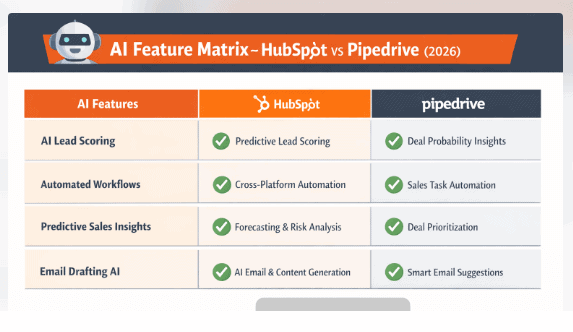
AI verdict (2026)
HubSpot delivers broader, cross-platform AI automation that supports marketing, sales, and service teams end to end.
Pipedrive focuses on sales-specific AI productivity, making it ideal for teams that want actionable insights without an all-in-one AI ecosystem.
Comparing HubSpot vs Pipedrive: Customization & Pipeline Management (2026)
When comparing HubSpot vs Pipedrive in 2026, both platforms offer strong customization and pipeline management—but they excel in different ways.
HubSpot prioritizes flexibility across teams and objects, while Pipedrive focuses on speed, clarity, and sales execution. What one platform gains in breadth, the other wins in simplicity.
Pipedrive: Sales-First Pipeline Customization
Pipedrive allows teams to create custom fields, design multiple pipelines, and fully customize deal stages to match their sales process.
Its visual pipeline remains one of the strongest in the CRM market, giving sales reps an instant overview of deal status, next actions, and bottlenecks.
In 2026, Pipedrive also supports:
-
-
- Custom reports and dashboards
- Sales-focused workflow automations (deal movement, task creation, follow-ups)
- AI-assisted deal insights and activity recommendations
-
While reporting and automation are more limited compared to HubSpot’s cross-hub capabilities, they are more than sufficient for most SMB sales teams and easier to configure without admin-heavy setup.
Pipedrive’s strength lies in pipeline hygiene and usability—teams can quickly move deals, log activities, and keep pipelines clean without friction.
Read also: AWeber vs Mailchimp and Other Email Tools
HubSpot: Deep Customization Across the CRM
HubSpot offers far deeper customization than Pipedrive, especially for teams managing complex data across marketing, sales, and service.
However, its pipeline management could be improved. Its bad UX, for example, makes it hard to progress a deal to a customer.
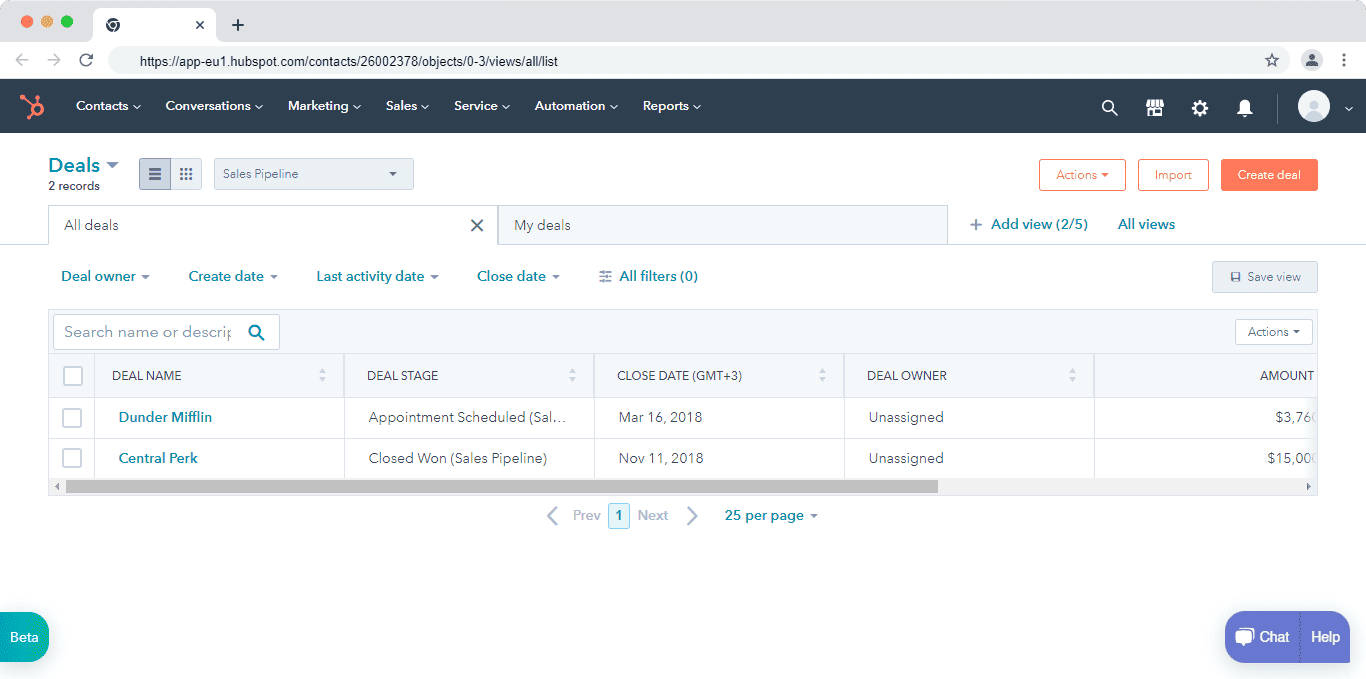
In 2026, HubSpot supports:
-
-
- Highly customizable CRM objects and properties
- Advanced custom reports and forecasting
- Cross-hub workflows spanning sales, marketing, and service
- AI-driven automation and predictive insights
-
However, this flexibility comes with trade-offs. HubSpot’s deal pipelines are powerful but can feel heavier and more complex, particularly for sales reps who only need quick pipeline updates.
Moving deals, managing stages, and configuring automations often requires more upfront setup and admin involvement than Pipedrive.
Here’s how Damien Frye, an enterprise sales representative at WordRake, sums it up:
“I’ve managed several CRM programs as an admin, and HubSpot is my top choice. … It offers a prompt support crew, an excellent knowledge base, and ease of use.” — Winston A., Mid‑Market (51–1000 employees)
Customization and pipeline management verdict (2026):
-
-
- Customization: HubSpot wins with broader, deeper configuration options
- Pipeline management: Pipedrive wins with a cleaner UX and faster sales execution
-
In short, HubSpot is better for teams that need flexibility across departments, while Pipedrive is better for teams that live and breathe sales pipelines.
Read also: HubSpot vs Mailchimp — A Complete Product Comparison
Comparing HubSpot vs Pipedrive: Marketing & Campaign Management (2026)
Both HubSpot and Pipedrive offer campaign-related capabilities, but they are built for very different use cases.
The difference stems from their core focus: HubSpot is a full-funnel marketing platform, while Pipedrive is a sales-first CRM with email outreach tools.
Pipedrive: Sales Email & Outreach Campaigns
Pipedrive’s marketing features are designed to support sales-led communication, not dedicated marketing teams.
In 2026, Pipedrive allows you to:
-
-
- Create and send sales emails using a built-in email editor
- Use pre-built email templates for faster outreach
- Segment contacts for targeted sales campaigns
- Track opens, clicks, and replies at the contact and deal level
- View email history directly inside each contact and deal record
-
These capabilities work well for one-to-one or small-batch sales campaigns, follow-ups, and pipeline-driven outreach.
However, Pipedrive does not offer native marketing automation, landing pages, advanced A/B testing, or multi-channel campaign orchestration.
Teams typically rely on add-ons or third-party tools for those needs.
In short, Pipedrive’s “campaigns” are sales campaigns—not full marketing programs.
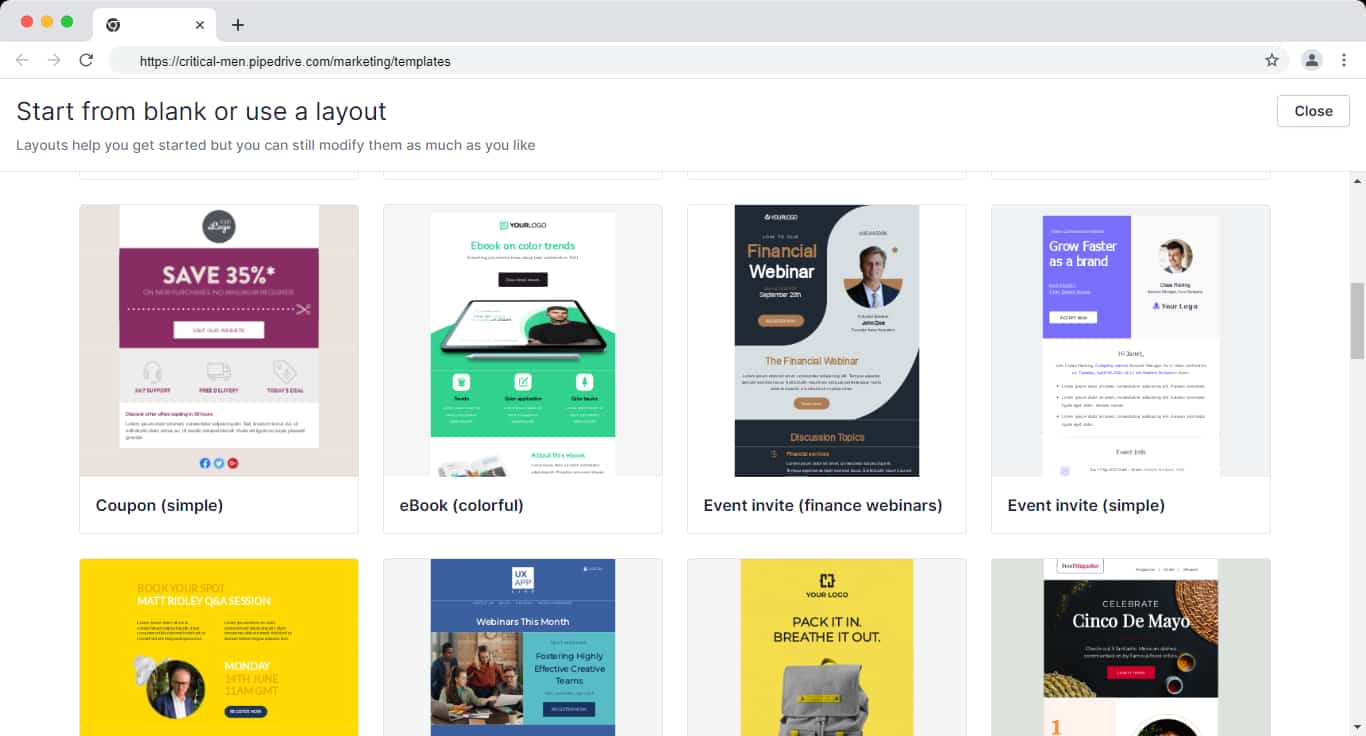
Pipedrive Email Templates
HubSpot: Full-Funnel Marketing & Campaign Orchestration
HubSpot provides a comprehensive marketing platform built for teams running multi-channel, data-driven campaigns.
In 2026, HubSpot enables you to:
-
-
- Create blogs, landing pages, forms, and CTAs
- Run email marketing with A/B testing and automation
- Manage paid ads and social media from one dashboard
- Build lead-nurturing and lifecycle-based workflows
- Attribute revenue and performance across channels
-
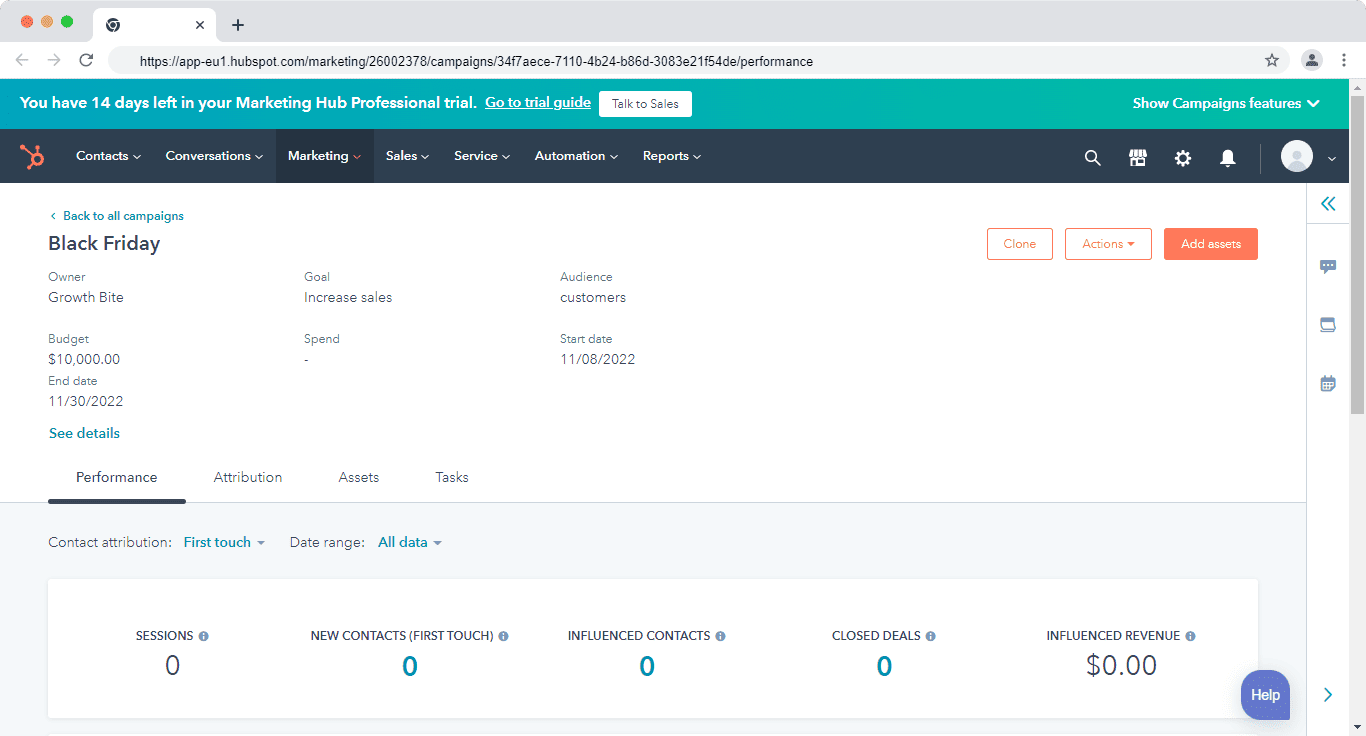
HubSpot’s campaign management feature lets marketers group all related assets—emails, ads, landing pages, workflows, and content—under a single campaign goal.
This makes it easy to track performance at both the asset level and the overall campaign level.
For example, a seasonal campaign like Black Friday can include emails, ads, landing pages, blog content, and automated follow-ups, all tied to one measurable objective.
Here’s how Krishna Raj a digital marketing strategist summed up HubSpot:
“Before the implementation of HubSpot, we were using multiple tools for all marketing activities, now with this single platform we can have email marketing, marketing & sales automation, social media posting analysis, website analytical reporting, and leads nurturing everything can be done under this single platform.”
Marketing and campaign management verdict (2026):
HubSpot clearly leads in marketing and campaign management, offering full-funnel automation, attribution, and multi-channel orchestration.
Pipedrive is sufficient if your needs are limited to sales emails and basic outreach—but it’s not designed to replace a dedicated marketing automation platform.
Read also: The Definitive Pipedrive vs Salesmate Review — Which is The Best CRM Solution?
Comparing HubSpot vs Pipedrive: Integrations (2026)
CRM integrations play a critical role in eliminating data silos and connecting sales, marketing, and support workflows across your tech stack.
Both HubSpot and Pipedrive integrate with popular business tools—but the scale and depth of their ecosystems differ.
Pipedrive: Strong Sales & Productivity Integrations
In 2026, Pipedrive offers 500+ integrations (Pipedrive marketplace, August 2026), primarily focused on sales productivity and deal execution.
It integrates seamlessly with tools across:
-
-
- Email and calendar platforms
- Accounting and invoicing tools
- Customer support and live chat software
- Marketing and outreach tools
- Calling and telephony solutions
-
Popular integrations include Slack, PandaDoc, Intercom, Zendesk, Google Workspace, Microsoft 365, and popular calling tools.
For apps not available natively, Zapier and Make enable no-code workflows—for example, automatically syncing Facebook Lead Ads or form submissions into Pipedrive as new deals or contacts.
Pipedrive’s integrations are easy to configure and well-suited for sales teams that want fast setup without complex dependencies.
App Marketplace Comparison
| Feature | HubSpot | Pipedrive |
|---|---|---|
| Integrations | 1,500+ | 500+ |
| API Access | Yes | Yes |
| Native Tools | Extensive | Limited |
HubSpot offers more native functionality, while Pipedrive relies more heavily on third-party tools.
HubSpot: One of the Largest CRM Integration Ecosystems
HubSpot’s App Marketplace includes 1,500+ integrations in 2026, spanning nearly every business function.
HubSpot integrates deeply with:
-
-
- Marketing and advertising platforms
- Sales enablement and revenue tools
- Customer support and success software
- Finance, billing, and payments
- Product, data, and analytics platforms
-
It also supports two-way integrations with other CRMs, including Salesforce, Pipedrive, Copper, and Insightly—useful for hybrid or phased CRM migrations.
Because HubSpot connects marketing, sales, service, and operations in one system, its integrations often go beyond basic data sync and support cross-tool automation, attribution, and reporting.
Integration verdict (2026):
Slight edge to HubSpot.
Both platforms integrate well with popular tools, but HubSpot offers a broader and deeper ecosystem, especially for marketing, analytics, and revenue operations.
Pipedrive’s integrations are more than sufficient for sales-focused teams, offering simplicity and speed without the complexity of enterprise-grade integration setups.
Comparing HubSpot vs Pipedrive: Sales automation (2026)
Sales Automations and workflows help teams eliminate repetitive work, improve follow-ups, and move deals through the pipeline faster.
While both HubSpot and Pipedrive offer automation, they differ significantly in depth, flexibility, and scope.
Pipedrive: Simple, Sales-Focused Automation
Pipedrive’s automation is designed to streamline day-to-day sales activities with minimal setup.
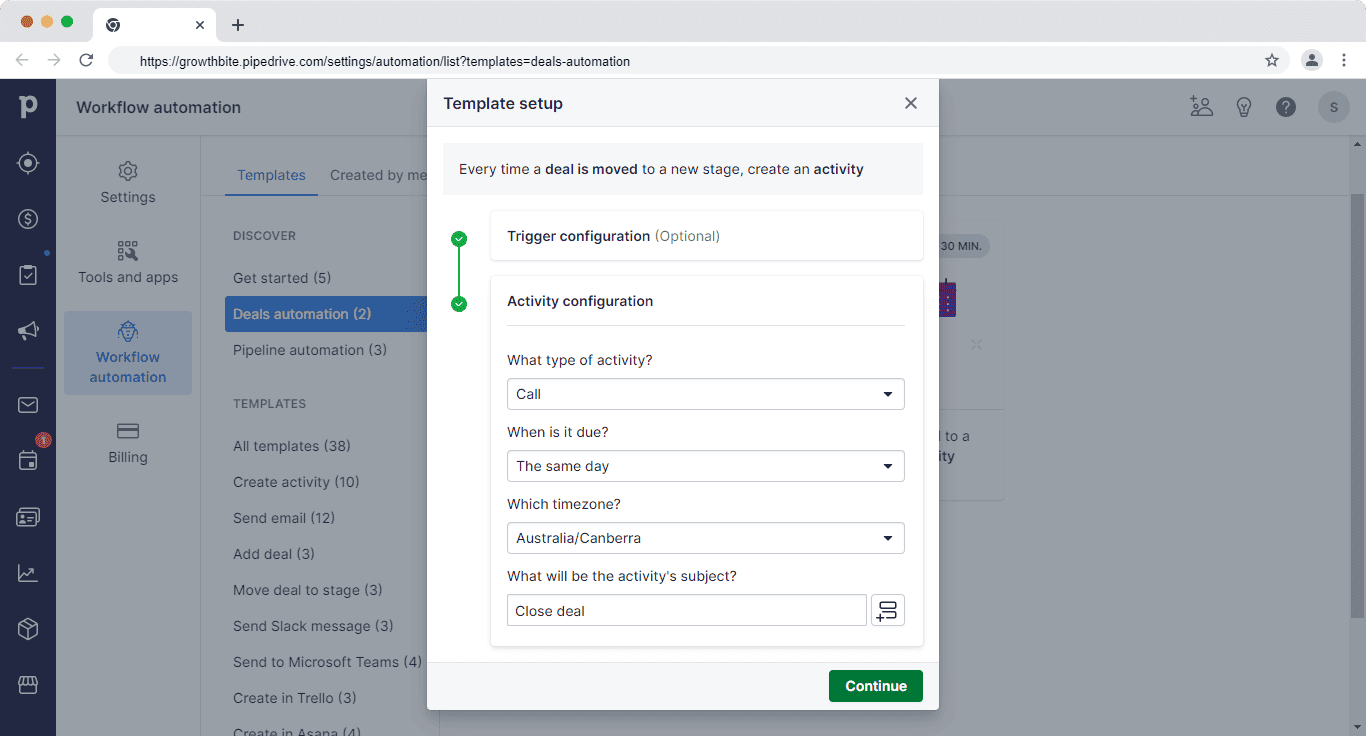
In 2026, Pipedrive includes:
-
-
- A visual workflow builder for deal- and activity-based automations
- Pre-built automation templates (e.g., move deal stages, create tasks, schedule follow-ups)
- Custom automation built from scratch for common sales actions
- An AI Sales Assistant that analyzes activity patterns and suggests next-best actions
-
These automations work well for keeping pipelines clean, ensuring consistent follow-ups, and reducing manual admin work.
However, Pipedrive’s automation is intentionally limited to sales workflows and does not extend deeply into marketing, service, or lifecycle automation.
For teams that need lightweight, easy-to-maintain automation, Pipedrive gets the job done without complexity.
Here’s how Sasha Trifkovic, CEO of Dawn Media summed it up:
“I absolutely hate the automation in Pipedrive. Although they serve a simple purpose like converting leads into deals or setting up a notification. They are too simple for us who want sophisticated automation.”
You can also use its AI sales assistant to analyze past performances and notify you of ways to improve your sales workflow.
It can also suggest features that you might have missed and could help you close more deals.
Redefining CRM Standards! Pipedrive Review 2024
HubSpot: Advanced, Cross-Hub Sales Automation
HubSpot’s automation capabilities are broader and more sophisticated, especially for teams using multiple hubs.
In 2026, HubSpot’s sales automation is powered by:
-
-
- Sequences for structured, personalized follow-ups with leads and deals
- Workflows that automate actions across sales, marketing, and service
- Multiple trigger types (contact, company, deal, ticket, quote, conversation, and form activity)
- AI-assisted automation for prioritization, content drafting, and deal insights
-
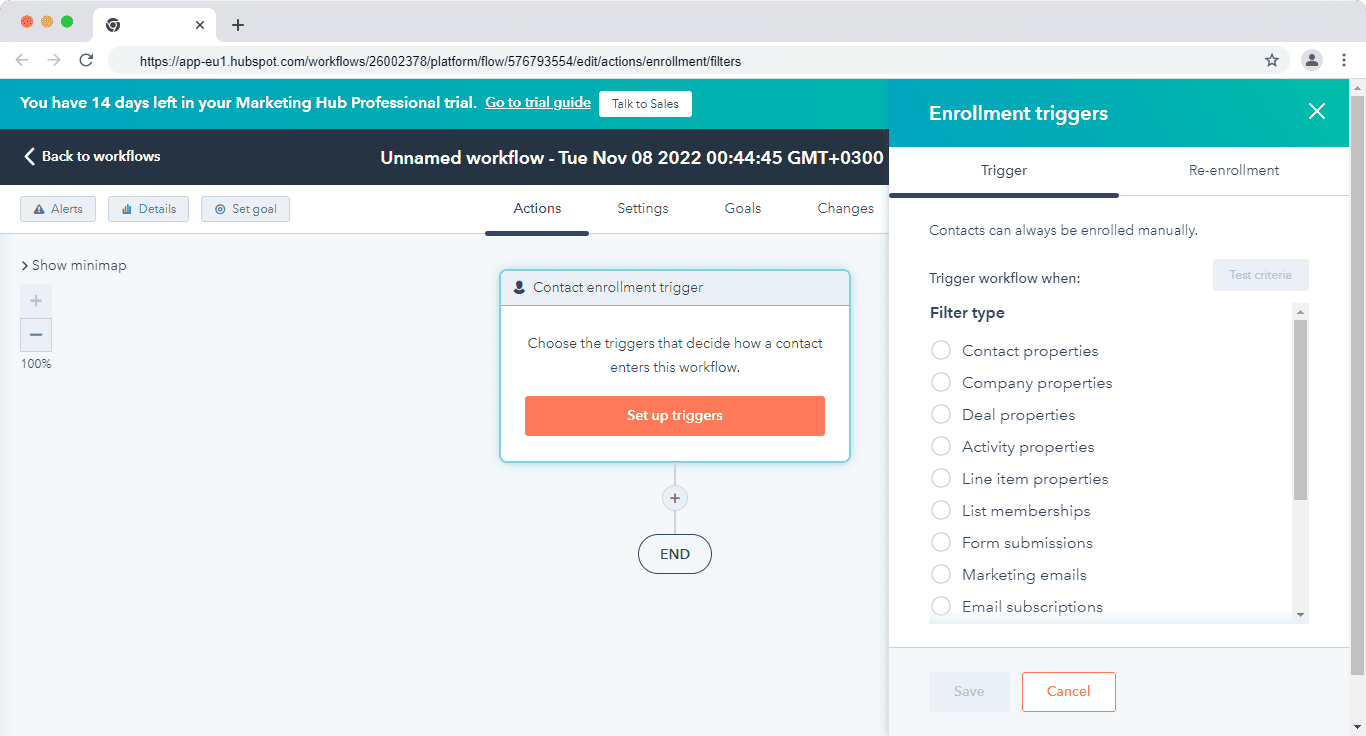
Workflow automation in HubSpor
With HubSpot, teams can automate everything from lead routing and lifecycle updates to sales handoffs, deal scoring, and post-close follow-ups—all within one connected CRM ecosystem.
HubSpot also offers a wide range of pre-built workflow templates, making it easier to get started while still allowing deep customization as teams scale.
Sales automation verdict (2026):
HubSpot clearly leads in sales automation for teams that need advanced, multi-step workflows and cross-team coordination.
Pipedrive excels at simple, practical automation that keeps sales reps focused and pipelines moving—without the overhead of managing complex systems.
In short:
-
-
- Choose Pipedrive for straightforward sales automation and ease of use
- Choose HubSpot if you want powerful, end-to-end automation that scales with your business
-
Read also: 6 Perfect Pipedrive Alternatives With Better Tools
Comparing HubSpot vs Pipedrive: Reporting & Analytics (2026)
CRM reporting helps teams understand pipeline health, forecast revenue, and measure individual and team performance.
When comparing HubSpot vs Pipedrive, reporting comes down to simplicity versus depth.
Key factors to consider include:
-
-
- How easy it is to build reports and dashboards
- The range of report types available
- How clearly insights are visualized and shared
-
Pipedrive: Clear, Sales-Focused Reporting
Pipedrive’s reporting is built for sales visibility and ease of use.
In 2026, Pipedrive offers:
-
-
- Visual dashboards for deals, activities, and pipeline stages
- Goal tracking based on deals, activities, and revenue
- Forecasting views based on expected close dates
- Custom dashboards and filters for individual reps and managers
-
Sales managers can track performance across the funnel—from new leads to closed deals—without complex setup.
Reports are easy to understand and presentable, making them ideal for weekly reviews and sales meetings.
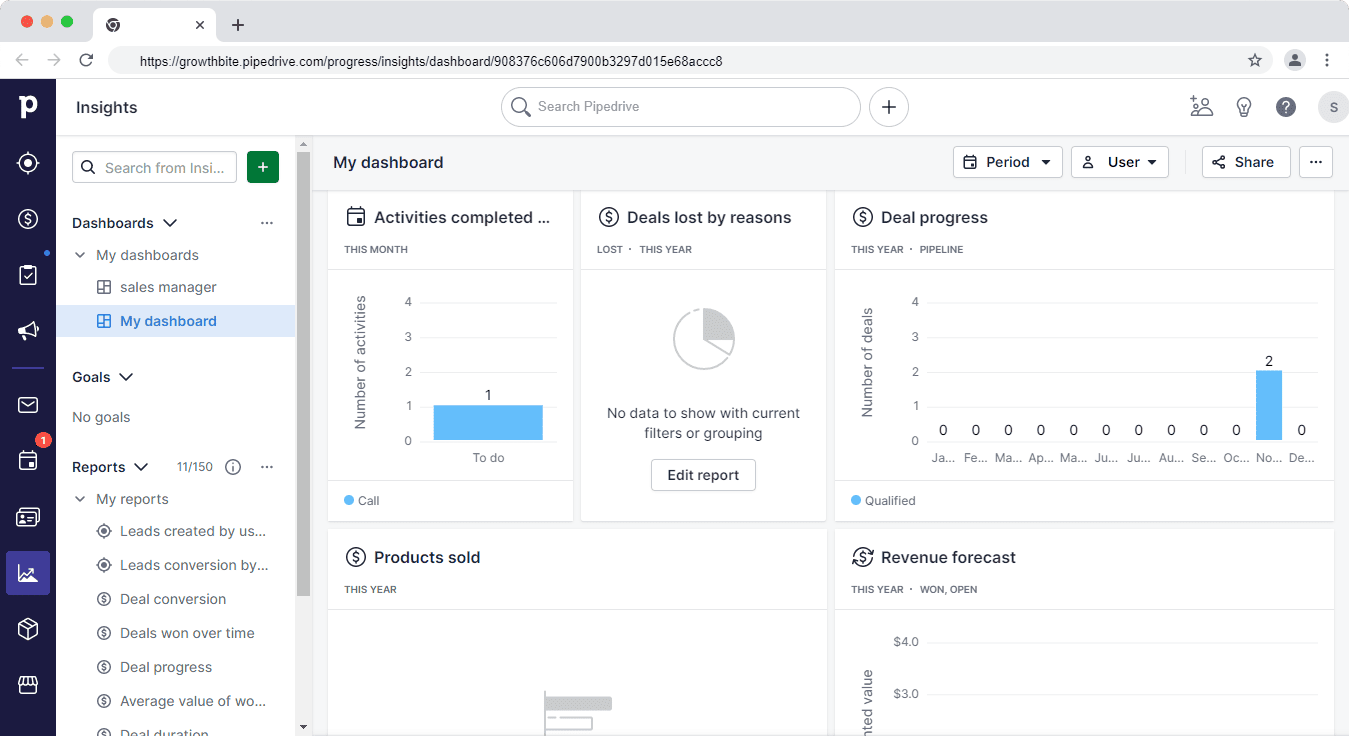
Reporting in Pipedrive
Customization is available, but primarily within sales-related metrics.
Pipedrive does not natively combine sales data with marketing or service analytics.
As one G2 user notes:
“Pipedrive’s visual pipeline and intuitive dashboards make it easy to track deals, performance, and progress without getting lost in data.”
Read also: Pipedrive Pricing, Features, and Affordable All-in-One Alternatives
HubSpot: Advanced, Cross-Team Reporting & Analytics
HubSpot offers far more advanced reporting, especially for teams using multiple hubs.
In 2026, HubSpot supports:
-
-
- A large library of pre-built reports across sales, marketing, and service
- Custom dashboards for executives, managers, and reps
- Funnel and lifecycle reporting across contacts, deals, and revenue
- Attribution and performance insights tied to marketing and sales activity
- A powerful custom report builder for tailored analysis
-
HubSpot’s reports can combine data from multiple hubs, allowing teams to analyze how marketing efforts impact sales outcomes and how deals progress across lifecycle stages.
Forecasting, pipeline analytics, and performance benchmarking are more granular than in Pipedrive.
These insights are particularly useful for leadership teams that need stakeholder-ready reports and long-term trend analysis.
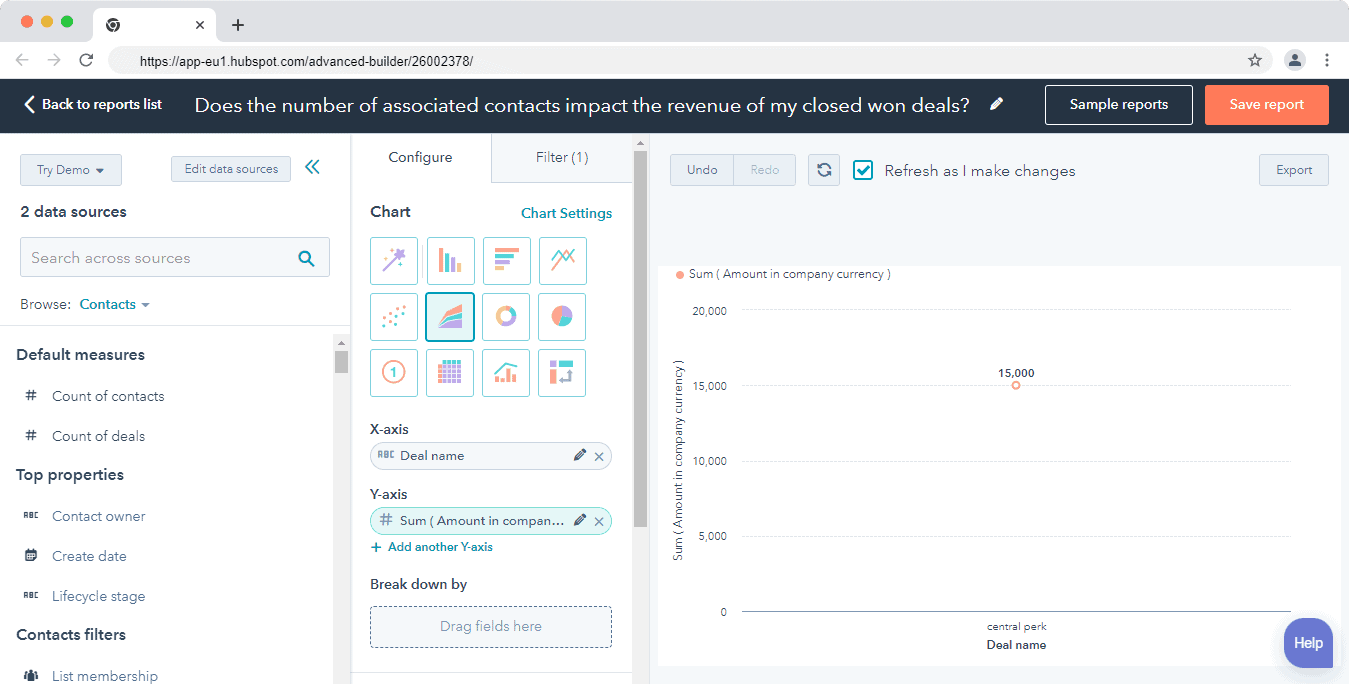
Custom Report Builder in HubSpot
Reporting verdict (2026):
HubSpot leads in reporting flexibility and analytical depth, especially for businesses that need cross-team visibility and advanced insights.
Pipedrive excels at straightforward, sales-only reporting that’s fast to set up and easy to interpret—making it a strong fit for sales teams that value clarity over complexity.
Read also: Sales Analysis — Learn To Zoom In & Master the Pipeline
Comparing HubSpot vs Pipedrive: Lead management (2026)
Both HubSpot and Pipedrive offer strong lead management capabilities, but they approach the problem from very different angles.
HubSpot treats lead management as part of a full customer lifecycle, while Pipedrive focuses on qualifying and converting sales-ready leads.
Pipedrive: Sales-Qualified Lead Management
Pipedrive’s lead management is designed to help sales teams capture, qualify, and move leads into deals efficiently.
In 2026, Pipedrive includes:
-
-
- A Lead Inbox to store and work leads before converting them into deals
- Activity-based lead qualification to ensure timely follow-ups
- Smart Contact Data to enrich lead profiles using publicly available data
- Clear separation between unqualified leads and active deals
-
To generate and capture leads, Pipedrive relies on paid add-ons rather than native CRM features. These include:
-
-
- Live chat and chatbot
- Web forms
- Prospector (lead sourcing)
- Website visitor tracking
-
These capabilities are bundled under add-ons like LeadBooster and Web Visitors, which increase the total cost beyond the base CRM subscription.
As a result, Pipedrive’s lead management works best for teams that:
-
-
- Already have lead sources in place
- Want a clean qualification workflow
- Prefer to keep marketing and lead generation outside the CRM
-
Read also: Pipedrive vs Close Comparison — Which CRM Is Right For You?
HubSpot: End-to-End Lead Management Across Teams
HubSpot offers end-to-end lead management built directly into its CRM ecosystem.
In 2026, HubSpot enables teams to:
-
-
- Capture leads using forms, live chat, and chatbots
- Track every interaction—emails, calls, website activity, social engagement, and support tickets—in a single contact record
- Use a unified conversations inbox for sales, marketing, and support
- Prioritize and route leads using lifecycle stages, scoring, and automation
- Nurture leads automatically before handing them to sales
-
HubSpot’s smart contact database gives teams a complete view of each lead, including engagement history across marketing, sales, and service touchpoints.
Because these tools are native to the platform, teams don’t need separate add-ons to manage the full lead lifecycle.
This makes HubSpot particularly effective for businesses that want marketing and sales working from the same lead data, with minimal handoffs or context loss.
Lead management verdict (2026):
No clear winner—just different strengths.
-
-
- HubSpot is better suited for businesses that want end-to-end lead capture, nurturing, and handoff in one platform
- Pipedrive is ideal for teams that want clean lead qualification and fast conversion into deals, and are comfortable using paid add-ons or external tools for lead generation
-
In short, HubSpot owns the full lead lifecycle, while Pipedrive excels at sales-ready lead execution.
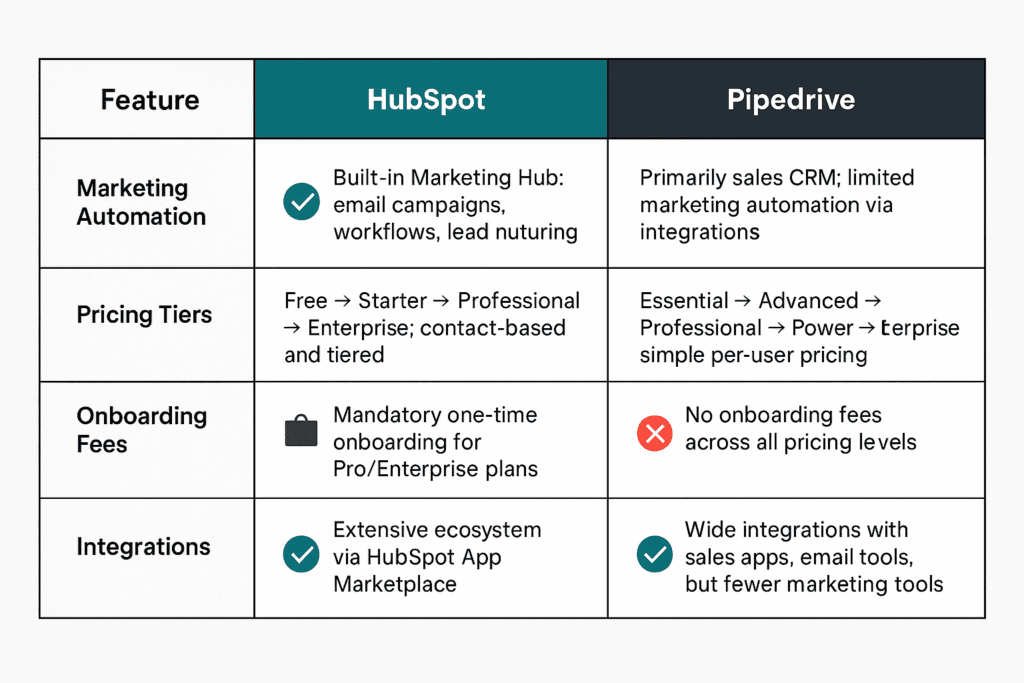
Comparison table showing HubSpot vs Pipedrive feature matrix
Read also: Pipedrive VS Monday — Which Is Better? A Side-By-Side Review
Comparing HubSpot vs Pipedrive: Mobile Apps (2026)
Field sales teams and reps who travel or work remotely increasingly rely on mobile apps to keep their pipelines moving.
Both HubSpot and Pipedrive offer iOS and Android apps, but they’re built around different use cases.
Pipedrive’s mobile app is well-regarded for its simplicity — sales reps can update deal stages, log calls, and view their pipeline from their phone without confusion. The mobile experience closely mirrors the desktop interface, meaning reps who are comfortable on desktop adapt instantly. Activity logging, deal updates, and contact notes are all easy to complete on the go.
HubSpot’s mobile app gives access to contacts, deals, tasks, and notifications across all connected hubs. It is particularly useful for managers who need to check marketing activity, review support tickets, or pull pipeline reports from anywhere — given the all-in-one nature of the platform. The app is feature-rich, though some users note it can feel complex to navigate for quick sales updates.
For pure sales reps on the go, Pipedrive’s mobile app is simpler. HubSpot’s app is better for managers who need visibility across teams.
Mobile App Comparison Table
| Feature | HubSpot Mobile | Pipedrive Mobile |
|---|---|---|
| Available on iOS & Android | Yes | Yes |
| Deal pipeline view | Yes | Yes |
| Call logging | Yes | Yes |
| Push notifications | Yes | Yes |
| Marketing dashboard access | Yes | No |
| Offline access | Limited | Limited |
Comparing HubSpot vs Pipedrive: Customer Support (2026)
The quality of support a CRM vendor provides can significantly affect onboarding success and long-term satisfaction — especially for teams without a dedicated IT or RevOps function.
HubSpot offers live chat, email ticketing, an extensive knowledge base, a community forum, and HubSpot Academy with free certifications and courses.
However, phone support is only available on higher-tier plans, and some users on Starter plans report slower response times during peak periods.
HubSpot’s self-service resources — particularly its Academy — are genuinely excellent and reduce the need for live support for motivated learners.
Pipedrive includes in-app live chat support with fast response times (often within minutes on business days), a well-organized help center with step-by-step guides, and email support.
Priority support is reserved for Enterprise plan users. Pipedrive’s chat support is frequently highlighted in reviews as one of its strongest points — particularly for teams that prefer fast human answers over browsing documentation.
Both tools have solid support ecosystems, but HubSpot’s free resources (Academy, community) give it an edge for self-starters, while Pipedrive’s faster in-app chat suits teams that want quick human answers.
Customer Support Comparison Table
| Support Type | HubSpot | Pipedrive |
|---|---|---|
| Live Chat | Yes (paid plans) | Yes (all plans) |
| Email/Ticket Support | Yes | Yes |
| Phone Support | Higher tiers only | No |
| Knowledge Base | Extensive | Good |
| Community Forum | Yes (large) | Limited |
| Free Certifications | Yes (HubSpot Academy) | No |
Comparing HubSpot vs Pipedrive: Switching or Migrating Data (2026)
One concern many buyers have before committing to a CRM is: “What if we need to switch later?” The good news is that neither HubSpot nor Pipedrive permanently locks you in — but the migration complexity varies.
Migrating from Pipedrive to HubSpot: Pipedrive offers a native export to CSV for contacts, deals, notes, and activity history.
HubSpot has a built-in import wizard that accepts CSV files with field mapping, making the migration of core data relatively straightforward.
Workflow automations and custom properties, however, need to be rebuilt manually in HubSpot — they don’t transfer between platforms.
Migrating from HubSpot to Pipedrive: HubSpot allows full data export in CSV format, including contacts, companies, deals, and activities.
Pipedrive accepts these imports with field remapping. Custom properties may need to be reconfigured in Pipedrive’s data structure.
Third-party integration tools like Zapier or dedicated migration services can automate the sync if the data volume is high.
Neither platform locks you in permanently, but HubSpot’s more complex data structure with multiple hubs, custom properties, and workflow logic can make migration more time-consuming than a simpler Pipedrive export.
HubSpot vs Pipedrive: What You’ll Actually Pay — Real Team Examples (2026)
Pricing in the abstract only tells part of the story. Here’s what three common team profiles actually pay once real-world usage, seats, and add-ons are factored in.
Scenario 1: 3-Person Startup Sales Team
For a small founding team that just wants to track deals, neither platform needs to be expensive — but the gap widens once you add the tools you’ll actually use.
| Comparison | HubSpot | Pipedrive |
|---|---|---|
| Plan | Starter (3 seats) | Growth (3 users, annual) |
| Base Cost | $60/month (3 × $20/seat) | $117/month (3 × $39/user) |
| Marketing Tools | Basic (limited automation) | Campaigns add-on: +$13.33/month |
| Lead Capture | Basic forms (included) | LeadBooster add-on: +$32.50/month |
| Realistic Monthly Total | ~$60/month | ~$163/month |
| Free Plan Available? | Yes (before upgrading) | No (trial only) |
Verdict for this scenario: HubSpot wins on cost for a 3-person team that needs basic CRM — particularly because the free plan is usable until you outgrow it. Pipedrive becomes competitive once you factor in its superior pipeline experience, but add-ons add up quickly.
Scenario 2: 10-Person Sales + Marketing Team
At 10 people, both platforms start showing their real cost structures. This is where HubSpot’s contact-based pricing and Pipedrive’s add-on model both have significant impact.
| Comparison | HubSpot | Pipedrive |
|---|---|---|
| Plan | Professional Customer Platform | Growth (10 users, annual) + add-ons |
| Base Seat Cost | $1,170–$1,300/month (5 seats incl.) | $390/month (10 × $39/user) |
| Additional Seats | 5 more × $50 = $250/month | — |
| Marketing Add-ons | Included in Marketing Hub Pro | Campaigns: +$13.33/month |
| Lead Capture | Included | LeadBooster: +$32.50/month |
| Onboarding (Year 1 only) | $3,000–$7,000 (one-time) | None |
| Realistic Monthly Total | ~$1,550+/month | ~$436/month |
Verdict for this scenario: Pipedrive is dramatically cheaper for a sales-focused team at 10 people. HubSpot only justifies its higher cost if your marketing team is actively using Marketing Hub’s automation, attribution, and A/B testing — tools that Pipedrive simply doesn’t offer natively.
Scenario 3: The EngageBay Alternative
For teams that want HubSpot’s all-in-one breadth without HubSpot’s price, EngageBay offers a direct comparison.
| Feature / Cost | HubSpot (Pro Platform) | Pipedrive Growth + add-ons | EngageBay Growth |
|---|---|---|---|
| Marketing Automation | ✅ (included) | ❌ (add-on) | ✅ (included) |
| CRM + Pipeline | ✅ | ✅ | ✅ |
| Email Marketing | ✅ | ❌ (add-on) | ✅ (included) |
| Live Chat + Helpdesk | ✅ (paid) | ❌ | ✅ (included) |
| Onboarding Fee | $3,000–$7,000 | None | None |
| 10-User Monthly Cost | ~$1,550+ | ~$436+ | ~$552.40 ($55.24/user) |
Verdict: EngageBay delivers full-suite functionality at a price between Pipedrive (sales only) and HubSpot (all-in-one at premium cost) — without the onboarding fees or annual contract lock-in.
HubSpot vs Pipedrive: Pros & Cons (2026)
HubSpot Pros & Cons
| ✅ Pros | ❌ Cons |
|---|---|
| Free CRM with unlimited users | Costs rise quickly at Professional+ |
| All-in-one: marketing, sales, service | Mandatory onboarding fees at higher tiers |
| 1,700+ integrations | Steeper learning curve for new users |
| Mature AI suite (Breeze) | Pricing compounds across hubs, seats, contacts |
| Predictive lead scoring | Annual commitments required |
Pipedrive Pros & Cons
| ✅ Pros | ❌ Cons |
|---|---|
| Extremely easy to set up and use | No free plan |
| Clean visual pipeline | Limited native marketing automation |
| Predictable per-user pricing | Advanced features locked to higher tiers |
| AI Sales Assistant + Pulse scoring | Needs add-ons for full capability |
| Fast team adoption | Not ideal for multi-department use |
| _ | Plan restructuring — old Essential/Advanced/Professional names still appear in third-party tools and exports, causing confusion for teams mid-migration |
HubSpot Pros
-
-
- Free CRM
- Powerful AI automation
- Built-in marketing tools
- Scales across teams
-
HubSpot Cons
-
-
- Expensive at scale
- Mandatory onboarding fees
-
Pipedrive Pros
-
-
- Easy to use
- Affordable sales CRM
- Strong pipeline visibility
-
Pipedrive Cons
-
-
- No free plan
- Limited marketing automation
-
HubSpot vs Pipedrive: Who Each Platform Is Best For (2026)
Not all businesses have the same CRM needs. Here’s a clear breakdown by business type to help you make a faster decision.
| Business Type | Best Choice | Why |
|---|---|---|
| Early-stage startup | HubSpot | Free CRM with unlimited users; no upfront cost |
| Small sales team (under 10 reps) | Pipedrive | Fast setup, visual pipeline, low cost |
| SaaS company | HubSpot | Marketing automation + CRM in one; scales with growth |
| Agency or consultancy | Pipedrive | Simple deal tracking without marketing overhead |
| E-commerce business | HubSpot | Marketing Hub connects email, ads, and CRM |
| Field sales team | Pipedrive | Mobile-first, activity-based selling |
| B2B enterprise (large teams) | HubSpot | Advanced permissions, AI, multi-hub scalability |
| Budget-conscious SMBs | EngageBay | All-in-one marketing, CRM, and service from $12.74/user/month — vs HubSpot’s $20+/seat or Pipedrive’s $14+ with add-ons |
HubSpot → Growing, Cross-Functional Teams
HubSpot is best suited for businesses that want a single, connected platform across marketing, sales, service, and operations.
In 2026, its strength lies in combining AI-driven automation, advanced reporting, and multi-channel engagement within one CRM ecosystem.
It’s an ideal choice for scaling startups, SaaS companies, and mid-to-large teams that need marketing automation, sales pipelines, customer support, and content management working together—without data silos.
Pipedrive → Sales-Focused and SMB Teams
Pipedrive is built for teams whose primary goal is closing deals efficiently.
Its visual, drag-and-drop pipelines, activity-based selling, and lightweight automation make it easy for sales reps to adopt and stay productive.
In 2026, Pipedrive remains a strong fit for small to mid-sized businesses and sales-led teams that want a fast, intuitive CRM—without the complexity or cost of marketing and service modules they don’t need.
EngageBay: A More Affordable All-in-One CRM Alternative (2026)
Most comparisons of HubSpot and Pipedrive reach the same conclusion: HubSpot is powerful but expensive, and Pipedrive is focused but limited. For a growing segment of buyers — small and mid-sized businesses that need both sales and marketing in one place — neither tool is the perfect fit.
That’s where EngageBay enters the picture. EngageBay combines marketing automation, CRM, sales pipeline management, email marketing, live chat, and customer support tools in one platform — similar in scope to HubSpot but at a significantly lower price point.
EngageBay vs HubSpot vs Pipedrive: Side-by-Side Comparison
| Feature | HubSpot | Pipedrive | EngageBay |
|---|---|---|---|
| Free Plan | ✅ (CRM only) | ❌ | ✅ (marketing + CRM + service) |
| Marketing Automation | ✅ (paid) | ❌ (add-on) | ✅ (included) |
| Sales Pipeline | ✅ | ✅ | ✅ |
| Live Chat / Helpdesk | ✅ (paid) | ❌ | ✅ (included) |
| Email Marketing | ✅ (paid) | ❌ (add-on) | ✅ (included) |
| Landing Pages | ✅ (paid) | ❌ | ✅ (included) |
| Starting Price | From $20/user/month | From $14/user/month | From $12.74/user/month (Basic plan) |
| All-in-One | ✅ (at high cost) | ❌ | ✅ (at low cost) |
Who Should Choose EngageBay?
EngageBay makes the most sense if you’re a small or mid-sized business that needs marketing, sales, and service tools in one place — but finds HubSpot’s pricing prohibitive and Pipedrive’s marketing limitations frustrating.
It’s the platform that removes the “either/or” dilemma entirely.
Here’s how Edo Modun, a sales specialist, summed up EngageBay:
“It’s very useful that you have a package with the most important tools such as CRM and email marketing as one service. Workflow is much easier, data flow is simpler and results are more visible. CRM has many options that you can only dream about in some other online solutions. The file repository is a nice touch.”
Built-In Support Without Extra Cost
EngageBay also includes native help desk and live chat tools, allowing teams to:
-
-
- Manage tickets and automate assignments
- Provide contextual, conversation-based support
- View sales, marketing, and support interactions in one dashboard
-
This eliminates the need for separate customer support software—something many small teams struggle to afford when using tools like HubSpot or Pipedrive.
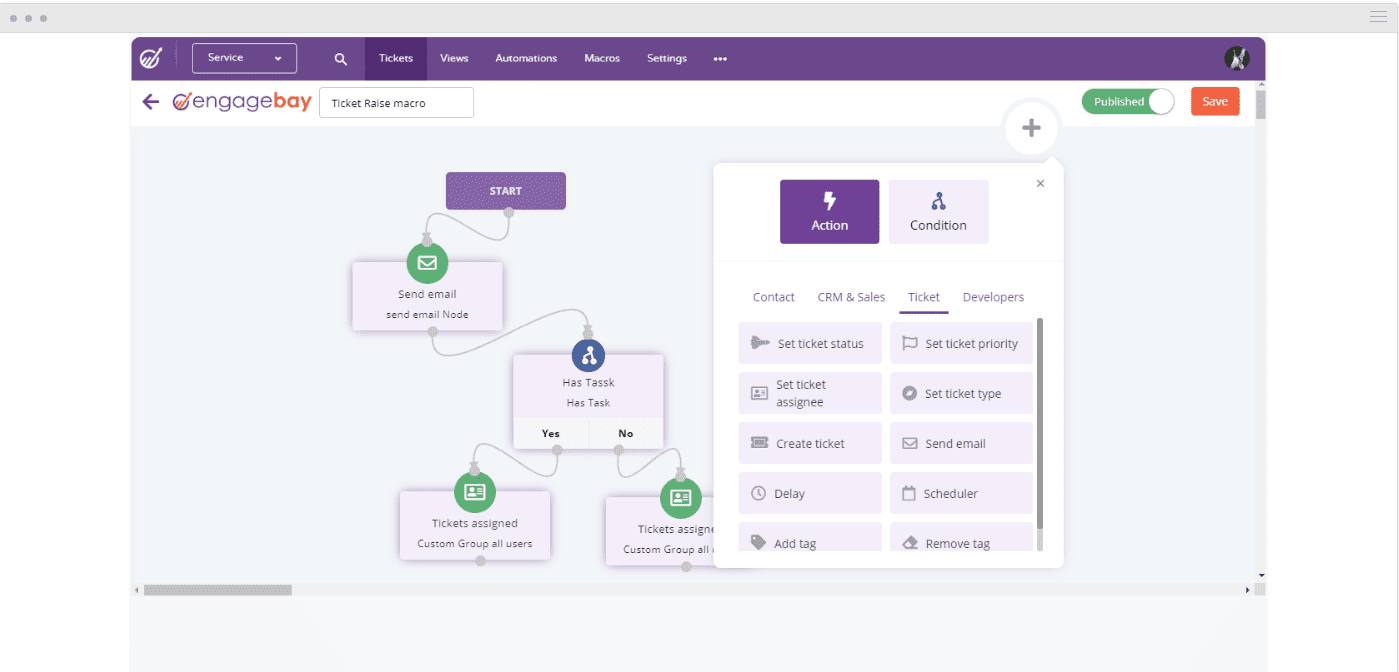
EngageBay Dashboard
When EngageBay Makes the Most Sense
EngageBay is a strong choice if you:
-
-
- Want marketing, sales, and support in one platform
- Need automation and insights without enterprise pricing
- Prefer predictable costs as your team grows
-
In short, EngageBay delivers all-in-one CRM functionality at a price point that works for growing businesses, making it a practical alternative to both HubSpot and Pipedrive in 2026.
Learn more about EngageBay:
Sign up with EngageBay for free
Wrapping up
Pipedrive is a strong choice if your primary need is a sales-focused CRM.
It excels at deal tracking, pipeline visibility, and straightforward sales automation, all wrapped in an interface that’s easy for reps to adopt quickly.
For teams that want to stay focused on closing deals—without the complexity of marketing or service tools—Pipedrive keeps things simple and efficient.
As Michelle Moore puts it:
“Many of the current CRMs I’ve tested in the past were so comprehensive and thorough, but also so difficult to grasp, that they couldn’t be set. Pipedrive has a restricted number of points, which has made my job much easier.”
HubSpot, on the other hand, is built for businesses that need more than just sales CRM functionality.
Its strength lies in unifying marketing, sales, service, and operations within a single platform, supported by advanced automation and reporting.
That breadth comes at a cost, though—pricing increases quickly as teams add hubs, automation, and paid seats.
Bottom line:
Choose Pipedrive for focused sales execution and fast adoption.
Choose HubSpot if you’re investing in a full customer lifecycle platform and are prepared for higher long-term costs as you scale.
If neither of the platforms seems a good fit, you can try EngageBay’s features with the free forever plan and evaluate whether it can serve your business needs.
Related reading:
- The best CRM Tools for Small Businesses
- The 14 Best CRM Automation Software in 2024
- 15 Best Marketing Automation Tools for Small Businesses
- Is HubSpot Worth It? In-Depth Review for Small Businesses
FAQs: HubSpot vs Pipedrive
In HubSpot vs Pipedrive pricing, HubSpot has a steeper tiered pricing structure, with sliding contact‑based charges and mandatory onboarding fees. Pipedrive offers simpler, per-user pricing with no onboarding costs.
HubSpot provides a forever‑free CRM tier with basic tools and unlimited free view‑only users. Pipedrive does not offer a true free plan—only a limited-time trial—making HubSpot more appealing for startups looking for free tools.
Yes. HubSpot includes mandatory onboarding fees on its Professional and Enterprise plans, sometimes running into thousands of dollars. Pipedrive, on the other hand, does not charge any onboarding fees across its pricing tiers.
HubSpot’s pricing increases significantly as your contact list grows, with charges based on the number of marketing contacts. Pipedrive uses fixed per-user pricing, regardless of how many contacts are stored.
Pipedrive is generally more cost-effective for small or growing teams due to its straightforward per-user pricing. HubSpot, while feature-rich, becomes expensive quickly as you scale contacts or add premium tools.
What are Pipedrive’s current plan names in 2026?
Pipedrive overhauled its plan structure in 2025. The plans are now called Lite, Growth, Premium, and Ultimate — replacing the previous Essential, Advanced, Professional, Power, and Enterprise lineup. Pricing on annual billing runs $14, $39, $49, and $79 per user/month respectively. Monthly billing is higher ($24, $49, $79, $99). There is no free plan, but a 14-day free trial is available on all tiers.
Does HubSpot’s Starter plan still cost $15/month in 2026?
The standard list price for HubSpot Starter is now $20/seat/month (when billed annually). However, HubSpot frequently runs promotional pricing for new customers — reducing this to $12–$15/seat/month for the first year on annual plans. These promotions are not permanent and revert to standard pricing at renewal. Always check HubSpot’s pricing page directly for current promotional
