
Last updated on: August 12, 2026
HubSpot is worth it: but only if you are a mid-size or enterprise business with a dedicated marketing team and a budget comfortably above $800 per month.
For freelancers, solopreneurs, and small teams under about ten people, the cost typically outweighs the benefit, and more affordable alternatives exist.
To reach that verdict, I signed up for HubSpot’s free plan, tested it hands-on for four weeks, and analyzed more than 500 user reviews across G2, Capterra, and Trustpilot. I also modeled the real monthly cost across every pricing tier, including the fees HubSpot doesn’t make obvious on its pricing page.
Here’s what I found — and who I think should (and shouldn’t) pay for it.
Quick verdict by business type
|
Business type |
Is HubSpot worth it? |
Suggested action |
|
Freelancer / solopreneur |
❌ No |
Use a free, simpler CRM (e.g., Notion, EngageBay free) |
|
Small business (2–20 people) |
⚠️ Maybe |
Start with the free plan; model costs before upgrading |
|
Growing SMB (20–100 people) |
⚠️ Conditional |
Calculate true cost (seats + contacts + onboarding) first |
|
Mid-market / Enterprise |
✅ Yes |
Strong ROI at scale with dedicated marketing ops team |
Table of Contents
Overview: What Is HubSpot?
HubSpot is a popular cloud-based marketing automation and customer relationship management (CRM) software that offers many tools for lead acquisition, conversion, and customer retention.
The cloud-based system provides five major solutions – sales, marketing, service, CMS, and operations – to empower small, medium, and large-scale businesses across several industries.
Founded in 2006, HubSpot has built great features that enable businesses to scale faster. A 2025 report from HubSpot reveals that customers, after using HubSpot for at least 12 months, acquire 129% more inbound leads and have a 109% better deal close rate.
HubSpot combines the functionalities (email marketing, content management, lead generation, help desk, etc.) of several applications to help you have an all-in-one system.
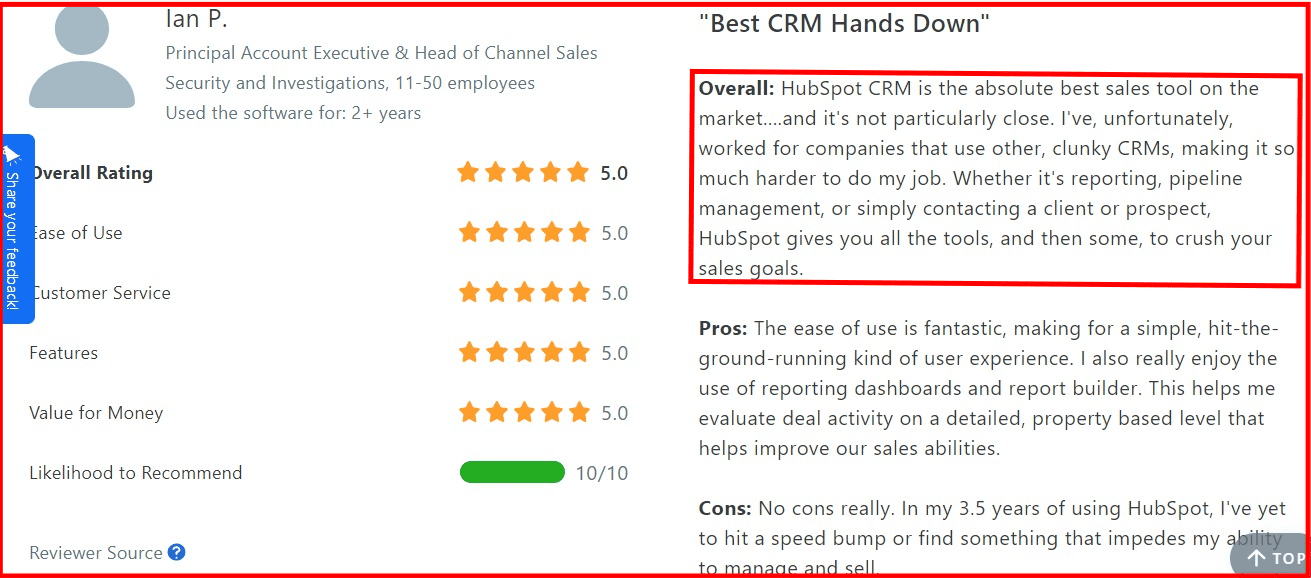
According to a user on Capterra, HubSpot beats other CRM platforms in terms of functionality and versatility.
However, several businesses may require a more suitable or tailored platform that meets their needs – the worthiness of HubSpot depends on your business type and operations.
Who should (and shouldn’t) use HubSpot?
|
✅ HubSpot IS worth it if you… |
❌ HubSpot is NOT worth it if you… |
|
Have a dedicated marketing or sales operations person |
Are a solo operator or freelancer — the free plan is complex for one person |
|
Can budget $800–$2,000+ per month consistently |
Have a team under 10 people — seat costs add up quickly |
|
Need a true all-in-one CRM, email, CMS, and analytics stack |
Are budget-constrained below $500/month for marketing software |
|
Have 20+ people who will actively use the platform |
Need only basic CRM or email — you’re paying for features you won’t use |
|
Are running inbound marketing at scale and need automation |
Want simple email campaigns without a steep learning curve |
|
Need deep integrations with Salesforce, Slack, or enterprise tools |
Need a quick setup — HubSpot has a significant onboarding investment |
Is HubSpot Worth the Money in 2026? TL;DR
In 2026, the question “Is HubSpot Worth It” boils down to hard math: is the platform still worth the money and can it create a measurable return on investment (ROI) quickly enough to cover its swelling price tag?
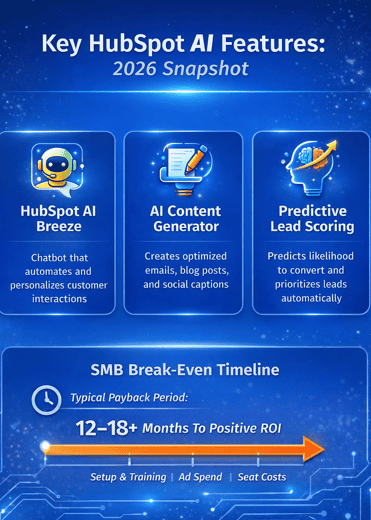
As of 2026, HubSpot’s AI-powered engines (like Breeze and AI reporting assistants) are core ROI drivers for teams that want automation at scale, with G2 reviewers citing efficiency improvements of 30%+ year-over-year.”
HubSpot’s own study claims users see 129 % more inbound leads and a 109 % higher close rate after 12 months—eye‑catching figures, but only if the costs don’t eat the gains.
1. New seat‑based pricing pushes breakeven further out
-
-
-
The 2024 rollout of “View‑Only” vs. “Core” seats turned formerly free editing rights into a paid line item, inflating every active user’s cost in 2026.
-
Mandatory onboarding now starts at $1,500/month (Sales Hub) to $3,000/month (Marketing Hub) for Professional and $6,000/month for Enterprise—fees due before you send a single campaign.
-
-
2. Real‑world ROI timelines
Sales Hub customers often see a meaningful increase in deal outcomes after 12 months, with data showing users close roughly 36 % more deals after one year of using Sales Hub compared to their first quarter.
This reflects how CRM adoption and pipeline optimization pay off over time.
HubSpot’s own ROI findings also highlight that customers using the full platform (Marketing + Sales) experience significant improvements in key performance metrics—such as a ~196 % increase in marketing leads and ~53 % more deals closed after one year—illustrating that investment gains traction gradually as workflows and automations mature.
Because teams typically need time to build processes, train staff, refine content strategies, and integrate CRM data into daily operations, most SMBs realistically see a payback window spanning 12 to 18+ months before their HubSpot investment fully breaks even—especially when factoring in seat costs, content creation, ad spend, and onboarding time. (General industry benchmark)
According to independent CRM reviews, companies using HubSpot CRM + Marketing Hub typically experience positive ROI after ~12–18 months, but costs often rise above $1,500/mo once contacts, seats, and add-ons scale. (Source)
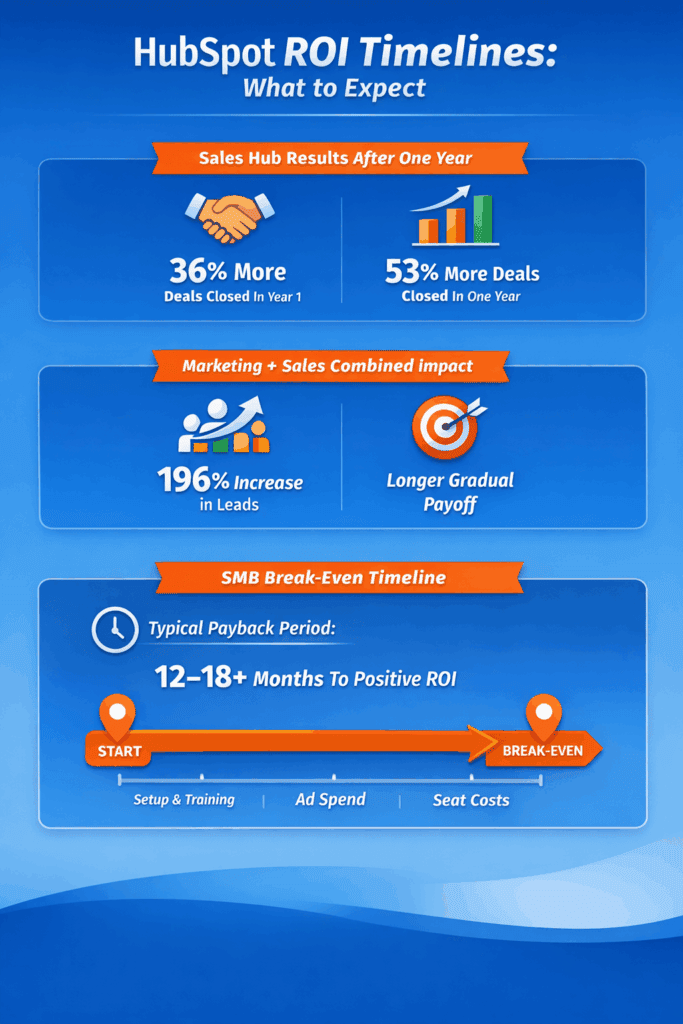
Is HubSpot worth it? Break-even ROI timeline
3. When HubSpot really is worth the money
HubSpot tends to justify its premium when you:
-
-
-
Run complex, multi‑touch funnels where even a 1 – 2 % conversion lift equals six‑figure revenue
-
Employ dedicated marketers who can exploit its deeper automation and reporting layers
-
Budget comfortably for every “Core” seat your editors, analysts, and sellers will need
-
-
Bottom line for 2026
If you have the scale, skill set, and cash flow to meet those criteria, HubSpot’s compounded lead‑gen gains can outstrip its fees. But for leaner teams, flat‑fee alternatives like EngageBay often return ROI sooner and with far less financial strain.
What real HubSpot users say in 2026
Across more than 19,000 verified reviews on G2, Capterra, Trustpilot, and GetApp, HubSpot holds a weighted average rating of approximately 4.4 out of 5 — with one notable exception.
|
Platform |
Rating |
Review count |
|
G2 |
4.4 / 5 |
11,000+ reviews |
|
Capterra |
4.5 / 5 |
4,000+ reviews |
|
Trustpilot |
2.2 / 5 |
700+ reviews |
|
GetApp |
4.5 / 5 |
3,000+ reviews |
|
Weighted average |
~4.4 / 5 |
19,000+ reviews combined |
The Trustpilot score — significantly lower than the others — reflects a concentrated set of complaints about billing disputes, contract renewal issues, and customer support response times. This divergence is worth noting: HubSpot scores very well on usability but faces persistent criticism on the commercial and support side.
What users consistently praise
-
-
- Ease of use relative to other enterprise CRM platforms — a common theme among Capterra reviewers is that their teams onboarded faster than expected compared to Salesforce.
- All-in-one convenience — reviewers on G2 frequently note that having CRM, email, landing pages, and analytics under one roof reduces the number of tools their teams need to manage.
- Integrations — the HubSpot app marketplace receives frequent positive mentions, particularly for connections with Slack, Zoom, and Google Workspace.
-
What users consistently complain about
-
-
- Pricing — the most common complaint across all platforms. Many G2 reviewers describe feeling the cost became unmanageable after their contact list or team size grew beyond initial projections.
- Steep learning curve for advanced features — while the core CRM is praised for usability, many Capterra reviewers note that advanced automation, workflows, and reporting require significant time investment to master.
- Customer support quality at lower tiers — a recurring concern on Trustpilot is that Starter and Professional plan customers receive slower support response times than Enterprise customers, with some reporting multi-day waits for urgent issues.
-
Read also: HubSpot Pricing and Comparison with Affordable Alternatives
Is HubSpot Worth It at Each Pricing Tier?
Most “is HubSpot worth it” reviews give you one verdict for the whole platform. That’s not useful, because HubSpot isn’t one product — it’s four very different products depending on which tier you’re on. Here’s an honest assessment of each one.
Is HubSpot Free Worth It?
Here’s what HubSpot’s free plan actually includes for new accounts in 2026:
- 1,000 marketing contacts (older guides still quote 1 million — that limit changed in September 2024)
- 2,000 marketing emails per month for your entire account
- 1 deal pipeline only
- No workflow automation — the feature most people associate with HubSpot does not exist on the free plan
- HubSpot branding on every email you send, every form, every meeting link, and every chat widget
- 2-user cap on most tool features
That last point matters more than it looks. Emails and forms with HubSpot’s logo undermine the professional image most businesses work hard to build, and there is no way around it on the free plan.
Verdict: HubSpot Free is worth using as a starting point if you have fewer than 1,000 contacts and only need basic CRM and deal tracking. It is a solid way to evaluate whether the platform suits your team before committing to paid. Most growing businesses will hit a hard ceiling — the contact cap, the pipeline limit, or the absence of automation — within 6 to 12 months and face an unavoidable upgrade decision.
Is HubSpot Starter Worth It?
HubSpot Starter costs approximately $7 per seat per month billed annually. Here is what it adds over the free plan:
- Removes HubSpot branding from your emails, forms, meeting links, and chat widgets
- Increases email send limits
- Lifts some user caps
- Adds light automation — up to 10 automated actions for basic email sequences
Here is what Starter still does not include:
- Real workflow automation (multi-step, condition-based sequences)
- A/B testing
- Lead scoring
- Custom reporting
- Advanced analytics
All of those features — the ones most people are actually thinking of when they picture “HubSpot automation” — are locked behind Professional. Starter removes the most visible friction from the free plan, but it does not unlock the platform’s core capabilities.
Verdict: HubSpot Starter is worth it if HubSpot branding on your customer-facing assets is the main problem with the free plan and you are already planning to scale toward Professional. It is not worth it if you signed up expecting real automation — you will not find it here. At $7 per seat per month, you are also paying more than several alternatives that include full automation at entry-level pricing.
Is HubSpot Professional Worth It?
Professional is the tier HubSpot’s marketing is actually selling you on. This is where real workflow automation, email sequences, A/B testing, lead scoring, custom reporting, and advanced analytics live. It is also where the pricing conversation changes significantly.
Marketing Hub Professional starts at $890 per month for three core seats and 2,000 marketing contacts. Before you use a single automated workflow, you also pay a mandatory one-time onboarding fee of $3,000. For Sales Hub Professional, the onboarding fee is $1,500.
Here is what a realistic Year 1 looks like for a five-person small business on Marketing Hub Professional with a 5,000-contact list:
| Cost item | Amount |
|---|---|
| Base plan (12 months × $890/month) | $10,680 |
| Contact overage (~3,000 extra contacts above the included 2,000) | ~$600 |
| Additional seats (2 extra seats × $50/month × 12 months) | $1,200 |
| Mandatory onboarding fee (one-time, non-negotiable) | $3,000 |
| Year 1 total | ~$15,480 |
This figure covers one Hub only — Marketing Hub. Teams that also need Sales Hub, Service Hub, or Operations Hub pay additional per-seat and per-hub fees on top of this.
Your bill also grows automatically as your contact list grows, even if nothing else about your plan changes. The contact tier pricing model means there is no fixed monthly cost you can budget with certainty as your business scales.
Verdict: HubSpot Professional is worth it for businesses with a dedicated marketing or sales operations function, a consistent budget of $1,000 to $1,500 per month or more, and a content-driven inbound marketing strategy at meaningful scale. For teams under 15 people without a dedicated HubSpot operator, the cost rarely matches the value — most of the platform’s depth goes unused, and the mandatory onboarding fee is a significant upfront commitment before you have proven the investment.
Check out EngageBay’s Tiers Instead
Is HubSpot Enterprise Worth It?
Enterprise adds custom objects, predictive lead scoring, advanced multi-team permissions, sophisticated revenue attribution reporting, and a higher ceiling on almost every limit in the platform. Marketing Hub Enterprise starts at $3,600 per month with a $6,000 mandatory onboarding fee. Sales Hub Enterprise is $150 per seat per month with a $3,500 onboarding fee.
For the majority of readers evaluating whether HubSpot is worth it, Enterprise is not the relevant tier. It is built for organizations with 50 or more users, complex multi-team sales and marketing operations, and a dedicated HubSpot administrator whose job is to keep the platform configured and optimized.
Verdict: HubSpot Enterprise is worth it for large organizations that have already proven ROI at the Professional tier and need capabilities that Professional cannot provide — custom objects, advanced permissions, and enterprise-level analytics chief among them. If you are reading this article trying to decide whether to adopt HubSpot for the first time, start by evaluating Professional. Enterprise is a graduation, not a starting point.
That’s the full block. A few notes for when you paste it in:
- The H2 (“Is HubSpot Worth It at Each Pricing Tier?”) becomes a new Table of Contents entry — update your ToC anchor links after pasting.
- The Verdict lines at the end of each section are the most likely featured snippet candidates — keep them bold and don’t trim them down.
- The Year 1 cost table inside the Professional section should paste as a standard WordPress table block. If the visual editor strips the formatting, recreate it manually using the table block — the arithmetic is what matters, not the styling.
Is HubSpot Really Worth It? An In-depth Review
Summary: HubSpot is a comprehensive marketing automation and CRM software tailored towards larger businesses and corporations, offering a powerful suite of features with a balanced UI.
So, is HubSpot worth it? While it’s a great tool, the complexity, cost, and commitment required for an optimal ROI from HubSpot make it a bad choice for SMBs, startups, and freelancers.
For smaller operations, more affordable alternatives like EngageBay and Sendinblue provide similar functionalities without the financial strain, making them better-suited options for those with limited resources (as you’ll see in this detailed HubSpot CRM review).
From creating attractive emails to customizing web pages, closing sales, and tracking customer interactions, HubSpot has a unique feature for every digital marketer.
However, it’s essential to understand what this sophisticated product offers, as many small businesses and startups with simple marketing needs may get overwhelmed by the complexities and advanced functionalities.
And, chances are, they may end up paying extra fees for the additional features they won’t use.
From pricing to features, ease of use, and customer support, check out what you stand to gain from HubSpot when you sign up for a plan.
A. HubSpot Pricing (2026 Updated)
EngageBay vs HubSpot – Which CRM Tool Gives You More Value?
HubSpot remains one of the most popular CRM platforms thanks to its powerful suite of marketing, sales, service, CMS, and operations tools.
However, its pricing structure has become more complex and can get expensive quickly for growing teams. HubSpot bills based on seat licenses and marketing contacts, and many advanced features are locked behind higher tiers—making it difficult for smaller businesses to forecast costs.
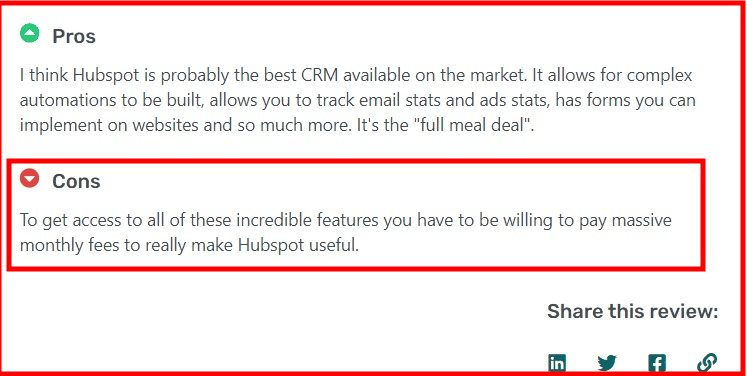
If you want access to more advanced features, you have to be willing to pay massive monthly fees, just as this user shared on GetApp.
HubSpot provides a wide range of pricing tiers based on its products – marketing, sales, service, CMS, and operations.
The various products, alongside their prices, are outlined thus:
i. Marketing Hub
The Marketing Hub focuses on email marketing, automation, campaigns, and lead management.
Marketing Hub pricing (2026):
-
-
-
Starter: ~$7 per core seat per month
-
Professional: ~$890 per month (includes 3 core seats; extra seats ~$50 each)
-
Enterprise: ~$3,600 per month (includes 5 core seats; extra seats ~$75 each)
-
-
✔️ Core seats are required to use the hub’s tools (e.g., dashboards, workflows).
Marketing Hub pricing also depends on your marketing contacts (the number of contacts you actively market to), which further increases costs as your database grows.

ii. Sales Hub
The Sales Hub supports powerful CRM functionalities such as pipeline management, automation, forecasting, and sales productivity tools.
Sales Hub pricing (2026):
-
-
-
Starter: ~$7 per sales seat per month
-
Professional: ~$100 per sales seat per month
-
Enterprise: ~$150 per sales seat per month
-
-
Additional seats are charged per user, so team expansion increases recurring costs.

iii. Service Hub
Service Hub equips support teams with ticketing, shared inbox, automation, and self-service tools.
Service Hub pricing (2026):
-
-
-
Starter: ~$7 per core/service seat per month
-
Professional: ~$100 per service seat per month
-
Enterprise: ~$150 per service seat per month
-
-
Note: Service seats unlock specialized service features; core seats are more general access licenses.
iv. Content Management System (CMS) Hub
CMS Hub helps you create, manage, and update website pages easily, without relying on developers for every change, making it simpler to build and optimize your website as your content and campaigns evolve.
CMS Hub pricing (2026):
-
-
-
Starter: ~$7 per core seat per month
-
Professional: ~$500 per month (includes 3 core seats)
-
Enterprise: ~$1,500 per month (includes 5 core seats)
-
-
CMS pricing also scales with added seats beyond the base included amounts.

v. Operations Hub
Operations Hub (often called Data Hub) helps with data sync, automation, and integration across apps.
Operations Hub pricing (2026):
-
-
-
Starter: ~$7 per core seat per month
-
Professional: ~$800 per month (3 core seats)
-
Enterprise: ~$2,000 per month (5 core seats)
-
-
Like other hubs, additional seats cost extra.

Enhance Your Email Marketing
Want to make your emails more impactful? Check out our beautiful, easy-to-customize marketing email templates.
Designed to boost engagement, these templates from EngageBay will help your emails stand out. Just customize the images, headings, and CTAs for your brand, and hit send in a few minutes!
HubSpot Starter CRM Suite
This is an all-in-one plan that covers all of HubSpot’s major products – sales, marketing, service, CMS, and operations.
If you run a small business and cannot afford to pay individually for separate tools, you can buy the Starter CRM Suite for $50/mo ($18/month for new customers).
This gives you access to the starter plan features for all products.
HubSpot onboarding starts at $1500/month (Sales Hub) to $3,000/month (Marketing Hub) for the Professional plans and $6,000 for the Enterprise plans.
EngageBay Vs HubSpot – Which is Better for CRM?
HubSpot Bundles & Additional Costs
Starter Customer Platform:
HubSpot offers a bundled starter plan that combines core features across major hubs at a lower combined entry price. Many sources show this bundle starting from about $7 per seat per month for teams wanting a simplified all-in-one entry point.
Onboarding & Implementation Fees
For mid-tier and enterprise plans, HubSpot often charges one-time onboarding or implementation fees (e.g., ~$3,000+ for Marketing Pro, scaling higher for enterprise bundles). These are separate from subscription costs.
What This Means for Your Budget
HubSpot’s pricing in 2026 continues to deliver excellent functionality—but it scales quickly:
-
-
-
Starter tiers are approachable for small teams, but still require per-seat or per-contact billing.
-
Professional and Enterprise tiers unlock automation, AI features, and advanced reporting—but can easily reach several thousand dollars per month when multiple hubs are included.
-
Predicting total cost requires estimating seats, contact volume, and add-on needs ahead of time.
-
-
Because of this complexity, many small businesses
| Plan | 2026 Pricing | Who It’s For |
|---|---|---|
| Free | $0/mo | Best for basic CRM needs with very limited automation |
| Starter | ~$7/core seat/mo | Small sales, marketing, and support teams |
| Professional | ~$890+/mo | Growing teams needing advanced automation and reporting |
| Enterprise | ~$3,600+/mo | Large teams with complex, multi-hub requirements |
predictable value with alternative CRM suites that offer unlimited users and flat pricing—especially when they don’t need every enterprise tool HubSpot locks behind higher tiers.
HubSpot 2024 pricing update
HubSpot made an important update to its pricing plans in March 2024. Frankly put, this move offers a myriad of benefits for many users. However, affordability is not one of them.
Here’s a brief explanation.
HubSpot has introduced two new types of seats for all its subscription tiers and hubs. The new seats are View-Only and Core.
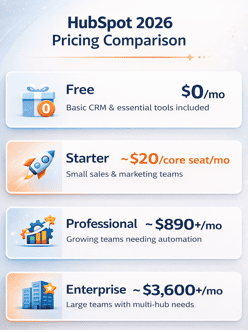
Is HubSpot worth it? 2026 yearly cost.
While the View-Only seats do not offer any edit access, the Core seat offers users edit access to most of its features.
Sounds familiar?
Well, the catch is that edit access that users enjoyed for free is now part of the paid ‘Core’ seat.
This table can help you understand better:
| User requirement | Previous pricing structure | New pricing structure |
| Users requiring view-only access to reports, records, and other data | Included in the free plan | Now offered in the free, View-Only seat |
| Users requiring edit access to records and reports, email tracking, and other editable tasks | Included in the free plan | Now offered in the paid, Core seat |
| Users requiring sales and service-specific features | Dedicated Sales and Service seat | Dedicated Sales and Service seat |
This table clearly shows how expensive HubSpot is becoming year on year.
The new pricing update moves an already expensive CRM/marketing automation platform out of reach of most SMBs.
HubSpot’s hidden costs: what the pricing page doesn’t tell you
HubSpot’s headline pricing is only part of what you’ll actually pay. Before signing an annual contract, factor in the five costs below that most businesses discover after they’ve committed.
|
Hidden cost |
What it means for you |
|
Mandatory onboarding fee |
Professional plan: $1500/month (Sales Hub); $3,000/month (Marketing Hub) one-time. Enterprise plan: $6,000 one-time. Non-negotiable and due upfront. |
|
Contact-tier pricing |
Your monthly bill rises automatically as your email list grows — even if you change nothing else about your plan. |
|
Seat-based pricing (2024 change) |
Every team member who needs editing access now requires a paid ‘Core Seat.’ Team size directly multiplies your monthly cost. |
|
API call limits |
Exceeding the API limit triggers overage fees or throttling. Heavy integrations can hit limits faster than expected. |
|
Locked add-on features |
Custom reporting, predictive lead scoring, and advanced automation are gated to Professional or Enterprise tiers — not included in Starter. |
To understand what you’ll really pay, add up: (base plan cost) + (number of Core Seats × seat fee) + (contact tier based on your list size) + (onboarding fee amortized over 12 months). For a team of five on the Professional plan with 10,000 contacts, that real monthly cost is often $1,200–$1,800 — not the $800 figure on the pricing page.
Before signing: ask HubSpot’s sales team to send you a full cost breakdown that includes your onboarding fee, your starting contact tier, and the per-seat cost for every team member who needs editing access. Get it in writing.
Perhaps this is the best time to look for a HubSpot alternative 😊
Read also: Is HubSpot CRM Free? An Unbiased Guide (with User Reviews)
The HubSpot Controversy: What You Should Know
HubSpot is one of the most widely used CRM platforms in the world, but two recurring issues have shaped how a portion of the market now talks about it. Both are worth knowing before you sign.
The 2024 account security incident
In June 2024, HubSpot disclosed that a small number of customer accounts were accessed without authorization. The root cause was credential theft originating outside HubSpot’s own systems — meaning HubSpot’s infrastructure was not breached. The company responded transparently and notified affected customers promptly. The incident itself was contained, but it reignited a broader conversation about vendor concentration risk: how much sensitive customer data should sit inside a single platform?
Contract and billing complaints
A documented and recurring pattern of complaints on Trustpilot centers on two issues: annual contract renewals that customers say were not clearly disclosed at signup, and requests for mid-contract cancellation being declined. These complaints are not isolated — the volume and consistency of similar reports across independent review platforms is notable. Annual contract lock-in is common across enterprise SaaS and HubSpot is not unique in this practice, but the frequency of these complaints warrants attention.
Before signing any HubSpot annual contract, ask the sales team to confirm renewal terms and cancellation policy in writing.
Affordable Alternatives to HubSpot (Pricing)
Now, let us look at some marketing & CRM software that are not as pricey as HubSpot.
1. EngageBay
EngageBay is a powerful marketing, sales, and support platform that allows small businesses to attract visitors, track sales, and manage tickets. It has a pricing model similar to HubSpot; however, it is a much more affordable option.
This makes it a well-suited platform for small companies and startups. Moreover, it provides a free plan on all products – you can use it free forever. The pricing includes:
i. All-in-one
-
-
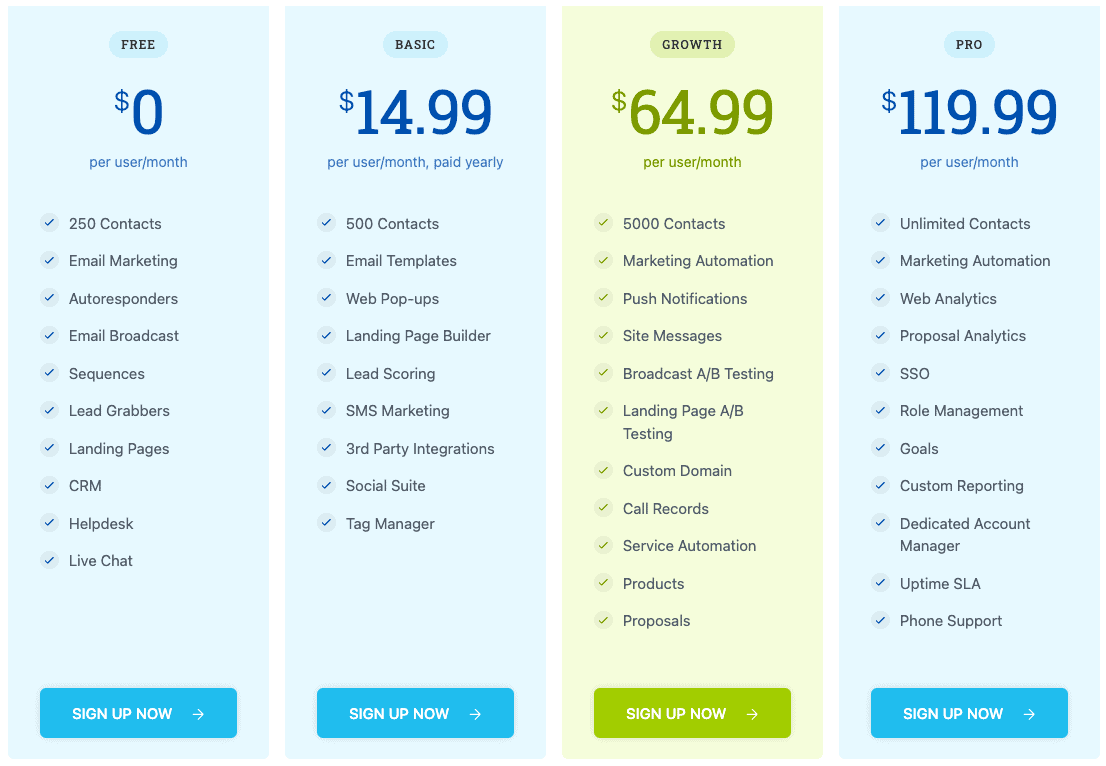
- Free – $0/month for 250 marketing contacts
- Basic – $14.99/month for 500 marketing contacts
- Growth – $64.99/month for 5,000 marketing contacts
- Pro – $119.99/month for unlimited marketing contacts
-
ii. Marketing Bay
-
-
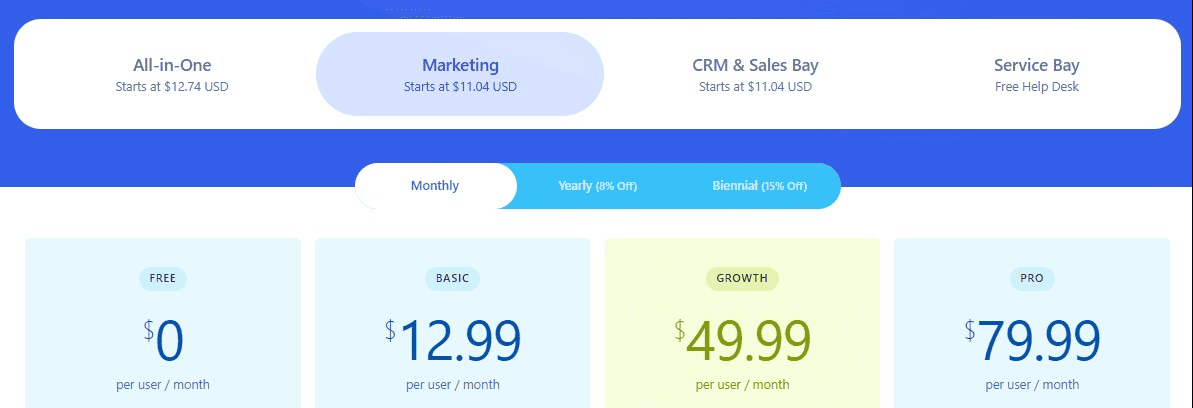
- Free – $0.month for 250 contacts
- Basic – $12.99/month for 500 contacts
- Growth – $49.99/month for 3,000 contacts
- Pro – $79.99/month for 30,000 contacts
-
iii. CRM and Sales Bay
(Same as Marketing Bay)
iv. Service Bay
Service Bay is free
Too long to read? Watch this video review of HubSpot instead:
Learn more about EngageBay:
Sign up with EngageBay for free
2. ActiveCampaign
ActiveCampaign is a marketing and sales software designed to help small businesses create better customer experiences.
It is a more affordable alternative to HubSpot, but costlier than EngageBay. It doesn’t have a free plan but offers a 14-day free trial. The pricing includes:
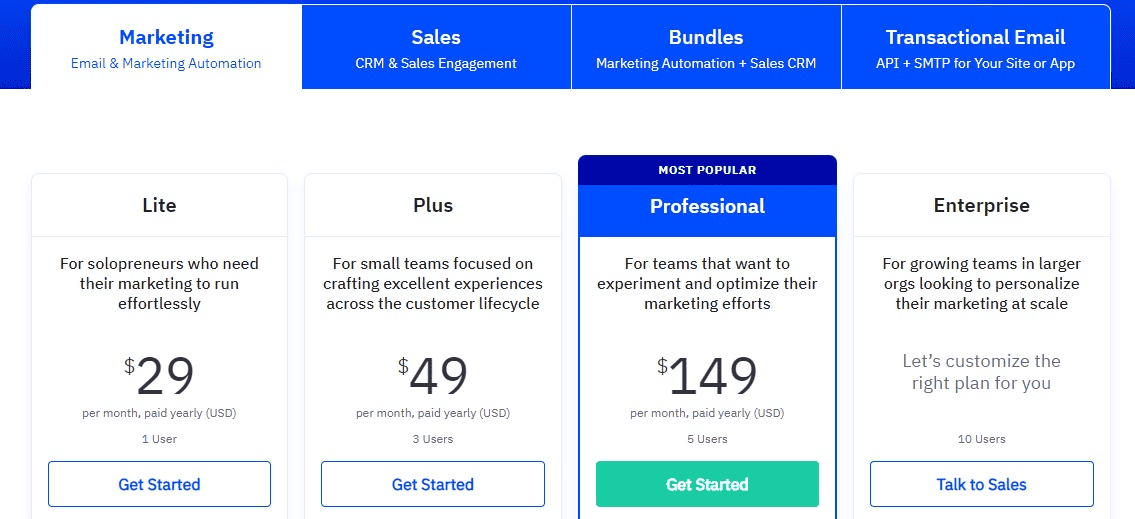
i. Marketing
-
-
- Lite – $29/month
- Plus – $49/month
- Professional – $149/month
- Enterprise – Custom quote, contact sales
-
ii. CRM and Sales
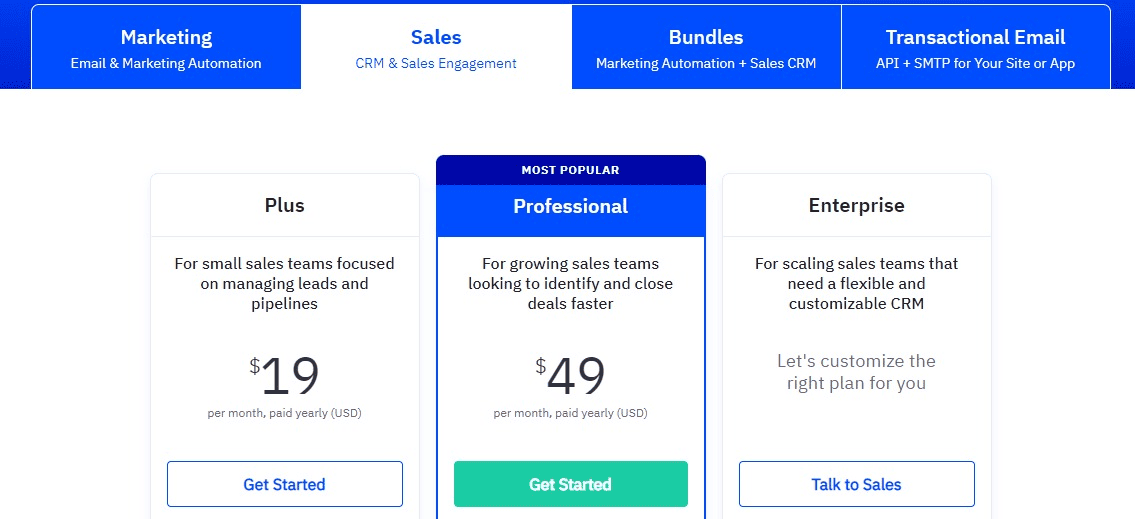
-
-
- Plus – $19/month
- Professional – $49/month
- Enterprise – Custom quote, contact sales
-
Read also: Find Your Perfect CRM Match: HubSpot vs ActiveCampaign
3. Brevo (fka Sendinblue)
Brevo (Sendinblue) is a powerful email service provider with a free CRM and sales feature. It is designed to help small businesses improve their digital marketing campaigns and boost revenue.
Like EngageBay, it is an affordable HubSpot alternative, having a free plan and no free trial.
Unlike other email platforms, Brevo (Sendinblue) charges based on the number of emails you send rather than the number of contacts you have – all plans support unlimited contacts. The pricing includes:
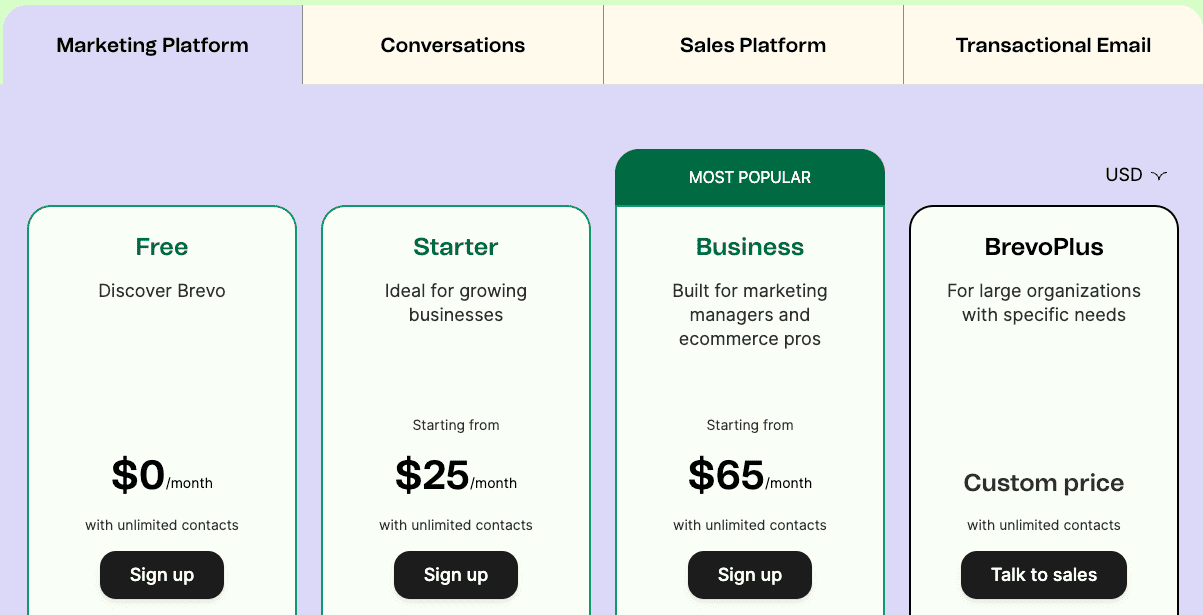
i. Marketing Platform
-
-
- Free – $0/month for 300 emails/day
- Starter – $25/month for 20,000 emails
- Business – $65/month for 20,000 emails
- BrevoPlus – Custom quote, contact sales
-
ii. Sales Platform
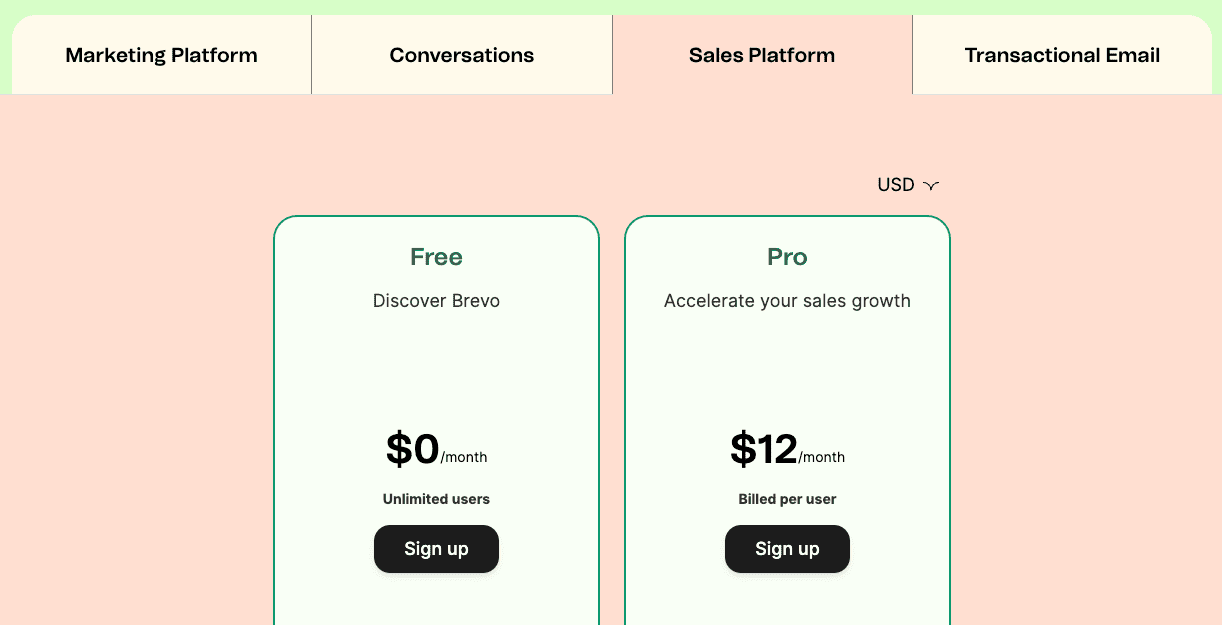
-
-
- Free — $0/month
- Pro — $12/month
-
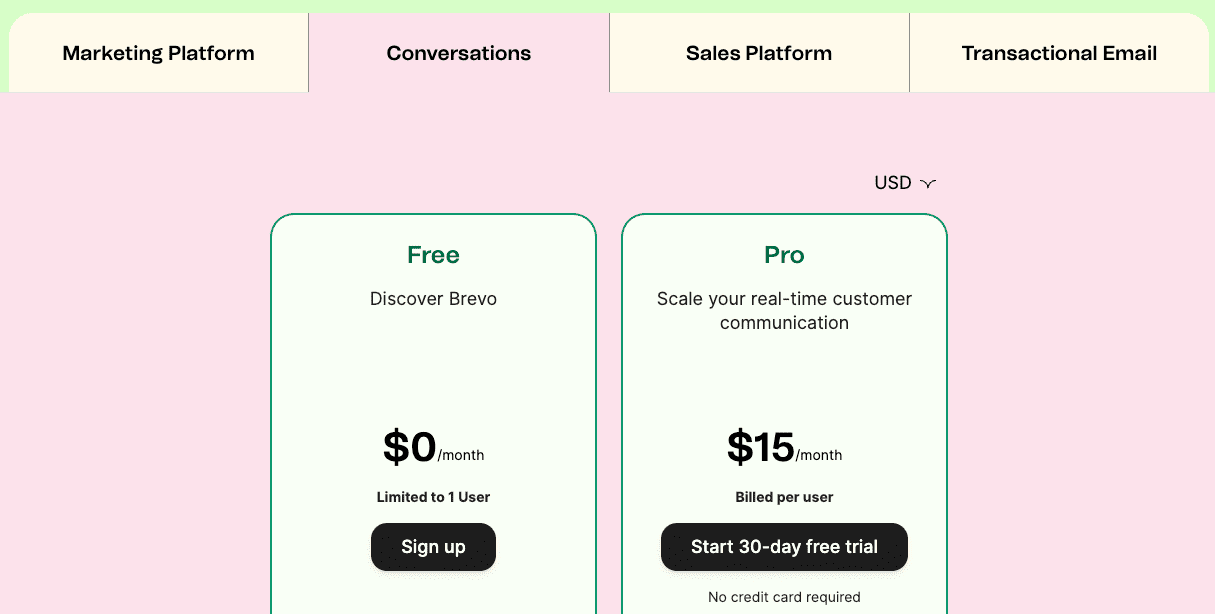
iii. Conversations
-
-
- Free – $0/month
- Pro – $15/month
-
Read also: Sendinblue (Brevo) Pricing — What You Need to Know Before Signing Up
4. Insightly
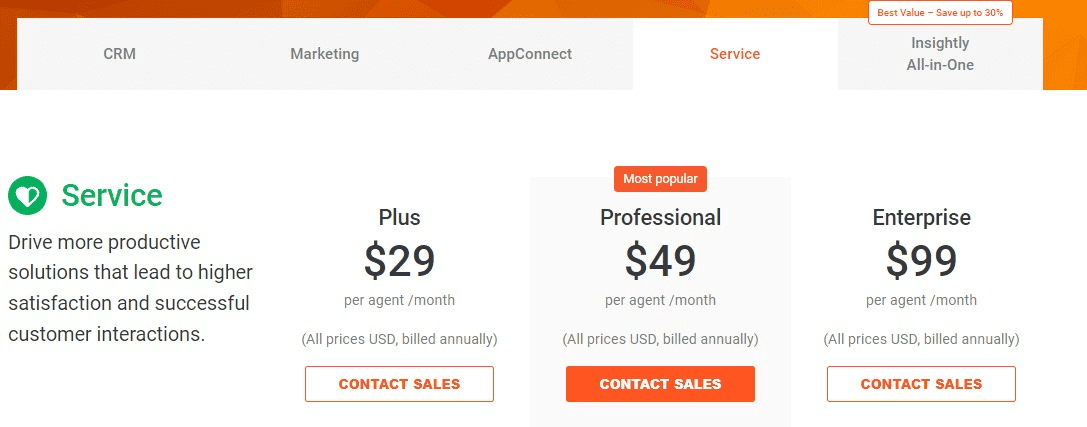
Insightly is a simple but powerful CRM solution built with unique features tailored to help small businesses close deals, create engaging customer journeys, sync data across third-party applications, and create better customer experiences.
It has a free plan, as well, as a 14-day free trial. The pricing includes:
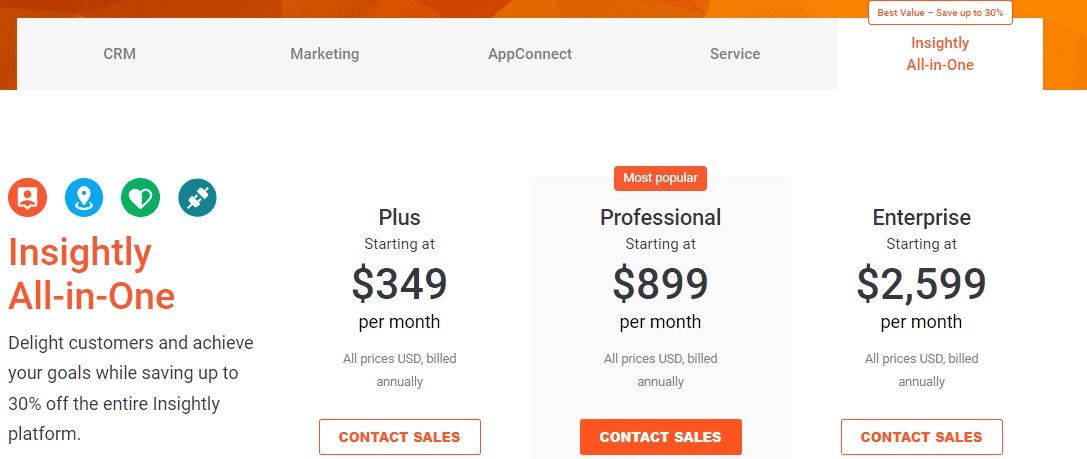
i. All-in-one
-
-
- Plus – $349/month
- Professional – $899/month
- Enterprise – $2,599/month
-
ii. CRM
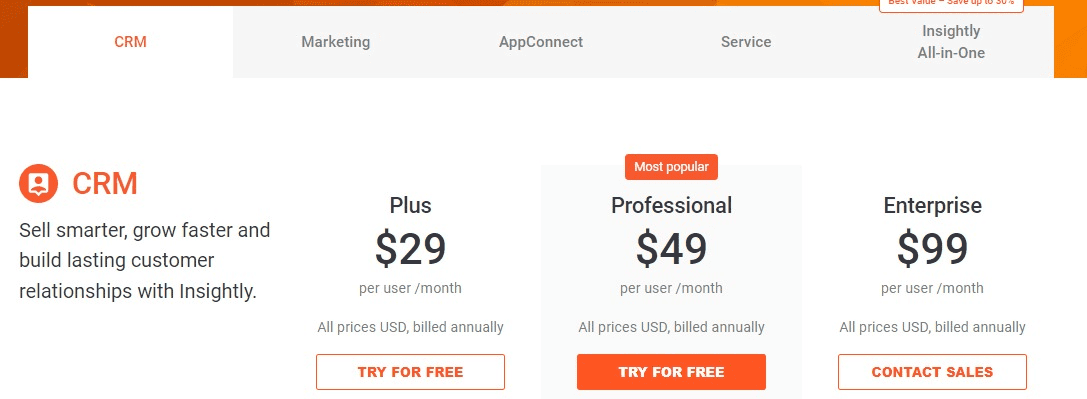
-
-
- Plus – $29/month
- Professional – $49/month
- Enterprise – $99/month
-
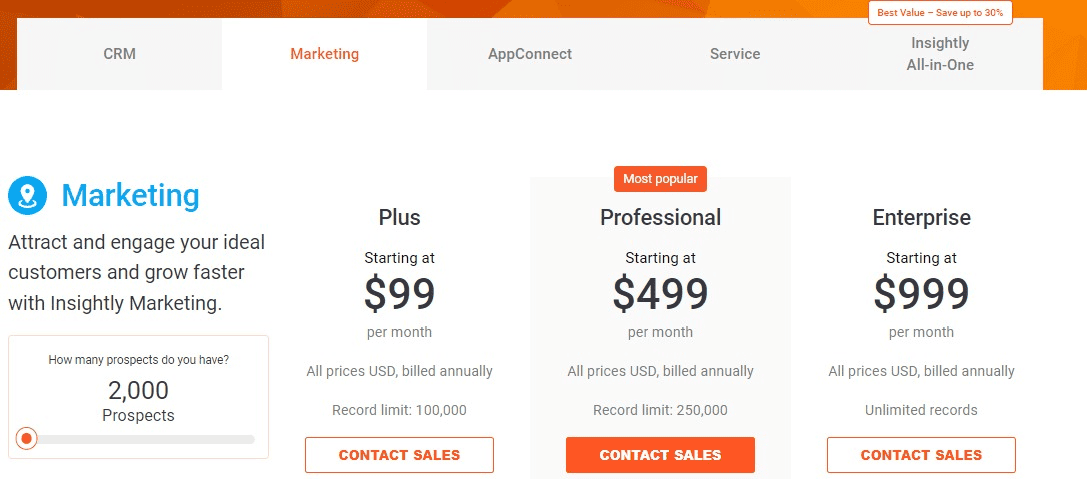
iii. Marketing
-
-
- Plus – $99/month for 2,000 contacts
- Professional – $499/month for 10,000 contacts
- Enterprise – $999/month for 20,000 contacts
-
iv. Service
-
-
- Plus – $29/month
- Professional – $49/month
- Enterprise – $99/month
-
Read also: HubSpot Pros And Cons — A Candid Assessment
Is HubSpot Worth the Cost for Small Businesses?
It depends – there are no right or wrong answers.
HubSpot is definitely an overkill for businesses that need only email marketing and automation functionalities.
This is because HubSpot offers several advanced features that cut across various marketing channels and operations. So, you’re likely going to pay for advanced products you won’t use.
While HubSpot offers powerful features at an increased price, other tools like EngageBay, Sendinblue (Brevo), and ActiveCampaign can provide similar functionalities at affordable fees.
Conversely, if you’re a fast-growing business and need more than email marketing and CRM features, you can opt-in for the HubSpot all-in-one plan, which covers marketing, sales, service, CMS, and operations.
You can still integrate your CRM system with a more powerful CMS like WordPress and other third-party applications to expand your functionalities.
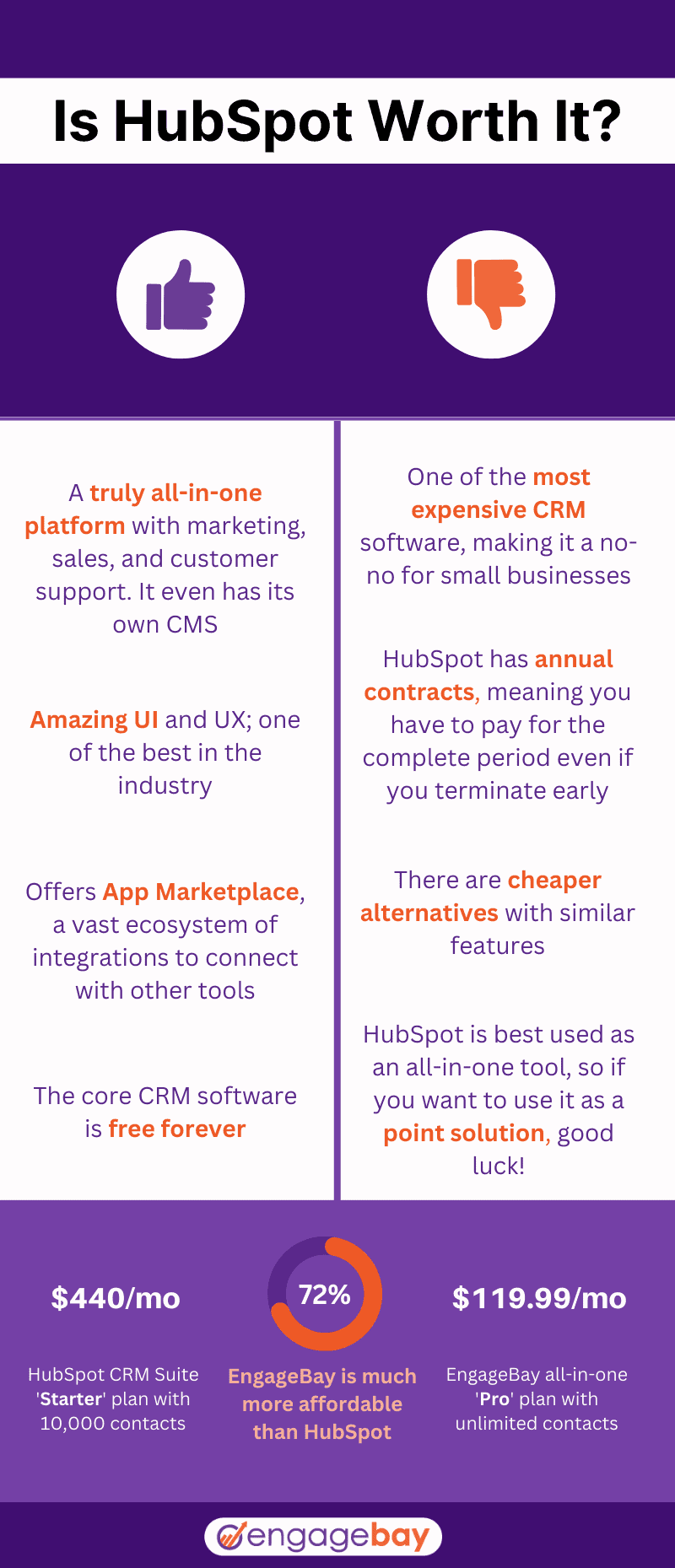
Here’s a simple infographic to help you weigh the pros and cons and decide if HubSpot is worth it.
B. HubSpot Features
What do you get when you pay for Sales, Marketing, or any other HubSpot product? Knowing the features HubSpot provides will help you understand how to fit each product into your business processes.
HubSpot is an extensive CRM software built with a wide array of powerful functionalities. It supports robust automation features, as well, as advanced content management capabilities. Based on the products it offers, here are a few features:
i. Marketing Hub
The HubSpot Marketing Hub provides great features that let you run successful inbound marketing campaigns at scale across various channels like emails, social media, and blogs.
When used with other products (sales CRM, CMS, etc.), it becomes a powerful tool for handling and automating your business operations. Some of these features include:
-
-
- Social media management/social media marketing
- Dynamic content
- Landing pages and forms builder
- Marketing automation
- Email marketing
- Marketing analytics and reporting
- Blog and SEO features
-
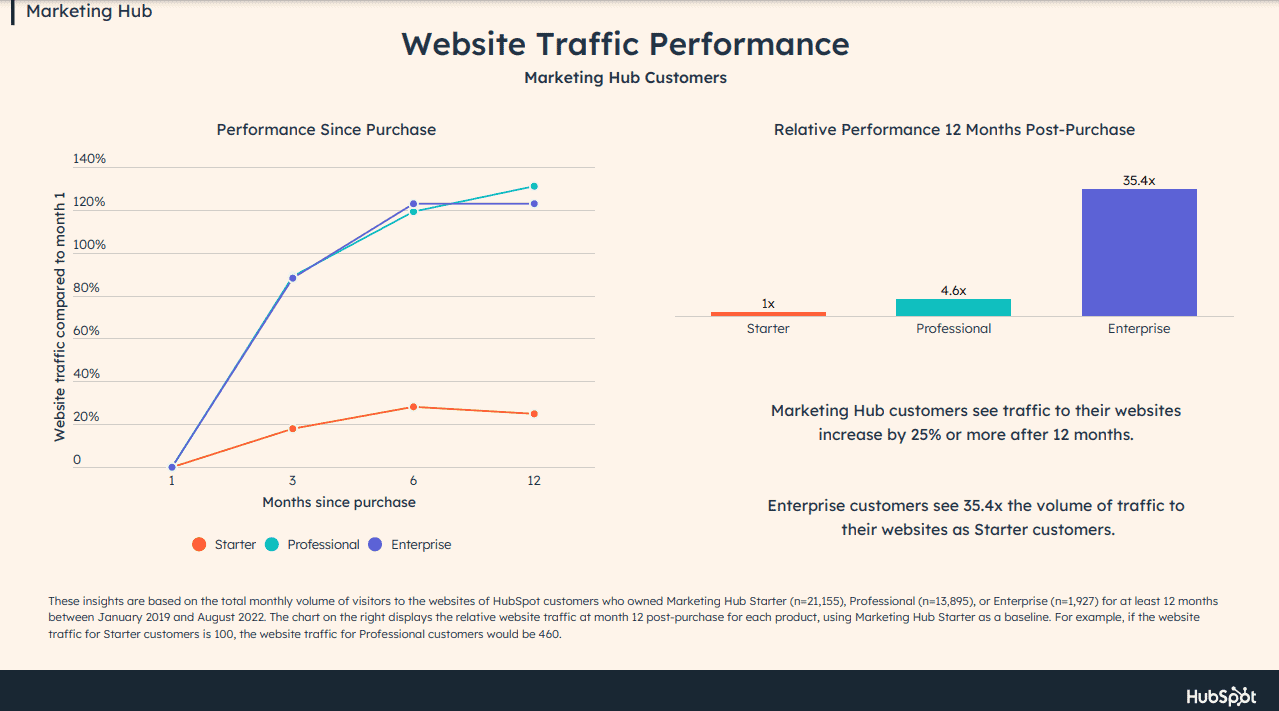
The reports show that after 12 months, Marketing Hub customers see traffic to their website increase by 25% or more. Also, customers on higher plans experience more returns than others on lower plans.
ii. Sales Hub
HubSpot supports a powerful sales CRM product that empowers sales teams to facilitate lead generation, enhance pipeline management, and close deals more effectively. Some features include:
-
-
- Email and call tracking
- Sales automation
- Live chat
- Meeting scheduler
- Sales analytics and reporting
- Conversation intelligence
-
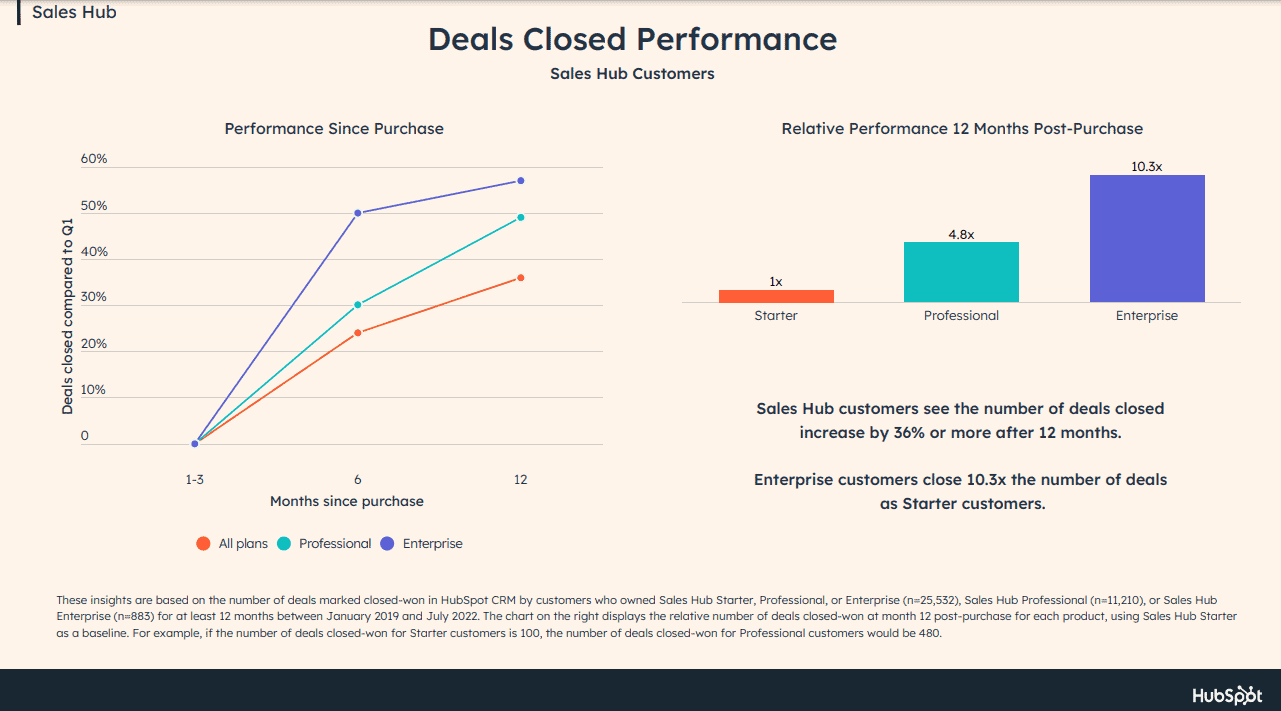
From the HubSpot ROI annual report, the number of closed deals increased by 36% for Sales Hub customers after using the tool for 12 months. The figure multiplies for customers on higher plans (Professional and Enterprise).
iii. Service Hub
The Service Hub aims to build stronger customer relationships and improve customer satisfaction.
Its connection to the HubSpot CRM platform expands its functionalities and empowers support teams to respond to customer requests, onboard new customers, and deliver personalized services.
Some of the features include:
-
-
- Customer Portal
- Knowledge base
- Live chat
- Shared inbox
- Omni-channel messaging
- Customer feedback surveys (NPS, CSAT, CES, etc.)
- Help desk and ticketing
- Service Analytics
- Team management
- Automated customer service
- Service level agreement (SLA)
-
iv. CMS Hub
Marketers who don’t rely on email marketing alone would opt for a powerful content management system (CMS) for creating blogs and high-converting web pages.
HubSpot CMS Hub provides unique features that enable marketers, developers, and IT teams to build responsive and attractive websites. Some of the features include:
-
-
- Website Builder
- Pre-built themes and templates
- Web hosting
- Blog maker
- Code alerts
- 24/7 security monitoring
- Custom CDN configuration
- Standard SSL certification
- Dynamic content
-
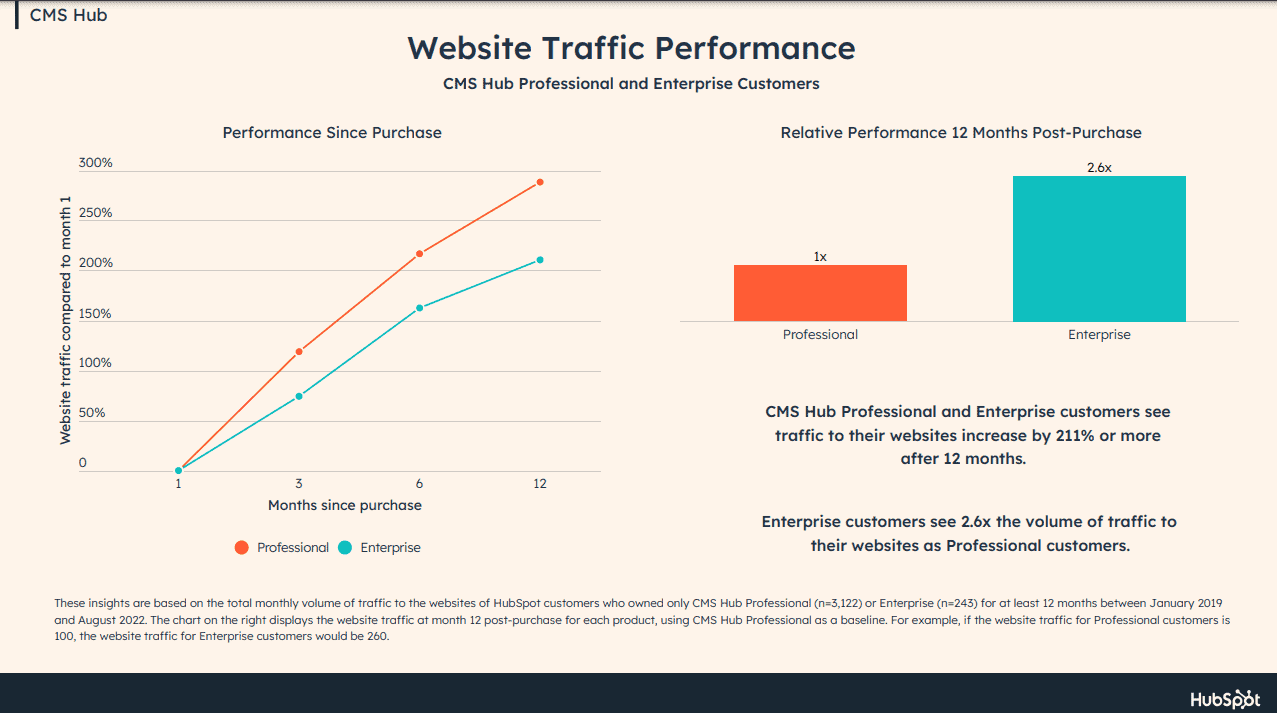
According to the reports, CMS Hub customers on Professional and Enterprise plans, after 12 months, see traffic to their websites increase by 211% or more.
v. Operations Hub
Asides from having a CRM system as a marketer, you may also need additional third-party applications for processing payments, handling orders, creating documents, scheduling meetings, etc.
With HubSpot Operations Hub, you can easily gather your customer data from these applications to help your teams stay aligned, giving you a clean database. Some of the features include:
-
-
- Data sync
- Data quality automation
- Workflow extension
- Programmable automation
- Data sets
- Custom report builder
- Team management and permissions
-
Read also: 8 Top HubSpot Competitors That Cost a Lot Less
HubSpot Breeze AI: are the AI features worth the upgrade?
HubSpot’s AI suite, called Breeze, was substantially expanded in 2024 and 2025. It now spans three categories: a content assistant for generating and editing marketing copy, a copilot that surfaces recommendations and automates routine tasks across the platform, and a set of AI agents for prospecting, customer support, and content workflows.
Not all Breeze features are available on all tiers. Here’s how access breaks down:
|
Feature |
Available from |
|
Breeze Content Assistant (AI writing) |
Starter and above |
|
Breeze Copilot (AI assistant across the platform) |
Starter and above |
|
AI agents (prospecting, customer, content) |
Professional and above |
|
Predictive lead scoring |
Professional and above |
|
AI-powered reporting and forecasting |
Professional and above |
Where Breeze AI works well
The Breeze Content Assistant genuinely accelerates email and landing page drafting for teams that produce a high volume of marketing content. Reviewers on G2 report measurable time savings on first-draft creation. The prospecting agent is also well-regarded by sales teams on the Professional tier for automating initial outreach research.
Where Breeze AI falls short
The core limitation of Breeze is that it operates only on data within HubSpot. It cannot pull in context from outside tools — so if your CRM data is incomplete or your contact records are sparse, the AI outputs are correspondingly limited. It also does not yet match the cross-platform reasoning of standalone AI tools like ChatGPT or Claude for complex writing tasks.
The central question for most mid-size businesses is whether Breeze’s AI features alone justify the $800/month jump from Starter to Professional. In most cases, no — the jump is better justified by the full automation, reporting, and seat access that come with Professional. The AI is a bonus, not the headline reason to upgrade.
Read also: Mailgun vs Sendgrid and Other Email Tools
👉 Create and launch successful email campaigns with EngageBay’s all-in-one solution and stunning free email templates. Don’t miss out; get started today!
Final verdict: is HubSpot worth your money in 2026?
Here’s a direct answer by audience type, based on four weeks of hands-on testing and analysis of 19,000+ user reviews.
Freelancers and solopreneurs
Don’t bother with a paid plan. The free CRM has more complexity than a solo operator needs, and the moment you require anything beyond basic contact management, the cost-to-value ratio collapses quickly. A simpler, cheaper tool will serve you better.
Small businesses (2–20 people)
Use the free plan to evaluate whether HubSpot’s interface suits your team’s workflow. But map out your upgrade path before you commit — moving to Starter adds up fast once you account for seats and contact tiers, and Professional-tier features can make the monthly cost feel disproportionate for a team of this size. Model the real cost before signing an annual contract.
Growing SMBs (20–100 people)
HubSpot can work at this scale, but only if you do the math first. Take your team size, multiply by the per-seat fee, add your contact tier cost, and factor in the mandatory onboarding fee amortized over 12 months. If the total exceeds your marketing software budget, the ROI case is harder to make — and alternatives worth comparing include EngageBay, ActiveCampaign, and Zoho CRM at a fraction of the cost.
Mid-market and enterprise companies
HubSpot earns its price at this level. The depth of its CRM, the quality of its integrations, and the increasingly capable Breeze AI features deliver genuine ROI for teams with dedicated marketing and sales operations resources. A 12–18 month payback period on the platform investment is realistic and widely reported. The key is having someone whose job it is to manage and optimize HubSpot — the platform rewards dedicated operators.
Looking for a HubSpot alternative?
If your budget or team size doesn’t justify HubSpot’s pricing, EngageBay offers a comparable all-in-one CRM, email marketing, and automation stack starting significantly lower. It’s worth modeling both options side by side before committing.
You can save yourself the stress and choose a more affordable solution like EngageBay, ActiveCampaign, or Brevo (formerly Sendinblue).
Read also: 14 Surprisingly Awesome HubSpot Alternatives
EngageBay: The Best Alternative to HubSpot
EngageBay is the ideal alternative to HubSpot, as you get all products – sales, marketing, and support – at a price that small companies, solopreneurs, and small business owners can easily afford.
It also offers seamless integrations with third-party apps to extend your marketing functionalities. Starting at $14.99/month, you can access a wide array of marketing functionalities.
Exciting HubSpot Alternatives to Watch out for
If you’re unsure about the best plan, sign up for free or book a demo to learn how the platform works.
Related reading:
- The best CRM Tools for Small Businesses
- The 14 Best CRM Automation Software in 2024
- 15 Best Marketing Automation Tools for Small Businesses
- Is HubSpot Worth It? In-Depth Review for Small Businesses
HubSpot is one of the best all-in-one marketing, sales, and customer support software geared toward larger businesses with deeper marketing budgets.
For small businesses? Not so much. In fact, HubSpot may be deceptively affordable at first, but the pricing quickly shoots up as your business grows.
Imagine paying thousands of dollars just for onboarding! We recommend trying out more affordable HubSpot alternatives mentioned in this blog. For small businesses and startups, EngageBay has the same all-in-one approach and ease of use as HubSpot, but without the exorbitant price tag.
Yes, HubSpot is designed for large companies with deep pockets. Some huge companies that use HubSpot include Trello, Headspace, BBC, and more.
Why do large companies choose HubSpot? It’s because HubSpot offers an integrated CRM system as opposed to point solutions (including tools like HubSpot CMS Hub).
But what about small businesses? In our own experience, we found that HubSpot is not for SMBs, solopreneurs, and startups.
If that’s you, we recommend trying EngageBay to have everything in one place, or ActiveCampaign if you need only marketing automation.
HubSpot’s free plan now includes only 5x Core seats for free, with unlimited View-Only seats. Users who enjoyed edit access for free will either have to upgrade to a paid Core seat, or do away with view-only access.
The seat-based pricing structure currently only affects new customers, meaning you won’t be requested to immediately switch to the new plans.
However, there’s a good chance that users will have to adopt the new structure during the next renewal.
If you’re a lean founder wondering “Is HubSpot Worth It?”, the short answer is: only when you can afford a long runway. HubSpot can be worth the money when a funded startup needs enterprise‑grade automation today and can wait 12–18 months for a positive return on investment (ROI). For bootstrapped teams, the platform’s rising costs often outrun early revenues.
6. Is HubSpot worth it compared to Salesforce?
HubSpot wins for marketing-led businesses that want a unified CRM and marketing automation stack with a manageable learning curve and faster setup. Salesforce wins for large enterprises that need deep customization, complex multi-team permissions, and an extensive partner and developer ecosystem. For most businesses under 50 users, HubSpot is the more practical choice — Salesforce’s power comes with significantly higher implementation complexity and cost. If your primary growth driver is inbound marketing and your team does not have a dedicated CRM administrator, HubSpot is the stronger fit. If you are running a large enterprise sales org with complex object relationships and need a platform your IT team can build on top of, Salesforce is worth the investment.
7. What are the biggest complaints about HubSpot in 2026?
Across Trustpilot, G2, and Capterra in 2026, complaints fall into three consistent categories. First, the price jump from Starter to Professional is steep — the mandatory onboarding fee of $1,500/month (Sales Hub) to $3,000/month (Marketing Hub) catches many businesses off guard before they have used a single advanced feature. Second, annual contract renewal terms were not clearly communicated at signup, with a notable number of Trustpilot reviewers reporting that mid-contract cancellation requests were declined. Third, customer support response times at Starter and Professional tiers are significantly slower than at Enterprise, with some reviewers reporting multi-day waits for urgent issues. The platform itself consistently earns high marks for usability and integrations — the complaints center almost entirely on pricing, contracts, and support, not on product quality.
8. Is HubSpot’s free plan still good in 2026?
HubSpot’s free plan remains one of the most functional free CRM tools available, but it is significantly more limited than older guides describe. New accounts created after September 2024 are capped at 1,000 marketing contacts — not the one million that many outdated reviews still quote — along with 2,000 marketing emails per month, one deal pipeline, and no workflow automation whatsoever. HubSpot branding also appears on every customer-facing asset: emails, forms, meeting links, and chat widgets, with no way to remove it on the free plan. For a freelancer, solo founder, or very early-stage team that only needs basic contact management and deal tracking, it is a genuinely useful starting point. For any business actively growing its list or needing automation, expect to hit a hard ceiling within 6 to 12 months.
9. Can you cancel HubSpot mid-contract?
HubSpot’s Professional and Enterprise plans require annual contracts, and the platform’s cancellation policy is strict. A recurring and well-documented pattern of complaints on Trustpilot involves customers attempting to cancel mid-contract and being declined, sometimes even when their business circumstances had materially changed. HubSpot is not unique in enforcing annual contract terms — this is standard practice across enterprise SaaS — but the volume of similar reports suggests the policy is applied consistently and with limited flexibility. Before signing, ask HubSpot’s sales team directly and in writing: what are the renewal terms, what is the cancellation window before auto-renewal, and is mid-contract downgrading or cancellation permitted under any circumstances. Getting these answers before you commit is significantly easier than negotiating them after.
10. Is HubSpot worth it for agencies?
For marketing agencies running inbound campaigns at scale for clients, HubSpot’s Marketing Hub can be a strong fit — particularly if the agency is also managing content, SEO, and lead nurturing workflows in one place. However, agencies managing multiple client pipelines simultaneously often find HubSpot’s structure less flexible than they need, since it is designed around one internal sales process rather than multiple parallel client-facing workflows. HubSpot does offer a Partner Program that provides agencies with discounted access and client management tools, and for agencies already recommending HubSpot to clients, the program can meaningfully change the economics. Before committing to standard retail pricing, evaluate whether the HubSpot Partner Program applies to your agency model — the pricing difference can be substantial.
